
Key takeaways
- Understand the graphics reality: At this price, most machines rely on integrated graphics like Radeon RX Vega 8 rather than a discrete GPU. That’s fine for CS2, Valorant, League, Fortnite at medium, Minecraft, and most indie and older titles at 1080p — but temper expectations for new AAA releases.
- Prioritise RAM type over raw capacity: Integrated graphics borrow system memory, so bandwidth matters enormously. A machine with 24GB of DDR5 will meaningfully outperform one with 16GB of older DDR4 in GPU-bound scenarios, even though both numbers look adequate on paper.
- Check the CPU suffix, not just the number: An “H” series chip (like the Ryzen 7 H255 or Ryzen 5 6600H) is built for sustained performance with a higher power budget. A “U” series chip (like the Ryzen 7 7430U) is tuned for efficiency and battery life, and will throttle sooner under gaming loads.
- Insist on a true FHD IPS panel: 1920×1080 is the right resolution here — anything higher just taxes the GPU. Look for IPS specifically, as budget TN panels wash out badly off-angle. Refresh rate above 60Hz is a bonus, not a guarantee, at this price.
- Verify storage and upgrade paths: 512GB NVMe is the sensible baseline; modern games devour space fast. Before buying, confirm whether the SSD slot is accessible and whether RAM is socketed or soldered — a machine you can upgrade in two years is worth more than one you can’t.
What's inside
Shopping for a gaming laptop under $800 in 2026 means navigating a market flooded with listings that use the word “gaming” loosely. Many budget machines pair a decent CPU with integrated graphics, generous-sounding RAM figures, and a 1080p panel — a combination that handles esports titles, emulation, and older AAA games well, but won’t run this year’s most demanding releases at high settings. The challenge is separating genuinely capable value machines from underpowered office laptops wearing a gamer badge.
This guide breaks down what actually matters at this price point — CPU generation, memory bandwidth, display quality, thermals, and upgrade headroom — and reviews the strongest sub-$800 options available right now. Every pick here is realistically within budget, and we’ve been explicit about what each machine can and can’t do so you buy with clear expectations rather than marketing-driven ones.
As an Amazon Associate we earn from qualifying purchases at no extra cost to you. Product prices and availability are accurate as of the date shown and are subject to change.







⚡ Save on Your Next PC — Amazon Prime
Prime members get fast free shipping on the systems above, plus early access to Prime Day & Black Friday PC deals. New members get a 30-day free trial.
Watch: Best Gaming Laptop Under $800 — Video Review
How to Choose Gaming Laptop Under $800
- Understand the graphics reality: At this price, most machines rely on integrated graphics like Radeon RX Vega 8 rather than a discrete GPU. That’s fine for CS2, Valorant, League, Fortnite at medium, Minecraft, and most indie and older titles at 1080p — but temper expectations for new AAA releases.
- Prioritise RAM type over raw capacity: Integrated graphics borrow system memory, so bandwidth matters enormously. A machine with 24GB of DDR5 will meaningfully outperform one with 16GB of older DDR4 in GPU-bound scenarios, even though both numbers look adequate on paper.
- Check the CPU suffix, not just the number: An “H” series chip (like the Ryzen 7 H255 or Ryzen 5 6600H) is built for sustained performance with a higher power budget. A “U” series chip (like the Ryzen 7 7430U) is tuned for efficiency and battery life, and will throttle sooner under gaming loads.
- Insist on a true FHD IPS panel: 1920×1080 is the right resolution here — anything higher just taxes the GPU. Look for IPS specifically, as budget TN panels wash out badly off-angle. Refresh rate above 60Hz is a bonus, not a guarantee, at this price.
- Verify storage and upgrade paths: 512GB NVMe is the sensible baseline; modern games devour space fast. Before buying, confirm whether the SSD slot is accessible and whether RAM is socketed or soldered — a machine you can upgrade in two years is worth more than one you can’t.
The Best Picks Reviewed
KAIGERR 2026 Gaming Laptop (Ryzen 7 H255, 24GB DDR5)
This is the standout of the group: an 8-core/16-thread Ryzen 7 H255 boosting to 4.9GHz, paired with 24GB of DDR5 and Radeon RX Vega 8 graphics on a roomy 16-inch panel. The DDR5 memory is the key detail here — it directly feeds the integrated GPU and delivers noticeably smoother frame pacing in esports titles than DDR4-equipped rivals, while the backlit keyboard and WiFi 6 round out a genuinely well-specced package.
Gaming Laptop with Ryzen 7 H255 (24GB DDR5, 512GB NVMe)
Essentially the same silicon formula as our top pick — H-series Ryzen 7, 24GB of DDR5, and a 512GB NVMe drive — making it an excellent alternative if you prefer a different chassis or find it at a better price. Performance in CPU-heavy work like streaming, compiling, or video editing is strong for the money, and the memory allocation gives integrated graphics room to breathe.
NIMO 15.6″ IPS FHD Light Gaming Laptop (Ryzen 5 6600H)
The Ryzen 5 6600H is a proper H-series six-core part, and NIMO pairs it with a genuine IPS FHD panel — a spec that budget brands often quietly skip. It’s the pick for anyone who values colour accuracy and viewing angles alongside gaming, and the 15.6-inch form factor stays reasonably portable.
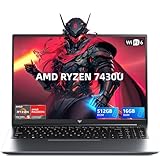
Light Gaming Laptop (Ryzen 7 7430U, 16GB / 512GB)
The 7430U is a U-series efficiency chip, so it won’t sustain heavy loads like the H-series options above, but it runs cool, quiet, and long on battery. Consider this the campus-and-commute choice: solid for esports and emulation between classes, less suited to marathon sessions in demanding titles.
Tunhail 15.6″ Laptop (16GB RAM, 512GB, Win 11 Pro)
Tunhail’s entry is the most conservative pick here, with a modest Core processor topping out at 3.40GHz — but it ships with Windows 11 Pro and a full 16GB/512GB configuration at the low end of this budget. Treat it as a capable everyday machine that handles lighter and older games, rather than a dedicated gaming rig.
Frequently Asked Questions
Can a laptop under $800 run modern AAA games?
Some, at reduced settings. Machines with Radeon RX Vega 8 graphics and DDR5 memory will play many 2023–2024 titles at 1080p with low-to-medium presets and upscaling enabled. For 2026’s most demanding releases at high settings, you’ll need a discrete GPU, which generally starts above this budget.
Is 16GB of RAM enough, or should I stretch to 24GB?
If the machine uses integrated graphics — and at this price it almost certainly does — the extra memory does double duty as VRAM. 16GB works, but 24GB of DDR5 gives the GPU more headroom and keeps background apps from squeezing your framerate. It’s the single upgrade we’d prioritise here.
What’s the practical difference between H-series and U-series processors?
H-series chips run at a higher sustained power draw, so they hold boost clocks longer under load — better for gaming, rendering, and streaming. U-series chips throttle back sooner to preserve battery and reduce heat, which makes them better travel companions but weaker performers in long sessions.
Should I buy now or wait for a sale?
Budget laptop pricing in this segment moves frequently, and the same configuration can swing considerably between listings. If you’re not in a rush, watching for a discount is worthwhile — but the core specs to hold out for are DDR5 memory and an H-series CPU, not a specific brand.
Final Thoughts
For most buyers, the KAIGERR 2026 Gaming Laptop is the clearest value in this bracket — its Ryzen 7 H255, 24GB of DDR5, and 16-inch display deliver the best gaming-per-dollar of anything here. The alternative Ryzen 7 H255 configuration is an equally strong choice if you find it cheaper, while the NIMO Ryzen 5 6600H earns its place for pairing real H-series performance with a genuine IPS panel. Any of the three will handle esports and older AAA titles confidently at 1080p; just go in knowing that integrated graphics, not a budget discrete GPU, is what you’re buying at this price.




