Key takeaways
- To set up a smart home as a beginner, pick one ecosystem, start with a single room and two or three devices, get a stable Wi-Fi network in place.
To set up a smart home as a beginner, pick one ecosystem, start with a single room and two or three devices, get a stable Wi-Fi network in place, and add more only after the first batch works the way you want. Smart plugs, bulbs, and a voice speaker or hub cover most first-week goals without any rewiring.
This guide is for people who play games, stream, or just spend long evenings at a desk and want lights, power, and climate to take care of themselves. It assumes no electrical skills and no prior smart home experience, and it flags the points where a licensed electrician is the right call.
Pick an Ecosystem First
The biggest beginner mistake is buying devices one by one without checking that they work together. A smart home ecosystem is the app and voice assistant that sits at the center. The three most common are Google Home, Alexa, and Apple Home, and a growing number of devices also support the cross-brand standard called Matter.
Choose the ecosystem that matches the phone you already carry and the speaker or display you are willing to buy. Then, when you shop, look at the “works with” badges on the box. Devices that list Matter support are the most flexible in 2026, because they can usually be added to more than one ecosystem at once.
Prepare Your Network
Smart devices depend on your Wi-Fi more than anything else. A weak router is the number-one cause of unreliable lights and plugs. Before you buy anything, check that the router sits in a central position, ideally not inside a cabinet, and that it supports the 2.4 GHz band, since many cheap smart devices only connect to 2.4 GHz.
- Update the router firmware and change the default admin password.
- Use a strong network password and avoid sharing it widely.
- Consider a mesh system if you have dead spots in the rooms you plan to automate.
- Keep the network name simple and free of special characters, which some devices cannot handle during setup.
Start With These Building Blocks
Smart plugs
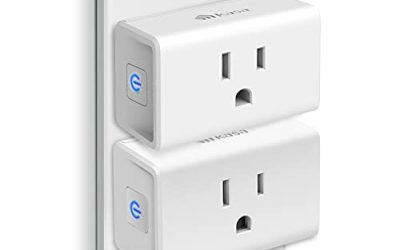
A smart plug turns any lamp, fan, or console charger into a device you can schedule or control by voice. It is the cheapest and safest way to begin, and it requires no wiring. Check the plug’s power rating against the device you want to control, and avoid plugging in heaters or other high-load appliances unless the plug is clearly rated for them.
Smart bulbs and lighting
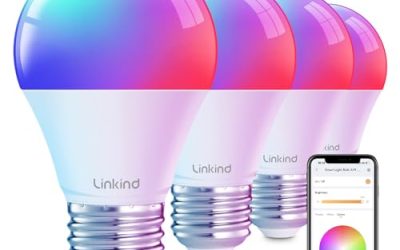
Smart bulbs replace existing bulbs and offer dimming, color, and schedules. They work best in lamps and fixtures where the wall switch stays on. If someone flips the switch off, the bulb loses power and cannot respond, so some people prefer smart switches in rooms with several bulbs.
Voice speaker or hub
A speaker or smart display lets you control everything by voice and lets family members share devices. Some devices need a hub, which is a small box that handles a separate wireless protocol. Many beginners can skip the hub by choosing Wi-Fi or Matter devices.
Cameras and sensors
Door sensors, motion sensors, and indoor cameras add awareness and safety, but they also collect personal data. Read the privacy settings, decide where footage is stored, and never point an indoor camera at private spaces such as bedrooms.
Step-by-Step Setup
- Install the ecosystem app on your phone and create an account.
- Plug in the first device and put it into pairing mode as the instructions say.
- Add the device in the app and name it clearly, such as “Desk Lamp” rather than “Plug 1.”
- Assign the device to a room so voice commands and groups make sense.
- Test the controls from the app, then by voice.
- Create one simple routine, such as turning the desk lights on at a set time.
Only add the next device once the first works reliably. A staged rollout makes it much easier to find which device or setting is causing a problem.
Build Useful Routines
Routines are where a smart home starts to feel smart. A gaming-room example would be a “game time” routine that dims the lights, turns on the monitor’s power strip, and switches the desk lamp to a warm color. A “goodnight” routine can turn everything off and lock the door if you have a smart lock.
Keep routines simple at first. A routine that does too much can be confusing when something goes wrong, and it is easier to expand a working routine than to debug a complicated one.
Security and Privacy Basics
Every smart device is another entry point into your network. Use unique passwords, turn on two-factor authentication for the ecosystem account, and install firmware updates when the app prompts you. Many routers offer a guest network, which is a good place for smart devices because it keeps them separate from your computers and phones.
Read what each device does with data. Disable features you do not use, such as voice recording storage, and be careful when selling or giving away devices, since you should reset them first to remove your account.
Beginner Starter Plan
| Stage | What to add | What it teaches you |
|---|---|---|
| Week one | One smart plug and one bulb | How pairing, naming, and voice control work |
| Week two | Voice speaker or display | How rooms and routines are organized |
| Month one | Motion or door sensor | How triggers and conditions work |
| Later | Thermostat, lock, or camera | Higher-impact devices with privacy trade-offs |
Before You Buy Checklist
- Pick one ecosystem and stay with it for the first few devices.
- Confirm your router supports the Wi-Fi band the devices need.
- Check the compatibility badge on each box.
- Verify the electrical rating of plugs and switches against the device.
- Decide what data you are comfortable sharing with each service.
- Hire a licensed electrician for any wired switch or fixture installation.
Smart Home Ideas for a Gaming Space
If your main reason for a smart home is a gaming or streaming desk, a few small automations deliver a lot of value. A single smart plug on a power strip can switch off the monitor, speakers, and chargers when you leave, which cuts the standby draw that quietly adds up over a month. Another plug can control a small desk fan or a bias light behind the screen.
Lighting is the second big win. Warm, dim light in the evening is easier on the eyes during long sessions, and a color change can mark the start of a stream. If you record video, a smart bulb with adjustable white tones lets you match your face lighting to the room without moving a lamp. Group these devices into one scene so a single voice command or button press sets everything at once.
Finally, think about what should never be automated. Anything with a heating element, an open flame, or a risk of tipping should stay under manual control. A smart plug can schedule a lamp, but it should not be the only thing standing between you and a fire hazard. Keep it simple, keep it safe, and expand slowly through the year.
Related guides
- Hall Effect Vs Potentiometer Controller Sticks Explained
- Low Profile Cpu Coolers For Small Form Factor Pcs
- How To Transfer Nintendo Switch Data To A New Console
Frequently Asked Questions
Do I need a hub to start a smart home?
Not always. Many plugs, bulbs, and speakers connect straight to Wi-Fi or use Matter. A hub becomes helpful when you add many sensors or devices that use a different wireless protocol.
Will smart devices slow my internet?
Most use very little bandwidth. Cameras are the main exception, because streaming video uses more data. A solid router and, if needed, a separate network for devices keep gaming and streaming traffic running smoothly.
What happens if the internet goes down?
Cloud-based devices may lose voice control and remote access. Some devices keep local controls and schedules working, and Matter devices can often work locally. Check the product description if offline operation matters to you.
Is a smart home safe to run when I am away?
Used sensibly, yes. Keep devices updated, protect the account with two-factor authentication, and avoid automating anything that could be a safety risk without a manual override. For high-load appliances and wiring, consult a qualified professional.
FAQ
Do I need a hub to start a smart home?
Will smart devices slow my internet?
What happens if the internet goes down?
Is a smart home safe to run when I am away?
More from Amazon
Programs that pair well with the guide above. Offers and eligibility are set by Amazon and may change.
Free shipping on eligible items, Prime Video and more. Eligible new members can start with a free trial.
Start a Prime free trialAd-free music streaming. Eligible new subscribers can start with a free trial.
Try Music Unlimited freeA Prime membership for ages 18-24 with a trial period. Eligibility is set by Amazon.
See Prime for Young AdultsAudiobooks and podcasts to listen to on the go. Eligible new members can start with a free trial.
Try Audible freeAs an Amazon Associate we earn from qualifying purchases.