Key takeaways
- Best webcams for cam whoring: compare resolution, autofocus, low-light performance, framing, lighting and privacy controls for a reliable adult-creator setup.
As an Amazon Associate we earn from qualifying purchases.
Choosing a webcam for adult-content creation comes down to how clearly and steadily you appear on screen during long live sessions. Viewers notice soft focus, grainy shadows and stuttering motion before they notice anything else about a broadcast, so the camera quietly sets the ceiling for the whole production. A well-chosen webcam keeps your face sharp as you move, holds colour steady when the room light shifts, and lets you frame the shot exactly the way you planned it. That steadiness is what keeps viewers watching through a long broadcast.
It speaks to independent adult creators broadcasting from a home room, performers building a regular streaming schedule, and newcomers setting up a first camera before going live. Resolution, autofocus, low-light handling, field of view, microphones, mounting and privacy controls are all explained in plain terms, so you can weigh cameras on the details that shape a session and pick hardware that suits your room, your lighting and your routine.
How to Choose
Every webcam balances the same competing demands, and the right balance shifts with your room, your lighting and how much you move while broadcasting. Read the four points below in order and settle what matters most to you before comparing any two cameras side by side, because a headline feature can add nothing to a fixed chair in a small room. Resolution, focus, light handling and framing each pull in a different direction, and a camera that excels at one can fall short at another, so judge the whole package against the sessions you actually run. Keep a short note of your room size, your light and your usual position as you read.
Resolution and Frame Rate
The resolution figure tells you how much detail the picture can hold, and Full HD at 1080p is the sensible baseline here, because it looks sharp on most viewers’ screens. Higher resolutions add detail up close, yet they also demand more upload speed, more light and computing power, so the gain can vanish on a weak connection. Frame rate governs how fluid movement appears: 30 frames per second covers seated conversation, while 60 frames per second earns its place when you gesture or change position. Read both figures together, since a camera that records 4K at a low frame rate can look less lively than a 1080p camera at 60 frames per second.
Autofocus, Field of View and Framing
Autofocus keeps you sharp as you lean in, sit back or shift position, and movement is part of the session. A camera with slow or hunting focus will drift soft, so look for listings that describe fast, continuous autofocus rather than a fixed-focus lens. Field of view sets how much of the room appears behind you: a narrow angle near 65 degrees frames a tight head-and-shoulders shot and hides the edges of the room, while a wide angle near 90 degrees shows more of your space. Check whether the angle is adjustable in software, because a camera that crops the frame digitally lets you change the look without moving the mount.
Low-Light Performance and Colour
Most home rooms are dimmer than they look on a phone screen, and a webcam that copes badly with low light will produce grain, smeared tones and a picture that darkens when you move from the lamp. Larger sensors and wider apertures gather more light, and some cameras add automatic light correction that lifts shadows without harsh highlights. Colour handling matters too: a camera that keeps skin tones warm and steady looks more natural than one that shifts hue as the light changes. Before settling on a model, check the listing’s low-light claims and what other creators say about evening sessions, since a camera that shines under studio lights can struggle beside a single lamp.
Privacy Controls, Audio and Mounting
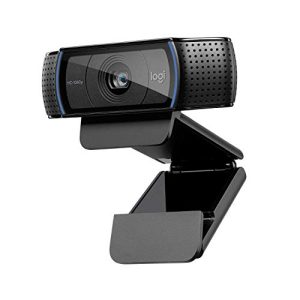
Privacy controls matter when the camera sits in a bedroom: a physical shutter or clip-on cover blocks the lens between sessions without unplugging, and a clear indicator light shows at a glance whether the camera is active. Some cameras add a microphone mute control or hardware switch for sessions where the picture stays live and the room stays silent. Built-in microphones vary widely, so decide whether to rely on them or use a separate microphone, and check whether the camera picks up keyboard clicks and fan noise. Mounting matters too: a sturdy clip fits a monitor, a tripod thread suits floor and desk stands, and a long cable keeps the camera where you want it.
Which One Fits Your Situation
There is no single webcam that suits every creator, because rooms, schedules and audiences differ. The four situations below cover the most common setups, so find the one closest to yours and weigh the criteria in that light. A camera that is perfect for a fixed desk can be the wrong choice for a performer who moves around the room, and the reverse is just as true. Start with the room you have, not the camera you wish you owned.
A Fixed Desk in a Small Room
If you broadcast from one chair at one desk, prioritise a camera with reliable autofocus, a moderate field of view and strong low-light correction, since the framing and the light rarely change. A narrow to mid-range angle keeps the background tidy and hides clutter at the edges of the room. A physical privacy shutter matters here too, because the camera stays mounted in a lived-in space between broadcasts.
Moving Around the Room
Performers who stand, move about or change position need a camera that tracks focus quickly and holds a steady frame rate while moving. A wider field of view helps here, because it keeps you in shot when you step sideways, and a tripod mount lets you place the camera back for a fuller view. Watch the autofocus behaviour closely, since a camera that hunts for focus while you move softens the picture at the moments viewers watch most closely.
Low Light and Evening Sessions
Evening broadcasts in a dim room test a webcam hardest, so low-light performance should lead your shortlist. Look for a larger sensor, automatic light correction and colour handling that stays steady as the light fades, and pair the camera with a simple key light in front of you. Test at the hour you actually broadcast, because a camera that looks fine in daylight can turn grainy once the sun goes down.
A First Setup on a Tight Budget
A first camera does not need the highest resolution available, and a dependable 1080p model with autofocus and a privacy cover will serve a new creator well. Spend the saving on lighting and a stable mount, which improve the picture more than extra pixels on a dim feed. Keep the setup simple: one camera, one light and a quiet room, then upgrade later once you know which limits bother you in practice.
Common Mistakes
Most disappointing webcam purchases come from the same handful of avoidable errors. Run through this list before ordering, because each one is cheaper to prevent than to fix after the camera arrives. A little preparation goes further than any single specification, and most of these errors share one root cause: choosing the camera before thinking about the room, the light and the way you actually broadcast.
- Buying the highest resolution and ignoring frame rate: a 4K camera capped at a low frame rate can look choppier than a 1080p camera at 60 frames per second, so read both numbers together and match them to how much you move during a session. Movement-heavy broadcasts suffer most from this mistake, because every gesture turns into a judder on screen.
- Pointing the camera at a bright window or lamp behind you: backlight turns your face into a silhouette and forces the camera to expose for the bright background, so place the main light in front of you and keep bright sources out of the frame. A quick test recording will show the problem at once, long before any viewer sees it.
- Skipping a privacy cover: a webcam in a bedroom should have a physical shutter or cover, because software indicators can be missed and unplugging the camera every time gets old fast. Treat the cover as part of the camera, not an accessory, and check it is fitted before every session ends.
- Mounting the camera too low or too far away: a camera sitting below eye level or across the room produces an unflattering angle and a small, distant figure, so mount it at eye level and close enough to fill the frame. A small tripod or a monitor clip usually solves this without any extra spending.
- Forgetting to test at broadcast time: a setup that looks fine in daylight can fall apart under evening lamps, so run a short test recording at the hour you plan to go live and check focus, colour and grain before your first session. Repeat the test whenever you move the camera or change a light, since small changes shift the picture more than expected.
Frequently Asked Questions
These are the questions creators ask most often before buying a webcam for this kind of work, answered directly so you can decide with the facts in hand. If a question below matches your situation, read the short answer and then check the matching section above for the fuller reasoning.
Is 1080p enough for adult-content creation?
Yes, for most creators. Full HD at 1080p looks sharp on the screens viewers actually use, and it keeps bandwidth and processing demands manageable during long sessions. Higher resolutions add detail in close framing, but they also need more upload speed and more light, so they only pay off when your connection and your lighting are already solid. It also leaves headroom on modest connections, which keeps the stream steady.
Do I need autofocus on my webcam?
Autofocus is worth having if you move during a session, lean in and out of frame, or change position between segments. It keeps your face sharp without you thinking about it. A fixed-focus camera can work for a creator who stays in one spot at a set distance, but it will soften the picture the moment you shift forward or back. For most creators it is worth having.
How important is lighting compared with the camera?
Lighting matters at least as much as the camera, and often more. A modest webcam under a good key light will outperform an expensive camera in a dark room, because sensors need light to produce a clean, low-grain picture. Place one light in front of you at eye level before spending extra on a higher-resolution model. Start with lighting, then choose the camera to match the room you have lit.
What privacy features should a webcam have?
Look for a physical shutter or clip-on cover that blocks the lens, a clear indicator light that shows when the camera is active, and a microphone mute control if you use the built-in audio. These features let you confirm at a glance that the camera is off between sessions, which matters when the camera lives in a bedroom. Check them on the listing before you buy, not after it arrives.
FAQ
Is 1080p enough for adult-content creation?
Do I need autofocus on my webcam?
How important is lighting compared with the camera?
What privacy features should a webcam have?
More from Amazon
Programs that pair well with the guide above. Offers and eligibility are set by Amazon and may change.
Free shipping on eligible items, Prime Video and more. Eligible new members can start with a free trial.
Start a Prime free trialAd-free music streaming. Eligible new subscribers can start with a free trial.
Try Music Unlimited freeA Prime membership for ages 18-24 with a trial period. Eligibility is set by Amazon.
See Prime for Young AdultsAudiobooks and podcasts to listen to on the go. Eligible new members can start with a free trial.
Try Audible freeAs an Amazon Associate we earn from qualifying purchases.