Our Top Picks
As an Amazon Associate we earn from qualifying purchases.
Disclosure: This article contains affiliate links. If you buy through a link on this page, we may earn a commission at no extra cost to you.
A note on the wording before the picks: this guide does not rank webcams by sales figures, because reliable, model-by-model sales numbers are not published in a form that can be checked here. Instead, it gathers webcams that are widely bought, long-listed and repeatedly chosen for streaming, meetings and gaming, and compares them on the specifications that actually decide whether one suits your desk. That is the honest way to shop this category. A webcam that has stayed on sale for years usually has done so because its basic formula works — a clear sensor, a sensible field of view, usable microphones and plug-and-play setup — and those are exactly the things you can verify on a listing before you spend anything.
The use cases split cleanly. Streamers and gamers who appear on camera next to gameplay need smooth motion, reliable autofocus and light correction that holds up in a dim room. Remote workers need a tidy head-and-shoulders frame, microphones that keep a voice clear without a separate headset, and a privacy shutter for the hours between calls. Anyone upgrading from a built-in laptop camera mainly needs a step up in sharpness and low-light handling without software headaches. The four webcams below cover those needs at different points: a long-running 1080p all-rounder, a streaming-focused variant with a faster 720p mode, a wide-angle model with a privacy cover, and a newer USB-C design with auto-framing and a desk-showing tilt mode.
Quick Picks
- Logitech C920 HD Pro (B006JH8T3S) — the long-running 1080p all-rounder for calls, recording and casual streaming.
- Logitech C922x Pro Stream (B01LXCDPPK) — the streaming pick, with 1080p at 30 fps or 720p at 60 fps and a tripod in the box.
- NexiGo N60 (B088TSR6YJ) — the wide-angle pick, with a 110-degree view, privacy cover and software control of field of view and zoom.
- Logitech Brio 500 (B09QWVYK6V) — the modern meetings pick, with USB-C, RightLight 4 light correction, auto-framing and Show Mode.
1. Logitech C920 HD Pro Webcam
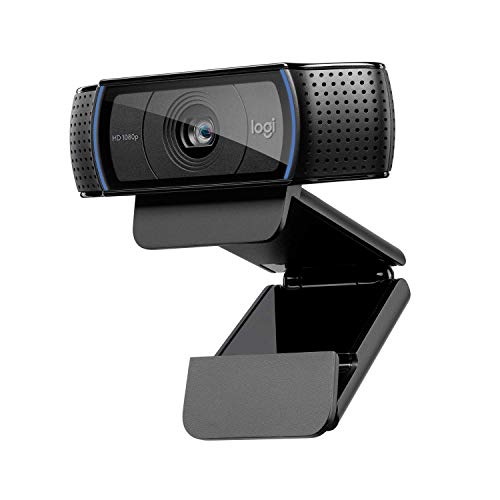
The C920 is the webcam many other models are still measured against, and its listing explains why it has remained a common purchase for so long. It records and calls in Full HD 1080p at 30 frames per second, uses autofocus and automatic light correction, and carries stereo microphones on either side of the lens. For a gamer adding a face camera to a stream, a teacher running lessons, or a worker replacing a soft laptop camera, that combination covers the job without a settings deep-dive.
Framing is a fixed, moderately wide view suited to one person at a desk. The glass lens and autofocus keep a face sharp as you lean in or back, and the light correction lifts a dim room enough to stay presentable, although a basic desk light still helps any webcam. The universal clip fits monitors, laptops and tripods, and the long attached cable gives flexibility about where the camera sits. Because the C920 has been sold for many years in large numbers, support in streaming and conferencing software is about as universal as this category gets: it is a USB Video Class device that works without special drivers.
Specifications
- Resolution and frame rate: 1080p at 30 fps; 720p at 30 fps
- Field of view: 78 degrees (diagonal)
- Focus: autofocus
- Microphones: stereo, dual built-in microphones
- Light correction: automatic HD light correction
- Connection: USB-A, attached cable
- Model number: 960-000764
Pros
- Proven 1080p formula with autofocus and stereo audio
- Works across Windows, macOS and ChromeOS conferencing and streaming apps
- Flexible clip mount for screens or a tripod
Cons
- No 60 fps mode at any resolution
- No built-in privacy shutter
- USB-A only, so newer USB-C-only laptops may need an adapter
View the Logitech C920 on Amazon
2. Logitech C922x Pro Stream Webcam

The C922x takes the same basic shape as the C920 and tunes it for people who stream. Its headline difference is the second frame-rate option: alongside Full HD 1080p at 30 fps, it offers 720p at 60 fps, which renders movement — head turns, gestures, a fast-paced game behind you — more smoothly. For a face camera that will be shrunk into a corner of a stream, that smoother 720p mode is often the more useful setting, while the 1080p mode suits full-screen calls and recordings.
The rest of the package is streaming-friendly. Autofocus and HD light correction are on board, the field of view matches the head-and-shoulders framing streamers expect, and dual microphones capture stereo audio for viewers when a separate microphone is not in use. Logitech lists compatibility with popular broadcasting software such as OBS and XSplit, and the box includes a small tripod, which makes it easy to place the camera off the monitor for a lower, more natural angle. The listing title also notes compatibility extending to newer uses such as the Nintendo Switch 2 GameChat mode, which underlines how broadly this model is still being sold and supported.
Specifications
- Resolution and frame rate: 1080p at 30 fps or 720p at 60 fps
- Field of view: 78 degrees (diagonal)
- Focus: autofocus
- Microphones: dual stereo microphones
- Light correction: HD auto light correction
- Connection: USB-A
- Included accessory: adjustable tripod (per listing)
- Model number: 960-001176
Pros
- 720p at 60 fps option for smoother streaming motion
- Tripod included for flexible placement
- Autofocus and light correction aimed at live video
Cons
- No 1080p60 mode
- No built-in privacy shutter
- Design and sensor generation are older than the newest 4K models
View the Logitech C922x on Amazon
3. NexiGo N60 1080P Webcam

The NexiGo N60 is the wide-angle option in this group, and that single specification changes who it suits. Its 110-degree field of view captures a small group around a table, a whiteboard behind a presenter, or a room-scale view for lessons and demonstrations — situations where the narrower Logitech models would crop people out. It records in 1080p, includes a built-in microphone, and ships with a privacy cover, a simple physical answer to the always-on-camera worry that the two Logitech models above do not provide.
NexiGo also leans on software control. The listing describes adjustable field of view, zoom and other settings through its software, which lets a solo user narrow that very wide default view for ordinary calls instead of sitting in a tiny corner of a huge frame. Setup is plug and play over USB for conferencing apps such as Zoom, Skype and Teams, and the camera is positioned by the brand as an everyday conferencing and calling webcam rather than a specialist streaming device. If your priority is fitting more into the frame and covering the lens when you are done, the N60 is the natural pick here; if your priority is the smoothest motion, look at the C922x instead.
Specifications
- Resolution: 1080p (1920 x 1080)
- Field of view: 110 degrees, adjustable in software (per listing)
- Microphone: built-in microphone
- Privacy: privacy cover included
- Software: software control for field of view, zoom and settings (per listing)
- Connection: USB, plug and play
- Model: N60
Pros
- Very wide 110-degree view for groups, rooms and demonstrations
- Privacy cover included in the box
- Software adjustment can narrow the view for solo calls
Cons
- Wide angle can distort faces near the edges of the frame
- No high frame-rate mode listed for fast-motion streaming
- Fixed-focus style designs reward sitting at a steady distance
4. Logitech Brio 500
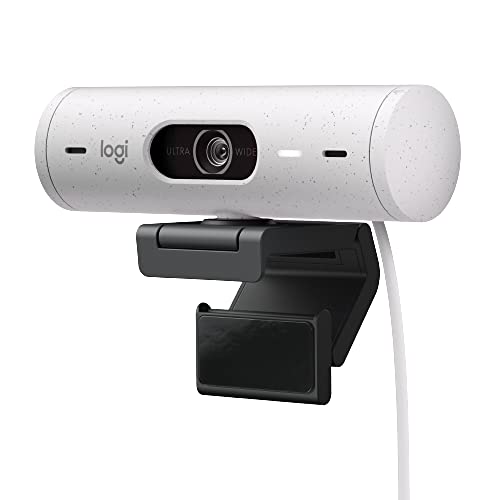
The Brio 500 is the newest design language in this guide and the one aimed most clearly at hybrid workers. It is a Full HD 1080p webcam on USB-C, with RightLight 4 auto light correction, dual noise-reducing microphones and a built-in privacy cover that rotates closed. Where the C920 simply presents you as framed, the Brio 500 adds RightSight auto-framing through Logi Tune, which keeps you centred if you shift position or stand during a call — useful for presenters and anyone who does not sit perfectly still.
Its party trick is Show Mode: tilt the camera down and it presents documents, sketches or objects on the desk in front of you, correctly oriented for viewers. That makes it a practical tool for design reviews, tutoring and product walkthroughs without a second camera. The listing for this ASIN is the Off White finish; the model is also part of a range with other finishes, so check the listing’s colour selector carefully if finish matters to you. Certified compatibility with Microsoft Teams, Google Meet and Zoom is stated on the listing, which matters for buyers whose employer standardises on one platform.
Specifications
- Resolution and frame rate: 1080p at 30 fps; 720p at 60 fps
- Field of view: up to 90 degrees, adjustable (90, 78 and 65 degrees per manufacturer specification)
- Sensor: 4 MP
- Light correction: RightLight 4 auto light correction
- Framing: RightSight auto-framing (via Logi Tune)
- Microphones: dual noise-reducing microphones
- Privacy: built-in rotating privacy cover
- Special mode: Show Mode for desk content
- Connection: USB-C cable
- Finish for this listing: Off White
Pros
- Auto-framing and Show Mode add genuinely useful meeting features
- Built-in privacy cover and USB-C connection
- Dual noise-reducing microphones for headset-free calls
Cons
- Top resolution is 1080p, with no 4K option
- Auto-framing depends on the Logi Tune software
- USB-C only, so older USB-A-only machines may need an adapter
View the Logitech Brio 500 on Amazon
How to Choose
Start with the frame rate your main use actually needs. Meetings and recorded talking-head video look fine at 1080p30, which every model here provides. Live streaming with movement benefits from a 60 fps option, which narrows the field to the C922x at 720p or the Brio 500 at 720p. Next, match field of view to your room: around 78 degrees frames one person neatly, up to 90 degrees gives a little breathing room, and the N60’s 110 degrees is a group-and-room tool that solo callers will usually want to narrow in software.
Then check the practical details. If you dislike wearing a headset, dual-microphone models — the C920, C922x and Brio 500 — are the safer bets. If a privacy shutter is non-negotiable, the N60’s cover and the Brio 500’s built-in cover are the two built-in answers here. Check your ports before ordering: the C920 and C922x are USB-A devices, the Brio 500 is USB-C, and an adapter may be needed either way depending on your laptop. Finally, ignore headline popularity and compare these verifiable specifications; the best-selling label on any marketplace page is a merchandising signal, not a measurement of which camera fits your desk.
FAQs
What does best selling actually mean for a webcam?
It usually signals that a model is bought often and has stayed listed for a long time, which tends to correlate with broad software support and easy replacement. It is not a published sales ranking, so this guide compares specifications instead of repeating sales claims.
Is 1080p enough, or should I look for 4K?
For meetings, lessons and most streaming face cameras, 1080p is enough, because platforms compress video and face cameras are often shown small. The models here are all 1080p designs; choose between them on frame rate, field of view and features rather than resolution alone.
Which of these is best for streaming games?
The C922x is the streaming-focused design, thanks to its 720p at 60 fps mode, autofocus, light correction and included tripod. The C920 remains a sensible alternative for a straightforward 1080p face camera.
Which webcam works best for a small meeting room?
The NexiGo N60, because its 110-degree field of view fits more people into the frame. Its software controls let you narrow the view again when you return to solo calls.
Do I still need a separate microphone?
Not necessarily for calls: three of these models carry dual microphones, and the Brio 500’s are noise-reducing. A separate microphone still gives streamers more placement control, but it is an upgrade, not a requirement, for everyday use.
Do these webcams need drivers?
They are plug-and-play USB cameras for the major conferencing and streaming apps. Optional manufacturer software — Logi Tune for the Brio 500, NexiGo’s software for the N60 — unlocks framing and image settings rather than basic operation.
Conclusion
Widely bought webcams earn their place by covering the basics reliably, and these four divide the work cleanly. Choose the Logitech C920 for a proven 1080p all-rounder, the C922x if smoother 720p60 streaming matters, the NexiGo N60 when a wide group view and a privacy cover come first, and the Brio 500 for USB-C meetings with auto-framing and Show Mode. Compare the frame rate, field of view, microphones and connector on the live listing for the model you pick, and you will end up with the camera that matches your desk rather than a headline.
More from Amazon
Programs that pair well with the guide above. Offers and eligibility are set by Amazon and may change.
Free shipping on eligible items, Prime Video and more. Eligible new members can start with a free trial.
Start a Prime free trialAd-free music streaming. Eligible new subscribers can start with a free trial.
Try Music Unlimited freeA Prime membership for ages 18-24 with a trial period. Eligibility is set by Amazon.
See Prime for Young AdultsAudiobooks and podcasts to listen to on the go. Eligible new members can start with a free trial.
Try Audible freeAs an Amazon Associate we earn from qualifying purchases.