Our Top Picks


As an Amazon Associate we earn from qualifying purchases.
Affiliate Disclosure: This article contains affiliate links. If you buy through a link on this page, we may earn a commission at no extra charge to you.
A plain tablet stand props a screen up on the desk. A desk tablet mount does a different job: it lifts the tablet off the surface, holds it beside or above your monitor, and keeps it there while you tap, type, or draw on it. That distinction matters for streamers and artists. A chat display only needs to stay visible. A drawing surface needs to stay still under pen pressure, stroke after stroke, without creeping, bouncing, or slowly sagging toward the desk.
Stiffness is therefore the lead spec in this guide, ahead of reach and looks. Articulated metal arms with lockable or spring-loaded joints resist pen pressure best. Weighted bases are steady for tapping and swiping, provided the tablet does not overhang too far. Goosenecks are the most flexible to position and the least steady to touch: every tap travels down a springy arm and comes back as a wobble. All five mounts below are real desk products sold on Amazon, covering each of those three families, so you can match the mount to the work instead of buying reach you cannot use.
1. SAMHOUSING Aluminum Arm Tablet Mount — Stiffest Pick for Drawing

This is the mount to start with if the tablet is a drawing surface. Instead of a bendable neck, the SAMHOUSING uses a folding mechanical aluminum arm with four joints and a strong internal spring rated to hold up to 1,500 grams. Jointed arms move only where you set them, so pen pressure goes into the desk clamp rather than into a flexible shaft. The holder rotates a full 360 degrees, which lets you work in landscape for a wide canvas, then spin to portrait for reference images or a vertical chat feed without removing the tablet.
The base is a padded clip that fits surfaces up to 52 mm thick, which covers most gaming desks, shelves, and headboards. Both the holder and the clamp are padded, so the tablet and the desk edge stay unmarked. Fit is the main limit to check: the holder suits devices from about 4.7 to 11 inches, so a 12.9-inch tablet in a thick case is outside its comfort zone. Keep the arm folded relatively close rather than fully stretched, and the spring holds its angle far better under a pen than any gooseneck in this guide.
Specs
- Mount type: Desk clamp with folding articulated arm
- Arm: Aluminum, 4 joints, spring-loaded, 360-degree holder rotation
- Maximum load: 1,500 g
- Device range: 4.7 to 11 inches
- Clamp range: Surfaces up to 52 mm thick, padded jaws
- Item weight: About 2.05 lb (920 g)
2. AboveTEK Tablet Stand Holder TS-388B — Long Arm for Bigger Tablets
The AboveTEK TS-388B takes the same jointed-arm idea and stretches it further. Its two-stage arm extends up to 27 inches across four adjustable joints, and the C-clamp grips surfaces up to 2.95 inches thick with anti-slip padding. That reach is useful on deep streaming desks, where the clamp can sit at the back edge and the tablet can still arrive beside your main monitor at eye level, instead of crowding the mousepad.
Compatibility is the other strength. The clamp holder fits devices from 4.7 to 13.5 inches, including large Pro tablets and Surface models, and it rotates 360 degrees for portrait chat or landscape video. The arm mixes aluminum alloy, iron, and ABS, which keeps it rigid in the lower stage where leverage is highest. As with any long arm, stiffness drops as you extend it: for drawing, run it shorter and tighter; for a chat or teleprompter display, the full reach is fine because you are looking, not pressing. A hex key is included for joint adjustment, and the box also includes a camera adapter for the same arm.
Specs
- Mount type: C-clamp with two-stage articulated long arm
- Arm length: Up to 27 inches, 4 adjustable joints
- Materials: Aluminum alloy, iron, and ABS
- Device range: 4.7 to 13.5 inches
- Clamp range: Surfaces up to 2.95 inches thick, anti-slip padding
- Rotation: 360-degree holder, hex key included
3. Twelve South HoverBar Duo (2nd Gen) — Weighted Base or Clamp
The HoverBar Duo is the flexible middle ground, and the only pick here that gives you two mounting systems in one box. A weighted desktop base handles desks with no usable edge, glass tops, or standing desks where a clamp would foul the frame. A separate shelf clamp, fitting edges from 0.4 to 1.4 inches, handles shelves and thinner desk tops. The QuickSwitch tab moves the arm between the two in seconds, so the same tablet can live on the desk for streaming and on a shelf for calls.
The articulated arm extends 15 inches and can raise the tablet up to about two feet, with two pivot points and a holder that rotates in any direction. The clip grips devices from 5 to 8.68 inches across and fits most iPads in cases, as long as the cased tablet stays within about 0.5 inches thick. That Apple-first sizing is the caveat: it suits iPads and phones beautifully, but wide Android tablets should be measured against the clip width before ordering. For Sidecar use beside a Mac monitor, or a portrait chat screen that needs to clear a speaker or microphone arm, it is the tidiest option here.
Specs
- Mount type: Weighted desktop base plus shelf clamp, QuickSwitch changeover
- Arm: Articulated, 15 inches fully extended, 2 pivot points
- Clip range: Devices 5 to 8.68 inches across, most cases up to about 0.5 inches thick
- Clamp range: Edges 0.4 to 1.4 inches (10 to 34 mm)
- Height: Raises tablet up to about 2 feet
- Material: Aluminum
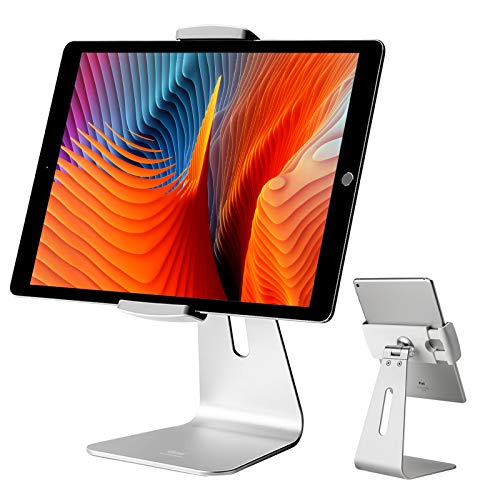
4. Viozon iPad Pro Stand AP-7S — Low Weighted Base for Tapping
Not every tablet needs to float. The Viozon AP-7S is a weighted desktop mount that keeps the tablet low, close, and anchored, which is exactly right for a Stream Deck-style control surface, a music or lighting control app, or a second screen you tap constantly. The aluminum body and broad base resist the downward force of repeated taps far better than a tall arm, because there is almost no leverage working against it.
The holder rotates 360 degrees, so the same base works in landscape for video and portrait for chat or lyrics, and the package includes two holders covering tablets and phones from 7 to 13 inches. Height and angle adjust at the neck, bringing the screen up to a comfortable reading angle without lifting it into wobble territory. It will not put a tablet at standing eye level, and it occupies a real footprint of desk, so measure the space beside your keyboard. In return, it is the steadiest tapping surface in this guide and needs no clamp edge at all, which makes it a safe pick for glass and thick-edged desks.
Specs
- Mount type: Weighted desktop base, no clamp needed
- Material: Aluminum alloy
- Device range: 7 to 13 inches, two holders included for tablets and phones
- Rotation: 360-degree holder rotation
- Adjustment: Height and angle adjustable neck
- Footprint: About 9.45 x 5.04 x 5.24 inches
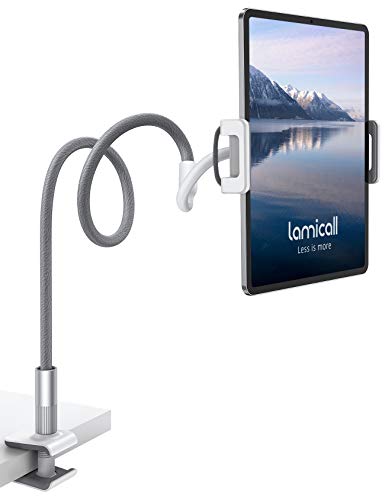
5. Lamicall Gooseneck Tablet Holder LS02 — Most Flexible, for Viewing
The Lamicall gooseneck is included with an honest warning: buy it for viewing, not for drawing. The long flexible arm bends into almost any shape, clamps to edges up to 2.8 inches thick, and rotates 360 degrees, which makes it superb for floating a chat display over a desk, angling a tablet down for an overhead camera view, or parking a recipe or reference screen exactly where your eyes already are. The holder fits devices from 4.7 to 10.5 inches and the clamp is rubber-lined to protect the desk edge.
The trade-off is built into the design. A gooseneck is a spring, and tapping the screen makes it bounce; Lamicall itself positions this type of holder for reading and viewing, and bending the arm into an S or loop shape close to the holder reduces the shake. Under a drawing pen it will frustrate you within minutes. Used as a hands-off display — chat, alerts, a stream preview, or a second monitor you rarely touch — that same flexibility becomes the point, and it frees the desk space a base would take.
Specs
- Mount type: Desk clamp with flexible gooseneck arm
- Model: LS02
- Device range: 4.7 to 10.5 inches
- Clamp range: Edges up to 2.8 inches thick, rubber-lined
- Rotation: 360-degree holder rotation
- Item weight: About 1.2 lb
How to Choose a Desk Tablet Mount
Start with the job. For drawing, choose a jointed metal arm — the SAMHOUSING for compact tablets, the AboveTEK for larger ones — and plan to work with the arm partly folded, joints tightened, and the tablet supported near its center. For a tapping control surface, choose a low weighted base such as the Viozon. For a look-only display, a gooseneck or the HoverBar Duo gives you the freest positioning.
Measure three things before ordering. First, your desk edge: clamp ranges here run from the HoverBar clamp at 1.4 inches maximum to the AboveTEK at 2.95 inches, and desks with beveled edges, cable trays, or steel frames underneath may offer far less flat grip than the top thickness suggests. Second, your tablet in its case: holder ranges are quoted for the device, and a rugged case can push a large tablet past the limit, so measure the cased width against the clip range. Third, the weight: check the mount load rating against a large tablet plus case, especially on spring arms and goosenecks run at full stretch.
Think about the cable at the same time as the mount. A permanently mounted tablet needs power that does not fight the holder: route the charging cable along the arm with slack at every joint, leave a loop where the holder rotates so portrait-to-landscape turns do not pull the plug, and avoid pinching the cable inside the clamp. Finally, decide your default orientation. Chat and alerts read best in portrait beside the monitor; drawing and video belong in landscape. Every mount here rotates, but the ones with a true 360-degree holder make that daily switch effortless.
FAQ
Can I draw on a tablet held by a gooseneck mount?
Not comfortably. A gooseneck flexes under pen pressure and rebounds after each stroke, which breaks line control. Use a jointed arm or a low weighted base for drawing, and reserve goosenecks for viewing, chat, and camera angles.
Will these mounts fit my tablet in its case?
Usually, if the cased tablet stays inside the holder range quoted in the Specs. Measure the tablet with the case on, including its thickness, and compare it with the clip range. Slim cases fit almost everywhere here; thick rugged cases are the common failure.
How thick can my desk be for a clamp mount?
It depends on the clamp. In this guide the ranges run from 0.4 to 1.4 inches for the HoverBar shelf clamp, up to 52 mm for the SAMHOUSING, and up to 2.95 inches for the AboveTEK. If your desk is thicker, or has no clear edge, use a weighted base instead.
Is a tablet mount better than a stand for streaming?
For streaming, usually yes. A mount lifts the tablet to eye level beside your monitor, frees the desk under it for a keyboard or control surface, and holds a portrait chat screen steady for hours. A simple stand is fine for occasional desk use, but it fixes the tablet at desk height.
How do I stop an arm mount from slowly sagging?
Shorten the extension, tighten the joints, and keep the tablet weight centered over the arm rather than cantilevered to one side. Sagging is worst at full reach with the heaviest tablet a mount allows, so staying inside the load rating with margin makes the biggest difference.
Conclusion
Match the mount family to the touch load. Artists should start with the SAMHOUSING articulated arm, or the AboveTEK when the tablet is large or the desk is deep. Streamers who tap a control app all session should look at the low, weighted Viozon AP-7S. The HoverBar Duo suits anyone who needs to move between a weighted base and a clamp, especially with an iPad. The Lamicall gooseneck earns its place as a flexible, space-saving holder for chat and preview screens you watch rather than press. Measure your desk edge and your cased tablet first, route the cable with slack at the joints, and any of these five will hold a tablet where a plain stand cannot.
FAQ
Can I draw on a tablet held by a gooseneck mount?
Will these mounts fit my tablet in its case?
How thick can my desk be for a clamp mount?
Is a tablet mount better than a stand for streaming?
How do I stop an arm mount from slowly sagging?
More from Amazon
Programs that pair well with the guide above. Offers and eligibility are set by Amazon and may change.
Free shipping on eligible items, Prime Video and more. Eligible new members can start with a free trial.
Start a Prime free trialAd-free music streaming. Eligible new subscribers can start with a free trial.
Try Music Unlimited freeA Prime membership for ages 18-24 with a trial period. Eligibility is set by Amazon.
See Prime for Young AdultsAudiobooks and podcasts to listen to on the go. Eligible new members can start with a free trial.
Try Audible freeAs an Amazon Associate we earn from qualifying purchases.