Our Top Picks
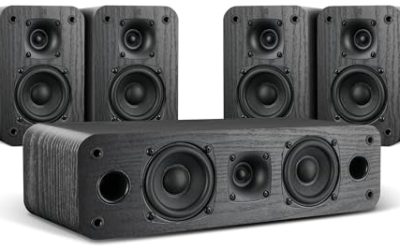
 Cyber Acoustics CA-3610 2.1 Multimedia Speaker System with2.1 62W13.2 x 10.6 x 9.8 inches9.7 poundsCheck on Amazon
The best computer speakers under $75 are compact 2.0 pairs and one 2.1 system with a subwoofer, powered by USB or a wall adapter. The Creative Pebble V3 is the top pick here, since its listing gives USB-C power, Bluetooth 5.0, 8W RMS and a USB-A adapter in the box.
These six speaker sets are compared from listing specifications, so every figure comes from the product text. Details a listing does not state, such as frequency response, driver size or cable length, are marked “not listed” or sent to the maker page. Each set is listed at or under the $75 ceiling, and all sit in the upper half of the range, where you get Bluetooth, volume dials and better cabinets rather than basic stick speakers.
Quick Comparison
| Model | Type and power (per listing) | Connectivity | Best for |
|---|---|---|---|
| Creative Pebble V3 | 2.0, 8W RMS | USB-C, Bluetooth 5.0, USB-A adapter | Small desks and mixed use |
| Logitech Z207 | 2.0, 10W peak | Bluetooth, 3.5mm input, headphone jack | Plug-and-play simplicity |
| Creative Pebble Pro | 2.0 with RGB lighting | USB-C, Bluetooth | Desk setups with lighting |
| Cyber Acoustics CA-3610 | 2.1 with subwoofer, 62W peak | Not listed | More bass for music and games |
| AOC Computer Speakers | 2.0 stereo, 6 RGB modes | Bluetooth and USB input, USB powered | Monitor-side gaming desks |
| Redragon GS560 | 2.0 soundbar, RGB light bar | USB powered, 3.5mm cable | Under-monitor soundbar look |
1. Creative Pebble V3
Specs (per listing): 2.0 USB-C desktop speakers, Bluetooth 5.0, 8W RMS, clear dialog, USB-A adapter included, stereo.
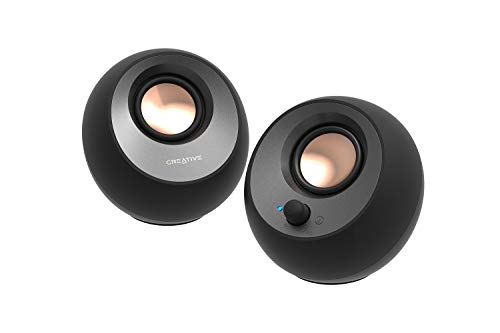
Creative Pebble V3, 2.0 USB-C Desktop Speakers, Bluetooth 5.0, Black | Bluetooth 5.0, USB-C, 2.0 Speaker, Clear Dialog, 8W RMS, USB-A Adapter, Desktop Speakers, Stereo, Black
Chosen because it specifies 2.0 USB-C Desktop Speakers and Bluetooth 5.0.
View on AmazonThe Pebble V3 is a compact pair that can be powered over USB-C and also includes a USB-A adapter, so it works with older and newer computers. Bluetooth 5.0 lets you pair a phone or tablet without a cable, which is handy on a desk where you switch between sources. The listing gives 8W RMS, which is a modest figure that suits near-field listening at a desk rather than filling a large room. The trade-off is bass: with no subwoofer, low frequencies are limited, and the listing does not give frequency range. If you want a small, tidy pair for music, video calls and casual games, this is the easiest place to start. It also pairs well with a laptop dock, since one cable can carry both power and audio on a USB-C port.
- Pros: USB-C power with a USB-A adapter included
- Pros: Bluetooth 5.0 for a second source
- Pros: Compact stereo pair, 8W RMS
- Cons: Limited bass without a subwoofer
- Cons: Frequency range not listed
2. Logitech Z207
Specs (per listing): 2.0 stereo computer speakers with Bluetooth, 10 watts peak power, active drivers with passive radiators, 3.5mm input and headphone jack.

Logitech Z207 2.0 Stereo Computer Speakers with Bluetooth | 10 Watts peak power, active drivers with passive radiators, 3.5 mm input and headphone jack, ideal for PC setups
Chosen because it specifies 10 Watts peak power and active drivers with passive radiators.
View on AmazonThe Z207 adds Bluetooth to a familiar wired layout, and the listing mentions both a 3.5mm input and a headphone jack, which makes switching to headphones easy without unplugging anything. Active drivers with passive radiators is Logitech’s way of getting more bass from a small cabinet, though the listing does not say how much. The 10W figure is a peak, not an RMS rating, so do not compare it directly with the 8W RMS on the Creative. Power source is not detailed in the listing text we compared. It is a sensible choice if you want a well-known brand, wired and wireless input, and few settings to fuss with. Volume and power controls are not described in the listing, so confirm where the knob sits if you want it within easy reach.
- Pros: Bluetooth plus 3.5mm input
- Pros: Headphone jack on the speakers
- Pros: Passive radiators for added bass
- Cons: 10W is a peak figure, not RMS
- Cons: Power connection not detailed in the listing
3. Creative Pebble Pro
Specs (per listing): 2.0 USB-C desktop speakers, Bluetooth, RGB lighting, clear dialog, stereo.

Creative Pebble Pro, 2.0 USB-C Desktop Speakers, RGB, Black | 2.0 desktop speakers, Bluetooth, USB-C, RGB Lighting, Clear Dialog, Stereo Speakers, Desktop Audio, PC Speakers, Black
Chosen because it specifies 2.0 USB-C Desktop Speakers and RGB.
View on AmazonThe Pebble Pro adds RGB lighting to the Pebble formula and lists Bluetooth and USB-C. It is the most visually styled option from Creative here, aimed at gaming desks where lighting colors matter. The listing text is light on numbers, with no wattage given, so we cannot compare its loudness to the V3. Treat the extra cost over the V3 as paying for the lighting and the Pro model’s features rather than for a confirmed jump in sound quality, and check the maker page for output figures before choosing it. Choose it when the look of your desk matters as much as the sound, and skip it if you simply want the lowest outlay for plain stereo audio.
- Pros: RGB lighting
- Pros: USB-C and Bluetooth
- Pros: Same compact stereo layout
- Cons: Power rating not listed
- Cons: Priced above the V3 for mostly cosmetic features
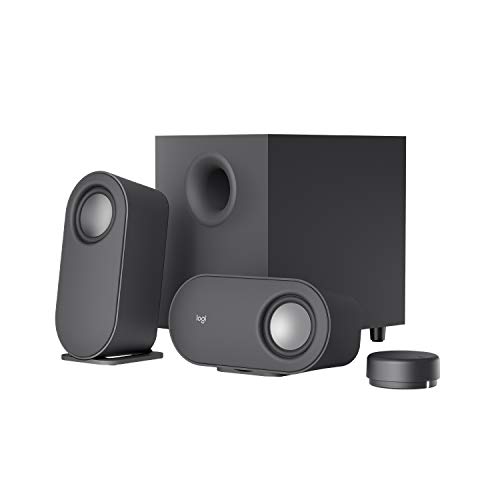
4. Cyber Acoustics CA-3610
Specs (per listing): 2.1 multimedia speaker system with subwoofer, 62 watts peak power, strong bass, for music, movies and games.
Cyber Acoustics CA-3610 2.1 Multimedia Speaker System with Subwoofer, 62 Watts Peak Power, Strong Bass, Perfect for Music, Movies, and Games
Chosen because it specifies 62 Watts Peak Power and Strong Bass.
View on AmazonThis is the only 2.1 system in the group, and the subwoofer is the reason to consider it. If you watch films or play games and miss low-frequency depth in small speakers, a separate sub fills that gap. The 62W figure is a peak rating, so real-world output is lower, but the headroom is still greater than the 2.0 pairs. The trade-off is desk and floor space: you need room for a subwoofer, plus extra cabling. The listing does not state the inputs or the wireless options, so confirm both on the maker page. It suits players who want more punch and have the room. Placing the subwoofer on the floor or under the desk usually gives smoother bass than putting it next to the monitor.
- Pros: Subwoofer for stronger bass
- Pros: 62W peak power
- Pros: Aimed at music, movies and games
- Cons: Needs extra space for the subwoofer
- Cons: Inputs and Bluetooth not listed
5. AOC Computer Speakers
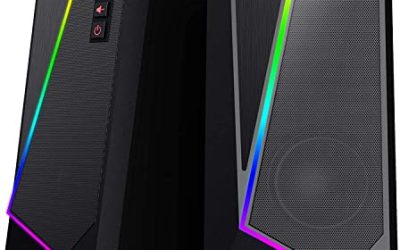
Specs (per listing): Bluetooth and USB input, USB powered, stereo gaming speakers, 6 RGB modes, detachable 2-in-1 design.

AOC Computer Speakers for Desktop, Bluetooth & USB Input, USB Powered Gaming Stereo Speakers for PC Laptop Monitor, 6 Colorful RGB Modes, Detachable 2-in-1 Design (Package Only 2 Speaker)
Chosen because it specifies Bluetooth & USB Input and USB Powered Gaming Stereo Speakers for PC Laptop Monitor.
View on AmazonThe AOC set is the lowest-priced option here, and it lists Bluetooth, USB input and six RGB lighting modes. The detachable 2-in-1 design suggests the two speakers can be separated or joined, though the listing does not explain how, so read the maker page. Because it is USB powered, it can run from a laptop port, which cuts down on cables. Power output, driver size and bass are not listed, so judge it as a simple gaming-desk set rather than a performance leader. It is a fair choice for a second room or a first PC where the monitor brand matches. Since it is described as a gaming set, it will most appeal to players who want matching lighting with an AOC monitor, although the listing does not say that the two are linked.
- Pros: Bluetooth and USB input
- Pros: USB powered, fewer cables
- Pros: 6 RGB lighting modes
- Cons: Wattage not listed
- Cons: Detachable design details unclear
6. Redragon GS560
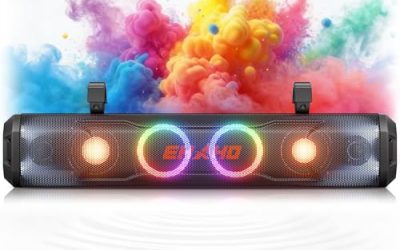
Specs (per listing): 2.0-channel RGB desktop soundbar, audio-light sync lighting bar, touch control, volume knob, USB powered with 3.5mm cable.
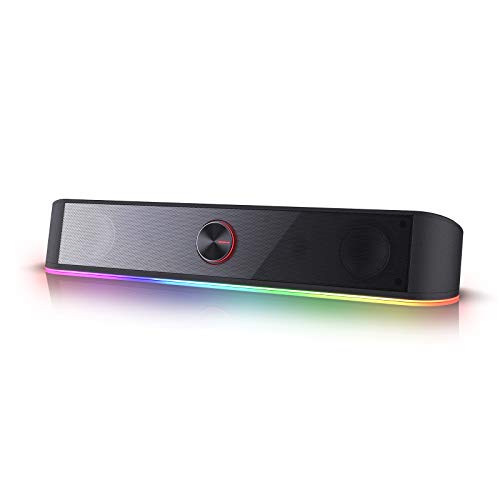
Redragon GS560 RGB Desktop Soundbar, 2.0 Channel Computer Speaker with Dynamic Lighting Bar Audio-Light Sync/Display, Touch-Control Backlit with Volume Knob, USB Powered w/ 3.5mm Cable, Black
Chosen because it specifies Touch-Control Backlit with Volume Knob and USB Powered w/ 3.5mm Cable.
View on AmazonThe GS560 is a soundbar rather than a pair, which makes it easy to slide under a monitor and keeps the desk clear. The listing highlights a dynamic lighting bar that syncs with audio, touch controls and a volume knob. It is USB powered with a 3.5mm audio cable, so it connects to almost any computer. Bluetooth is not listed. Soundbars of this size usually trade stereo separation for tidiness, so expect a narrower sound than the separate Creative pairs. Pick it for the look and the lighting rather than for audio performance. If you place the soundbar under the display, make sure its height does not block the screen or the monitor’s controls.
- Pros: Compact soundbar under a monitor
- Pros: Audio-synced lighting bar
- Pros: Volume knob and touch control
- Cons: Bluetooth not listed
- Cons: Narrow stereo image typical of soundbars
How to Choose Under $75
Decide on 2.0 or 2.1
A 2.0 pair is enough for voice, videos and casual music. A 2.1 system such as the Cyber Acoustics adds a subwoofer for low frequencies, but it needs floor or desk space and an extra power connection.
Read the wattage correctly
RMS is continuous power and peak is a short burst. The Creative V3 lists 8W RMS, while the Logitech and Cyber Acoustics list peak numbers, so do not compare them directly. For a desk at arm’s length, anything near 8W RMS is plenty.
Match the connection to your PC
USB-C, USB-A and 3.5mm all appear in these listings. Check that your computer has a free USB port, or choose a pair with a 3.5mm cable. Bluetooth is useful if you want to stream from a phone as well.
Plan speaker placement
Place the two speakers about as far apart as you sit from them, angled slightly toward your ears, and keep them away from walls to avoid boomy bass. Soundbars work best centered below the screen. Small desk speakers give the best results when they sit at ear height, so a stand or a stack of books can help.
Weigh lighting against sound
RGB adds cost without improving sound. If you want the best audio for the money, prefer the plainer models and spend any difference on a better set later.
Computer speakers for home office
For calls and music at a work desk, a pair with a headphone jack and Bluetooth, like the Logitech Z207 or Creative V3, keeps things flexible. Keep the volume modest in a shared office, and use the headphone jack when others are nearby.
Computer speakers for small spaces
The Redragon soundbar and the Pebble pairs take the least room. Dimensions are not listed, so check the maker page for the exact footprint. A soundbar or a pair of compact cubes leaves the most desk space for a keyboard and notebook, and a 2.1 system is the hardest to fit.
Computer speakers for gaming
For gaming, the Cyber Acoustics 2.1 system gives the most bass, while the AOC and Redragon sets add lighting. None of the listings mention surround or positional audio. Wired input generally has less delay than Bluetooth, so connect by cable for fast-paced games.
FAQ
Do I need a subwoofer on my desk?
Not for casual listening. A subwoofer helps with film and game bass, but it takes space and may be too loud for apartments.
Can USB speakers run from my laptop?
Often yes. USB-powered speakers draw power from a laptop port, though some also need a wall adapter. Check the maker page. If you use a desktop with limited front ports, a short USB extension cable can also help.
Is Bluetooth worth having?
Yes if you stream from a phone or tablet. It adds no cable clutter, but wired input usually has less delay for gaming.
What does 8W RMS mean?
RMS is continuous output power. It is a more realistic figure than peak watts when comparing speaker loudness.
Are RGB speakers worse for sound?
Not necessarily, but lighting adds to the price without improving audio. Compare the listed power and features rather than the lighting.
Last updated: November 2026
FAQ
Do I need a subwoofer on my desk?
Can USB speakers run from my laptop?
Is Bluetooth worth having?
What does 8W RMS mean?
Are RGB speakers worse for sound?
More from Amazon
Programs that pair well with the guide above. Offers and eligibility are set by Amazon and may change.
Free shipping on eligible items, Prime Video and more. Eligible new members can start with a free trial.
Start a Prime free trialAd-free music streaming. Eligible new subscribers can start with a free trial.
Try Music Unlimited freeA Prime membership for ages 18-24 with a trial period. Eligibility is set by Amazon.
See Prime for Young AdultsAudiobooks and podcasts to listen to on the go. Eligible new members can start with a free trial.
Try Audible freeAs an Amazon Associate we earn from qualifying purchases.