Our Top Picks
 Klipsch ProMedia 2.1 THX Certified Computer Speaker System3-piece5.67 x 4.2 x 8.5 Inches2.1 PoundsCheck on Amazon
 Logitech Z407 Bluetooth Computer Speakers with Subwoofer and12.4 x 9.6 x 7.3 inches8.8 poundsCheck on Amazon
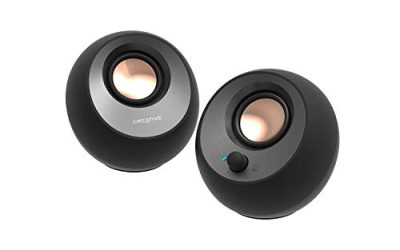
 Creative Pebble Plus 2.1 USB-Powered Desktop Speakers with2 x 4 x 8 inches5.45 poundsCheck on Amazon
A 2.1 speaker system is a specific kind of compromise. You get two small satellites to sit beside the monitor and a separate subwoofer to handle the low end, which is why a desk setup with a pair of tiny speakers can suddenly sound like it has a floor under it. The decision is not just “which brand sounds best.” It is how much desk and floor space you can give up, which inputs your PC actually offers, and whether you want a plain wired setup or something that also takes a phone over Bluetooth.
This guide is for gamers, movie watchers and music listeners who have outgrown laptop or monitor speakers but do not want a full 5.1 setup with rear cables running across the room. The eight systems below range from compact USB-powered sets to larger THX-certified kits with a wall-powered subwoofer. In 2026 the real divide is between older wired designs with a control pod and newer Bluetooth models with wireless remotes and lighting, so the picks are grouped around those trade-offs.
Quick Picks
Klipsch ProMedia 2.1 THX Certified Computer Speaker System (Black)
One of the consumer electronics options compared in this guide.
View on AmazonLogitech Z407 Bluetooth Computer Speakers with Subwoofer and Wireless Control, Immersive Sound, Premium Audio with Multiple Inputs, USB Speakers
One of the consumer electronics options compared in this guide.
View on Amazon
Cyber Acoustics CA-3090 2.1 Speaker System, 18W, Subwoofer | Compact 2.1 PC Speaker System; 3.5mm Audio Connection; Volume Control Pod; Subwoofer Adjustable Bass; Music, Movies, Gaming
One of the consumer electronics options compared in this guide.
View on Amazon
Nylavee Computer Speakers with Subwoofer, 2.1 PC Speakers, Bluetooth 5.4 | 8 Lighting Modes, 60W Peak Power, AC Adapter Powered with USB/USB-C and 3.5mm AUX Inputs for Desktop PC
One of the consumer electronics options compared in this guide.
View on AmazonCreative Pebble Plus 2.1 USB-Powered Desktop Speakers with Powerful Down-Firing Subwoofer and Far-Field Drivers, Up to 8W RMS Total Power for Computer PCs and Laptops (Black)
One of the consumer electronics options compared in this guide.
View on Amazon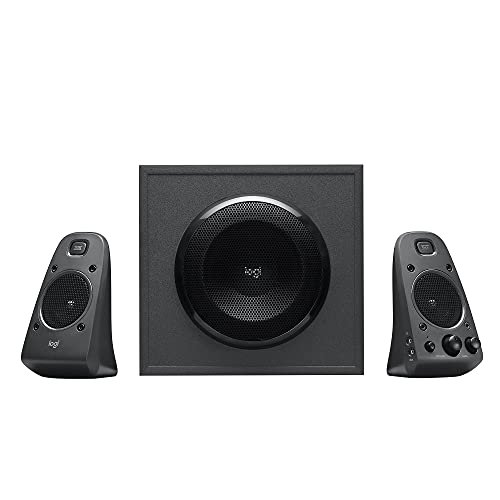
Logitech Z625 Powerful THX® Certified 2.1 Speaker System with Optical Input
One of the consumer electronics options compared in this guide.
View on Amazon
Cyber Acoustics CA-3610 2.1 Multimedia Speaker System with Subwoofer, 62 Watts Peak Power, Strong Bass, Perfect for Music, Movies, and Games
One of the consumer electronics options compared in this guide.
View on Amazon
Bluedee Computer Speakers with Subwoofer, 2.1 PC Speakers, 80W Peak Power | DSP-Tuned Sound, Deep Bass, Adapter Powered, Bluetooth 5.4 & USB/USB-C/AUX, RGB Desktop Speakers for Laptop & Monitor
One of the consumer electronics options compared in this guide.
View on Amazon| Product | Best for | Key spec from the title |
|---|---|---|
| Klipsch ProMedia 2.1 THX | Desktop gaming and movies with a certified standard | THX certified 2.1 system |
| Logitech Z407 | Wireless control and flexible connections | Bluetooth, wireless control, multiple inputs, USB |
| Cyber Acoustics CA-3090 | Simple wired setups on a small desk | 18W, 3.5mm, volume control pod |
| Nylavee 2.1 | Lighting fans who want modern connections | Bluetooth 5.4, 60W peak, USB-C |
| Creative Pebble Plus | Tight desks and USB power | USB-powered, up to 8W RMS total |
| Logitech Z625 | Living-room-style PC and console audio | THX certified, optical input |
| Cyber Acoustics CA-3610 | Bass-forward music, movies and games | 62 watts peak power |
| Bluedee 2.1 | Loud, tuned sound from a wall adapter | 80W peak, DSP-tuned, Bluetooth 5.4 |
How to Choose
Read the power figure carefully
Watch the difference between RMS and peak power. An 8W RMS total, as the Creative Pebble Plus lists, describes sustained output. Figures such as 60W, 62W or 80W “peak” describe brief bursts and are always bigger numbers. Compare RMS to RMS when you can, and treat peak figures as marketing. For a desk where you sit an arm’s length away, even a modest sustained rating is plenty; the larger systems matter when the PC doubles as a movie room.
Match the inputs to your PC
List what your computer can output before you shop. Nearly every motherboard has a 3.5mm jack, which covers the Cyber Acoustics models. If you want a digital signal, the Logitech Z625 lists an optical input, which only helps if your sound card or motherboard has an optical out. USB and USB-C inputs, listed on several newer models, are convenient for laptops. Bluetooth is a bonus for phones but adds latency for games, so keep a wired connection for anything timing sensitive.
Plan the physical footprint
The subwoofer is the piece buyers underestimate. It needs a spot on the floor or desk, roughly in line with the satellites, and it must be near an outlet. Compact USB-powered designs such as the Pebble Plus put the subwoofer under the desk or beside it with a down-firing driver. Larger kits with wall adapters need more clearance. Measure the gap between your monitor and the desk edge, because satellite speakers that fit on a shelf are often too tall for a monitor stand.
Know where budget systems cut corners
Budget systems usually spend on the subwoofer and skimp on the satellites, so mids and vocals can sound thin. They also save money on controls: a cable-mounted pod is cheaper than a remote, and some models lack a headphone jack. Ignore lighting modes unless you actually want them, and be skeptical of very large peak-wattage numbers on the cheapest kits. Certifications such as THX are a more useful signal than a big number on the box.
The 8 Best Options
Klipsch ProMedia 2.1 THX
This is the pick for buyers who want a certified standard rather than a marketing claim. The title lists it as a THX Certified computer speaker system, which means it was built to meet a published set of performance criteria for desktop listening. It suits someone who plays games and watches films at a desk and wants a straightforward wired kit.
- Strength: THX certification gives a recognizable baseline for desktop audio.
- Strength: A classic 2.1 layout with a separate subwoofer for low-end weight.
- Trade-off: The title lists no Bluetooth, so phone streaming is off the table.
Skip it if you want wireless pairing or lighting. Anyone short on desk space should also check the dimensions on the listing first.
Logitech Z407
The Z407 is aimed at people who want less cable fuss. The title lists Bluetooth, a subwoofer, wireless control, multiple inputs and USB, which makes it the most flexible all-rounder in the group. It fits someone who switches between a PC, a phone and perhaps a tablet over the course of a day.
- Strength: Wireless control means you can adjust volume without reaching under the desk.
- Strength: Multiple inputs cover Bluetooth, USB and wired sources in one set.
- Trade-off: The title offers no THX certification or optical input for a digital connection.
Skip it if you want a digital optical link or a specific certified standard.
Cyber Acoustics CA-3090
A compact, no-nonsense wired system. The title states 18W, a subwoofer, a 3.5mm connection, a volume control pod and an adjustable subwoofer level. That combination suits a bedroom or dorm desk where you want better sound than a monitor provides without a complicated setup.
- Strength: The volume control pod keeps the controls within reach on the desk.
- Strength: An adjustable subwoofer lets you tame the bass in small rooms.
- Trade-off: The 18W rating is the lowest wattage in this group, so it is built for near-field listening only.
Skip it if the room is large or you want wireless connectivity.
Nylavee 2.1
The Nylavee targets buyers who want modern connections and a bit of flair. The title lists Bluetooth 5.4, eight lighting modes, 60W peak power, an AC adapter, and USB, USB-C and 3.5mm inputs. It fits a gaming desk where the speakers are part of the look as well as the sound.
- Strength: USB-C and 3.5mm inputs cover laptops and desktops alike.
- Strength: Bluetooth 5.4 is a current standard for wireless pairing.
- Trade-off: The 60W figure is peak power, so it should not be read as sustained output.
Skip it if you dislike lit speakers or prefer a certified, understated design.
Creative Pebble Plus
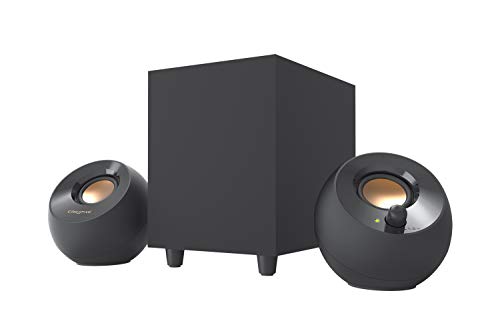
The Pebble Plus is the space saver. The title describes USB-powered desktop speakers with a down-firing subwoofer, far-field drivers and up to 8W RMS total power. That makes it a natural fit for a crowded desk or a student room where you do not want a wall adapter dedicated to speakers.
- Strength: USB power keeps the cable count low and works well with laptops.
- Strength: The down-firing subwoofer is designed to add low-end without a bulky cabinet.
- Trade-off: 8W RMS total is modest, so it will not fill a large room or deliver cinema-level bass.
Skip it if you want loud, room-filling playback.
Logitech Z625
The Z625 is the more serious option for people who run a PC alongside a console or other digital source. The title lists THX certification and an optical input, which gives it a digital connection that most budget kits lack. It suits a gamer or movie fan who has a sound card or motherboard with optical output.
- Strength: THX certification signals a defined performance target.
- Strength: The optical input gives a digital path from compatible sources.
- Trade-off: The title mentions no Bluetooth, so it is wired only.
Skip it if your devices have no optical output or you want wireless phone streaming.
Cyber Acoustics CA-3610
This one is for people who want more bass than the CA-3090 can provide. The title cites a 62 watt peak rating, a subwoofer and strong bass for music, movies and games. It suits a general-purpose desk where you listen to a bit of everything and want the system to sound lively.
- Strength: A higher peak rating than the smaller Cyber Acoustics model signals more headroom.
- Strength: Positioned for music, movies and games rather than only one use.
- Trade-off: The title lists no wireless features or optical input.
Skip it if you want Bluetooth or a certified standard.
Bluedee 2.1
The Bluedee leans on tuning and power. The title lists 80W peak power, DSP-tuned sound, deep bass, adapter power, Bluetooth 5.4 and USB, USB-C and AUX inputs. It fits someone who wants a loud, modern 2.1 system with several connection options and does not mind a wall adapter.
- Strength: DSP tuning is intended to balance the bass against the satellites.
- Strength: Bluetooth 5.4 plus three wired inputs gives broad compatibility.
- Trade-off: The 80W number is a peak figure, so do not treat it as sustained output.
Skip it if you want a known certification or a very small footprint.
Which One Fits Your Situation
You game on a desk and want a recognized standard
Go with the Klipsch ProMedia 2.1 THX or the Logitech Z625. Both list THX certification, and the Z625 adds an optical input if your hardware supports it.
You switch between a laptop and a phone
The Logitech Z407 is the cleanest answer. Bluetooth, USB and multiple inputs come in one set, and the wireless control saves you from reaching for a knob.
Space and cables are the problem
Pick the Creative Pebble Plus. USB power and a compact layout suit a small desk, and you only give up raw volume.
You want maximum features on a mid-range budget
Look at the Nylavee or Bluedee. Both list Bluetooth 5.4 and several inputs, with lighting on the Nylavee and DSP tuning on the Bluedee.
Common Mistakes
- Comparing peak wattage across brands instead of RMS, which makes cheap kits look louder on paper than they are.
- Forgetting to measure the desk, then discovering the subwoofer or satellites do not fit.
- Buying an optical-input model when the PC has no optical output to use it.
- Using Bluetooth for gaming, where the extra latency can make audio lag behind the screen.
- Placing the subwoofer in a corner and flooding the room with boomy bass; start near the desk and move it gradually.
Related guides
- How To Fix Stick Drift On Xbox And Ps5 Controllers
- How Long Does A Gaming Laptop Last Before Upgrade
- Gaming Chairs For Tall People Over 6 Foot 3
Frequently Asked Questions
Is a 2.1 system better than a soundbar for a PC?
For a desk, a 2.1 system usually gives better stereo separation because the satellites sit on either side of the monitor. A soundbar is more compact but narrows the stereo image. If bass matters, the separate subwoofer is the clearer advantage.
Do I need a sound card?
Not for the 3.5mm and USB models, which work from the motherboard or laptop output. A dedicated card only matters if you want an optical connection for a model like the Logitech Z625 and your PC does not already offer one.
What does THX certified mean?
It means the product was built to meet a published set of performance criteria for a given listening situation. It does not guarantee you will love the sound, but it does set a baseline that unlabeled kits lack.
Can I use these speakers with a console?
Systems with a 3.5mm or optical input can work with consoles that offer a matching output. Check your console’s available ports first, since some newer models have dropped optical output.