Our Top Picks
 Redragon GS520 Wired 2.0 Channel Stereo Sound Desktop7.48 x 6.69 x 4.33 inches1.8 PoundsCheck on Amazon
 Logitech G560 PC Gaming Speaker System with 7.111.9010 x 8.1 x 15.9 inches12.1 PoundsCheck on Amazon
Speakers marketed as gaming speakers are almost always built for PCs, and that creates the first trap for console players. A console sends its sound out over HDMI to a TV or monitor, so the real question is how your speakers get a signal from that screen or from a controller’s headphone jack. A speaker that only accepts USB audio or Bluetooth may sit silent next to a console, however good it looks in the listing.
This guide is for console players who want to add real desktop sound to a monitor setup or a small gaming nook. The seven models below are PC-style speakers, so each one is judged on the input types and power sources named in its listing. You will find a compact USB-powered pair, a full 2.1 system, and a few Bluetooth-plus-AUX options that look the most practical for 2026 setups where the console connects through the screen.
Quick Picks
Redragon GS520 Wired 2.0 Channel Stereo Sound Desktop RGB Computer Speakers | Enhanced Auido Quality, Plug & Play USB Powered PC Gaming Speaker, 6 Colorful Backlight Modes, Easy-Access Volume Control
One of the consumer electronics options compared in this guide.
View on Amazon
FUNLOGY Speaker - 14W Stereo PC Speakers, USB Powered, Compact Size with 30° Tilt Design, Volume Dial Control, for Desktop, Laptop, Monitor, Gaming Consoles, Black
One of the consumer electronics options compared in this guide.
View on AmazonLogitech G560 PC Gaming Speaker System with 7.1 DTS X - Black | 7.1 DTS:X Ultra Surround Sound, Bluetooth, USB, Subwoofer + 2 Satellite Speakers, LIGHTSYNC RGB
One of the consumer electronics options compared in this guide.
View on Amazon
Computer Speakers, 2 in 1 PC Speaker , Gaming Speakers for PC Computer Laptop Desktop Monitor, RGB Speakers with Touch Sensitive Lighting, USB Powered 3.5mm Aux(Package Only Two Speaker, No Soundbar)
One of the consumer electronics options compared in this guide.
View on Amazon
Edifier G2000 32W PC Gaming Computer Speakers for Laptop Mac Desktop Computer Woofer Speakers Bluetooth USB 3.5mm AUX Inputs RGB Lights Multimedia Speakers Black
One of the consumer electronics options compared in this guide.
View on Amazon
Bluedee Computer Speakers for Desktop PC, Bluetooth AUX Computer Sound Bar | HiFi Stereo PC Speakers for Computer Desktop, PC Soundbar, USB/USB C Powered Gaming Speakers for Monitor, PC, Laptop
One of the consumer electronics options compared in this guide.
View on Amazon
X Rocker Pixel Printed Video Gaming Floor Chair with Headrest Speakers, Wireless Bluetooth, Foldable, Vegan Leather, 300 lbs Max, Amazon Exclusive, Black, Gifts for Gamers
One of the consumer electronics options compared in this guide.
View on Amazon| Product | Best for | Key spec from the title |
|---|---|---|
| Redragon GS520 | Budget desk setups with colorful lighting | 2.0 stereo, USB powered, RGB |
| FUNLOGY 14W Speakers | Small desks and monitors | 14W stereo, 30 degree tilt, volume dial |
| Logitech G560 | Immersive sound with a subwoofer | 7.1 DTS:X, Bluetooth, USB, subwoofer plus 2 satellites |
| 2-in-1 RGB Touch Speakers | Lighting-first desks | Touch sensitive lighting, USB powered |
| Edifier G2000 | Players who want power and several inputs | 32W, Bluetooth, USB, 3.5mm AUX |
| Bluedee Computer Speakers | Tight spaces under a monitor | Soundbar form, Bluetooth, AUX, USB/USB-C power |
| Redragon GS510 | Bass-leaning compact speakers | 2.0 stereo, enhanced bass, volume control |
How to Choose
Input type decides everything
Look for a 3.5mm AUX input first. That is the connection you can feed from a monitor’s headphone output or a controller’s jack. USB on these speakers often means power only, not sound, which is why the wording matters. Bluetooth is handy for phones, but most consoles do not stream sound to Bluetooth speakers directly. Check that the listing names an analog input, otherwise the speakers may only work with a PC.
Power and size
Watt figures such as 14W or 32W describe maximum output, not loudness in a bedroom. For a desk shelf, 14W is plenty; 32W suits a bigger room or a player who likes bass. Subwoofer systems add low-end punch but need floor space and a wall socket. Ignore peak-power claims and consider the room. A small bedroom rarely needs more than a modest pair, and a loud system can make late-night sessions awkward for the household.
Channels and surround
A 2.0 pair has two speakers and no subwoofer. A 2.1 system adds a subwoofer. A 7.1 label means virtual or multi-speaker surround that usually relies on PC software, which a console cannot supply. For consoles, plan on stereo and let the game’s mix do the work. Most console games already mix for headphones or TV speakers, so a good stereo pair is the dependable choice.
Lighting, controls, and budget corners
RGB lighting looks good but does not improve sound. A front volume dial saves reaching behind the desk. Budget speakers cut corners on cabinet material and bass depth, so avoid paying extra for lights if sound quality is the goal. Placement matters too: keep the speakers at ear height, a few feet apart, and away from the wall for cleaner bass.
The 7 Best Options
Redragon GS520
The GS520 is a wired 2.0 stereo desktop speaker pair with RGB lighting, and plug-and-play USB power. It is for players who want an inexpensive, simple upgrade over monitor speakers and enjoy a lit-up desk. The listing stresses enhanced audio quality, though it does not describe the input in detail. Treat it as a desk pair for someone who has already confirmed how the sound will reach the speakers, whether through a monitor jack or a small adapter, and who values lighting and low cost over a long feature list.
- Strength: simple 2.0 stereo layout.
- Strength: USB power and RGB lighting.
- Trade-off: the title does not state an AUX input, so confirm one before using it with a console.
Skip it if you cannot verify an analog connection on your setup.
FUNLOGY 14W Speakers
The FUNLOGY lists 14W stereo output, USB power, a compact body, a 30 degree tilt design, and a volume dial. The tilt angles sound up toward your ears, which helps on a low desk, and the dial gives quick control. It suits crowded desks and monitor setups where space is the main constraint. The title also positions it for desktop, laptop, and monitor use, so it can follow you if you rearrange the room or move between a console and a computer.
- Strength: tilt design directs sound upward.
- Strength: volume dial and compact size.
- Trade-off: the 14W figure points to modest volume for large rooms.
Skip it if you want a subwoofer or room-filling bass.
Logitech G560
The G560 is a PC gaming speaker system with 7.1 DTS:X Ultra Surround, Bluetooth, USB, a subwoofer, and two satellite speakers. It targets PC players who want surround and light effects. For console players, the listed inputs are Bluetooth and USB, with no analog input named. That does not make it a bad system, only a mismatched one for a console that outputs sound through HDMI to a screen. On a shared PC and console desk, it could still serve the computer while the console uses the monitor speakers.
- Strength: subwoofer plus two satellites gives a full low-end layout.
- Strength: Bluetooth and USB connections listed.
- Trade-off: the listed inputs do not include 3.5mm AUX, which limits console use.
Skip it if your console has no way to send audio over USB or Bluetooth to speakers.
2-in-1 RGB Touch Speakers
This unbranded pair is described as 2-in-1 PC speakers for computer, laptop, desktop, and monitor, with RGB touch-sensitive lighting and USB power. It is a lighting-first pick for those who want a desk accent as much as audio. Few sound details appear in the title, so you would be buying on looks and a USB power source more than on stated audio performance. It can work as a secondary pair in a bedroom or dorm where the goal is a step up from tinny monitor speakers and a bit of atmosphere.
- Strength: touch-sensitive lighting listed.
- Strength: USB powered, so it needs no bulky adapter.
- Trade-off: no wattage or input types in the title.
Skip it if you pick speakers by power and input details.
Edifier G2000
The Edifier G2000 lists 32W output, a woofer, Bluetooth, USB, and 3.5mm AUX inputs, plus RGB lights. It is the strongest match for the keyword because it names the AUX input a console setup relies on, and the higher wattage fills a room better than the smaller pairs. The woofer in the title suggests fuller low-end than a plain stereo pair, and Bluetooth is there for phone music between matches. It is the pick for a console player who wants one capable system rather than a novelty.
- Strength: 3.5mm AUX, Bluetooth, and USB inputs all listed.
- Strength: 32W output for larger rooms.
- Trade-off: bigger footprint than the compact desk pairs.
Skip it if your desk is tiny.
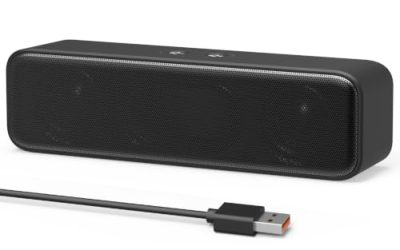
Bluedee Computer Speakers
The Bluedee is a Bluetooth and AUX computer sound bar with HiFi stereo, powered over USB or USB-C. A bar fits under a monitor and keeps the desk clear. The AUX input is the route for a console fed through a screen or controller. USB or USB-C power means it can often draw from a spare port on the monitor or a wall charger, which keeps cabling tidy. It is a good fit for apartment players who want clearer dialog without a stack of boxes.
- Strength: sound bar shape saves desk space.
- Strength: AUX and Bluetooth both listed.
- Trade-off: a slim bar usually gives less bass than a woofer system.
Skip it if you want strong low-end impact.
Redragon GS510
The GS510 is a wired 2.0 channel stereo pair with four LED backlight modes, enhanced bass, and easy-access volume control. It suits a small desk and players who want a little extra low-end without a subwoofer. The listing is light on connection details, so the buyer should verify the plug type before assuming console compatibility. Where it does fit, its volume control and lighting modes make it easy to live with on a small desk, especially for players who want a modest bump in bass over built-in screen speakers.
- Strength: easy-access volume control.
- Strength: enhanced bass noted for a compact pair.
- Trade-off: the title does not name an AUX input.
Skip it if you cannot confirm a 3.5mm connection for your console setup.
Which One Fits Your Situation
You game on a console through a monitor
The Edifier G2000 is the clearest match, thanks to the named 3.5mm AUX input. Run a cable from the monitor’s headphone out or a controller jack, and the speakers behave like any other analog source.
Your desk is crowded
The Bluedee Computer Speakers slide under a monitor, and the FUNLOGY 14W Speakers add a tilt for a low desk. Either leaves room for a keyboard, a controller, and a drink.
You like a lit-up setup
The Redragon GS520 and the 2-in-1 RGB Touch Speakers put lighting first.
You also play on a PC
The Logitech G560 is built for PC surround with a subwoofer, so it fits players who split time with a computer. Keep the console on the screen’s own audio if you rarely touch the PC.
Common Mistakes
- Assuming USB means the speakers can take audio from a console, when it often only supplies power.
- Buying 7.1 surround speakers for a console that outputs stereo through the screen, which wastes the extra channels.
- Paying more for lighting than for sound quality.
- Ignoring the footprint of a subwoofer and its wall socket.
- Skipping the volume dial or knob position, which matters during long sessions when you adjust levels between menus and matches.
Related guides
- How To Fix Stick Drift On Xbox And Ps5 Controllers
- Mirrorless Cameras For Landscape Photography
- How Long Does A Gaming Laptop Last Before Upgrade
Frequently Asked Questions
Can I use PC speakers with a console?
Often yes, if the speakers have a 3.5mm AUX input and you have an audio source such as a monitor headphone jack or controller jack. Read the listing for the input type before you buy, because the name PC speakers hides a lot of variation.
Do I need a subwoofer?
Not necessarily. A subwoofer adds bass, but a good 2.0 pair is enough for dialog and effects in many games. If you play at night or share a wall with a neighbor, a smaller system is often the better fit anyway.
Is Bluetooth good for gaming speakers?
It is useful for phones and music, but wireless links add delay and many consoles do not stream to Bluetooth speakers directly.
Does RGB lighting affect sound?
No. It is a cosmetic feature, so choose by inputs, power, and size first. Lighting can be a pleasant extra once the basics fit your desk.