Our Top Picks
 Xbox-licensed wirelessHyperX CloudX Flight 2 Wireless Gaming Headset forOne-size7 x 1.6 x 7.7 inches0.79 poundsCheck on Amazon
The best HyperX Cloud headset for Xbox Series X depends on one question: do you want wireless or wired? For wireless, the CloudX Flight 2 and the CloudX Stinger Core Wireless are the Xbox-ready picks; for wired, the CloudX and Cloud Stinger 2 Core models plug into the controller. The big trap is that many Cloud headsets named without “X” do not work with Xbox consoles.
Short answer: For wireless Xbox Series X play, pick the CloudX Flight 2 for battery life or the CloudX Stinger Core Wireless for a lighter, cheaper option. For wired play, the CloudX (Cloud II style) or CloudX Stinger 2 Core connect through the controller’s 3.5 mm jack. Check that the name says Xbox or CloudX.
Picks at a glance
| Pick | Connection | Best for | Key detail |
|---|---|---|---|
| HyperX CloudX Flight 2 | Wireless dongle, Xbox and PC modes | Long sessions | Listed with 100+ hour battery, detachable mic |
| HyperX CloudX Stinger Core Wireless | Xbox wireless | Simple wireless on a budget | 40 mm drivers, about 17 hours |
| HyperX CloudX Stinger 3 Wireless | Wireless, Xbox version | Newer wireless family | Check maker page for specs |
| HyperX CloudX (Cloud II style, wired) | 3.5 mm | Comfort and sound on a wired headset | 53 mm drivers, Xbox licensed |
| HyperX CloudX Stinger 2 Core | 3.5 mm | Lightweight wired budget | 40 mm drivers, swivel-to-mute mic |
| HyperX Cloud II (wired) | 3.5 mm (USB dongle for PC) | Cross-platform owners | 7.1 effect is a PC feature |
| HyperX Cloud Core (wired) | 3.5 mm | Cheapest Xbox-listed Cloud | DTS Headphone:X listed for PC and Xbox |
How we chose
This guide is research-based. We did not use the headsets ourselves. We compared HyperX’s product pages, retailer spec listings and editorial buying guides, and we kept only models that the maker or a retailer lists as compatible with Xbox Series X|S. Where compatibility was unclear, we say so and send you to the maker page. We also restricted the list to Cloud-family headsets because that is the series people search for.
Buying guide: HyperX Cloud headsets on Xbox Series X
Which HyperX Cloud headsets work on Xbox Series X?
Xbox consoles accept headsets in two ways: licensed Xbox wireless headsets, which connect directly to the console, and wired headsets that plug into the controller’s 3.5 mm jack. Generic 2.4 GHz USB-dongle headsets from other platforms do not work on Xbox.
- Xbox-licensed wireless: the CloudX Flight 2, CloudX Flight and CloudX Stinger Core Wireless families connect directly.
- Wired 3.5 mm: the CloudX, Cloud II, Stinger 2 Core and Cloud Core-style headsets can plug into the controller.
- USB-only or dongle-only models: check the product page. Models built for PC and PlayStation through a USB dongle are not Xbox compatible.
Wireless or wired
Wireless saves you from cable drag between the controller and your face and works well from a couch. Wired headsets never need charging and are usually cheaper, but you must keep the cable on the controller. If you play on a big TV from a distance, choose wireless; if you play at a desk, wired is hard to beat for value.
Battery thresholds
- Under 20 hours: fine for evenings, charge every few days.
- 20 to 50 hours: weekly charging for most players.
- Over 50 hours: monthly charging for casual players.
Driver size and sound
The Cloud II style models use 53 mm drivers and tend to sound fuller, while the Stinger family uses 40 mm drivers and is lighter. A bigger driver does not guarantee better sound, but in this family it generally goes with a more bass-rich tuning.
Microphone
Detachable booms are easier to store and replace; fixed swivel-to-mute booms are simpler. Decide whether you want to remove the mic when you listen to music.
What to check on every listing
Before you click buy on any model below, run through four quick checks. First, read the platform line and confirm that Xbox Series X|S is named. Second, confirm the connection: Xbox wireless, a dongle with an Xbox mode, or a 3.5 mm plug. Third, look at the microphone type, since a fixed boom and a detachable one suit different habits. Fourth, check that the seller is selling the exact variant and color you intend to buy, because the same Cloud name can cover several versions with different platform support.
1. HyperX CloudX Flight 2: best wireless HyperX Cloud for Xbox
HyperX CloudX Flight 2 Wireless Gaming Headset for Xbox | Wireless Headphones | Wireless Connectivity
Chosen because it specifies Wireless Headphones and Wireless Connectivity.
View on AmazonThe CloudX Flight 2 is HyperX’s newer wireless headset for Xbox, listed as compatible with Xbox Series X|S, Xbox One, PC, PS5, PS4, Nintendo Switch, Mac and mobile. It has a switch on the USB dongle that toggles between Xbox and PC modes, RGB lighting, a detachable microphone and a battery listed above 100 hours. This is the pick if you want a set-and-forget wireless headset that also works on other devices.
- Connection: 2.4 GHz dongle with Xbox mode
- Battery: 100+ hours listed
- Mic: detachable
- Extras: RGB lighting
Best for: players who want one wireless headset for console, PC and phone. Skip if: you prefer a simple wired set or want the lowest price.
Pros: very long listed battery; works across platforms; detachable mic; dongle mode switch. Cons: higher price tier than the Stinger family; features such as lighting can confuse people who want simplicity.
2. HyperX CloudX Stinger Core Wireless: best budget wireless
The CloudX Stinger Core Wireless is the Xbox-licensed version of the Stinger Core line. It connects to Xbox Series X|S and Xbox One over Xbox wireless with one button press. It has 40 mm drivers, memory foam ear cushions with leatherette, a stated range up to 20 meters and a battery rated at about 17 hours. A retail listing gives its weight at about 275 g.
- Connection: Xbox wireless, no dongle needed
- Battery: about 17 hours
- Drivers: 40 mm, 20 Hz to 20 kHz
- Range: up to 20 m
Best for: console-only players who want a cheap wireless headset. Skip if: you want Bluetooth or a long battery.
Pros: direct Xbox pairing; comfortable memory foam; straightforward controls; lower price tier. Cons: about 17 hours of battery; fixed mic; modest bass.
3. HyperX CloudX Stinger 3 Wireless: newer wireless family
HyperX’s Cloud Stinger 3 family includes an Xbox version listed as the CloudX Stinger 3 Wireless Gaming Headset for Xbox, with signature comfort branding. Specifications on the listing are limited, so confirm battery life, weight and microphone details on HyperX’s page. It is the sensible choice if you prefer the latest design in the Stinger range and want to stay with a wireless headset that is listed for Xbox.
Best for: shoppers who want the newest Stinger generation. Skip if: you need confirmed specs before buying.
Pros: newer design; Xbox-specific version; wireless. Cons: fewer published details in listings; may cost more than the older Stinger Core.
4. HyperX CloudX (Cloud II style): best wired comfort
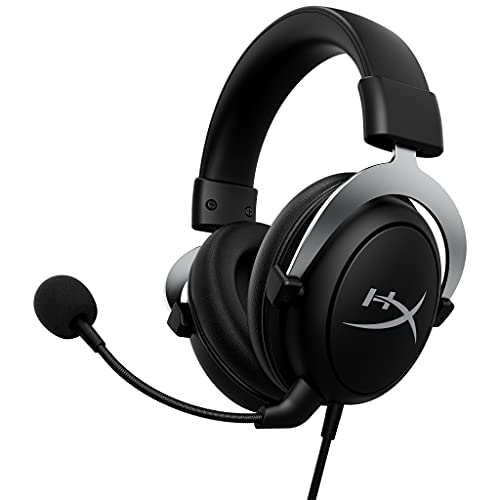
HyperX CloudX, Official Xbox Licensed Gaming Headset, Compatible with Xbox One and Series X|S, Memory Foam Ear Cushions, Detachable Noise-Cancelling Mic, in-line Audio Controls,Black/ Silver
Chosen because it specifies Official Xbox Licensed Gaming Headset and Compatible with Xbox One and Series X.
View on AmazonThe CloudX is the Xbox-licensed take on the original Cloud design that many people know through the Cloud II. It uses 53 mm drivers with a 15 Hz to 25 kHz response on the maker’s spec, memory foam ear cushions and a detachable microphone. It plugs into the 3.5 mm jack on Xbox One and Series X|S controllers.
- Connection: 3.5 mm to the controller
- Drivers: 53 mm
- Mic: detachable
- Build: aluminum frame
Best for: players who want a wired headset with a fuller sound. Skip if: you want a wireless headset.
Pros: comfortable for long sessions; solid frame; no charging. Cons: cable between you and the controller; heavier than the Stinger line.
5. HyperX CloudX Stinger 2 Core: best lightweight wired budget
The CloudX Stinger 2 Core is a wired headset for Xbox with 40 mm drivers, a swivel-to-mute mic and a lightweight over-ear design. It connects with a 3.5 mm plug to the controller and has been approved by Microsoft for use with Xbox One and Series X|S, per HyperX’s listing. It is the choice if the lowest cost matters more than extras.
Best for: budget buyers and younger players who need a light headset. Skip if: you want a premium sound or wireless freedom.
Pros: low price tier; light; simple. Cons: basic sound; fixed mic; cable.
6. HyperX Cloud II (wired): best for cross-platform owners
The Cloud II is a long-running design with 53 mm drivers, memory foam, an aluminum frame and a 7.1 surround effect. On PC, 7.1 comes from the included USB sound card; on a console, you generally use the 3.5 mm connection and the 7.1 effect is not part of the console experience. Retail listings show Xbox-compatible versions, but confirm the exact variant on the page before you order, since the name alone does not guarantee console support.
Best for: people who use the same headset on PC and Xbox. Skip if: you want the Xbox-licensed packaging and mixer features of a CloudX model.
Pros: popular, comfortable design; works across devices through 3.5 mm. Cons: 7.1 is a PC feature; older design.
7. HyperX Cloud Core (wired): cheapest Xbox-listed Cloud
The Cloud Core Wired is listed with DTS Headphone:X for PC and Xbox X|S. It is a wired, budget-oriented headset that makes sense if you want a Cloud-branded headset for the controller at the lowest cost. Spatial audio on Xbox generally depends on how the console is set up and the headset’s compatibility, so check the details on the maker page.
Best for: cost-conscious Xbox owners who want a Cloud headset. Skip if: you want wireless or the fullest sound.
Pros: low price tier; wired simplicity; Xbox-listed. Cons: basic features; wired.
Wireless versus wired: a side-by-side view
| Factor | Wireless picks (Flight 2, Stinger Core Wireless, Stinger 3) | Wired picks (CloudX, Stinger 2 Core, Cloud II, Cloud Core) |
|---|---|---|
| Freedom of movement | High, no cable from controller | Limited to the controller cable length |
| Charging | Needed, from 17 hours to 100+ hours between charges | Never |
| Typical price tier | Mid to upper-mid | Entry to mid |
| Controller battery drain | None from the headset | A small extra drain on the controller |
| Risk of lag or dropouts | Low when within range | None |
| Best for | Couch play, long sessions, multi-device use | Desk play, budget, simplicity |
One detail many guides skip: a wired headset draws power from the controller, so it can shorten the controller’s own battery life a little over a long session. Players who use rechargeable packs or a charging dock rarely notice this, but it is a fair reason to consider wireless if you play for many hours at a time.
Also consider
- HyperX Cloud III (wired): listed for PC, PS5, PS4 and Xbox Series X|S with USB-C, USB-A and 3.5 mm connections and 53 mm drivers. A strong pick if you want a modern wired Cloud that crosses platforms.
- HyperX CloudX Flight: the earlier wireless Xbox-licensed Flight, listed with a game and chat mixer; check whether it is still sold in your store.
- HyperX Cloud Alpha (wired): a dual-chamber wired headset that plugs in through 3.5 mm. The related Cloud Alpha S relies on a USB sound control module, so confirm Xbox compatibility before buying it.
Headsets that look right but may not work on Xbox
This is the section that saves returns. If the product name does not mention Xbox or CloudX, and the listing says USB dongle, the headset is probably meant for PC and PlayStation. Searches for the Cloud II Wireless, Cloud Alpha S, Cloud Core Wireless or standard Stinger wireless models often lead to products that need a PC or PlayStation, not an Xbox. A common older guide from SoundGuys notes that non-Xbox wireless Stinger headsets use USB dongles and will not work on Xbox consoles. Always read the platform line on the maker page or the product title before you order.
How to connect each type to Xbox Series X
Xbox wireless (CloudX Stinger Core Wireless, CloudX Flight models)
- Switch on the headset.
- Press the pairing button on the console.
- Press the pairing button on the headset until the light shows it is connected.
- Open the console’s audio settings to adjust chat mix and volume.
3.5 mm wired headsets
- Plug the headset into the controller’s 3.5 mm port.
- Turn the controller on and use the console’s volume and chat mix settings.
- If voice does not work, check that the mic is fully seated and unmuted on the headset.
Matching a headset to how you play
A pick list is only useful if it maps to your habits. Use these scenarios to narrow the field quickly.
You play on the couch, several meters from the console
Wireless is the obvious route. The CloudX Flight 2 gives the longest listed battery, while the CloudX Stinger Core Wireless connects directly over Xbox wireless and is lighter on the budget. Both avoid the cable that would otherwise run from the controller to your head.
You play at a desk with a monitor
Wired headsets make more sense here. A cable from the controller is not a problem when the controller sits in your hands in front of you, and wired headsets never need charging. The CloudX and Cloud III styles give the fullest sound, and the Stinger 2 Core keeps cost and weight down.
You share the headset with a PC or phone
Choose a headset that lists several platforms. The Flight 2 is listed for Xbox, PC, PlayStation, Switch, Mac and mobile with a dongle mode switch, and the Cloud III wired lists PC, PlayStation and Xbox Series X|S through its connections. Avoid buying a console-licensed model if you want to use it widely.
You buy for a child or teenager
Light weight, a fixed swivel-to-mute mic and a low price tier make the Stinger line sensible. Wired models also avoid the nightly charging routine that tends to be forgotten.
You wear glasses or have a larger head
Look for models with soft memory foam pads and adjustable steel or aluminum sliders. The Cloud II style frame is known for its metal construction and generous adjustment, and the Stinger line is lighter. Because fit is personal, buy from a store with an easy return policy.
Xbox settings that make the headset sound better
Even a good headset can sound flat if the console settings are not set up well. These steps are quick and apply to most Cloud models.
- Open the console’s audio settings and select the headset output so that game and chat audio go to the headset.
- Adjust the chat mixer so that teammates are loud enough without drowning the game audio.
- Try the console’s spatial sound option if your headset supports it, and compare it with plain stereo in a familiar game before you decide.
- Check the mic monitoring option. A little sidetone makes it easier to judge how loud you are speaking.
- Keep the headset firmware up to date, using the HyperX or Xbox accessory tools where a firmware update exists for your model.
Weight, comfort and fit by family
| Family | Feel | Typical fit note |
|---|---|---|
| Cloud II / CloudX style | Substantial, metal frame, plush pads | Suits larger heads; can feel warm over hours |
| Cloud III | Modern refinement of the Cloud design | Suits long sessions; check maker specs for exact weight |
| Stinger family | Light, plastic and steel | Suits smaller heads and shorter sessions |
| Flight family | Wireless with detachable mic | Balanced weight; battery in the cups |
Weights differ between sources, so use them only as a guide and compare numbers on the maker page.
Common problems on Xbox and how to solve them
No voice chat even though the headset plays game audio
This usually means the mic is muted or not fully seated. Check the swivel or detachable boom and the mute switch. Also look in the console’s privacy and chat settings in case voice communication is restricted for your account.
Headset keeps disconnecting
For wireless Xbox headsets, move closer to the console and make sure the battery is charged. Re-pair the headset if needed. Reduce interference by keeping other 2.4 GHz equipment away from the console.
Sound comes from the TV and the headset
Set the console’s audio output so that the headset takes over. Some setups play game audio on the TV while chat plays through the headset; the chat mixer and output settings let you change that.
Volume is too low on a wired headset
Raise both the controller volume and the in-game volume. Some controllers have limited headphone output, which wired headsets with lower impedance cope with better than high-impedance ones.
Why many HyperX names look alike
HyperX reuses names, and that causes most wrong purchases. The prefix CloudX signals an Xbox version of a family; the suffix Core, Alpha, Flight, Stinger, Mix or III signals the design. A headset such as the Cloud Alpha Wireless has a different list of platforms than the wired Cloud Alpha, and the Stinger family has wired, wireless and Xbox variants. When you compare two listings, read the platform line, the connection type and the first few words of the title. If they disagree with what you want, keep looking.
Budget tiers in plain words
- Entry: Stinger 2 Core and Cloud Core wired models for the lowest spend.
- Mid: CloudX Stinger Core Wireless, the CloudX wired headset and the Cloud III wired.
- Upper-mid: CloudX Flight 2 and the newer Stinger 3 wireless Xbox model.
We avoid exact prices because they change often, so check the store page for the current figure.
FAQ
Does the HyperX Cloud II wireless work on Xbox Series X?
Not in its standard form. The Cloud II Wireless uses a 2.4 GHz USB dongle that works with PC and PlayStation. Pick a CloudX model for Xbox.
Does the HyperX Cloud Flight work on Xbox Series X?
The standard Cloud Flight is not an Xbox headset. The CloudX Flight and CloudX Flight 2 are the Xbox-ready versions.
Does the HyperX Cloud Stinger work on Xbox Series X?
The wired Stinger 2 Core has a CloudX version for Xbox, and the CloudX Stinger Core Wireless connects directly. Standard dongle-based Stingers do not.
Does the HyperX Cloud Alpha S work on Xbox?
Check the listing. The Alpha S depends on a USB sound control module. The wired Cloud Alpha with 3.5 mm plugs into the controller.
Does the HyperX Cloud Core Wireless work on Xbox Series X?
The wireless Cloud Core uses a dongle for PC and PlayStation. The wired Cloud Core is listed for PC and Xbox.
Can I use a HyperX Cloud headset on Xbox with the 3.5 mm jack?
Yes, headsets with a 3.5 mm plug and a mic can generally connect through the controller. Confirm that the cable is a single four-pole plug.
Is the HyperX Cloud II good for Xbox Series X?
It can be, through 3.5 mm, and it is comfortable. The 7.1 effect is a PC feature, so a CloudX model suits console-only owners better.
Which one should you buy?
- Want wireless and long battery: CloudX Flight 2.
- Want wireless on a budget: CloudX Stinger Core Wireless.
- Want wired comfort and fuller sound: CloudX (Cloud II style).
- Want the cheapest wired option: CloudX Stinger 2 Core or Cloud Core.
- Want a modern wired headset that works everywhere: Cloud III.
Sources
- HyperX product pages and press release on Xbox licensing
- SoundGuys HyperX gaming headset buying guide
- Retailer spec listings for the CloudX line
Last updated: November 2026
FAQ
Which HyperX Cloud headsets work on Xbox Series X?
Does the HyperX Cloud II wireless work on Xbox Series X?
Does the HyperX Cloud Flight work on Xbox Series X?
Does the HyperX Cloud Stinger work on Xbox Series X?
Does the HyperX Cloud Alpha S work on Xbox?
Does the HyperX Cloud Core Wireless work on Xbox Series X?
Can I use a HyperX Cloud headset on Xbox with the 3.5 mm jack?
Is the HyperX Cloud II good for Xbox Series X?
More from Amazon
Programs that pair well with the guide above. Offers and eligibility are set by Amazon and may change.
Free shipping on eligible items, Prime Video and more. Eligible new members can start with a free trial.
Start a Prime free trialAd-free music streaming. Eligible new subscribers can start with a free trial.
Try Music Unlimited freeA Prime membership for ages 18-24 with a trial period. Eligibility is set by Amazon.
See Prime for Young AdultsAudiobooks and podcasts to listen to on the go. Eligible new members can start with a free trial.
Try Audible freeAs an Amazon Associate we earn from qualifying purchases.