Key takeaways
- If the stand includes its own wall adapter or a separate power brick, it’s a powered hub, which means its ports work even when your PC is off or asleep.
- If the stand connects to your PC with a single USB cable and offers no separate power input, it’s a passthrough hub, which pulls all its power and data through that one PC connection and goes dead when the PC sleeps.
- Passthrough is fine for headset-only charging overnight. Powered hubs are worth the extra cost if you also plug in a mouse dongle, a webcam, or want charging to continue when your PC is off.
What's inside
The best gaming headset stand with a USB charger for most desks is one with a base under 90mm in diameter, a dedicated 5V/1A (or better) charging port that stays powered independently of your PC’s sleep state, and a weighted aluminium base if your headset weighs over 350g. Beyond that baseline, the right pick depends on how much clear desk space you actually have around your monitor arm, and whether your “USB hub” ports are real power deliveries or just data passthrough. Here’s how to measure for fit and separate marketing claims from actual wattage.
Footprint and height: the math your desk setup actually needs
Most buying guides list base diameter and overall height as separate numbers, but what matters is the clearance triangle between the stand, your monitor arm’s clamp, and any desk shelf or riser you’re running. A monitor arm clamp typically eats 60-100mm of desk depth at the back edge. If your headset stand’s base is 100mm or wider and you’re placing it behind the clamp, you’ve already lost your typing space.

New Bee Headphone Stand with RGB Lighting, Sturdy Aluminum Gaming Headset Holder with USB-C & USB Charging Ports, Stable Desktop Earphone Stand for All Headphones Size, Black
Included for 'Best Gaming Headset Stands With USB Chargers: Ports, Power and Footprint Compared' because the listing specifies Stable Desktop Earphone Stand for All Headphones Size and Black, details this guide uses to compare options.
View on Amazon
KAFRI RGB Headphone Stand with USB A&C Charger Desk Gaming Headset Holder Hanger Rack with 3 USB Charging Port and 2 Outlet - Suitable for Gamer Desktop Table Game Earphone Accessories Boyfriend Gifts
Included for 'Best Gaming Headset Stands With USB Chargers: Ports, Power and Footprint Compared' as a relevant option in this category; details come from the product listing.
View on Amazon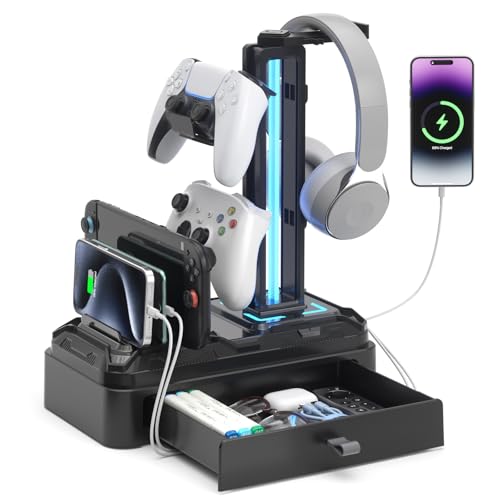
KDD Headphone Stand with USB A&C Charger Ports - RGB Controller Stand with Detachable Hooks - Rotatable Headset Hanger & Device Slot for Phones/Tablets - Drawer Storage Base for Gaming Desk Organizer
Included for 'Best Gaming Headset Stands With USB Chargers: Ports, Power and Footprint Compared' because the listing specifies RGB Controller Stand with Detachable Hooks and Rotatable Headset Hanger & Device Slot for Phones/Tablets, details this guide uses to compare options.
View on Amazon
cozoo Headphone Stand with Charger, USB C, Gifts for Gamers Men, Black Pro
Included for 'Best Gaming Headset Stands With USB Chargers: Ports, Power and Footprint Compared' because the listing specifies USB C and Gifts for Gamers Men, details this guide uses to compare options.
View on AmazonStandard measurements across the current USB-charging stand category:
| Stand type | Base diameter | Total height | Clearance needed under monitor arm |
|---|---|---|---|
| Compact aluminium post | 70-85mm | 280-320mm | None if arm clamp is behind it |
| Standard weighted base | 90-120mm | 300-360mm | 50mm minimum side clearance |
| Hub-integrated tower (4+ ports) | 110-150mm | 320-400mm | 80mm minimum, check arm swing radius |
| Desk-clamp mounted stand | N/A (clamps to edge) | 250-350mm above clamp point | Competes directly with monitor arm clamp space |
If you run a gas-spring monitor arm, measure its swing radius with the monitor pulled toward you, not just its resting position. A tower-style hub stand with a 150mm base will physically collide with a monitor arm’s elbow joint on desks shallower than 600mm when the arm is extended. Clamp-mounted stands avoid the base footprint problem entirely but then compete for the same 2-3cm of desk edge your monitor arm clamp needs, so check your desk’s usable edge length before buying one if you already run a clamped arm or a desk shelf bracket.
Per-port wattage: what “USB charger” actually means
“USB charging stand” is used loosely. Some stands have a single port wired straight to a 5V/1A line from your PC’s USB header, which is enough for a headset but will charge a phone slowly or not at all. Others include a powered hub with its own wall adapter capable of 5V/2.4A or more per port. The difference matters if you plan to charge anything besides your headset.
| Port spec | Typical output | Headset charge time (400mAh battery) | Can it fast-charge a phone? |
|---|---|---|---|
| Passthrough from PC USB-A 2.0 | 5V/0.5A | ~2.5 hours | No |
| Passthrough from PC USB-A 3.0 | 5V/0.9A | ~1.5 hours | No |
| Powered hub, basic wall adapter | 5V/1A per port | ~1.3 hours | No |
| Powered hub, high-output adapter | 5V/2.4A per port | ~45 minutes | Yes, for most phones |
Worked example: a typical wireless gaming headset battery sits around 400-500mAh. At 5V/0.5A (2.5W), charge time to roughly 80% is about 2.5 hours, accounting for the usual 10-15% conversion loss in cheap stand circuitry. At 5V/2.4A (12W), that drops to under an hour. If your routine is “dock it during a 20-minute lunch break and expect a usable charge,” only the high-output powered hubs deliver that. The passthrough models are fine for overnight charging and nothing else.
The practical check before buying: look for the stand’s listed wattage on its own spec sheet, not just “USB 3.0 compatible.” If a product only says “supports USB charging” with no amperage listed, assume it’s a basic 5V/0.5A passthrough port.
Powered hub vs. passthrough: how to tell which one you have
- If the stand includes its own wall adapter or a separate power brick, it’s a powered hub, which means its ports work even when your PC is off or asleep.
- If the stand connects to your PC with a single USB cable and offers no separate power input, it’s a passthrough hub, which pulls all its power and data through that one PC connection and goes dead when the PC sleeps.
- Passthrough is fine for headset-only charging overnight. Powered hubs are worth the extra cost if you also plug in a mouse dongle, a webcam, or want charging to continue when your PC is off.
Aluminium vs. ABS base: tip resistance with heavy headsets
Headset weight has crept up. Headsets with large planar drivers or dual-battery designs now commonly weigh 350-420g, well above the 280-320g that most ABS plastic stand bases were designed around. A top-heavy stand with a light base is a real tip-over risk, especially on a desk mat or glass desktop with low friction.
Aluminium bases typically weigh 250-400g on their own, versus 80-150g for ABS plastic bases of the same footprint. That weight difference is the entire story: a stand’s resistance to tipping is a function of base mass and base diameter relative to the height and weight of what’s hanging off the top. A 400g headset on a tall post with an 80g plastic base will tip under a stray cable tug or a bump from reaching for a mouse. The same headset on a 300g aluminium base with a wider footprint stays put.
Rule of thumb for matching base to headset weight:
- Headsets under 300g: ABS base is fine if the base diameter is at least 90mm.
- Headsets 300-380g: aluminium base recommended, or ABS base no narrower than 110mm.
- Headsets over 380g (most planar-magnetic and dual-battery wireless models): aluminium base strongly recommended regardless of diameter, since the weight is usually concentrated high on the post.
Aluminium bases also resist warping from heat and UV near a window, which matters less for tipping but affects long-term stability since a slightly warped base loses contact area and effective weight distribution.
Decision matrix: matching stand type to your setup
| Your situation | Recommended stand type | Why |
|---|---|---|
| Shallow desk (under 600mm), monitor arm installed | Compact aluminium post, 70-85mm base | Avoids collision with arm swing radius |
| Heavy headset (380g+), no monitor arm | Weighted aluminium base, 100mm+ | Base mass prevents tipping under cable tension |
| Need to charge headset + phone + controller | Powered hub tower with 2.4A ports | Passthrough hubs can’t deliver fast-charge wattage |
| Minimal desk space, already using a desk shelf | Desk-clamp mounted stand | Zero base footprint, mounts to shelf or desk edge |
| Budget priority, headset under 300g | ABS base with passthrough USB | Tipping risk is low and overnight charging is sufficient |
Prices for USB-charging headset stands generally run $20-$40 for basic ABS passthrough models, $35-$60 for aluminium weighted bases, and $50-$90 for powered hub towers with multiple high-output ports. The jump in price from passthrough to powered hub is almost entirely the cost of the separate power adapter and the extra circuitry to regulate multiple ports independently, so it’s a reasonable cost if you’ll actually use the extra ports.