Key takeaways
- Only one XLR input when you know you will host a second in-person speaker.
- No documented 48V phantom power for a condenser microphone.
- A single shared gain control for two microphones.
- No direct monitoring, especially if you are sensitive to delayed headphone audio.
- “USB-C” listed without clear computer, tablet, or phone compatibility information.
- Unclear warranty terms or no return option from the seller.
- Marketing that emphasizes voice effects but does not identify inputs, outputs, or monitoring controls.
- A unit that requires several adapters before it can connect to your actual computer and microphone.
Choosing an XLR audio interface for streaming is less about buying the most expensive box and more about matching the hardware to the way you actually go live. Common mistakes include buying an interface with too few inputs for planned guests, choosing a portable model that has no physical monitor knob, assuming every USB-C port delivers the same power, or paying for recording features that do nothing for a one-person stream.
Another frequent error is confusing an XLR interface with a complete streaming mixer. An audio interface converts microphone and instrument signals into digital audio for a computer or mobile device. Some models also provide loopback, headphone monitoring, direct monitoring, and onboard effects, but not all do. Before comparing specifications, decide whether you need a straightforward microphone front end or a more hands-on streaming control center. In 2026, a good entry-level XLR interface can cost under $100, while a better-equipped streaming setup typically lands between $150 and $300 before the microphone, boom arm, and cables.
Our top picks
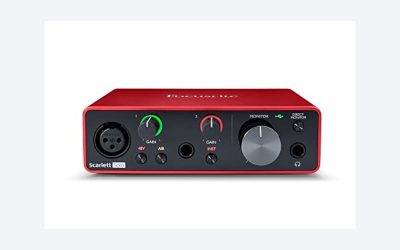
 Focusrite Scarlett Solo 3rd Gen USB-C Audio
- Pro performance with great pre-amps - Achieve a…
- Get the perfect guitar and vocal take with…
- Studio quality recording for your music & podcasts…
 MAONO P2 Hybrid USB Audio Interface Dual
- Dual USB ports with MFi-certified connectivity connect your…
- 56dB Dual XLR Audio Interface Compatible with Most…
- Built for podcasters, streamers, and musician creators
 M-AUDIO M-Track Duo USB Audio Interface
- Podcast, Record, Live Stream, This Portable Audio Interface…
- Be ready for anything with this versatile M-AUDIO…
- Everything you Demand from an Audio Interface for…
| Product | Key specs | |
|---|---|---|
| Focusrite Scarlett Solo 3rd Gen USB-C Audio | Pro performance with great pre-amps - Achieve a… Get the perfect guitar and vocal take with… Studio quality recording for your music & podcasts… | Check price |
| MAONO P2 Hybrid USB Audio Interface Dual | Dual USB ports with MFi-certified connectivity connect your… 56dB Dual XLR Audio Interface Compatible with Most… Built for podcasters, streamers, and musician creators | Check price |
| M-AUDIO M-Track Duo USB Audio Interface | Podcast, Record, Live Stream, This Portable Audio Interface… Be ready for anything with this versatile M-AUDIO… Everything you Demand from an Audio Interface for… | Check price |
 USB C Audio Interface for Recording Music USB C Audio Interface for Recording Music | ✔️[High-fidelity sound quality, accurate sampling] The Synido 2x2… ✔️[Three monitoring modes, easy to switch] The audio… ✔️[User-friendly design] The audio interface is intuitively designed,… | Check price |
As an Amazon Associate we earn from qualifying purchases at no extra cost to you.
Decide These 3 Things First
- How many people or sources will you use at once? A solo streamer with one XLR microphone needs one mic preamp and one XLR input. Two hosts need two independent XLR inputs, not one input plus a headphone splitter. Add another input if you plan to connect a guitar, a second mic, or an external device.
- What device will receive the audio? Most interfaces connect to Mac or Windows computers through USB-C or USB-A. If you stream from a phone or tablet, verify compatibility before buying. Some hybrid models accept mobile devices directly, while others require a powered adapter or cannot reliably operate from mobile hardware.
- Do you need live control or simple reliability? For gaming, podcasting, music streams, and interviews, look for direct monitoring, a dedicated headphone volume knob, mute control, and loopback. For a basic talking-head stream, one good preamp, 48V phantom power, and stable USB connection matter more than pads, RGB lighting, or extra effects.
Size: Choose a Footprint That Fits Your Desk, Not Just Your Budget
Interfaces range from pocket-friendly units around 5 to 7 inches wide to desktop mixer-style units measuring 10 to 14 inches wide. A compact single-input interface is usually about 5.5 to 7.5 inches wide, 3.5 to 5 inches deep, and 1.5 to 2.5 inches tall. These are easy to place beside a laptop or under a monitor riser. A typical example is a compact unit such as the Focusrite Scarlett Solo 3rd Gen, listed around $119.99, which is aimed at a single microphone or instrument source.
For streaming, leave at least 3 inches of clearance behind the interface for XLR, USB, and headphone plugs. An XLR connector extends roughly 2 inches beyond the rear panel, and stiff cables can need more room to bend safely. If your desk is shallow, a front-mounted headphone jack is especially useful.
Weight matters when the interface will travel. Small bus-powered interfaces often weigh 0.8 to 1.5 pounds; larger two-channel desktop units generally weigh 1.5 to 3 pounds. A heavier interface is less likely to slide when you turn a gain knob, but a unit under 1 pound is easier to pack for travel streams or remote recording.
Material: Prioritize Solid Knobs, Stable Feet, and Practical Housing
Most affordable interfaces use molded plastic housings, metal faceplates, or a combination of both. Plastic is not automatically a problem: it keeps weight and price down, and it can be perfectly suitable for a stationary desk setup. However, look closely at the parts you touch every stream. The gain knob, headphone knob, XLR socket, USB port, and buttons should feel firmly mounted rather than loose in the chassis.
An all-metal or metal-fronted enclosure generally handles frequent transport better than thin plastic. It can also add enough weight to prevent cable drag from pulling the interface across a desk. Rubber feet are worth having, particularly on smooth laminate or glass desks. Four non-slip feet can make more difference in daily use than cosmetic features such as colored LEDs.
Do not select an interface solely because it has a metal case. A plastic-bodied model with recessed ports and well-secured controls may be more practical than a heavier model with awkward rear connections. The best material choice depends on whether the interface stays in one place or travels several times each month.
Construction: Check Inputs, Power, and Connection Layout
The most important construction detail is the input configuration. For a single XLR microphone, choose an interface with one genuine XLR mic input, a microphone preamp, gain control, and switchable 48V phantom power. Phantom power is needed by most condenser microphones. Dynamic microphones usually do not need it, although leaving 48V off is the sensible default unless your microphone requires it.
A combo XLR/TRS jack accepts either an XLR microphone cable or a 1/4-inch instrument or line cable. It is flexible, but make sure each combo jack has its own gain control if you will use two microphones. Some inexpensive interfaces offer two physical inputs but only limited independent control, which is frustrating when one speaker is much louder than the other.
USB-C describes the connector shape, not a guaranteed feature set. Confirm whether the interface is bus-powered, whether it needs an external 5V power supply, and whether the included cable matches your computer. Bus-powered units reduce clutter. Interfaces that power from USB may draw only a few watts, but adding a bright display, multiple headphones, or mobile-device support can increase power requirements. If your laptop has unreliable ports, use a direct connection rather than an unpowered hub.
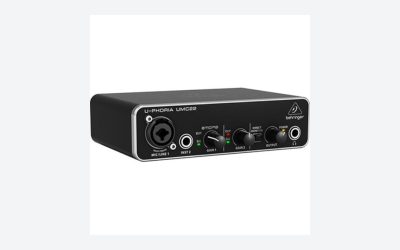
For two-person streams, target two XLR-capable inputs, two gain controls, one or two headphone outputs, and balanced 1/4-inch monitor outputs. The M-Audio M-Track Duo, often priced around $69, illustrates the low-cost two-input category, though buyers should verify its monitoring and software-routing features against their streaming workflow.
Comfort and Performance: Monitoring Is What Makes an Interface Easy to Use
Audio interfaces are not furniture, but their controls should still be comfortable to use for hours. Large, clearly separated gain and headphone knobs are easier to adjust while looking at a screen. Tiny side-mounted controls may save space, yet they can be difficult to reach once XLR and USB cables are connected.
For voice streaming, look for a gain range suited to your microphone. Low-output dynamic microphones can require substantial clean gain. Rather than relying on a claimed number alone, check whether the manufacturer identifies the interface as suitable for dynamic microphones and whether it offers enough level without forcing the gain knob to its maximum position. An inline mic booster can cost roughly $60 to $150 if your microphone needs more gain, so buying the right interface up front can be simpler.
Direct monitoring is a major usability feature. It sends your microphone to headphones before the computer adds processing delay, helping you speak naturally without hearing an echo. A physical direct-monitor switch or blend knob is ideal. For streams with music, alerts, or guest audio, loopback is equally valuable: it lets computer playback enter the stream mix without relying on awkward cable workarounds.
Use headphones with a 1/4-inch or 3.5 mm plug as supported by the interface. A dedicated headphone output with its own volume control is preferable to sharing the main monitor knob. If two hosts need headphones, choose two independently controlled outputs or budget $20 to $50 for a suitable headphone distribution solution.
Price Tiers: Spend for Inputs and Workflow, Not Decorative Extras
Budget: $40 to $90. Expect one or two inputs, basic 48V phantom power, USB connectivity, a headphone jack, and limited routing features. A generic USB-C recording and streaming interface around $39.99 can work for a first desk setup, but confirm driver support, return policy, and whether a proper XLR preamp is included. This tier suits occasional solo streaming and tight budgets.
Mid-range: $100 to $220. This is the practical sweet spot for most streamers. Expect better control layouts, more dependable build quality, clearer metering, balanced outputs, and sometimes loopback or mobile support. The $119.99 Focusrite Scarlett Solo 3rd Gen sits near this range for solo creators. A hybrid dual-XLR unit such as the MAONO P2, also listed around $119.99, may make more sense for creators who need two microphones or computer-and-phone flexibility.
Premium: $250 to $500-plus. Pay this when you need two to four microphone inputs, advanced routing, onboard processing, multiple headphone mixes, robust software control, or a production-ready desktop format. Do not move into this tier just for a better-looking case. A premium interface earns its price when it eliminates extra adapters, boosters, mixers, and routing complications.
Warranty: Treat Support as Part of the Purchase Price
Look for at least a 1-year manufacturer warranty. Two or three years is preferable for an interface you will use several times a week. Read what the warranty covers: knobs, ports, power supplies, and USB connection failures are more relevant than superficial finish damage.
Buy from a retailer with a return window of at least 14 days; 30 days gives more time to test computer compatibility, loopback, microphone gain, and headphone monitoring. Keep the packaging until you have completed several full streams. If the interface produces pops, disconnects, or driver conflicts during those tests, return or exchange it rather than trying to build a permanent workaround.
Delivery and Assembly: Plan for the Small Extras
There is no furniture-style assembly, but a streaming interface is not always ready the minute it arrives. Setup typically takes 15 to 45 minutes: connect the USB cable, install any required control software, attach an XLR cable, select the interface in your streaming software, and set monitoring levels.
Budget for accessories. A 6- to 10-foot XLR cable usually costs $10 to $25. A desk boom arm runs roughly $25 to $120, while closed-back monitoring headphones commonly cost $40 to $150. If you use speakers, two balanced 1/4-inch cables can add $15 to $40. Check the box contents: some interfaces include a USB cable, but many do not include an XLR cable, microphone, headphones, or power adapter.
Spec Checklist
| Spec | Budget | Mid | Premium |
|---|---|---|---|
| XLR mic inputs | 1–2 | 1–2 with independent gain | 2–4 or more |
| Typical price | $40–$90 | $100–$220 | $250–$500+ |
| Phantom power | 48V, usually shared | 48V with clearer controls | 48V plus expanded routing |
| Monitoring | Headphone jack; basic direct monitor | Dedicated headphone control; direct monitor | Multiple headphone mixes or advanced control |
| Computer audio routing | May be limited | Look for loopback | Loopback and flexible software routing |
| Best for | First solo stream | Regular solo or two-person streaming | Multi-host shows and complex productions |
Red Flags
- Only one XLR input when you know you will host a second in-person speaker.
- No documented 48V phantom power for a condenser microphone.
- A single shared gain control for two microphones.
- No direct monitoring, especially if you are sensitive to delayed headphone audio.
- “USB-C” listed without clear computer, tablet, or phone compatibility information.
- Unclear warranty terms or no return option from the seller.
- Marketing that emphasizes voice effects but does not identify inputs, outputs, or monitoring controls.
- A unit that requires several adapters before it can connect to your actual computer and microphone.
FAQ
Do I need an XLR audio interface for streaming?
You need one if you use an XLR microphone and want to connect it properly to a computer or compatible mobile device. USB microphones connect directly and do not require an interface. XLR is often the better choice when you want to upgrade microphones, add a second speaker, or use better monitoring controls later.
Is one XLR input enough for streaming?
Yes, for a solo streamer using one microphone. Choose two inputs if you expect in-person guests, a co-host, or an instrument. It is usually cheaper to buy a two-input interface initially than replace a one-input model after a few months.
Do I need phantom power for my streaming microphone?
Most condenser microphones require 48V phantom power. Most dynamic microphones do not. Check your microphone manual before switching it on. Do not assume that an XLR connection alone means phantom power is required.
What is loopback, and should I pay for it?
Loopback routes computer audio, such as music, browser audio, alerts, or remote guests, back into your streaming software. It is useful for gaming streams, podcasts, and live demonstrations. For a simple microphone-only broadcast, it is convenient but not essential.