
Key takeaways
- Provides meaningful extra gain: A 20 to 30 dB boost can be enough to make a low-output dynamic mic practical with a modest interface or portable recorder.
- Can reduce audible preamp hiss: When an interface becomes noisy near its maximum gain setting, adding gain earlier in the chain may produce a cleaner recording.
- Simple setup: There are no drivers, apps, batteries, or menus. It is generally plug-and-play once the XLR connections and 48V phantom power are in place.
- Small and portable: Inline boosters are far easier to carry than replacing an interface, mixer, or recording setup.
- Useful for spoken word: Podcasting, livestreaming, voice-over work, remote interviews, and quiet vocal recording are common use cases.
- Less expensive than replacing hardware: At about $40 to $75 for common options, a booster may solve a specific gain problem for far less than a new interface.
The Short Answer
It depends: you need a gain-boost inline preamp for a dynamic mic only if your interface, mixer, or recorder cannot provide enough clean gain at your normal speaking or singing volume. If you have to turn your preamp knob close to maximum and your recordings still sound quiet, hissy, or thin after level boosting, an inline booster can help. If your recordings already reach healthy levels without audible noise, it is an unnecessary extra purchase.
Dynamic microphones naturally produce a lower output than condenser microphones. That is not a defect—it is part of why many broadcasters, podcasters, stage performers, and home studio users like them. But low-output models can challenge entry-level USB interfaces and compact mixers, especially when recording soft speech, quiet acoustic instruments, or distant sound sources.
Our top picks
 StudioMan DPM1 XLR Dynamic Microphones Preamp
- 【Essential for Dynamic Mics & Ribbons】 Designed specifically…
- 【Studio-Grade Noise Reduction】 Say goodbye to background hiss
- 【Rugged Metal Build & Interference Shielding】 Built for…
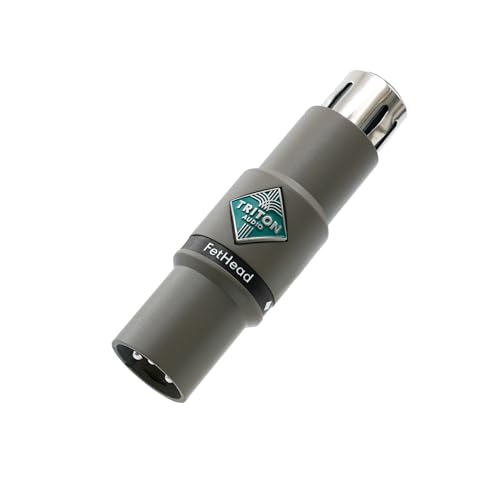 Triton Audio FetHead in-Line Microphone Preamp
- Low-Noise Class-A JEFT Amplifier
- Double Single-Ended Amplifier Topology
- Shielded Enclosure
As an Amazon Associate we earn from qualifying purchases at no extra cost to you.
An inline preamp sits between the microphone and your interface. It uses phantom power from the interface or mixer to add clean gain before the signal reaches the device’s own preamp. Products such as the roughly $40 StudioMan DPM1 and the roughly $75 Triton Audio FetHead are designed for this job. They do not make a microphone “better” in every respect; they primarily give you more usable level with less dependence on a noisy preamp stage.
What You Actually Get
A gain booster is a small XLR device, usually a metal barrel or compact inline adapter. You connect your dynamic microphone to one end, run an XLR cable from the booster to your interface or mixer, then switch on 48V phantom power at the interface. The phantom power runs the booster, not the dynamic mic itself.
The main benefit is additional gain. The StudioMan DPM1, for example, is marketed with up to 29 dB of gain. Many competing inline preamps fall in the approximate 20 to 30 dB range. That is a substantial increase: it can move a weak spoken-word recording from “barely usable without cranking everything” to a level your interface can handle more comfortably.
What you do not get is automatic noise removal, room treatment, better microphone placement, or a richer voice by default. If your room has computer-fan noise, air-conditioning rumble, echo, or traffic noise, an inline preamp will raise the microphone signal—but it can also make those unwanted sounds easier to hear. It is a gain solution, not an acoustic solution.
It also does not replace basic gain staging. You still need to speak or sing at a sensible distance, typically about 2 to 6 inches from a broadcast-style dynamic mic for close voice work, depending on the mic and desired tone. Set your interface gain lower after installing the booster, and aim to avoid clipping. For digital recording, many users target ordinary peaks around -12 dBFS to -6 dBFS rather than trying to hit 0 dBFS.
Before buying, check three things. First, confirm that your microphone is a standard XLR dynamic model. Second, make sure your interface or mixer supplies 48V phantom power. Third, verify that the booster is intended for dynamic microphones. Do not assume every inline device is appropriate for every microphone type, especially ribbon microphones or microphones with unusual wiring requirements.
Pros
- Provides meaningful extra gain: A 20 to 30 dB boost can be enough to make a low-output dynamic mic practical with a modest interface or portable recorder.
- Can reduce audible preamp hiss: When an interface becomes noisy near its maximum gain setting, adding gain earlier in the chain may produce a cleaner recording.
- Simple setup: There are no drivers, apps, batteries, or menus. It is generally plug-and-play once the XLR connections and 48V phantom power are in place.
- Small and portable: Inline boosters are far easier to carry than replacing an interface, mixer, or recording setup.
- Useful for spoken word: Podcasting, livestreaming, voice-over work, remote interviews, and quiet vocal recording are common use cases.
- Less expensive than replacing hardware: At about $40 to $75 for common options, a booster may solve a specific gain problem for far less than a new interface.
Cons
- It requires phantom power: Even though most dynamic mics do not need 48V, the inline preamp does. A recorder or mixer without phantom power cannot run it.
- It will not fix a bad room: Gain boost cannot remove echo, background noise, keyboard clicks, or poor mic technique.
- It is another part in the signal chain: You need an extra XLR connection, and that adds one more component to pack, troubleshoot, and protect.
- Not every dynamic mic needs one: Higher-output dynamic microphones and interfaces with strong, quiet preamps may work perfectly without an added device.
- It can encourage poor gain staging: Too much total gain can create clipping, excessive room noise, or an overly hot input signal.
- Compatibility deserves attention: Check the manufacturer guidance before using an inline booster with passive ribbon microphones or specialty microphones.
Who Should Buy It
Buy a gain-boost inline preamp if you use a low-output XLR dynamic microphone for close-mic voice recording and regularly run out of clean gain. This is especially common with budget USB interfaces that offer limited gain or become noticeably noisy in their final portion of the gain range.
It is also a sensible purchase for podcasters and streamers who have already done the basics: the microphone is close enough, the XLR cable is in good condition, input levels are set correctly, and the room is reasonably quiet. In that situation, an inline booster is a focused fix rather than a guess.
The StudioMan DPM1 is the budget-oriented choice for someone who simply needs a listed 29 dB boost and has a phantom-powered interface. At around $39.99, it costs less than many accessories people buy before addressing their actual gain problem. The Triton Audio FetHead, typically around $74.95, is a more established inline-preamp option for buyers who prefer that brand’s long-standing presence in audio setups.
In 2026, these devices still make the most sense as problem-solvers—not mandatory accessories. Buy one because your current setup demonstrates a clean-gain shortage, not because every dynamic mic setup online appears to use one.
Who Should Skip It
Skip an inline preamp if your interface already gives you adequate clean level. If you can record normal speech at a sensible gain setting, with peaks landing in a healthy range and no distracting hiss, there is little practical reason to add 20 to 30 dB more gain.
You should also skip it if the real issue is microphone distance. A dynamic mic positioned 12 inches away will often sound quiet and room-heavy compared with the same mic positioned 3 inches away. Moving closer is free, improves vocal presence, and usually reduces the amount of gain you need.
Do not buy one to cure room echo, laptop-fan noise, or low-quality USB audio. Consider basic acoustic treatment, a quieter recording position, a boom arm that lets you place the mic correctly, or a better interface if the preamp remains the limiting factor. And if your device does not offer 48V phantom power, an ordinary phantom-powered inline booster is not the right answer.
Cheaper Alternatives
| Option | Cost | Trade-off |
|---|---|---|
| Move the mic closer on a boom arm | $0 if you already own an arm; about $20 to $60 for a basic arm | Improves level and vocal tone, but may not solve a genuinely weak or noisy interface preamp. |
| Adjust interface gain and recording level correctly | $0 | Free and essential, but cannot create clean gain your hardware does not have. |
| Use a quieter recording location | $0 to $50 for simple soft furnishings or basic sound control | Reduces noise and can make lower gain workable, but does not increase microphone output. |
| Choose the StudioMan DPM1 | About $39.99 | Low upfront cost and listed 29 dB boost; still requires 48V phantom power and an XLR setup. |
| Upgrade the audio interface later | Often $120 to $250 or more | Costs more, but may improve preamp gain, monitoring, connections, and overall recording flexibility. |
FAQ
Do I need a gain booster for every dynamic microphone?
No. Many dynamic microphones work well without one. The deciding factor is whether your specific microphone and interface combination can reach a clean recording level at your usual distance and volume.
Will an inline preamp make my dynamic mic sound better?
It can make the recording sound cleaner if your current interface becomes hissy when its gain is turned very high. It will not change the microphone’s core character or compensate for poor placement, excessive room echo, or background noise.
Does turning on 48V phantom power damage a dynamic microphone?
With properly wired balanced XLR connections, standard dynamic microphones are generally designed to coexist safely with phantom power. In this setup, the 48V is needed to power the inline preamp. Follow the microphone and booster manufacturer instructions, especially for ribbon or specialty microphones.
Is a $40 inline preamp good enough, or should I buy a pricier one?
A lower-cost option can be enough when your only goal is adding clean, usable gain to a standard dynamic mic. A pricier model may appeal for brand preference, build expectations, or particular compatibility needs. Start with your actual problem: if you need roughly 20 to 30 dB of extra gain and have reliable 48V phantom power, the basic function matters more than buying the most expensive barrel-shaped adapter.








