Key takeaways
- Clearer sightlines to your monitor. This is the main reason to choose one. A conventional boom arm often crosses above or beside the display at eye level. A low profile design can sit beneath the bottom edge of a monitor or behind it, leaving the center of the screen area visually open.
- Better fit for low monitor setups. If your monitor is on a stand or monitor arm with its bottom edge 3 to 6 inches above the desktop, a low profile mic arm can often tuck beneath or behind it. That can be useful on desks where a tall boom would block a secondary screen or webcam view.
- Less visual clutter in a multipurpose room. A large elevated boom can make a work desk look like a permanent recording station. A low arm is easier to park flat along the rear of the desk when you are finished, which matters in bedrooms, shared offices, and living-room workspaces.
- Useful cable management. Many models include channels, clips, or removable covers for a USB or XLR cable. Keeping the cable along the arm is neater than letting it hang from an overhead boom, especially if the arm is mounted near a monitor cable bundle.
- Stable positioning for close-mic use. Podcast and streaming microphones usually sound best when placed roughly 4 to 8 inches from the speaker’s mouth. A low profile arm can bring the mic in from below or beside the monitor while keeping it close enough for that practical speaking distance.
- Often easier to avoid camera interference. With a webcam centered above a display, an overhead boom may enter the camera frame when adjusted. A low profile arm approaches from desk height, reducing the chance of an arm bar appearing above your head in a video call.
- Good match for a clean, monitor-arm desk. If your screen is already floating on a VESA monitor arm, a low mic arm can preserve the open, minimal look rather than adding another tall structure behind the display.
The Short Answer
It depends: a low profile mic arm is usually the better choice for desk clearance if you have at least 3 to 5 inches of open space behind your monitor or along the rear edge of your desk. Instead of rising high above the work surface like a traditional scissor boom, it runs low and horizontally, keeping the visual field between you and the screen clearer.
For gaming, streaming, video calls, podcasting, and compact home offices, that lower placement can make a desk feel less crowded. The compromise is reach. A low profile arm works best when the microphone can stay close to the desk’s back edge or side edge; it is less forgiving in a deep desk setup where you need the mic to swing far forward, high upward, or around multiple large monitors.
Our top picks
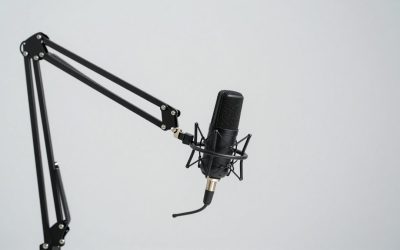
 FIFINE BM88 Low Profile Microphone Boom Arm
- [Sturdy Metal] The all metal microphone arm stand…
- [Low Profile] The arm stand for gaming can…
- [Cable Management] The low profile microphone boom stand…
 InnoGear Mic Arm Low Profile Microphone Boom
- Streamlined Low-Profile Arm Stand: Elevate your workspace with…
- Ultimate Adjustability: Experience unparalleled flexibility with our fully…
- Robust Construction: Engineered from solid alloy steel, the…
As an Amazon Associate we earn from qualifying purchases at no extra cost to you.
In 2026, low profile arms are no longer a niche choice, but they are still not automatically the best arm for every desk. Measure your desk, monitor placement, and microphone weight before buying.
What You Actually Get
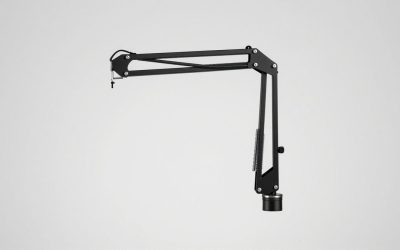
A low profile mic arm is a jointed microphone support that sits near desk height rather than forming a tall overhead arch. Most attach with a C-clamp to the rear or side of a desk. The arm sections extend outward in a low, parallel arrangement, usually with internal springs, friction joints, or a combination of both to hold their position.
Typical models have roughly 27 to 32 inches of total horizontal reach, although usable reach is shorter once you account for the clamp location, monitor stand, and the microphone’s position. Many fold down to a footprint only a few inches tall when parked behind a display. Expect clamp openings around 0.4 to 2.4 inches, though thick desktop lips, cable trays, drawers, and beveled edges can limit compatibility.
Most low profile arms use a standard 5/8-inch microphone thread and include adapters for 3/8-inch or 1/4-inch mounting hardware. They are generally intended for microphones and shock mounts weighing about 1.5 to 4.5 pounds combined. A lightweight USB mic may weigh 0.5 to 1.5 pounds, while a broadcast-style dynamic mic with a metal shock mount can push beyond 2 pounds.
At the lower end, an arm such as the InnoGear low profile model is commonly priced around $25 to $35. Midrange options such as the FIFINE BM88 are generally around $50 to $60. Paying more usually buys a sturdier clamp, smoother joint movement, better cable routing, and a higher stated weight capacity—not necessarily dramatically more desk clearance.
Pros
- Clearer sightlines to your monitor. This is the main reason to choose one. A conventional boom arm often crosses above or beside the display at eye level. A low profile design can sit beneath the bottom edge of a monitor or behind it, leaving the center of the screen area visually open.
- Better fit for low monitor setups. If your monitor is on a stand or monitor arm with its bottom edge 3 to 6 inches above the desktop, a low profile mic arm can often tuck beneath or behind it. That can be useful on desks where a tall boom would block a secondary screen or webcam view.
- Less visual clutter in a multipurpose room. A large elevated boom can make a work desk look like a permanent recording station. A low arm is easier to park flat along the rear of the desk when you are finished, which matters in bedrooms, shared offices, and living-room workspaces.
- Useful cable management. Many models include channels, clips, or removable covers for a USB or XLR cable. Keeping the cable along the arm is neater than letting it hang from an overhead boom, especially if the arm is mounted near a monitor cable bundle.
- Stable positioning for close-mic use. Podcast and streaming microphones usually sound best when placed roughly 4 to 8 inches from the speaker’s mouth. A low profile arm can bring the mic in from below or beside the monitor while keeping it close enough for that practical speaking distance.
- Often easier to avoid camera interference. With a webcam centered above a display, an overhead boom may enter the camera frame when adjusted. A low profile arm approaches from desk height, reducing the chance of an arm bar appearing above your head in a video call.
- Good match for a clean, monitor-arm desk. If your screen is already floating on a VESA monitor arm, a low mic arm can preserve the open, minimal look rather than adding another tall structure behind the display.
Cons
- It needs rear or side clearance. “Low profile” does not mean “zero space required.” The arm has to travel somewhere. If your desk sits flush against a wall, your monitor base fills the rear edge, or a hutch blocks the back of the desk, the arm may have nowhere to fold or pivot.
- Limited vertical lift. A traditional scissor arm can raise a microphone 15 inches or more above the desktop, depending on the model. Low profile designs prioritize horizontal movement, so they are less suitable when you need to position a mic high above a standing desk surface, musical instrument, or large monitor.
- Deep desks can expose the reach limitation. On a 30-inch-deep desk, the microphone may need to travel farther than expected to reach a comfortable speaking position. Total advertised reach can sound generous, but the clamp and first joint may consume several inches before the microphone gets near you.
- Not ideal for frequent stand-up use. If you alternate between sitting and standing, a low arm may require more repositioning than a tall boom. It can work at a sit-stand desk, but a model with strong joints and adequate vertical adjustment is essential.
- Heavy microphone setups demand careful checking. A mic, shock mount, pop filter, and cable can add up quickly. If the combined load exceeds the arm’s rated capacity, it may sag, drift, or put excess stress on the joints. Do not assume every low profile arm is suitable for a heavy broadcast microphone.
- The clamp can compete with other desk hardware. Monitor arms, under-desk cable trays, headphone hooks, and drawers often occupy the same rear edge. Before ordering, check not just desktop thickness but also whether there is enough clear, flat underside for the clamp pad.
- Lower-priced versions can have stiff or loose joints. Budget arms can be excellent for a light USB microphone, but their movement may be less refined. A joint that is too tight is frustrating to adjust; a joint that is too loose can slowly drop under a heavier mic.
Who Should Buy It
Buy a low profile mic arm if your main goal is reclaiming visual space around a monitor. It is especially well suited to streamers with a single display or dual monitors on arms, remote workers who use a USB microphone for calls, and podcasters who want the microphone close without a large boom crossing the desk.
It is also a smart choice for desks around 24 to 30 inches deep when the monitor is mounted toward the rear and there is at least a few inches of clearance behind it. A person using a compact dynamic microphone, a lightweight condenser, or a USB microphone under roughly 2 pounds will generally have the easiest experience.
Choose one if you prefer to speak into a mic from below or slightly to the side of your face. That position keeps the microphone out of direct view while still allowing close placement.
Who Should Skip It
Skip a low profile arm if your desk is pressed tightly against a wall and the monitor stand already occupies the entire rear edge. You may be better served by a side-mounted traditional boom, a desk stand, or a monitor-mounted solution where appropriate.
Also skip it if you need a microphone high above the desk for instruments, overhead recording, standing presentations, or frequent sit-stand transitions. A conventional scissor boom offers more vertical range and more ways to route around a large display.
Finally, avoid buying based on looks alone if you have a heavy microphone package. Add the microphone, shock mount, pop filter, and any adapter together, then compare that total with the manufacturer’s stated capacity. Leaving a reasonable margin is wiser than buying an arm rated exactly at your setup’s weight.
Cheaper Alternatives
| Option | Cost | Trade-off |
|---|---|---|
| Budget low profile arm, such as an InnoGear-style model | $25–$35 | Lower price and similar low routing, but usually less refined joints, clamp hardware, and cable management. |
| Basic desk microphone stand | $15–$30 | Uses no rear desk clearance and is very stable, but takes up desktop space and offers little reach. |
| Standard scissor boom arm | $20–$45 | More vertical reach and easier positioning around obstacles, but more likely to block screens or appear in camera shots. |
| Weighted round-base floor stand | $30–$60 | Preserves desk space and avoids clamp compatibility issues, but occupies floor area and can be awkward in tight rooms. |
FAQ
How much clearance does a low profile mic arm need behind a desk?
Plan for at least 3 to 5 inches for basic arm movement, plus enough room for the clamp and cable. Some setups need more, particularly if the arm must fold completely behind a monitor. Measure from the desk’s rear edge to the wall, monitor stand, shelf, or cable tray—not just the empty space you can see from above.
Will a low profile mic arm fit under my monitor?
It can if the monitor’s lower edge sits several inches above the desktop and the arm’s body is slim enough to pass beneath it. Check the arm’s folded height and the location of its joints. If your display rests directly on the desk or has a wide, low stand, the arm may need to sit behind the monitor instead.
Are low profile mic arms good for heavy microphones?
They can be, but capacity matters more than the arm style. Check the rated load for the exact model and include the weight of the shock mount and accessories. For a combined setup above about 2 pounds, prioritize a clearly stated higher-capacity arm with solid joints and a robust clamp.
Is a low profile arm better than a regular boom arm?
For desk clearance in front of a monitor, usually yes. For maximum reach, vertical adjustment, and flexible placement, usually no. A low profile arm is the better specialized choice when a clean screen area is the priority; a regular boom is the more adaptable choice when your recording position changes often.