Key takeaways
- The listing gives a maximum microphone weight but not a maximum desk thickness.
- The clamp is shown on a thin desk but no underside dimensions are provided.
- The arm’s “360-degree” claim describes rotation at one joint rather than full positioning flexibility.
- There is no close-up photo of the clamp pad, joint hardware, or locking mechanism.
- The product depends on a shock mount that is not included, changing the final weight and reach.
- The arm bends visibly when extended, or the seller recommends tightening with tools.
- Reviews repeatedly mention sagging, stripped knobs, damaged desktop finishes, or missing adapters.
- The return policy excludes opened or assembled products, making fit problems expensive to solve.
Choosing a low profile mic arm for a thick desk is less about finding the arm with the longest reach and more about matching the clamp, clearance, and movement to your setup. The most common mistake is buying a compact boom arm because it looks tidy, then discovering that the clamp does not open wide enough, the base hits the desk frame, or the microphone sits too high for comfortable use.
Another frequent error is judging a mount by its advertised weight capacity alone. A microphone may weigh only 2 to 4 pounds, but an extended arm creates leverage that can make a weak clamp tilt, slip, or slowly sag. Desk thickness, edge shape, under-desk clearance, microphone weight, and how often you reposition the arm all matter.
Our top picks
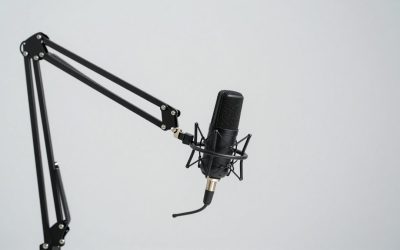
 NEEWER Low Profile Mic Arm Desk Mount
- 【All Metal Desktop Low Profile Stand】 This sleek,…
- 【Pneumatic Boom Arm with Adjustable Piston Damping】 Features…
- 【Extended Reach & Flexible Adjustment】 Upgraded with a…
 FIFINE BM88 Low Profile Microphone Boom Arm
- [Sturdy Metal] The all metal microphone arm stand…
- [Low Profile] The arm stand for gaming can…
- [Cable Management] The low profile microphone boom stand…
 InnoGear Mic Arm Low Profile Microphone Boom
- Streamlined Low-Profile Arm Stand: Elevate your workspace with…
- Ultimate Adjustability: Experience unparalleled flexibility with our fully…
- Robust Construction: Engineered from solid alloy steel, the…
| Product | Key specs | |
|---|---|---|
| NEEWER Low Profile Mic Arm Desk Mount | 【All Metal Desktop Low Profile Stand】 This sleek,… 【Pneumatic Boom Arm with Adjustable Piston Damping】 Features… 【Extended Reach & Flexible Adjustment】 Upgraded with a… | Check price |
| FIFINE BM88 Low Profile Microphone Boom Arm | [Sturdy Metal] The all metal microphone arm stand… [Low Profile] The arm stand for gaming can… [Cable Management] The low profile microphone boom stand… | Check price |
| InnoGear Mic Arm Low Profile Microphone Boom | Streamlined Low-Profile Arm Stand: Elevate your workspace with… Ultimate Adjustability: Experience unparalleled flexibility with our fully… Robust Construction: Engineered from solid alloy steel, the… | Check price |
 InnoGear Low Profile Mic Arm Boom Arm InnoGear Low Profile Mic Arm Boom Arm | Space-Saving, Ultra-Sleek Design: With the lower arm sitting… Integrated Magnetic Cable Management: The built-in snap-on magnetic… Full-Range Adjustability: A full 360° base rotation, 180°… | Check price |
As an Amazon Associate we earn from qualifying purchases at no extra cost to you.
This guide explains how to choose low profile mic arm for thick desks in 2026, with practical dimensions and price ranges you can use before buying.
Decide These 3 Things First
- Measure the desk. Record the desktop thickness, available edge depth, underside clearance, and distance to the wall or monitor. A “thick” desk may be 1.5 inches, while a butcher-block top can be 2.5 to 3 inches or more.
- Calculate your microphone load. Add the microphone, shock mount, pop filter, cable, and any small accessories. A practical setup often weighs 2 to 5 pounds, even when the microphone itself is lighter.
- Choose your speaking position. Decide whether the microphone must sit directly in front of your mouth, swing beside the monitor when not in use, or cover a wide seating area. This determines the reach and how much leverage the arm creates.
Size and Clamp Range
For a thick desk, clamp range is the first specification to verify. Look for a mount that explicitly supports at least 2.4 inches of thickness for a standard thick desktop. For tops between 2.5 and 3 inches, choose a clamp rated to at least 3.1 inches so there is room for the clamp pads and any desk protector. Do not assume that a clamp labeled “heavy duty” will fit; some compact arms stop at about 2 inches.
Measure the usable edge, not just the desktop. A rear cable channel, metal apron, drawer rail, or sit-stand frame can reduce the actual clamping area. Ideally, allow 3 to 4 inches of unobstructed vertical space beneath the edge. If the underside is blocked, a low-profile arm may need a different mounting point or a grommet installation.
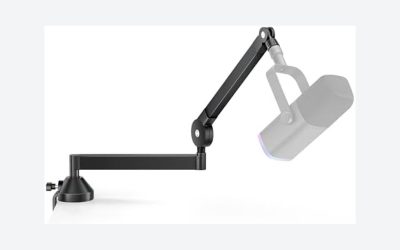
Reach is usually more important than maximum height. A horizontal reach of 20 to 30 inches works for most single-monitor desks. Choose 30 to 36 inches if you record from different seating positions, but remember that a fully extended arm puts more force on the clamp. Low-profile arms generally keep the microphone closer to desk level, which is useful for clear sightlines over a keyboard and under a monitor.
Material and Weight
Steel is the preferred material for the main arm sections and clamp because it resists flexing under a microphone’s leverage. Aluminum can reduce weight and still work well when the joints and clamp are properly reinforced. Plastic is acceptable for knobs, cable clips, or cosmetic covers, but a mostly plastic load-bearing joint deserves extra scrutiny.
Expect a compact arm to weigh roughly 3 to 6 pounds. More weight is not automatically better, but a very light arm may have thinner tubing, smaller joints, or a less substantial base. For microphones weighing 3 pounds or more, prioritize a broad clamp plate and steel arm sections over a flashy accessory package.
The desk itself also needs protection. A clamp pad of at least 2 by 2 inches spreads pressure better than a narrow contact point. On a soft-wood desktop, add a 3/16- to 1/4-inch rubber or cork protector. Avoid tightening a metal pad directly against a finished surface.
Construction and Mounting Method
Compare three mounting details: the clamp throat, the contact plate, and the joint design. The clamp throat must open wide enough for the desktop, while the contact plate should remain flat against the underside. If the underside is angled or interrupted by a frame, the arm can twist even when the clamp is tight.
A two-section boom arm with locking knobs is often more dependable for a heavy microphone than a very small spring arm. Pneumatic or gas-spring designs offer cleaner movement, but they need enough adjustment range for your microphone’s weight. An arm rated for a much heavier microphone may not stay in position with a very light one.
Look for a standard 3/8-inch or 5/8-inch microphone thread, preferably with an adapter included. Check whether the arm has a removable microphone mount. A removable mount makes it easier to use a shock mount or switch between a USB microphone and an XLR microphone without replacing the entire arm.
Through-desk or grommet mounting can be the best solution when the desktop is thicker than the clamp’s stated limit. It requires drilling a hole, usually around 2 to 3 inches depending on the hardware, so it is less convenient but often more stable for permanent installations.
Comfort and Performance
A low-profile arm should move quietly enough that repositioning does not become distracting during a call or recording. Smooth joints matter more than the number of advertised rotation points. Look for 180-degree or 360-degree horizontal movement, but make sure the arm can lock or hold its position without constant retightening.
For normal voice work, position the microphone 4 to 8 inches from your mouth, slightly off-axis to reduce plosive sounds. The arm should support that position without blocking the screen. A vertical adjustment range of about 8 to 16 inches is suitable for most seated setups; more is useful only if you alternate between sitting and standing.
Cable management is another performance issue. Built-in clips or channels should accommodate a cable approximately 4 to 6 millimeters thick without crushing it. Leave a small service loop near each joint. A tightly stretched USB or XLR cable can pull the arm out of position and transfer desk vibration into the microphone.
There is no meaningful wattage rating for a passive microphone arm. If a listing presents wattage, it usually refers to an optional light or electronic accessory rather than the boom itself. Focus on weight capacity, reach, joint stability, and mounting thickness instead.
Price Tiers
Budget low-profile arms generally cost about $20 to $40. They can work for lightweight microphones under roughly 2.5 pounds and occasional video calls, but their clamps and joints may have less adjustment range. The InnoGear low-profile models priced around $25.19 and $49.99 illustrate the broad budget-to-lower-midrange span, though the exact clamp capacity and included hardware should be checked on the current listing.
Midrange models typically cost $45 to $80. This is where you are more likely to find a stronger clamp, smoother adjustment, better cable routing, and a more useful weight range. The FIFINE BM88 at about $56.99 and the NEEWER MS002 at about $72.49 fall into this practical comparison range.
Premium arms usually cost $90 to $180 or more. The extra money may buy quieter joints, better machining, a heavier base, more precise tension adjustment, or modular mounting. Premium pricing is worthwhile for daily streaming, a heavy broadcast microphone, or a desk that must remain visually clean. It is unnecessary for a light USB microphone used once or twice a week.
Warranty and Replacement Support
Look for at least a 12-month warranty, with clear coverage for broken joints, clamp failure, and manufacturing defects. A longer warranty is helpful, but its terms matter more than the headline length. Some policies exclude wear items, stripped knobs, cosmetic damage, or damage caused by exceeding the weight limit.
Check whether replacement screws, pads, adapters, and cable clips are available separately. These inexpensive parts are often the first to disappear or wear out. A brand that provides a parts diagram, responsive support, or replacement hardware can be a better long-term choice than a cheaper arm with no service path.
Delivery and Assembly
Most low-profile arms require 10 to 25 minutes of assembly. You will usually attach the clamp, install the boom sections, fit the microphone thread adapter, and route the cable. A hex key may be included, but keep a Phillips screwdriver and a small adjustable wrench nearby.
Before ordering, verify the package weight and return policy. A complete arm may arrive in a box measuring roughly 18 to 24 inches long. Confirm that the listing includes the clamp, thread adapters, cable clips, and any desk-protection pad. If your desk is 2.5 inches thick, do not wait until delivery to discover that the included clamp supports only 2 inches.
After installation, tighten the clamp by hand, then apply moderate additional pressure. Do not use pliers. Test the arm at half reach before extending it fully, and check the clamp again after 24 hours. This catches slow settling before the microphone falls.
Spec Checklist
| Spec | Budget | Mid | Premium |
|---|---|---|---|
| Typical price | $20–$40 | $45–$80 | $90–$180+ |
| Desk thickness support | Up to 2.0–2.4 in. | Up to 2.4–3.0 in. | 3.0 in.+ or modular/grommet options |
| Recommended microphone load | Up to 2.5 lb | 2.5–4 lb | 4–6 lb, subject to maker rating |
| Useful horizontal reach | 18–24 in. | 20–30 in. | 24–36 in. |
| Main construction | Steel or mixed metal | Steel arm and reinforced clamp | Heavy steel or machined metal components |
| Movement | Basic pivoting joints | Multi-axis, tension-adjustable | Smoother, quieter, lockable movement |
| Warranty target | 6–12 months | At least 12 months | 12–36 months |
| Wattage | N/A | N/A | N/A unless an electronic accessory is included |
Red Flags
- The listing gives a maximum microphone weight but not a maximum desk thickness.
- The clamp is shown on a thin desk but no underside dimensions are provided.
- The arm’s “360-degree” claim describes rotation at one joint rather than full positioning flexibility.
- There is no close-up photo of the clamp pad, joint hardware, or locking mechanism.
- The product depends on a shock mount that is not included, changing the final weight and reach.
- The arm bends visibly when extended, or the seller recommends tightening with tools.
- Reviews repeatedly mention sagging, stripped knobs, damaged desktop finishes, or missing adapters.
- The return policy excludes opened or assembled products, making fit problems expensive to solve.
FAQ
What desk thickness is too thick for a clamp-on mic arm?
There is no universal cutoff, but many compact clamps stop around 2 inches. For a 2.5- to 3-inch desktop, choose a model with a stated maximum of at least 3 inches. If your desk is thicker than that or has a deep underside frame, use a grommet mount or a manufacturer-approved extension.
Can a low-profile mic arm hold a heavy broadcast microphone?
Yes, if the arm’s weight rating includes the microphone, shock mount, pop filter, and cable. Keep the microphone close to the joints rather than fully extending the boom. For a combined load above 4 pounds, favor a reinforced midrange or premium arm and a wide clamp plate.
Will a low-profile arm damage a thick wood desk?
It can if the clamp concentrates pressure on a small area or is overtightened. Use a rubber or cork pad between the clamp and the desktop, confirm that the contact surfaces are flat, and inspect the finish after installation. A broad 2- by 2-inch or larger pad distributes pressure more safely.
Is a $25 mic arm good enough for a USB microphone?
It may be, especially for a lightweight microphone used at a fixed position. Confirm that it supports your desk thickness, includes the correct 5/8-inch or 3/8-inch adapter, and can hold the microphone without sagging. Spend $45 to $80 if you reposition the arm daily, use a heavy shock mount, or need dependable cable management.