Key takeaways
- Lets an XLR dynamic mic work with a computer. This is the essential reason to buy one: it provides the preamp and USB conversion an ordinary XLR mic lacks.
- Better control over recording level. A physical gain knob makes it easy to set levels without digging through operating-system menus.
- Low-latency headphone monitoring. You can hear your voice in real time while recording, streaming, or taking calls.
- More flexible than a USB microphone. You can change microphones later without replacing the entire computer connection setup.
- Useful for more than one task. An interface can connect a microphone, headphones, and powered speakers, making it a tidy hub for a desk setup.
- Usually bus-powered. Small USB interfaces generally run from the computer connection, so there is no separate power brick to accommodate.
- Dynamic mics suit untreated rooms. While the interface does not remove noise, a close-used dynamic mic often picks up less distant room sound than a sensitive condenser.
The Short Answer
It depends: you need an audio interface for a dynamic microphone if the microphone uses an XLR connection and you want to record or stream through a computer. A standard XLR dynamic mic cannot plug directly into a laptop’s USB port. An interface supplies a microphone preamp, converts the analog signal into digital audio, and gives you practical controls for gain, headphone monitoring, and recording level.
You do not necessarily need a separate interface if you buy a USB dynamic microphone, because it has its own preamp and digital converter built in. You can also use an XLR mic with a dedicated recorder, mixer, or camera that has a proper mic input and preamp. But for a desk-based podcasting, gaming, voice-over, music, or video setup, an interface is usually the cleanest and most flexible answer.
Our top picks
 Focusrite Scarlett Solo 3rd Gen USB-C Audio
- Pro performance with great pre-amps - Achieve a…
- Get the perfect guitar and vocal take with…
- Studio quality recording for your music & podcasts…
 Focusrite Scarlett Solo 4th Gen USB-C Audio
- The new generation of the songwriter's interface: Plug…
- Studio-quality sound: With a huge 120dB dynamic range,…
- Find your signature sound: Scarlett 4th Gen's improved…
As an Amazon Associate we earn from qualifying purchases at no extra cost to you.
The important detail is gain. Dynamic microphones tend to produce a lower output than condenser microphones, especially broadcast-style models used a few inches from the mouth. A decent modern interface can handle many dynamic mics well, but quieter sources or low-output mics may call for a higher-gain interface or an inline gain booster.
What You Actually Get
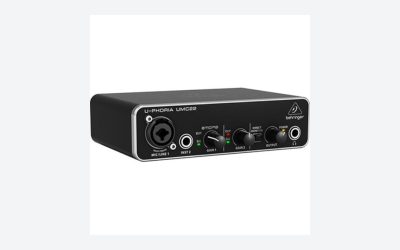
An audio interface is a small desktop box that sits between your microphone and your computer. You plug an XLR cable from the mic into the interface, connect the interface to your computer by USB, then select it as the input and output device in your recording, streaming, video-call, or editing software.
The first thing it provides is a microphone preamp. This raises the very quiet electrical signal coming from a dynamic microphone to a usable recording level. Without enough clean gain, you may need to turn the gain knob all the way up, which can make room noise and electronic hiss more noticeable. More gain is not automatically better, but it gives you more headroom to work with.
Second, an interface includes analog-to-digital conversion. Your microphone creates an analog signal; your computer records digital data. The interface handles that translation at common recording resolutions such as 24-bit audio and sample rates including 44.1 kHz or 48 kHz. For spoken-word recording, 48 kHz is a practical default because it matches most video workflows.
Third, it gives you better monitoring. Most compact interfaces have a headphone jack and a direct-monitor function or mix control. This lets you hear yourself without the distracting delay that can happen when monitoring through software. It also gives you a proper volume knob for headphones or powered desktop speakers.
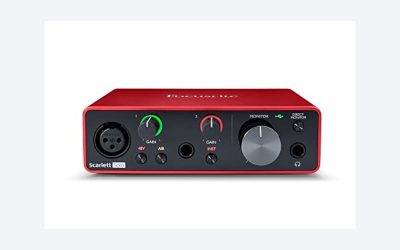
A single-input model is enough for one person using one XLR microphone. The Focusrite Scarlett Solo 3rd Gen, commonly found around $119.99 when still available from remaining stock, is a basic example of this format. The newer Scarlett Solo 4th Gen is commonly listed around $159.99 and adds updated features, including more available preamp gain than the earlier generation. Both are compact USB interfaces designed for a one-mic desktop setup, with a footprint of roughly 5.6 by 3.8 inches, so they do not demand much desk space.
For a typical dynamic mic used close to the mouth, a compact interface is often all you need. Keep the mic about 2 to 6 inches away, speak across the grille rather than directly into it, and use a pop filter or foam windscreen if plosives are a problem. Good mic placement does more for clarity than buying a more expensive box.
One caveat: some popular dynamic microphones are unusually gain-hungry. If you use one of these for soft speech, acoustic instruments, or recording from farther away, an entry-level interface may need to be turned up substantially. In that case, consider an interface with high available gain or an inline booster. Many inline boosters cost roughly $70 to $150 and require 48-volt phantom power from the interface, even though the dynamic microphone itself does not need phantom power.
Pros
- Lets an XLR dynamic mic work with a computer. This is the essential reason to buy one: it provides the preamp and USB conversion an ordinary XLR mic lacks.
- Better control over recording level. A physical gain knob makes it easy to set levels without digging through operating-system menus.
- Low-latency headphone monitoring. You can hear your voice in real time while recording, streaming, or taking calls.
- More flexible than a USB microphone. You can change microphones later without replacing the entire computer connection setup.
- Useful for more than one task. An interface can connect a microphone, headphones, and powered speakers, making it a tidy hub for a desk setup.
- Usually bus-powered. Small USB interfaces generally run from the computer connection, so there is no separate power brick to accommodate.
- Dynamic mics suit untreated rooms. While the interface does not remove noise, a close-used dynamic mic often picks up less distant room sound than a sensitive condenser.
Cons
- It is another purchase. Expect roughly $100 to $200 for a reputable entry-level one-input interface, before the cost of the microphone, XLR cable, and optional stand or boom arm.
- It adds a little setup. You need to select the interface in your software, set gain, connect headphones or speakers, and occasionally update drivers or firmware.
- Not every interface has enough gain for every dynamic mic. Low-output broadcast dynamics can benefit from a higher-gain preamp or inline booster.
- One-input models have limits. A Scarlett Solo-style interface is ideal for one microphone, but it cannot record two XLR microphones independently at the same time.
- It uses desk space and a USB port. The box is small, but cable management can become noticeable on a compact desk.
- Phantom power can be confusing. Most standard dynamic mics do not require 48V phantom power. It is generally best left off unless your mic or an inline booster specifically calls for it.
Who Should Buy It
Buy an audio interface if you already own, or specifically want, an XLR dynamic microphone. It is the sensible choice for podcasters, streamers, remote workers, voice-over beginners, musicians recording vocals or guitar amps, and anyone who wants a more permanent desk audio setup.
It is especially worthwhile if you care about monitoring through headphones, want physical level controls, or expect to upgrade microphones over time. An XLR-based system gives you choices: you can keep the interface and swap the microphone as your needs change. A compact one-input interface is also a good fit for solo creators who record one voice at a time.
Choose a two-input interface instead if you expect to record two people in the same room, such as a co-hosted podcast or interview. Buying a one-input unit because it is cheaper, then needing a second mic a month later, is usually false economy.
For most single-person voice setups in 2026, a basic USB interface in the $120 to $160 range is the practical middle ground: more capable than a direct-to-computer workaround, without paying for inputs and features you will not use.
Who Should Skip It
Skip a separate interface if convenience matters more than expandability and you have not bought a microphone yet. A USB dynamic microphone connects directly to a computer and can be an excellent choice for video calls, casual streaming, gaming, and simple voice recording. It reduces cables, setup time, and the number of controls to learn.
You can also skip one if you record entirely into a portable field recorder, use a mixer with USB output and decent mic preamps, or only need audio for a phone or camera. In those cases, adding a separate interface may duplicate equipment you already have.
Finally, do not buy an interface expecting it to fix a bad room, a poorly placed microphone, or noisy computer fans. It can provide a cleaner signal path and more usable gain, but it cannot make a distant microphone sound close and polished. Start with close mic placement, a stable stand, and sensible recording levels.
Cheaper Alternatives
| Option | Cost | Trade-off |
|---|---|---|
| USB dynamic microphone | $50–$180 | No separate interface required, but the mic and converter are one unit; upgrading one usually means replacing both. |
| Used entry-level USB interface | $50–$100 | Can be a strong value, but check that USB compatibility, included cables, controls, and drivers suit your computer. |
| Basic USB mixer with XLR input | $70–$150 | Useful for live controls and multiple sources, but budget mixers may have noisier preamps and less straightforward recording options. |
| Handheld recorder with XLR input | $100–$220 | Portable and independent of a computer, but less convenient as a permanent desktop headphone and speaker hub. |
| 3.5 mm computer mic adapter | $10–$30 | Not recommended for a normal XLR dynamic mic; weak preamps, noise, and connection mismatches are common. |
FAQ
Can I plug a dynamic microphone directly into my computer?
Only if it is a USB dynamic microphone. A conventional XLR dynamic mic needs a preamp and an audio conversion device, such as a USB audio interface, USB mixer, or recorder with computer-audio capability. Do not expect an inexpensive XLR-to-USB cable alone to deliver the same level of gain, monitoring, and control.
Do dynamic microphones need phantom power?
Most traditional dynamic microphones do not need 48V phantom power. Leave it off unless the microphone manufacturer says otherwise. However, an inline gain booster used with a dynamic mic often does require phantom power from the interface. That power feeds the booster, not the microphone itself.
How much gain does a dynamic microphone need?
There is no single number for every mic and voice. A close-spoken, average-output dynamic mic may work comfortably with a standard interface. Low-output broadcast models, quiet speakers, and distant placement demand more gain. If your gain knob is nearly maxed out and recordings are still quiet, consider closer placement first, then a higher-gain interface or inline booster.
Is the Scarlett Solo enough for a dynamic microphone?
Yes, for many one-person XLR dynamic-mic setups. The Scarlett Solo format provides one microphone input, a headphone output, and USB connection for recording or streaming. It is not the right size if you need two XLR microphones at once, and very low-output microphones may benefit from the higher-gain capability of a newer interface generation or an added gain booster.