
Key takeaways
- Solves low-gain problems: A 20dB to 30dB boost can make low-output dynamic mics much easier to use with entry-level interfaces, portable recorders, and camera XLR adapters.
- Can reduce audible hiss: If your current preamp gets noisy when pushed near maximum, lowering its gain after adding a booster may produce a quieter recording.
- Simple setup: There are no drivers, apps, batteries, or menus. It is an XLR-to-XLR hardware addition.
- Less expensive than replacing an interface: Spending about $40 to $75 can be more sensible than replacing a working interface solely because it lacks clean gain.
- Useful across multiple setups: One inline preamp can move between a desktop interface, a field recorder, a mixer, and certain camera rigs with XLR inputs.
- Helps preserve sensible gain staging: You can keep the receiving preamp out of its noisiest upper range instead of running it almost fully open.
The Short Answer
It depends: an inline mic preamp is worth it for XLR mics only when your microphone needs more clean gain than your interface, mixer, recorder, or camera adapter can provide without adding noticeable hiss.
This is most common with low-output dynamic microphones and some passive ribbon microphones. If you use a broadcast-style dynamic mic for podcasts, streaming, voice-over, or remote calls and regularly turn your gain knob close to maximum, an inline booster can be a practical fix. A basic model such as the StudioMan DPM1, priced around $40, can be enough for a budget setup; a more established option such as the Triton Audio FetHead, around $75, is often chosen for its compact build and straightforward design.
Our top picks
 StudioMan DPM1 XLR Dynamic Microphones Preamp
- 【Essential for Dynamic Mics & Ribbons】 Designed specifically…
- 【Studio-Grade Noise Reduction】 Say goodbye to background hiss
- 【Rugged Metal Build & Interference Shielding】 Built for…
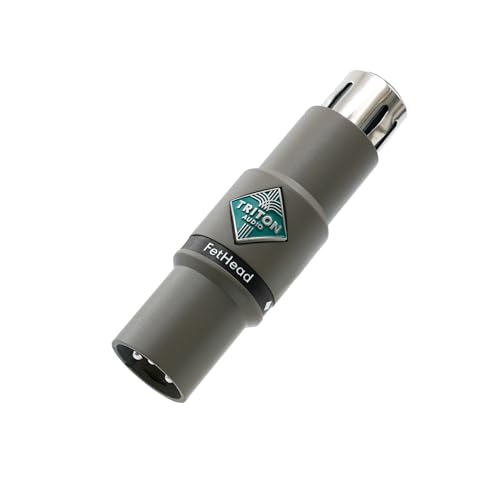 Triton Audio FetHead in-Line Microphone Preamp
- Low-Noise Class-A JEFT Amplifier
- Double Single-Ended Amplifier Topology
- Shielded Enclosure
As an Amazon Associate we earn from qualifying purchases at no extra cost to you.
But it is not a universal upgrade. Condenser microphones usually do not need one, and an inline preamp cannot repair poor room acoustics, a cheap cable, bad mic placement, or an inherently noisy interface. In 2026, the best reason to buy one remains simple: you need clean extra gain, not “better sound” in every situation.
What You Actually Get
An inline mic preamp, also called an inline gain booster or mic activator, is a small device that connects between an XLR microphone and an XLR cable. It uses 48V phantom power from the interface, mixer, or recorder to amplify the microphone signal before that signal reaches the receiving preamp.
Most units add roughly 20dB to 30dB of gain. The StudioMan DPM1, for example, is advertised with up to 29dB of gain and requires 48V phantom power. That added signal level means you can turn down the gain control on a noisy interface or camera adapter. The result can be a cleaner recording, especially when the original preamp becomes hissy near the top of its gain range.
It is important to understand what the device does not do. It does not replace your interface’s microphone preamp; it boosts the microphone’s output before it reaches that preamp. It also does not create detail that the microphone did not capture. You may hear less preamp noise, but you will not automatically get a richer voice, tighter bass, or a more professional room sound.
Most inline preamps are designed for dynamic microphones. Some are also suitable for passive ribbon microphones, but you should verify that explicitly before connecting one. Passive ribbons can be damaged by phantom power when connected incorrectly or used with faulty equipment. Do not assume that every booster is ribbon-safe just because it accepts an XLR connection.
For installation, connect the inline preamp directly to the microphone or at the microphone end of the XLR cable, connect the other end to your interface or mixer, then enable 48V phantom power on that input. Start with the interface gain set low and raise it gradually while monitoring your recording level. An inline booster can provide plenty of level; setting both the booster-fed signal and the interface gain too high can cause clipping.
Pros
- Solves low-gain problems: A 20dB to 30dB boost can make low-output dynamic mics much easier to use with entry-level interfaces, portable recorders, and camera XLR adapters.
- Can reduce audible hiss: If your current preamp gets noisy when pushed near maximum, lowering its gain after adding a booster may produce a quieter recording.
- Simple setup: There are no drivers, apps, batteries, or menus. It is an XLR-to-XLR hardware addition.
- Less expensive than replacing an interface: Spending about $40 to $75 can be more sensible than replacing a working interface solely because it lacks clean gain.
- Useful across multiple setups: One inline preamp can move between a desktop interface, a field recorder, a mixer, and certain camera rigs with XLR inputs.
- Helps preserve sensible gain staging: You can keep the receiving preamp out of its noisiest upper range instead of running it almost fully open.
Cons
- Requires phantom power: Most inline boosters need 48V phantom power to operate. If your recorder, camera adapter, or mixer cannot supply it, the booster will not work.
- Usually unnecessary for condensers: Condenser microphones generally have much higher output than low-sensitivity dynamics and already require phantom power themselves.
- Does not fix room noise: A booster raises the wanted voice signal, but it does not make a loud HVAC system, keyboard clicks, traffic, or echo disappear.
- Adds another connection: The extra device adds one more point to check if you have intermittent audio, a loose XLR connector, or routing confusion.
- May overload weak inputs: A high-output source, loud singer, or aggressively set booster can overload certain budget inputs. Begin with low interface gain.
- Not all models suit ribbon mics: Owners of passive ribbon microphones need to check compatibility carefully rather than buying the least expensive option.
- Can be redundant with a good interface: Many modern interfaces offer 60dB or more of usable gain. In that case, the purchase may add little or nothing.
Who Should Buy It
Buy an inline mic preamp if you use a low-output dynamic XLR microphone and hear steady hiss when recording at normal speaking volume. A common sign is that your interface gain control needs to sit at 80% to 100% for podcasting or streaming while your recorded waveform still looks weak.
It is especially sensible for people using dynamic broadcast or stage mics with inexpensive one- or two-channel USB interfaces, portable recorders, or basic camera audio adapters. These devices can work well, but their available clean gain varies widely. A booster may be the least disruptive improvement because it lets you keep the equipment you already own.
It also makes sense for users who record soft speech, quiet narration, acoustic instruments at moderate levels, or interviews where they cannot place the mic extremely close. Keep in mind that closer placement is still usually the better first move. For speech, placing a dynamic microphone about 2 to 4 inches from the speaker’s mouth, slightly off-axis to reduce plosives, often improves signal level more effectively than buying extra gear.
The StudioMan DPM1 is the value-oriented choice for someone who needs a basic 29dB boost for a dynamic mic and has reliable 48V phantom power available. The Triton Audio FetHead costs more, but it can appeal to buyers who prefer a well-known inline-preamp format and want a compact, dedicated solution without moving to a new interface.
Who Should Skip It
Skip it if you use a condenser microphone and have normal recording levels with your current equipment. Most condensers already output enough level that an inline booster is unnecessary and may reduce your usable headroom.
You should also skip it if the real issue is your recording environment. If your room is echoey, your desk vibrates, your computer fan is loud, or your mic is 12 inches away from your mouth, an inline preamp is not the answer. Improve placement first, add a boom arm or shock mount if needed, reduce background noise, and use soft furnishings or acoustic treatment where practical.
Do not buy one merely because internet discussions say a particular dynamic microphone “needs” a booster. The deciding factor is your complete signal chain. A microphone that needs help with one interface may work perfectly with another. Record a short sample first: if you can get a healthy level without obvious hiss or clipping, you do not need an inline preamp.
Finally, skip the accessory if you are already planning to replace an interface that has other limitations, such as unreliable drivers, inadequate inputs, poor headphone power, or missing monitoring controls. In that situation, putting the money toward a better interface can be the more lasting upgrade.
Cheaper Alternatives
| Option | Cost | Trade-off |
|---|---|---|
| Move the mic closer and speak across, not directly into, the capsule | $0 | Improves level and reduces room sound, but changes the on-camera or desk setup. |
| Lower background noise and soften the recording space | $0 to $100 | Can improve perceived quality more than added gain, but requires room changes and does not add electrical gain. |
| Use a foam windscreen or pop filter | $8 to $30 | Helps with plosives and allows closer placement, but will not cure a genuinely underpowered preamp. |
| Budget inline preamp, such as the StudioMan DPM1 | About $39.99 | Needs 48V phantom power and is intended for dynamic microphones. |
| Increase gain in editing | $0 if you already have software | Raises microphone signal and existing hiss together; it cannot improve a noisy recording. |
FAQ
Do inline mic preamps improve sound quality?
They can improve the practical quality of a recording when your current preamp adds hiss at high gain settings. They do not change the fundamental character of the microphone, remove room echo, or replace good technique. Think of one as a gain-staging tool rather than an audio-effect device.
Do I need 48V phantom power for an inline preamp?
Usually, yes. Most inline preamps use 48V phantom power from the connected interface, mixer, or recorder. The StudioMan DPM1 specifically requires 48V. Check your device’s manual before buying, because some camera adapters and portable recorders either do not provide phantom power or provide it only on selected inputs.
Can I use an inline preamp with a condenser microphone?
Physically, some combinations may function, but it is rarely useful. Condenser microphones normally provide enough output already, and adding 20dB to 30dB of boost can reduce headroom or make clipping easier. Use an inline booster mainly for low-output dynamics and compatible passive ribbons.
Is a $40 inline preamp good enough, or should I buy a $75 model?
If your goal is simply to add usable gain to a dynamic microphone, a roughly $40 model may be enough. Pay more when the higher-priced unit offers compatibility you need, stronger build confidence, a preferred gain amount, or a reputation that matters for professional work. Either way, confirm phantom-power requirements and microphone compatibility before ordering.








