Key takeaways
- Bandwidth: DDR5 gaming kits typically run 6000–6400MT/s, roughly double the 3200–3600MT/s that represents the practical DDR4 sweet spot.
- Latency: DDR4 still holds a nominal advantage in CAS latency (CL16 vs CL30), but DDR5’s higher clocks mean real-world nanosecond latency is now essentially level — and better on tuned CL30 kits.
- Architecture: Each DDR5 module carries two independent 32-bit sub-channels, improving efficiency under the scattered, parallel access patterns that modern game engines generate.
- Power and reliability: DDR5 moves voltage regulation onto the module via an integrated PMIC and adds on-die ECC, which corrects internal bit errors and improves stability at high frequencies.
- Capacity headroom: DDR5 scales cleanly to 64GB and 96GB kits, while DDR4 consumer platforms mostly cap out at 128GB with significant speed penalties when all four slots are populated.
- Compatibility: The standards are physically and electrically incompatible. The 288-pin connectors are keyed differently, and no motherboard supports both.
Memory is the one component most gamers still buy on autopilot, and in 2026 that habit costs real frames. DDR5 has spent four years maturing from an expensive early-adopter tax into the default standard: kits are faster, cheaper per gigabyte, and far better binned than the first-generation modules that gave the platform a rocky reputation. DDR4, meanwhile, refuses to die — it still powers millions of AM4 and LGA1700 systems that remain perfectly capable of high-refresh 1080p gaming.
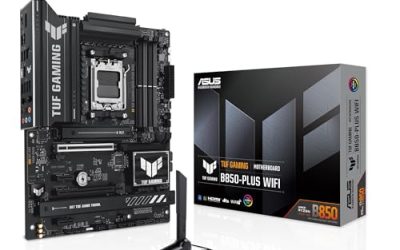
The choice matters because it is rarely just a RAM decision. Your motherboard socket dictates which standard you can run, so picking DDR5 usually means committing to a new CPU and board as well. Getting this right determines whether you spend a modest amount extending the life of a good machine, or invest in a platform that will carry you through the next two GPU generations. Below we break down where each standard genuinely wins.
Our top picks
 Lexar Thor Z RGB DDR5 RAM 32GB
- Unleash Next-Gen Dominance: Experience Lexar DDR5 RAM performance…
- Sleek & Robust Thermal Design: Engineered for both…
- Game in Style with Brighter RGB Lighting: Elevate…
 KLEVV CRAS V RGB DDR5 32GB
- [Precaution: Please check the motherboard's Qualified Vendor List…
- Breakthrough in Performance Unprecedented Speed Like Never Before:…
- Full Range for RGB Color Support Marvelous Lighting…
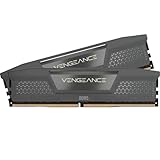
 CORSAIR Vengeance RGB DDR5 RAM 32GB
- Disclaimer: Maximum Speed requires overclocking/PC BIOS adjustments
- Dynamic Ten-Zone RGB Lighting: Illuminate your system with…
- Onboard Voltage Regulation: Enables easier, more finely-tuned, and…
| Product | Key specs | |
|---|---|---|
| Lexar Thor Z RGB DDR5 RAM 32GB | Unleash Next-Gen Dominance: Experience Lexar DDR5 RAM performance… Sleek & Robust Thermal Design: Engineered for both… Game in Style with Brighter RGB Lighting: Elevate… | Check price |
| KLEVV CRAS V RGB DDR5 32GB | [Precaution: Please check the motherboard's Qualified Vendor List… Breakthrough in Performance Unprecedented Speed Like Never Before:… Full Range for RGB Color Support Marvelous Lighting… | Check price |
| CORSAIR Vengeance RGB DDR5 RAM 32GB | Disclaimer: Maximum Speed requires overclocking/PC BIOS adjustments Dynamic Ten-Zone RGB Lighting: Illuminate your system with… Onboard Voltage Regulation: Enables easier, more finely-tuned, and… | Check price |
| KLEVV CRAS V RGB DDR5 32GB | [Precaution: Please check the motherboard's Qualified Vendor List… Breakthrough in Performance Unprecedented Speed Like Never Before:… Full Range for RGB Color Support Marvelous Lighting… | Check price |
 KLEVV FIT V DDR5 32GB KLEVV FIT V DDR5 32GB | Please be advised that this product is not… KLEVV is a premium memory brand introduced by… Supercharged for Content Creators: Experience seamless multitasking and… | Check price |
 KLEVV Urbane V RGB DDR5 32GB KLEVV Urbane V RGB DDR5 32GB | Crafted for Gamers and Creative Professionals: Turbocharge your… Stylish Design and Impeccable Cooling: The URBANE V… Stunning RGB Illumination: Unleash your full aesthetic potential… | Check price |
 TEAMGROUP Elite SODIMM DDR5 32GB TEAMGROUP Elite SODIMM DDR5 32GB | Faster than ever with 5600MHz frequency, new structural… Conserve energy with energy-efficient 1.1V working voltage. Supports on-die ECC for more stable systems. | Check price |
 Crucial 32GB DDR5 RAM Kit Crucial 32GB DDR5 RAM Kit | Boosts System Performance: 32GB DDR5 RAM laptop memory… Accelerated gaming performance: Every millisecond gained in fast-paced… Optimized DDR5 compatibility: Best for 12th Gen Intel… | Check price |
As an Amazon Associate we earn from qualifying purchases at no extra cost to you.
⚡ Save on Your Next PC — Amazon Prime
Prime members get fast free shipping on the systems above, plus early access to Prime Day & Black Friday PC deals. New members get a 30-day free trial.
Watch: DDR5 vs DDR4 RAM: Does It Matter in 2026? — Video Review
Quick Verdict
DDR5 is the correct choice for anyone building a new gaming PC in 2026 — it is the only option on AMD’s AM5 and Intel’s current sockets, it delivers meaningfully better 1% lows in CPU-bound titles, and 32GB kits now sit close to DDR4 pricing. DDR4 remains the smart, unglamorous pick if you already own an AM4 or LGA1700 system and want to jump from 16GB to 32GB for the price of a game or two, rather than replacing three components at once.
Key Differences
- Bandwidth: DDR5 gaming kits typically run 6000–6400MT/s, roughly double the 3200–3600MT/s that represents the practical DDR4 sweet spot.
- Latency: DDR4 still holds a nominal advantage in CAS latency (CL16 vs CL30), but DDR5’s higher clocks mean real-world nanosecond latency is now essentially level — and better on tuned CL30 kits.
- Architecture: Each DDR5 module carries two independent 32-bit sub-channels, improving efficiency under the scattered, parallel access patterns that modern game engines generate.
- Power and reliability: DDR5 moves voltage regulation onto the module via an integrated PMIC and adds on-die ECC, which corrects internal bit errors and improves stability at high frequencies.
- Capacity headroom: DDR5 scales cleanly to 64GB and 96GB kits, while DDR4 consumer platforms mostly cap out at 128GB with significant speed penalties when all four slots are populated.
- Compatibility: The standards are physically and electrically incompatible. The 288-pin connectors are keyed differently, and no motherboard supports both.
DDR5: The Standard for New Builds
DDR5’s advantage shows up where it matters most to gamers: frame consistency. In CPU-limited scenarios — large-scale strategy, simulation titles, competitive shooters at 1080p with a high-end GPU — the extra bandwidth reduces stutter and lifts 1% lows even when average framerates look similar. Kits built on SK Hynix A-Die silicon, such as the KLEVV CRAS V RGB 6000 CL30 and the non-RGB KLEVV FIT V 6000 CL30, are the current value benchmark because they hit tight timings at a modest 1.35V, which keeps memory controller temperatures sensible on AM5.
Beyond raw speed, DDR5 is where the ecosystem support lives. Both XMP 3.0 and AMD EXPO profiles are standard on quality kits, so enabling rated speed is a single BIOS toggle. The Lexar Thor Z RGB 6000 CL38 is a sensible entry point with on-die ECC and PMIC, while the CORSAIR Vengeance RGB 6000 CL36 offers the broadest motherboard QVL coverage if you want a guaranteed-first-boot experience. Pushing higher, the KLEVV CRAS V RGB 6400 CL30 suits Intel builds and tuned AM5 systems, and the KLEVV Urbane V RGB 6000 CL30 splits the difference with understated styling.
DDR4: The Value Upgrade Path
Dismissing DDR4 in 2026 would be a mistake. A Ryzen 7 5800X3D or Core i5-13600K paired with 32GB of 3600 CL16 remains a genuinely strong 1440p gaming setup, and that memory now costs very little. If your bottleneck is a four-year-old GPU or a 16GB capacity ceiling, spending on DDR4 and putting the savings toward graphics will produce a far larger performance gain than a full platform migration.
The limitations are structural rather than immediate. DDR4 is end-of-life: production is winding down, new CPUs will not support it, and prices for the remaining stock have begun drifting upward rather than falling. You are buying into a dead end, which is fine if you plan to replace the whole system in two or three years, and poor value if you expect this build to keep evolving with new components.
Which Should You Buy?
- For a new 2026 build: DDR5, without hesitation — a 32GB 6000 CL30 kit such as the KLEVV CRAS V RGB or FIT V is the platform sweet spot.
- For an existing AM4 or LGA1700 rig: Stay on DDR4 and spend the difference on your GPU or an SSD.
- For competitive high-refresh gaming: DDR5 at 6000–6400 CL30, where improved 1% lows translate directly into smoother tracking.
- For streaming, editing, or AI workloads: DDR5’s bandwidth and 64GB-plus scaling make it the only sensible option.
- For maximum compatibility with zero tuning: The CORSAIR Vengeance RGB 6000 CL36, which is validated across virtually every current board.
Frequently Asked Questions
Can I install DDR5 in a DDR4 motherboard?
No. Despite both using 288-pin DIMMs, the notch positions and electrical designs differ, and the modules will not physically seat. Upgrading to DDR5 requires a compatible motherboard and CPU.
Is 32GB enough for gaming in 2026?
Yes. A handful of demanding titles now exceed 16GB with high-resolution texture packs, but 32GB covers current games comfortably alongside a browser, Discord, and streaming software. 64GB is worth it only for content creation or heavy multitasking.
Does faster RAM actually increase FPS?
It depends on the bottleneck. GPU-limited 4K gaming shows minimal difference, but CPU-bound scenarios can gain 10–15% moving from slow to well-tuned memory — and the improvement to frame pacing is often more noticeable than the average FPS figure suggests.
What is the difference between XMP 3.0 and EXPO?
They are overclocking profiles stored on the module — XMP 3.0 is Intel’s, EXPO is AMD’s. Most quality kits, including the KLEVV CRAS V and FIT V ranges, carry both, so a single BIOS setting applies the rated speed regardless of platform.
Final Verdict
If you are building fresh, buy DDR5 and target 32GB at 6000MT/s CL30 — the KLEVV CRAS V RGB and FIT V kits deliver that specification at the best price, with the Lexar Thor Z and CORSAIR Vengeance offering solid alternatives depending on your aesthetic and compatibility priorities. If you already own a capable DDR4 system, resist the upgrade itch, add capacity cheaply, and save your budget for a platform jump when your CPU genuinely holds you back.