Key takeaways
- Wired security cameras get their power and video connection over a cable, which makes them steadier and easier to trust for permanent.
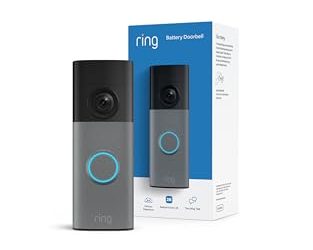
Wired security cameras get their power and video connection over a cable, which makes them steadier and easier to trust for permanent, always-on coverage, while wireless cameras send video over Wi-Fi and run on batteries or a plug, which makes them far easier to install and move. If you own your home and can run cable, wired suits main entrances and long-term coverage. If you rent or need flexibility, wireless is usually the practical pick.
The labels cause confusion because “wireless” rarely means “no wires at all.” Many wireless cameras still need a power cable, and many wired cameras still use Wi-Fi for remote viewing. This guide separates power from data, compares the two designs, and explains what to check on the listing so the camera fits your home, network, and budget tier.
What “Wired” and “Wireless” Really Mean
Two questions define a camera: how does it get power, and how does it send video? A true wired camera uses one cable for both, commonly an Ethernet cable that carries data and power together. A wireless camera sends video over Wi-Fi, and then takes power from a battery, a solar panel, or a plug. Some models mix the two: a camera that runs on a power adapter but reports over Wi-Fi is often sold as wireless even though it needs an outlet nearby.
Side-by-Side Comparison
| Factor | Wired | Wireless |
|---|---|---|
| Installation | More work: cable runs, drilling, a recorder or switch | Simple: mount, connect to Wi-Fi, set up in an app |
| Reliability | Stable connection not affected by Wi-Fi interference | Depends on signal strength and network quality |
| Power | Cable provides continuous power | Battery needs recharging; plug-in models need an outlet |
| Video quality headroom | Cable handles high-resolution streams well | Bandwidth limits can affect quality on busy networks |
| Flexibility | Fixed once installed | Easy to move or take when you relocate |
| Exposure to tampering | Cut cables are a risk if exposed | Signal jamming and dead batteries are risks |
| Best for | Owned homes, permanent entry points | Rentals, quick coverage, hard-to-wire spots |
How to Decide for Your Home
Consider Your Property and Permissions
Renters often cannot drill through walls or run cable through shared spaces, which points toward wireless. Homeowners with an attic, crawl space, or conduit can run cable more easily, and that effort pays off in a connection that stays stable year after year. For electrical work or cable runs through walls, a licensed professional can help you stay within local codes.
Test Your Wi-Fi Where the Camera Will Sit
A wireless camera is only as dependable as the signal it receives. Use your phone to check signal strength at the exact spot, not just inside the house. Thick walls, metal siding, and distance from the router weaken the link. If the signal is weak, consider a mesh node or a wired design for that location.
Think About Power and Maintenance
Battery cameras remove the cable but add a chore: recharging, which can be frequent in cold weather or when motion events are many. Plug-in wireless cameras avoid that but need an outlet. Wired cameras with a cable carrying power avoid both problems once installed.
Plan for Storage and Subscription Needs
Wired systems often record to a local recorder, while wireless cameras frequently use cloud storage or memory cards. Read what the listing says about local storage, whether cloud features need a subscription, and how long clips are kept. These ongoing details can matter more than the camera itself.
Features Worth Comparing Either Way
Regardless of connection, compare the same basics: resolution, night vision range, field of view, weather resistance for outdoor use, motion detection options, and two-way audio if you want it. Look at how the camera handles alerts, because too many false alerts push people to ignore them. Check which smart home platforms the camera supports if you already use one.
Power Over Ethernet in Plain Language
Many wired systems use power over Ethernet, often shortened to PoE. A single network cable carries both power and video from a recorder or switch to the camera, so there is no outlet needed at the mounting spot. The benefits are a clean install and steady power; the drawbacks are the cable run and the need for a compatible switch or recorder. If you are planning more than three or four cameras, PoE often becomes the tidier path, because every camera connects back to one central box.
Where Each Type Works Best
- Front door and driveway of an owned home: wired for stable, always-on recording.
- Back patio or side yard with no nearby outlet: battery or solar wireless.
- Indoor room coverage in a rental: plug-in wireless, since it avoids drilling.
- Detached garage or shed: wired if a trench or conduit is possible, otherwise wireless with a strong signal extender.
Picture Quality and Bandwidth
Higher resolution means larger video streams. A wired camera on a dedicated cable handles that load easily. Several wireless cameras sharing one home network can crowd it, causing buffering for everyone in the house, including people streaming games. If you plan multiple wireless cameras, look for models that let you lower the bitrate or record locally, and consider placing them on a separate network band or a dedicated access point.
Night vision deserves a second look too. Infrared and color night modes both appear in listings, and the practical difference is whether you want black-and-white images or a light that switches on when motion occurs. A bright spotlight can deter visitors but may also disturb neighbors, so aim it carefully.
Security and Privacy Basics
Any camera that connects to a network should use a strong, unique password and, where offered, two-factor sign-in. Keep the firmware updated and change default settings. Point outdoor cameras at your own property and entrances, and learn local rules about recording audio or capturing neighbors’ spaces, since laws vary by place. For questions about legal requirements in your area, a local authority or attorney is the right source.
Before You Buy Checklist
- Decide which spots need coverage and whether each has power nearby.
- Check Wi-Fi strength at each camera location.
- Confirm whether you can drill or run cable, especially if you rent.
- Read the storage options and any subscription terms.
- Check weather resistance for outdoor locations.
- Look at app reviews and update policy in 2026 listings, since software support affects daily use.
Common Mistakes
- Assuming a wireless camera needs no power source at all.
- Mounting a Wi-Fi camera at the edge of the router’s range.
- Ignoring subscription costs for cloud clips and extended storage.
- Leaving the default password in place after setup.
- Placing cameras too low or too exposed, where they can be reached or covered.
Related guides
- Hall Effect Vs Potentiometer Controller Sticks Explained
- Low Profile Cpu Coolers For Small Form Factor Pcs
- How To Transfer Nintendo Switch Data To A New Console
Frequently Asked Questions
Are wired cameras more secure than wireless ones?
Wired connections avoid Wi-Fi interference and jamming, but they can still be reached if cables are exposed or the network is poorly protected. Strong passwords, updates, and good placement matter for both types.
Do wireless cameras work if the internet goes down?
Many lose remote viewing and cloud recording without internet, though some keep recording to a memory card. Check the listing for local storage support if outages are a concern.
How often do battery cameras need charging?
It varies with motion events, temperature, and video settings. Listings often give an estimate, but real use differs, so choose a model with easy battery access or a solar option if you want fewer chores.
Can I mix wired and wireless cameras in one system?
Often yes, if they work with the same app or recorder. Verify compatibility before buying, since some ecosystems only support their own cameras.
FAQ
Are wired cameras more secure than wireless ones?
Do wireless cameras work if the internet goes down?
How often do battery cameras need charging?
Can I mix wired and wireless cameras in one system?
More from Amazon
Programs that pair well with the guide above. Offers and eligibility are set by Amazon and may change.
Free shipping on eligible items, Prime Video and more. Eligible new members can start with a free trial.
Start a Prime free trialAd-free music streaming. Eligible new subscribers can start with a free trial.
Try Music Unlimited freeA Prime membership for ages 18-24 with a trial period. Eligibility is set by Amazon.
See Prime for Young AdultsAudiobooks and podcasts to listen to on the go. Eligible new members can start with a free trial.
Try Audible freeAs an Amazon Associate we earn from qualifying purchases.