Our Top Picks
 MOTPK Gaming Desk with Power Outlet & LED48 Inch22.44 x 48.43 x 29.53 inches43 poundsCheck on Amazon
 Bestier 42-Inch L-Shaped Computer Desk with Charging &42 Inch32.28 x 41.93 x 35.91 inches32.63 poundsCheck on Amazon
A small room forces every choice to earn its place, and the desk is the biggest one. A gaming desk that is too wide blocks the door, crowds the bed, or leaves no room for the chair to pull out, while a desk that is too small holds the monitor and keyboard and nothing else. The right desk for a tight space fits the monitor, keyboard, and tower without swallowing the room, and it keeps cables and clutter out of the way.
This guide is for gamers setting up in a bedroom, a dorm room, or a shared corner of a flat. Every desk below was chosen from the names and specifications on its Amazon page, with the desktop size, storage, and built-in features that decide whether a small desk works for a full gaming setup, including the footprint that matters most in a tight room.
Quick Picks
As an Amazon Associate we earn from qualifying purchases.
| Product | Best for | Key spec from title |
|---|---|---|
| MOTPK 47 Inch Gaming Desk | A full setup in a tight room | 47-inch desktop with power outlet and LED lights |
| CubiCubi 40 Inch Computer Desk with 2 Drawers | A single-monitor corner | 40-inch desktop with two storage drawers |
| Bestier 42 Inch L-Shaped Gaming Desk | A corner that needs storage | 42-inch L-shaped desktop with power outlets |
| SEDETA 32 Inch Corner Standing Desk | A tiny room with sit-stand use | 32-inch height-adjustable corner desk with drawer |
How to Choose
Measure Your Space First
Start with a tape measure, not a shopping list. Measure the wall where the desk will sit, the depth from the wall to where the chair needs to roll back, and the height of any windowsill or radiator that could get in the way. Leave at least enough room to pull the chair out and stand up without hitting the bed or the door. A desk that looks compact online can still block a walkway once the chair and the tower are in place. Write the numbers down and check them against the dimensions on the product page before ordering, because a desk that does not fit has to go back in the box.
Desktop Size and Shape
For a small room, a desktop between 40 and 47 inches wide usually holds a monitor, a keyboard, and a mouse without crowding the edges. A straight desk suits a flat wall, while an L-shaped desk turns an unused corner into workspace and keeps the tower off the main surface. A corner desk with a short return is often the best use of a tight room, since it gives more surface without reaching further into the room. Check the depth too: a desk around 20 inches deep fits a monitor and keyboard, while a deeper top leaves room for speakers, a notebook, or a small lamp.
Storage and Cable Management
Small desks earn their keep with storage that does not take floor space. A monitor shelf lifts the screen and frees the desktop underneath for a keyboard or a notebook. Drawers and side shelves hold controllers, headsets, and chargers that would otherwise pile up on the surface. A built-in power outlet or a cable tray keeps the monitor, the PC, and the phone charger plugged in without a tangle of wires across the floor. Look for a headphone hook and a cup holder too, since small items are the first things to clutter a compact desk, and a tidy desk makes a small room feel bigger.
Build Quality and Stability
A gaming desk in a small room gets leaned on, bumped by the chair, and loaded with a monitor, a tower, and a stack of gear, so the frame has to be solid. A steel frame with a thick top resists wobble when the keyboard gets a hard session, while a thin top can sag under a heavy monitor. Check the load rating on the product page and compare it with the weight of everything you plan to put on the desk. Crossbars and adjustable feet help on uneven floors, and a desk that stays steady keeps the monitor from shaking during play, which matters more in a tight room where every bump reaches the screen.
The 4 Best Options
MOTPK 47 Inch Gaming Desk with Power Outlet and LED Lights
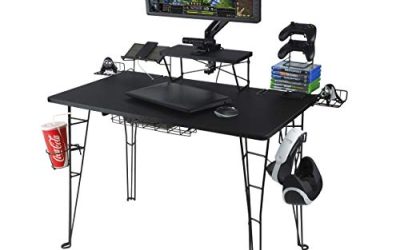
The MOTPK 47 inch desk is the most complete small-space setup here, with a wide top that holds a monitor, keyboard, and speakers without feeling cramped. A built-in power outlet sits on the desktop, so the monitor and phone charger plug in without crawling under the desk, and the LED light strip adds a glow that suits a gaming corner. The carbon fiber textured top resists scratches, and a PC storage shelf keeps the tower off the floor. It is the widest desk in this guide, so measure the wall first and confirm the chair has room to roll back.
Specs
- 47-inch desktop with carbon fiber texture
- Built-in power outlet on the desktop
- LED light strip
- PC storage shelf
Best for: A full gaming setup in a tight room.
Watch out for: The 47-inch width needs a clear wall run, so check the tape measure before ordering.
CubiCubi Computer Desk with 2 Drawers, 40 Inch

The CubiCubi 40 inch desk is the simplest pick in this guide, and its small footprint fits a bedroom corner or a dorm room with room to spare. Two drawers sit under the top and swallow controllers, cables, and notebooks that would otherwise cover the desktop. The clean rectangular top holds a single monitor and a keyboard with space left for a mug, and the frame keeps the desk steady at this size. It has no lighting or built-in power, so it suits buyers who want a plain desk that does the basics well and costs less in floor space than any other pick here.
Specs
- 40-inch desktop
- Two storage drawers
- Modern black finish
Best for: A single-monitor setup in a small corner.
Watch out for: The narrow top leaves little room for a second monitor or large speakers.
Bestier 42 Inch L-Shaped Gaming Desk with Power Outlets and LED Lights
The Bestier 42 inch L-shaped desk turns a corner into a full gaming station without reaching far into the room. The short return holds the tower or a second screen, while the main top carries the monitor and keyboard, and reversible shelves give storage that can face either side. Built-in power outlets sit on the desktop for the monitor and charger, and the LED light strip sets the mood for evening sessions. The carbon fiber surface wipes clean, and the steel frame holds the desk steady when the action gets fast and the keyboard takes a beating.
Specs
- 42-inch L-shaped desktop
- Built-in power outlets
- LED light strip
- Reversible storage shelves and hooks
Best for: A corner setup that needs storage and lighting.
Watch out for: The L shape needs a free corner, so it does not suit a flat wall.
SEDETA Corner Electric Standing Desk, 32 Inch

The SEDETA 32 inch corner desk is the smallest pick here, and its electric height adjustment makes it the most flexible. The motor lifts the desktop for standing sessions and lowers it for seated play, which suits a room where one desk has to serve work and gaming. A drawer holds small gear, and the corner shape tucks into a spot that a straight desk would waste. The 32-inch top fits a single monitor and keyboard, so it suits compact setups rather than a wide dual-screen rig, and the height range covers both a tall chair and standing use.
Specs
- 32-inch corner desktop
- Electric height adjustment
- Storage drawer
- 200-pound load capacity
Best for: A tiny room where one desk serves work and gaming.
Watch out for: The compact top fits one monitor, so a dual-screen setup will feel cramped.
Which One Fits Your Situation
A Corner Setup in a Bedroom
If the only free spot is a bedroom corner, the Bestier L-shaped desk uses that corner best. Its return holds the tower off the main top, the shelves keep gear out of sight, and the built-in outlets mean no extension cord across the floor. The MOTPK is the fallback when the corner is too tight for an L shape, since its straight 47-inch top fits a flat wall and leaves room for the chair.
One Monitor and a Console
For a single monitor with a console or a laptop, the CubiCubi 40 inch desk is enough. Its drawers hide controllers and cables, and the small top keeps the setup tidy in a dorm room or a shared flat. Add the SEDETA if the room doubles as a workspace, since its height adjustment suits long study sessions as well as evening play.
A Desk That Doubles as a Workstation
When the same desk has to handle work by day and games at night, the SEDETA standing desk is the pick. Raise it for standing work, lower it for gaming, and keep the drawer for notebooks and chargers. The MOTPK suits the same job in a bigger room, since its wide top and power outlet handle a monitor, a laptop, and a phone charger at once.
A Standing Desk in a Tiny Room
If standing while you play matters, the SEDETA is the only pick here with a motor. Its 32-inch corner shape fits where a full standing desk would not, and the height adjustment works for both a tall chair and a standing session. The trade is surface space, so keep the setup to one monitor and a compact keyboard.
Common Mistakes
- Buying a desk wider than the wall it has to sit against.
- Forgetting the space the chair needs to roll back.
- Ignoring the depth, so the monitor ends up too close to your eyes.
- Skipping the load rating and overloading a thin top.
- Choosing a desk with no cable plan, so wires trail across the floor.
Frequently Asked Questions
What size gaming desk fits a small room?
A desktop between 40 and 47 inches wide usually fits a small room, with enough space for a monitor, a keyboard, and a mouse. Measure the wall and the chair clearance first, then match the desk width to those numbers. A corner or L-shaped desk often gives more usable surface than a straight desk of the same width.
Is a 40-inch desk big enough for gaming?
A 40-inch desk is enough for a single monitor, a keyboard, and a mouse, which covers most gaming setups. It struggles with a second monitor, large speakers, or a full-size tower on the desktop. If the setup stays compact, a 40-inch top keeps the room open and the desk easy to place.
Are L-shaped desks good for small spaces?
An L-shaped desk is often the best use of a small room, since it turns an unused corner into workspace without reaching further into the room. The return holds the tower or a second screen, while the main top carries the monitor and keyboard. It only works when the room has a free corner to spare.
Do small gaming desks need built-in power outlets?
Built-in outlets are not required, but they help a lot on a small desk. They keep the monitor, the PC, and a phone charger plugged in without a power strip taking up floor space or a tangle of cables behind the desk. A desk without outlets works if the wall socket is close and a short cable tray is fitted.
FAQ
What size gaming desk fits a small room?
Is a 40-inch desk big enough for gaming?
Are L-shaped desks good for small spaces?
Do small gaming desks need built-in power outlets?
More from Amazon
Programs that pair well with the guide above. Offers and eligibility are set by Amazon and may change.
Free shipping on eligible items, Prime Video and more. Eligible new members can start with a free trial.
Start a Prime free trialAd-free music streaming. Eligible new subscribers can start with a free trial.
Try Music Unlimited freeA Prime membership for ages 18-24 with a trial period. Eligibility is set by Amazon.
See Prime for Young AdultsAudiobooks and podcasts to listen to on the go. Eligible new members can start with a free trial.
Try Audible freeAs an Amazon Associate we earn from qualifying purchases.