Our Top Picks
 Razer Iskur V2 X Ergonomic Gaming ChairStandard27.58 x 27.58 x 49.64 inches50.26 poundsCheck on Amazon
A gaming chair is the part of your setup your body actually touches for hours at a time, so it deserves more thought than the colour of the stitching. The real decision is about fit: a seat that holds your back in a neutral position, armrests that line up with your desk, and a frame that stays steady when you lean back. Get those three things right and long sessions stop ending in a stiff neck and sore shoulders.
This guide is for PC gamers who play for hours most evenings, streamers who sit on camera all day, and anyone replacing a worn-out office chair with something built for gaming. Every chair below was chosen from the name and specifications stated on its Amazon page, with the focus on how it supports real bodies during real sessions rather than how it looks in a product photo.
Quick Picks
As an Amazon Associate we earn from qualifying purchases.
| Product | Best for | Key spec from title |
|---|---|---|
| AKRacing Core Series EX-Wide | Bigger frames needing a wide seat | Wide seat, high and wide backrest |
| Corsair T3 Rush (2023) | Cool fabric comfort for long sessions | Soft fabric exterior, memory foam lumbar |
| AndaSeat Kaiser 3 Large | Tall gamers wanting maximum adjustment | XL size, 165-degree recline |
| Razer Iskur V2 X | Built-in lumbar support without pillows | Built-in lumbar support, widened seat base |
How to Choose
Match the chair to your body, not the other way round
Gaming chairs are built around a size range: one that is too small pinches your shoulders, while one that is too large leaves your feet dangling and your lower back unsupported. Check the seat width and depth against your own frame, and the stated height range before anything else. Wide models suit larger players, while a standard racing seat fits slimmer builds better. The gas lift range matters too: you want your feet flat on the floor with your knees at roughly a right angle. If a chair lists a weight capacity, treat it as a real limit: an overloaded lift sags over time.
Look at lumbar support before looks
Lower back support decides whether a chair stays comfortable after the third hour. Some chairs use separate pillows that slide around and need constant adjustment, while others build the support into the backrest itself so it stays where your spine needs it. A built-in adjustable lumbar system is the most reliable option because it moves with you when you shift position. If you prefer pillows, check that they strap on firmly and sit at the right height for your back. Either way, the support should fill the natural curve of your lower back without pushing you forward, and it should still feel right when you lean back to watch a cutscene.
Check the armrests and the recline
Armrests that only move up and down force your shoulders into one fixed position, which gets tiring during long sessions. Four-way armrests that also slide forward, back and sideways let you line your elbows up with your keyboard and mouse, and that small adjustment takes real strain off your shoulders. The recline matters just as much: a backrest that locks at several angles lets you sit upright for competitive play and lean back between matches. A rocking tilt adds a little movement that keeps your posture from freezing up. Test the locking positions in the listing details and make sure the mechanism feels solid rather than wobbly.
Consider the material and the frame underneath
Fabric breathes and stays cool through long sessions, which makes it the better choice if your room runs warm or you play for hours without a break. Leather-style upholstery wipes clean easily and looks sharp, but it can feel sticky in summer and cold in winter. Under the cover, a steel frame and a Class-4 gas lift are the parts that decide whether the chair lasts years or starts creaking after a few months. Casters should roll smoothly on your floor type, and a wide five-star base keeps the chair stable when you lean. Read the listing for the frame material rather than trusting the photos.
The 4 Best Options
AKRacing Core Series EX-Wide
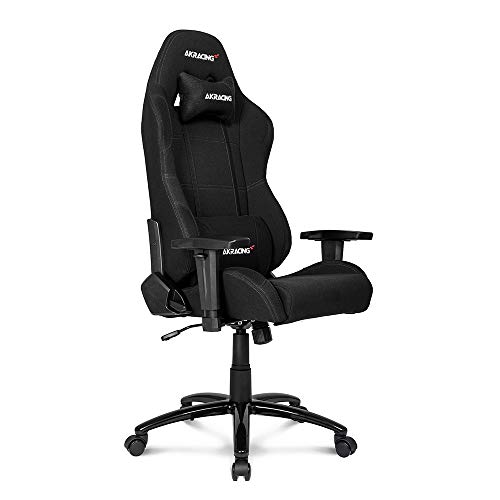
The AKRacing Core Series EX-Wide is built for gamers who find standard racing seats too narrow, with a wide seat and a high, wide backrest that give broader shoulders and hips room to sit naturally. The fabric upholstery breathes well during long sessions, and the full set of adjustments covers reclining, swivelling, tilting, rocking and seat height, so you can tune the position rather than settling for one fixed posture. It suits players who have always felt squeezed by regular gaming chairs and want the same racing style in a roomier cut.
Specs
- Wide seat with high and wide backrest
- Fabric upholstery
- Recline, swivel, tilt, rocker and seat height adjustment
- 5/10 warranty coverage
Best for: Larger gamers who need a genuinely wide seat and backrest.
Watch out for: The wide frame takes up more floor space than a standard racing chair, so measure your desk area first.
Corsair T3 Rush (2023)

The Corsair T3 Rush (2023) trades the usual leather-style cover for a soft fabric exterior that stays cool and dry through long sessions, which makes it a strong pick if your gaming room runs warm. A padded neck cushion and a memory foam lumbar support come included, and the adjustable seat height and 4D armrests let you line the chair up with your desk and keyboard. The racing-inspired shape keeps the familiar gaming look while the breathable fabric does the quiet work of keeping you comfortable hour after hour.
Specs
- Soft fabric exterior
- Padded neck cushion
- Memory foam lumbar support
- Adjustable seat height
- 4D armrests
- Embedded steel frame
Best for: Gamers who run warm and want a breathable fabric chair for long sessions.
Watch out for: Fabric needs more cleaning care than wipe-clean leather-style covers, especially if you eat at your desk.
AndaSeat Kaiser 3 Large

The AndaSeat Kaiser 3 Large is the chair for tall and broad gamers who want nearly everything adjustable, from the magnetic 4D armrests to the integrated lumbar support that moves up, down, in and out. The backrest reclines to 165 degrees with five lockable positions, so you can sit upright for ranked matches and stretch out flat between games. A magnetic head pillow stays exactly where you put it, and the aluminium wheelbase and Class-4 gas lift give the whole chair a planted, heavy-duty feel under a larger frame.
Specs
- XL size for larger frames
- Reclines to 165 degrees with five lockable positions
- Magnetic 4D armrests
- Magnetic head pillow
- Integrated 4-way lumbar support
- SGS Class-4 gas lift
- Aluminium wheelbase
Best for: Tall gamers who want the widest range of adjustments in one chair.
Watch out for: The XL size and heavy build make it a two-person job to move once assembled.
Razer Iskur V2 X
The Razer Iskur V2 X skips the loose lumbar pillow entirely and builds the lower back support into the chair itself, which means it stays in place no matter how much you shift during a session. The widened seat base gives your hips room without pushing your legs together, and the high-density foam cushions hold their shape instead of flattening out after a few months. A 152-degree recline and 2D armrests cover the adjustments most players actually use, and the plush fabric finish keeps the chair comfortable against bare arms in warm rooms.
Specs
- Built-in lumbar support
- Widened seat base
- High-density foam cushions
- 152-degree adjustable recline
- 2D armrests
- Plush fabric finish
Best for: Players who hate fiddly lumbar pillows and want support built into the chair.
Watch out for: The 2D armrests adjust less than 4D armrests, so check the height range fits your desk.
Which One Fits Your Situation
You are tall or broad and standard chairs feel tight
Pick the AndaSeat Kaiser 3 Large or the AKRacing Core Series EX-Wide. Both are built around a larger frame, with wider seats and taller backrests that let you sit without your shoulders spilling over the edges. The Kaiser 3 adds more adjustment if you like to fine-tune everything, while the EX-Wide keeps things simpler with its wide fabric seat.
You play in a warm room and sweat through sessions
Go for the Corsair T3 Rush (2023) or the Razer Iskur V2 X. Both use breathable fabric rather than leather-style covers, so heat escapes instead of building up against your back. The T3 Rush adds a memory foam lumbar cushion, while the Iskur V2 X keeps its support built in.
You want the least fuss with lumbar support
Choose the Razer Iskur V2 X. Its built-in lumbar support never slides out of place, which suits players who have spent too long repositioning loose pillows mid-match. Set the height once and forget about it. There is no pillow to lose, no strap to tighten, and nothing to readjust when you sit back down. The support is part of the backrest itself, so it works the same way every session.
You sit for very long stretches and adjust constantly
Take the AndaSeat Kaiser 3 Large. Magnetic armrests, a four-way lumbar system and five lockable recline positions mean you can shift posture through a long evening without standing up to fix the chair. The magnetic head pillow stays put, the aluminium wheelbase keeps the chair planted, and the Class-4 gas lift holds your height all evening. When a session runs past midnight, that adjustability is what keeps your back from complaining.
Common Mistakes
- Buying by looks alone and ignoring seat width, seat depth and the stated height range.
- Choosing a chair rated below your weight and wondering why the gas lift sinks after a few months.
- Treating a loose lumbar pillow as real support when it slides out of place every session.
- Setting the chair too high or too low so your feet dangle or your knees sit above your hips.
- Forgetting to measure the room, then finding the wide frame blocks a door or crowds the desk.
Frequently Asked Questions
What size gaming chair should I buy?
Measure your height, weight and shoulder width, then compare them with the seat width, seat depth and height range in the listing. A chair that matches your frame keeps your feet flat on the floor and your back against the support. Wide models exist for larger players, and buying one size up is usually better than squeezing into a standard racing seat.
Is fabric or leather-style upholstery better for gaming chairs?
Fabric breathes and stays cooler during long sessions, which suits warm rooms and players who sit for hours. Leather-style covers wipe clean in seconds and look sharp, but they can feel sticky in summer. The right choice depends on your room temperature and how much cleaning you are willing to do.
Do I need a lumbar pillow if the chair has built-in support?
No. Built-in lumbar support is designed to replace the pillow, and it stays in place when you move. A pillow adds flexibility if you like to adjust the position yourself, but it needs straps that hold firmly or it will slide down. Choose one approach and make sure it fits the curve of your lower back.
How far should a gaming chair recline?
A recline of around 135 to 165 degrees covers everything from upright competitive play to resting between matches. Lockable positions matter more than the maximum angle, because a chair that only locks upright or flat gives you nothing in between. Check that the tilt mechanism locks firmly at the angles you actually use.
FAQ
What size gaming chair should I buy?
Is fabric or leather-style upholstery better for gaming chairs?
Do I need a lumbar pillow if the chair has built-in support?
How far should a gaming chair recline?
More from Amazon
Programs that pair well with the guide above. Offers and eligibility are set by Amazon and may change.
Free shipping on eligible items, Prime Video and more. Eligible new members can start with a free trial.
Start a Prime free trialAd-free music streaming. Eligible new subscribers can start with a free trial.
Try Music Unlimited freeA Prime membership for ages 18-24 with a trial period. Eligibility is set by Amazon.
See Prime for Young AdultsAudiobooks and podcasts to listen to on the go. Eligible new members can start with a free trial.
Try Audible freeAs an Amazon Associate we earn from qualifying purchases.