Key takeaways
- Nine practical gaming desk setup ideas: corner layouts, monitor arms, cable trays, bias lighting and small-room fixes that make any desk feel purpose-built.
Most gaming desks fail in the same quiet ways. The monitor sits too low, cables spill onto the floor, the PC tower steals the legroom, and within a month the surface is covered by everything except what you need mid-game. None of those problems require a new desk. They are layout problems, and they can be fixed with placement, a few mounting choices and a plan for power and cables before anything else gets plugged in.
The ideas below suit different rooms and habits: corner layouts for tight bedrooms, monitor arms that hand the desk surface back to you, cable systems that stay tidy when you swap gear, and standing configurations that work for long sessions. Pick the two or three that match your space rather than copying a whole setup photo. As an Amazon Associate we earn from qualifying purchases.
How to Choose Which Ideas Fit Your Room
Measure the room before the desk
Start with a tape measure, not a shopping list. Note the wall length you can actually use, then subtract the space lost to door swing, radiators, windows and the walkway you cross every day. Mark the footprint on the floor with tape and live with it for an evening: sit in the chair, roll back, stand up, and check nothing collides. Many failed setups were the right ideas fitted into ten centimetres too little room, so honest measurements decide which layouts below are even possible for you.
Fix the screen position first
Every other choice arranges itself around the monitor. Decide where the screen must sit for a comfortable viewing distance and an eye line near the top third of the display, then build outward from there. If the screen position is wrong, no amount of lighting or cable tidying rescues the setup, because you will hunch toward it for hours. Getting this one position right also tells you whether you need an arm, a riser or simply a different wall, which narrows the rest of the ideas quickly.
Plan power and cables before furniture
Count your plugs before you move anything: PC, monitor, speakers, console, chargers and lamps quickly outgrow a single wall socket. Decide where the power strip will live, how cables will travel from it to each device, and how much slack each run needs when the desk moves or the chair swivels. A layout that ignores this ends with cables stretched across legroom. Planning power first turns cable management from a weekend rescue job into something the setup simply keeps doing on its own.
Leave one thing easy to change
Your setup will evolve: a second monitor arrives, the PC gets replaced, the room gains a work laptop. Favour ideas you can undo or adjust, such as clamp-on arms, trays that screw under the desk and shelves that move along a rail, over permanent fixes like drilled cable holes in a wall you rent. One flexible element absorbs the next upgrade without a rebuild. The setups that age best are the ones where changing a single part never means starting again from an empty room.
Gaming Desk Ideas Worth Copying
Run an L-shape into the corner
An L-shaped layout turns the corner most rooms waste into the centre of the setup. The main screen sits on the long run directly in front of you, while the short return holds the things you reach for less often: a console, a second screen angled inward, or the printer and paperwork of a work-from-home day. Corners also hide the PC tower neatly at the join, where its cables reach both sides without crossing your legs. The shape suits square rooms especially well, because it claims two short walls instead of demanding one long one.
Swap the monitor stand for an arm
A monitor arm replaces the wide factory stand with a single clamp at the back edge of the desk, and the difference in usable surface is immediate. The area under the screen becomes space for a keyboard pushed back, a notebook, or simply nothing at all. An arm also solves the height problem properly: the screen floats at eye level instead of sitting on a pile of books. Gas-spring arms let you pull the display closer for focused play and push it away for films, which makes one desk serve several postures.
Turn the second screen vertical
If you run two monitors, rotating the secondary one into portrait orientation is a small change with outsized effects. A vertical screen fits chat windows, stream dashboards, playlists, documents and code far better than a landscape one, and it takes noticeably less width, which matters on desks under a metre and a half. Your main display stays centred for games, so your neck stops travelling side to side. The arrangement also reads clearly as a workstation, which helps when the same desk has to look respectable on a work call.
Hide power in a tray under the desk
The single most effective cable idea is boring: mount a tray or basket under the back edge of the desk and put the power strip inside it. Every device plugs in above the floor, cables drop a few centimetres into the tray instead of dangling to the ground, and the floor stays clear for feet, pedals and the vacuum cleaner. Add hook-and-loop ties inside the tray rather than zip ties, so swapping one device does not mean cutting the whole bundle apart. From the chair, the setup looks wireless.
Put a soft light behind the screen
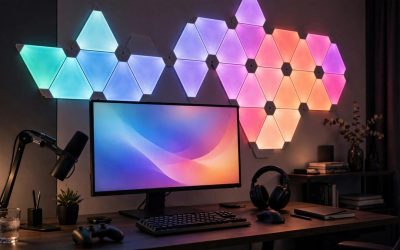
A gentle light source behind the monitor, aimed at the wall, does more for comfort than most decorative lighting. It softens the contrast between a bright screen and a dark room, which reduces the tired, strained feeling of late sessions, and it makes the desk area feel finished without shining anything into your eyes. Keep the rest of the lighting dim and indirect: a shaded lamp to one side rather than an overhead bulb reflecting in the display. Save saturated colour washes for the wall behind you, where they never compete with the game.
Move storage onto the wall
Desks fill up because everything lives on the surface. Shifting storage upward breaks the pattern: a pegboard or a pair of shelves above the desk holds controllers, headsets, game cases and the tools you reach for weekly, while hooks underneath take the headset and coiled spare cables. The surface then holds only what a session actually uses. Wall storage also keeps small rooms feeling open, because the floor and desk stay visible. Just keep heavy items on studs or proper fixings, and leave the wall space directly behind the monitor free for the screen to tilt.
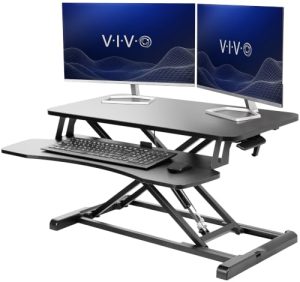
Set up a standing desk in two zones
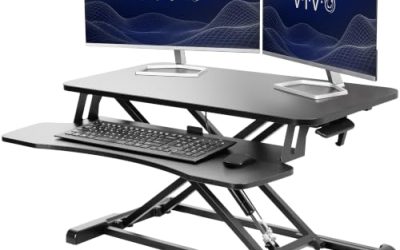
A height-adjustable desk only earns its space if both positions are genuinely set up. Treat sitting and standing as two zones: save a memory preset for each, position the monitor arm so the screen reaches eye level in both, and put a mat where your feet land when standing. Route cables with enough slack for the full travel of the desk, gathered in a tray that rises with it, so nothing pulls tight at standing height. Alternate in blocks rather than standing all day; the benefit comes from changing position, not from enduring one.
Build upward in a small room
When floor space is the limit, the answer is height. A compact desk with a raised shelf or hutch keeps the monitor at eye level and lifts storage off the work surface. The PC goes on a low stand or a wide shelf beside the desk instead of on the floor, where it collects dust and blocks your feet, or on the desk, where it eats the space you bought the desk for. Narrow rooms also favour mounting what you can: screens on arms, lights on the wall, cables in a tray, so the small footprint stays entirely for you and the chair.
Make one desk serve work and play
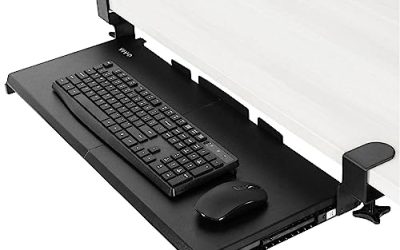
A shared desk fails when changing modes means moving everything. Give work and gaming separate, shallow territories instead: the laptop docks on a stand to one side, the gaming keyboard slides under or hangs on a hook, and a small rolling cart holds whichever set of gear is off duty. Switching then takes a minute and touches nothing fragile. Neutral lighting for the day and a dimmer scene for the evening complete the split. The idea is not two setups in one room, but one surface with a fast, repeatable changeover.
Which One Fits Your Situation
A bedroom that only fits one desk
Start with the corner L-shape or the build-upward approach, and add a monitor arm early, because surface space is your scarcest resource. Wall storage keeps the desk clear for homework, work and play in rotation. Measure the chair’s roll-back space honestly; in a small bedroom the bed usually sets the limit, not the wall.
A shared living room corner
Choose ideas that hide the hobby when it is off. A cable tray, a PC tucked at the side of the desk and dim, warm lighting make the corner read as furniture rather than a cockpit. Avoid tall shelving and strong coloured light washes here; the goal is a setup that looks deliberate in a room other people also use.
A two-monitor desk that still feels crowded
Turn the second screen vertical and put both displays on arms if the desk allows it. Those two changes usually recover more space than a wider desk would, because the stands and the landscape second screen are what consume the surface. Keep the main screen centred on your chair, not on the desk, so the layout follows your body.
Long sessions that leave you stiff
Build the two-zone standing setup and fix the screen height before anything else. Most stiffness after long sessions traces back to a display that sits too low and a chair position that never changes. Alternate positions in blocks through the session, keep the mat where you stand, and let the monitor arm, not your neck, do the adjusting.
Common Mistakes
- Copying a photographed setup without measuring your own room, then discovering the desk blocks a door or a radiator.
- Buying storage and lighting first, while the monitor still sits at the wrong height on its factory stand.
- Routing cables neatly once, with zip ties, so the first hardware swap turns into a full teardown.
- Putting the PC tower on the desk for looks and losing a third of the surface you actually use.
- Standing all day at a new standing desk instead of alternating positions in blocks.
Frequently Asked Questions
How much space does a gaming desk setup actually need?
Enough for the desk, the chair pulled out, and you standing behind it. In practice, allow the desk depth plus roughly a metre behind it for the chair and movement. A compact setup can work in a corner about a metre and a half wide if storage moves onto the wall and the PC stays off the surface.
Is a monitor arm worth it on a small desk?
Yes, usually more than on a large one. The factory stand occupies the most valuable part of a small surface, directly in front of you. An arm returns that area, sets the screen at a proper height, and lets you push the display back when you need the desk for writing or work.
Where should the PC tower go?
On a stand or shelf beside or under the desk, raised off the floor, with airflow unobstructed and cables able to reach without strain. Avoid the desk surface unless the desk is genuinely wide, and avoid carpet directly, where intake fans pull in dust. The corner join of an L-shaped desk is often the neatest spot.
How do I keep cables tidy when I swap gear often?
Build the system around access, not permanence. Keep the power strip in an under-desk tray, use hook-and-loop ties instead of zip ties, and leave a labelled spare cable in the tray for the device you swap most. When every connection is reachable from the chair, tidiness survives changes instead of ending at the first one.
FAQ
How much space does a gaming desk setup actually need?
Is a monitor arm worth it on a small desk?
Where should the PC tower go?
How do I keep cables tidy when I swap gear often?
More from Amazon
Programs that pair well with the guide above. Offers and eligibility are set by Amazon and may change.
Free shipping on eligible items, Prime Video and more. Eligible new members can start with a free trial.
Start a Prime free trialAd-free music streaming. Eligible new subscribers can start with a free trial.
Try Music Unlimited freeA Prime membership for ages 18-24 with a trial period. Eligibility is set by Amazon.
See Prime for Young AdultsAudiobooks and podcasts to listen to on the go. Eligible new members can start with a free trial.
Try Audible freeAs an Amazon Associate we earn from qualifying purchases.