Our Top Picks
 Logitech H390 Wired USB-A Headset with Noise Cancelling1 Pack3.23 x 8.35 x 10.24 inches0.44 poundsCheck on Amazon
Buying a headset for a laptop is really two decisions made at once. The first is fit: a stereo headset covers both ears and suits calls, classes and media, while a mono headset covers one ear and leaves the other open to the room around you. The second is connection, because laptops no longer agree on ports. USB-A, USB-C, a 3.5mm jack and wireless dongles all appear in this group, and the right pick is the one that matches the ports your machine actually has.
This roundup is for people who take meetings, lessons or support calls from a laptop at home or in an office. Every pick was chosen from the connection type, microphone wording and controls printed on its own Amazon listing. The five split into clear roles: a simple plug-and-play stereo model, a USB-C stereo model built around Microsoft Teams, a mono wired model for one-ear working, a wireless model with a charging station, and a stereo Jabra that connects by jack or USB.
Quick Picks
As an Amazon Associate we earn from qualifying purchases.
| Product | Best for | Key spec from title |
|---|---|---|
| Logitech H390 Wired Headset | A simple plug-and-play desk setup | Wired USB-A, rotating noise-canceling mic |
| Logitech H570e Wired Headset (USB-C, Teams version) | Teams calls on a USB-C laptop | Dual noise-canceling mics, 30mm driver |
| Logitech H570e Mono Wired Headset | Keeping one ear open to the room | Mono wired USB, mute button with LED |
| Soothielec KH156M Wireless Headset | Moving around during long calls | Bluetooth 5.2 plus USB dongle, charging station |
| Jabra Evolve 30 II Stereo (MS version) | Laptops with a 3.5mm jack or USB | 3.5mm jack or USB-A/USB-C connection |
How to Choose
Stereo or Mono Is the First Fork in the Road
Decide this before looking at anything else, because it changes how you work all day. A stereo headset covers both ears, which helps you concentrate on a call in a noisy home and makes the same headset usable for video and music afterwards. A mono headset covers a single ear, so you can hear a doorbell, a colleague or a child while still following the meeting. Neither is better in general; call-centre and front-desk work usually favours mono, while focused remote work usually favours stereo. The product names in this guide state which is which, so read them literally.
Match the Plug to the Ports Your Laptop Has
Connection types in this group cover the whole modern spread: wired USB-A, wired USB-C, a 3.5mm jack, and wireless links through Bluetooth or a USB dongle. Thin laptops increasingly ship with USB-C only, which rules out a USB-A headset unless you add an adapter, while older machines may lack USB-C entirely. One model here, the Jabra Evolve 30 II Stereo, lists both a 3.5mm jack and USB-A/USB-C connectivity, which makes it the flexible option across several machines. Check your laptop’s sides before ordering; the best microphone in the world is useless on a plug that does not fit.
Microphone Wording Tells You What the Maker Claims
Every headset here lists a noise-cancelling or noise-canceling microphone, but the details differ in ways worth reading. The USB-C H570e lists dual noise-canceling mics, while the Soothielec KH156M lists ENC noise cancelling, and the wired models list a single noise-cancelling microphone each. These are listing claims about how the microphone handles background sound, not measurements, so treat them as the maker’s description rather than a tested result. A boom that positions the microphone near your mouth, and a mute control you can reach without looking, matter as much in practice as the cancelling claim itself.
Controls and Platform Fit Shape Daily Use
Small control details decide whether a headset is pleasant across a full working week. In-line controls appear on the wired Logitech models here, and the mono H570e adds a mute button with an indicator LED, so you can see your mute state at a glance. The USB-C H570e goes further for one platform: its listing states certification for Microsoft Teams and includes an inline Teams button. The Jabra Evolve 30 II Stereo MS version is likewise listed as Microsoft Teams certified. If your working day lives inside one calling platform, that stated certification and the matching controls are worth prioritising.
The 5 Best Options
Logitech H390 Wired Headset
The H390 is the no-fuss starting point for laptop calls: a wired USB-A headset that Logitech lists as plug-and-play, with a rotating noise-canceling microphone you can swing out of the way when you are not talking, and in-line controls for the basics. It is the headset to buy when the requirement is simply that it works the moment it is plugged into a laptop with a USB-A port. There are no batteries to charge, no pairing steps and no software decisions, which is exactly why this long-running design keeps its place in offices and classrooms.
Specs
- Model: 981-000014, as listed
- Connection: wired USB-A
- Microphone: rotating noise-canceling mic, as listed
- Controls: in-line controls; plug-and-play, as listed
- Colour: Black
Best for: A simple plug-and-play desk setup on a USB-A laptop.
Watch out for: The Rose colourway sold under a different listing code is the same model 981-000014, so do not pay a premium thinking it is an upgraded version.
ASIN: B000UXZQ42
Logitech H570e Wired Headset (USB-C, Teams version)

This is the stereo H570e in its current USB-C form, and its listing is aimed squarely at Teams users: certified for Microsoft Teams, with inline controls that include a Teams button. The microphone side lists dual noise-canceling mics, and the audio side lists a 30mm driver. For a laptop that only offers USB-C ports, it removes the adapter question entirely. Keep its name in full when comparing listings, because the H570e line also includes a mono wired model, covered next, which is a different headset for a different way of working.
Specs
- Model: 981-001429, as listed
- Connection: USB-C wired
- Microphone: dual noise-canceling mics, as listed
- Driver: 30mm, as listed
- Platform: certified for Microsoft Teams, as listed; inline controls with Teams button
Best for: Teams calls on a USB-C laptop, with platform controls on the cable.
Watch out for: Do not confuse this stereo USB-C model with the Logitech H570e Mono listed below; the names are close but the headsets and connections differ.
ASIN: B0DBY7RNMH
Logitech H570e Mono Wired Headset

The H570e Mono is the one-ear member of the Logitech line: a wired USB headset with a noise-cancelling boom microphone and in-line controls that include a mute button with an indicator LED, so your mute state is visible rather than guessed. It suits reception desks, support roles and home workers who need to hear the room while staying on the call. Its model number is 981-000570, distinct from the stereo USB-C version above. If you take calls all day but cannot afford to be sealed off from your surroundings, this is the deliberate choice rather than a cut-down one.
Specs
- Model: 981-000570, as listed
- Connection: wired USB (mono)
- Microphone: noise-cancelling boom mic, as listed
- Controls: in-line controls with mute button and indicator LED, as listed
Best for: One-ear working where you must stay aware of the room.
Watch out for: Mono means a single earpiece by design; if you want both ears covered for focus or media, choose one of the stereo models instead.
ASIN: B00MUTWMJQ
Soothielec KH156M Wireless Headset

The KH156M cuts the cable for people who pace, fetch documents or make coffee mid-call. Its listing gives two wireless routes, Bluetooth 5.2 and a plug-and-play USB dongle, so it can connect to a laptop that lacks Bluetooth or already has its Bluetooth busy. The microphone lists ENC noise cancelling, there is a mute function, and the headset returns to a charging station rather than a loose cable at the end of the day. For laptop-based calling in a home office, that combination of dongle reliability and a charging dock is the practical sweet spot in this group.
Specs
- Connection: Bluetooth 5.2 plus plug-and-play USB dongle, as listed
- Microphone: ENC noise cancelling, as listed
- Controls: mute function, as listed
- Charging: charging station included, as listed
- Compatibility note: listing states not compatible with desk phones or landlines
Best for: Moving around the home or office while staying on laptop calls.
Watch out for: The listing states plainly that it is not compatible with desk phones or landlines, so buy it for laptop calling only.
ASIN: B0F4CJR3JK
Jabra Evolve 30 II Stereo (MS version)
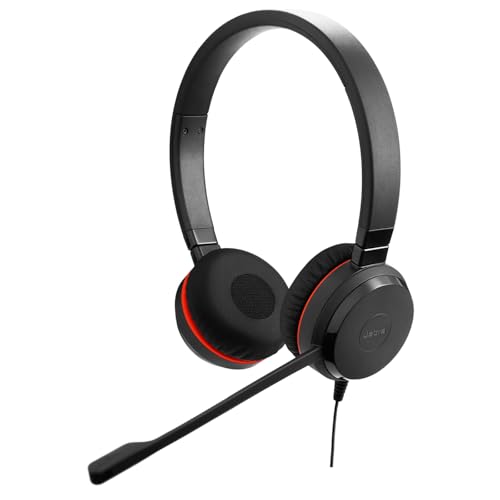
The Evolve 30 II Stereo is the flexible connector of the group: its listing offers a 3.5mm jack or USB-A/USB-C connectivity, which lets one headset serve an older laptop, a newer one and anything else with a headphone jack. It is the stereo version of Jabra’s Evolve 30 II line, listed as Microsoft Teams certified in this MS version, with a noise-cancelling microphone and call control. The model number is 5399-823-389-01. For households and offices with several different machines, that connection range is the reason to pick it over a single-plug rival.
Specs
- Model: 5399-823-389-01, as listed
- Connection: 3.5mm jack or USB-A/USB-C, as listed
- Microphone: noise-cancelling microphone, as listed
- Platform: Microsoft Teams certified, as listed; call control
- Fit: Stereo (this listing)
Best for: Mixed laptop fleets and anyone who wants jack and USB in one headset.
Watch out for: A tracker reported the UC Stereo variant of this model unavailable on Amazon as of 2026-11-21; that is a different variant from this MS listing, but check this listing’s live availability before ordering.
ASIN: B0FB16HGH3
Which One Fits Your Situation
Your Whole Day Is Back-to-Back Teams Calls
Choose the Logitech H570e Wired Headset (USB-C, Teams version). Its listing states Microsoft Teams certification and puts a Teams button on the inline controls, and its dual noise-canceling mics are the strongest microphone wording in this group. It is stereo, wired and adapter-free on a USB-C laptop, which is the combination a meeting-heavy day actually needs.
You Must Hear the Room While You Work
Choose the Logitech H570e Mono Wired Headset. The mono design covers one ear and leaves the other open, and its mute button carries an indicator LED so you always know whether the room can hear you. It is the right tool for reception work, caregiving households and support desks, where sealing yourself into stereo would be a drawback rather than a feature.
You Want the Simplest Possible Setup
Choose the Logitech H390. Plug-and-play USB-A, a rotating microphone and in-line controls cover everything a straightforward calling setup requires, with nothing to charge and nothing to pair. It is also the easiest headset to hand to a family member or a new starter, because there is exactly one way to connect it and it works immediately.
You Walk Around During Long Calls
Choose the Soothielec KH156M. Bluetooth 5.2 covers laptops with wireless built in, the USB dongle covers those without, and the charging station gives it a home on the desk between calls. Just keep it for laptop use, since the listing rules out desk phones and landlines. For a home office where calls happen from the kitchen as often as the desk, it is the natural fit.
Common Mistakes
- Mixing up the Logitech H570e stereo USB-C model and the H570e Mono, which share a name but differ in fit, model number and connection.
- Buying a USB-A headset for a USB-C-only laptop, or the reverse, without checking the ports on the machine first.
- Treating a mono headset as a faulty stereo one, when the single earpiece is the deliberate design for one-ear working.
- Assuming a wireless laptop headset will also run a desk phone, when the KH156M listing states it is not compatible with desk phones or landlines.
- Confusing Jabra’s MS and UC variants of the same model, which are separate listings with separate availability.
Frequently Asked Questions
Should I Choose a Mono or Stereo Headset for Laptop Calls?
Choose stereo if calls are your focus and you also use the headset for media, since both ears are covered. Choose mono if you need one ear open to your surroundings, as in reception, support or caregiving work. The names state the fit directly: the H570e Mono is the one-ear option, while the H390, the USB-C H570e and the Jabra Evolve 30 II Stereo cover both ears.
Will a USB Headset Work With Any Laptop?
Only if the port matches. The H390 needs USB-A, the stereo H570e needs USB-C, and the mono H570e uses wired USB. The Jabra Evolve 30 II Stereo is the safest bet across machines because its listing covers a 3.5mm jack or USB-A/USB-C. The Soothielec KH156M sidesteps the question with Bluetooth 5.2 and a USB dongle. Check your laptop’s ports before ordering anything.
Can I Use One of These Headsets for Gaming as Well as Calls?
For casual gaming voice chat, yes: each model here pairs a headphone with a boom microphone, which is what game chat needs, and the stereo models double for game audio. These are call-focused headsets rather than gaming models, though, so buyers who prioritise game sound should compare dedicated gaming headsets as well. Within this group, the stereo H570e and the H390 are the most natural double-duty picks.
What Does Microsoft Teams Certified Mean on These Listings?
It is the listing’s own claim that the headset meets Microsoft’s requirements for Teams use. The USB-C H570e states the certification and adds an inline Teams button; the Jabra Evolve 30 II Stereo MS version also states it. Treat the wording as the maker’s and platform’s designation rather than an independent test result, and note that MS and UC variants of the same Jabra model are separate listings.
FAQ
Should I Choose a Mono or Stereo Headset for Laptop Calls?
Will a USB Headset Work With Any Laptop?
Can I Use One of These Headsets for Gaming as Well as Calls?
What Does Microsoft Teams Certified Mean on These Listings?
More from Amazon
Programs that pair well with the guide above. Offers and eligibility are set by Amazon and may change.
Free shipping on eligible items, Prime Video and more. Eligible new members can start with a free trial.
Start a Prime free trialAd-free music streaming. Eligible new subscribers can start with a free trial.
Try Music Unlimited freeA Prime membership for ages 18-24 with a trial period. Eligibility is set by Amazon.
See Prime for Young AdultsAudiobooks and podcasts to listen to on the go. Eligible new members can start with a free trial.
Try Audible freeAs an Amazon Associate we earn from qualifying purchases.