Our Top Picks
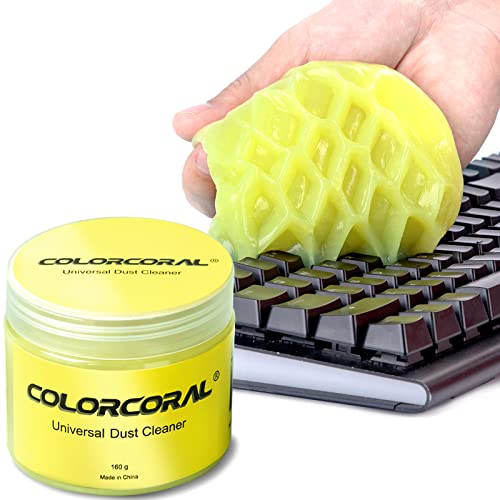 ColorCoral Cleaning Gel Universal Dust Cleaner for PC5.6 Ounce (Pack of 1)2.69 x 2.69 x 2.35 inches0.35 poundsCheck on Amazon


As an Amazon Associate we earn from qualifying purchases.
Gaming hardware lives a dusty life. Consoles pull room air through their vents for hours at a time, controllers collect skin oil and snack residue in every seam, and screens gather fingerprints faster than you can wipe them off. None of that grime is dangerous on day one, but it compounds: dust blankets on fan intakes make cooling work harder and louder, grit in a thumbstick well accelerates wear, and a film of dust and oil on a display quietly dulls the picture you paid good money for. A short cleaning routine every few weeks prevents almost all of it, and the tools involved are neither exotic nor expensive.
Here is the honest truth that should shape how you shop: console cleaning is overwhelmingly dust management, not deep restoration. A soft brush and a microfiber cloth handle the large majority of the job — vents, fan intakes, controller shells, seams, screens. The kits below were chosen around that reality. They cover the five jobs that actually come up: sweeping dust out of vents and crevices, lifting debris out of keyboards and controller seams, pulling dust out of speaker grilles and ports, wiping screens without damaging their coatings, and — for owners who are comfortable with it — opening a PlayStation shell for a proper internal dust-out, with the warranty caveats that involves stated plainly.
Two warnings before the picks. First, aggression is the enemy. Glossy console shells and controller plastics scratch easily, and a stiff brush, a metal pick, or a gritty cloth will leave permanent marks on them. Second, canned compressed air is not the shortcut it appears to be: tilt the can and it spits liquid propellant onto your hardware, and even used correctly it can drive loose dust deeper into a console instead of out of it. The brush-based kits below are slower and far safer.
Affiliate Disclosure: This article contains affiliate links. If you buy through a link on this page, we may earn a commission at no additional cost to you. It does not change which products we include or what we say about them.
1. Hagibis Cleaning Soft Brush Keyboard Cleaner 5-in-1

The Hagibis 5-in-1 is the kit that lives in a desk drawer and gets used constantly, because it collapses five small tools into one pen-sized body. The main tool is a soft nylon brush for sweeping dust off controller shells, keyboard decks, and console top panels. The handle end opens to reveal a second, hidden set: a high-density mini brush for seams and gaps, a flocking sponge that picks dust out of charging cases and recessed ports, a metal pen tip for prying out compacted debris, and a keycap puller sized for mechanical keyboard caps. For gaming gear, the flocking sponge and mini brush are the stars — they are exactly the right shape for the dust that packs into Joy-Con rails, controller seams, earbud cases, and the groove around a console’s disc slot.
Specs
- Tools included: soft nylon brush, high-density brush, flocking sponge, metal pen tip, keycap puller
- Form factor: single pen-style body, tools stored in the handle
- Intended surfaces: keyboards, earbuds and cases, camera lenses, small electronics gaps
- Color options: grey and other colors sold
The metal pen tip is the one part to use with restraint. It is genuinely useful for digging a hardened crumb out of a seam, but dragged across a glossy controller shell or a piano-black console panel it will leave a scratch that never comes out. Treat it as a tool for hidden crevices only, and let the brushes do everything visible. Used that way, this is the most versatile small kit on the list and the one most gamers will reach for weekly.
2. TECKMAN Cleaning Repair Tool Kit for PS4 and PS5
This is the only kit here built specifically for PlayStation hardware, and it is a cleaning kit with a repair kit’s toolkit attached. The cleaning side is a proper anti-static brush and a pair of cotton swabs for working dust out of fan blades and heatsink fins. The opening side is the full set of drivers a PS4 or PS5 shell actually requires: a TR9 Torx security screwdriver with the center hole the console’s security screws demand, PH00, PH0 and PH1 Phillips drivers for controller and shell screws, plus a nylon spudger, pry tools, an opening pick, and curved tweezers for connectors and dust clumps. If your goal is the annual deep clean — shell off, fan and heatsink swept out, dust cake removed from the intake path — this is the kit that makes it possible.
Specs
- Drivers: TR9 Torx security, PH00, PH0 and PH1 Phillips (S2 steel)
- Cleaning tools: anti-static brush, 2 cotton swabs
- Opening tools: nylon spudger, double-end pry bar, short plastic pry tool, opening pick, curved tweezers
- Compatibility: PS4 and PS5 consoles and DualShock 4 / DualSense controllers
Now the plain warning this kit requires. Removing the outer cover plates on a PS5 is designed to be user-friendly, but going further — breaking the warranty seal and removing internal screws — can void your warranty on some models and in some regions, and Sony’s terms are the ones that decide, not this article’s. Check your console’s warranty status before a single screw comes out, power the machine fully off and unplugged, and keep track of every screw’s position, because they are not all the same length. If the console is still covered, limit yourself to the brush-and-swab cleaning you can do from outside and leave the teardown for later.
3. ColorCoral Cleaning Gel Universal Dust Cleaner
Cleaning gel is the oddball of the category: a soft, kneadable putty you press onto a surface and peel back, pulling dust, crumbs, and lint out of places a brush just pushes around. ColorCoral’s 160g tub is the widely sold version, aimed at keyboards, car vents, and electronics. On gaming gear its best uses are speaker grilles, the mesh on headsets, the texture around controller grips, and the intake slots on a console that a brush cannot quite clear. It conforms to whatever you press it into, needs no liquid, and leaves the surface dry, which makes it a useful second step after brushing loosens everything up.
Specs
- Contents: 160g of cleaning gel in a resealable tub
- Use: press onto surface, peel off; reusable until the gel darkens and loses tack
- Suitable for: keyboards, vents, speaker grilles, controller grips, console slots
- Scent: lightly scented
Gel has real limits, and they are worth knowing before you press it into anything expensive. Press it too hard into a speaker grille or a port and it can leave residue behind in the mesh, which then attracts more dust than it removed — use a light touch and short contact. It is also a consumable, not a permanent tool: once it darkens and stops picking things up, it goes in the bin. And it does nothing for grease or fingerprints, so it complements a cloth rather than replacing one. Within those limits, it clears grille mesh better than any brush in this roundup.
4. OXO Good Grips Sweep & Swipe Laptop Cleaner
OXO’s Sweep & Swipe is the simplest tool here and, for screens and handhelds, possibly the most useful. One end carries a retractable soft brush that sweeps crumbs and dust out of keyboard gaps, Switch vents, and the seams of a handheld. Flip it over and the other end is a microfiber cleaning pad for wiping fingerprints and smudges off screens — a phone, a tablet, a Switch or Steam Deck display, or a monitor between deeper cleans. A cap covers both ends in storage, which matters more than it sounds: a microfiber pad that lives loose in a drawer collects grit, and a gritty pad scratches screens instead of cleaning them.
Specs
- Design: double-ended, retractable brush on one end, microfiber pad on the other
- Model: 12246100
- Storage: protective cap covers both ends
- Intended for: laptops, tablets, phones, handheld consoles and screens
The pad is not washable in the way a loose microfiber cloth is, and once it is loaded with grime its effectiveness fades, so think of this as a maintenance tool for gear that is already fairly clean rather than a rescue tool for a neglected setup. The brush end is soft enough for coated screens but is really at its best on keyboards and vents. As a keep-it-next-to-the-couch tool for a thirty-second wipe before a session, nothing else on this list is as convenient.
5. WHOOSH! Screen Shine Duo Cleaning Kit
Every screen in a gaming setup — TV, monitor, phone, handheld — eventually needs more than a dry wipe, and this is where owners do the most accidental damage, usually with a household glass cleaner that was never meant for display coatings. WHOOSH! Screen Shine is formulated for screens specifically: non-toxic, odorless, and free of the alcohol and ammonia that can strip anti-glare and oleophobic coatings over time. The Duo kit pairs a full-size 3.4 fl oz bottle for the desk with a pocket 0.3 fl oz bottle for a bag, and includes two microfiber cloths, so one can live with each bottle.
Specs
- Contents: 3.4 fl oz spray bottle, 0.3 fl oz spray bottle, 2 microfiber cloths
- Formula: non-toxic, odorless, alcohol- and ammonia-free
- Safe for: TVs, monitors, laptops, tablets, phones, handheld screens and coatings
- Application: spray onto the cloth, never directly onto the screen
That application note in the specs is the single most important screen-cleaning rule in this article, and it applies to every liquid cleaner, not just this one: never spray liquid directly onto a screen or into a port. Liquid sprayed at a display runs down into the bezel and pools where you cannot wipe it, and liquid aimed at a controller or console opening goes straight onto electronics. Spray the cloth until it is damp, wipe, then buff with the dry side. A spray kit used correctly is the difference between a screen that looks new after years of use and one with a permanently cloudy patch where the coating gave up.
How to Choose the Right Cleaning Kit
Match the kit to the dirt, because the five picks above solve different problems. If your gear mostly gathers loose dust — and for most setups it does — a soft brush kit like the Hagibis or the OXO covers the routine: vents, seams, shells, and a dry screen wipe. Add the ColorCoral gel if your dust lives in speaker grilles, headset mesh, or textured grips, where brushes push debris around instead of removing it. Screens that see fingerprints daily, especially on handhelds and phones, justify the WHOOSH! kit, since dry wiping alone eventually just smears oil around. The TECKMAN kit is the specialist: only choose it if you specifically intend to open a PlayStation shell, and only once you have read the warranty note in its section.
A few rules apply no matter which kit you buy. Clean with the device powered off and unplugged; a brush across a spinning fan or a damp cloth near a live port helps no one. Work from soft to firm — cloth first, brush second, and anything metal only in hidden crevices, never on glossy visible plastic. Keep liquids on the cloth, never on the device, and keep them away from ports entirely. Finally, be suspicious of kits that promise everything through air power: blasting dust with canned air feels thorough, but the propellant risk and the chance of driving dust deeper into a console make brushes the safer default for routine work.
FAQ
How often should I clean my console and controllers?
A light brush-down of vents and a controller wipe every few weeks is enough for most rooms. Screens can be wiped whenever fingerprints bother you. The deep clean — gel in the grilles, a thorough vent sweep — is a few-times-a-year job unless your setup sits near a kitchen, a smoker, or a pet’s favorite spot.
Can I use household glass cleaner on my TV or monitor?
It is a bad idea. Many household glass cleaners contain ammonia or alcohol, which can damage anti-glare and oleophobic coatings with repeated use. A cleaner formulated for screens, applied to a cloth rather than sprayed on the display, avoids the risk entirely.
Will opening my console to clean it void the warranty?
It can. Removing outer cover plates is generally fine, but breaking seals and removing internal screws may void coverage on some models and in some regions. Check your warranty status first, and if the console is still covered, stick to external cleaning with brushes and cloths.
Is cleaning gel safe for speaker grilles and ports?
Used gently, yes — that is one of its best uses. Press lightly and peel slowly. Pressing hard can leave residue in the mesh, and gel should never be forced into charging or headphone ports, where a flocking sponge or soft brush is the safer tool.
Conclusion
Console cleaning rewards the gentle and the regular. The Hagibis 5-in-1 is the best all-round drawer kit, the OXO Sweep & Swipe is the quickest screen-and-handheld wipe, the ColorCoral gel handles the grilles and textures brushes cannot, the WHOOSH! Duo keeps display coatings safe when a dry wipe is not enough, and the TECKMAN kit is there for PlayStation owners ready for a careful internal dust-out — warranty checked first. Pick the one that matches the dirt you actually have, use it little and often, and your hardware will run cooler, quieter, and better-looking for it.
More from Amazon
Programs that pair well with the guide above. Offers and eligibility are set by Amazon and may change.
Free shipping on eligible items, Prime Video and more. Eligible new members can start with a free trial.
Start a Prime free trialAd-free music streaming. Eligible new subscribers can start with a free trial.
Try Music Unlimited freeA Prime membership for ages 18-24 with a trial period. Eligibility is set by Amazon.
See Prime for Young AdultsAudiobooks and podcasts to listen to on the go. Eligible new members can start with a free trial.
Try Audible freeAs an Amazon Associate we earn from qualifying purchases.