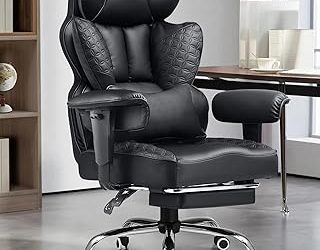
Our Top Picks
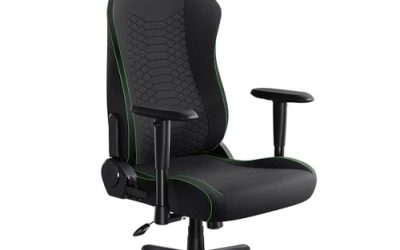
 Razer Iskur V2 X Ergonomic Gaming ChairStandard27.58 x 27.58 x 49.64 inches50.26 poundsCheck on Amazon
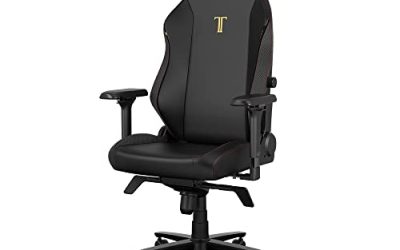
 Secretlab Titan Evo XL Stealth Gaming ChairX-Large19.7 x 22.8 x 53.1 inches75.4 poundsCheck on Amazon
 Anda Seat Kaiser 3 XL Gaming Chairs forX-Large22.04 x 21.65 x 53.94 inches74.5 poundsCheck on Amazon
 noblechairs Hero Gaming Chair/Office Chair with Lumbar SupportPU FAUX LEATHER18.9 x 22.45 x 54.75 inches63.9 poundsCheck on Amazon
Ergonomic on a gaming chair can mean almost anything, from a fixed curve moulded into the backrest to a lumbar mechanism you can move up, down, in and out while seated. That difference decides whether support lands where your lower back actually needs it, or simply where a pillow happened to stop, so the lumbar system deserves more attention than colour, stitching or racing stripes.
This guide is for PC players and desk workers who spend long stretches at one computer and want support built for that posture. Every chair below is a desk gaming chair whose own Amazon listing names ergonomic design, a built-in lumbar arch, an adjustable lumbar system or adjustable lumbar support, chosen from the product names and specifications on those pages.
Quick Picks
As an Amazon Associate we earn from qualifying purchases
| Product | Best for | Key spec from title |
|---|---|---|
| Razer Iskur V2 X Ergonomic Gaming Chair – Black | Players who slouch and want support built into the backrest | Built-in Lumbar Support and Widened Seat Base |
| Secretlab Titan Evo Stealth Gaming Chair – XL | Big and tall players who need a heavy duty XL frame | Ergonomic & Heavy Duty, Big and Tall Up to 395lbs |
| Anda Seat Kaiser 3 XL Gaming Chair – PVC Leather | Larger players who want adaptive lumbar inside an XL seat | Ergonomic Black PVC Leather with Lumbar Support |
| Corsair TC100 Relaxed Gaming Chair – Fabric | Players who prefer a wider, softer seat with movable pillows | Lumbar Pillow and Detachable Memory Foam Neck Pillow |
| noblechairs Hero Gaming Chair – Real Leather | Players who want integrated lumbar in a real leather chair | With Lumbar Support, Real Leather, Black |
How to Choose
Built-In, Adjustable or Pillow Lumbar Support
Start with how the lower back support is delivered, because the three approaches behave very differently during a session. A built-in arch, as on the Razer Iskur V2 X, stays fixed in place and asks nothing of you, yet it cannot move if its curve misses your spine. An adjustable internal system, found on the Secretlab, Anda Seat and noblechairs chairs here, lets you change height or depth until contact feels even. A separate lumbar pillow, used by the Corsair, can be repositioned or removed entirely, although it may drift when you stand up and sit down again.
Seat Width, Depth and Stated Fit Limits
Ergonomic shaping helps little when the seat itself is the wrong size for your body. Compare the stated maximum weight, the seat width and depth, and any recommended height guidance on the listing against your own measurements before looking at finishes. XL models from Secretlab and Anda Seat give broader players room that a standard seat cannot, while a widened base on a regular chair suits someone who shifts position or sits with one leg tucked. Leave space behind your knees, check that your feet rest flat, and measure the gap under your desk for the armrests at their highest setting.
Armrests, Recline and Seat Tilt Behaviour
Armrests should meet your forearms where your keyboard and controller naturally place them, not force your shoulders upward. Four-direction armrests, offered on several chairs in this guide, move in height, width, depth and angle, whereas two-direction designs cover height and rotation only. Recline range matters in a different way: a deep recline helps during cutscenes and breaks, while a reactive or tilting seat can keep the backrest in contact as you lean. Decide which movements you perform daily, then favour the chair whose adjustments match those habits instead of counting total features.
Upholstery, Foam and Cleaning Routine
Surface material changes both temperature and upkeep across a long desk day. Fabric finishes, including the plush fabric on the Razer and the fabric Corsair, tend to feel less sticky in warm rooms and suit players who sit in shorts or short sleeves. Leatherette, PVC leather and real leather wipe clean more easily after spills, although real leather asks for more careful care than a synthetic surface. Foam wording matters too: high density and cold-cure foams are described as holding shape, while memory foam pillows soften contact at the neck and lower back rather than supporting the whole seat.
The 5 Best Options
Razer Iskur V2 X Ergonomic Gaming Chair – Black
Pick this Razer when you want the chair itself to guide your posture without a daily routine of moving cushions around. Its listing names built-in lumbar support, a widened seat base with reduced edges, contoured high density foam cushions and a plush fabric finish, a combination aimed at players who drift into a slouch during long ranked sessions. The two-direction armrests and deep recline cover the everyday adjustments most desk setups need, while the fabric surface should suit a warm room better than a smooth finish would during summer play.
Specs
- Brand: Razer
- Model Name: Iskur V2 X
- Model Number: RZ38-05310100-R3UA
- Colour: Black
- Finish: Plush Fabric Finish
- Support: Built-in Lumbar Support, integrated lumbar arch
- Seat: Widened Seat Base with reduced edges
- Cushions: Contoured High Density Foam Cushions
- Recline: Adjustable 152 Degree Recline
- Armrests: 2D Armrests, height adjustable and rotatable
- Dimensions: 27.58″D x 27.58″W x 49.64″H, as stated on the listing
- Maximum Weight Recommendation: 299 Pounds, as stated on the listing
- Assembly: Required, as stated on the listing
Best for: Players who want a fixed built-in lumbar arch and a fabric finish at a standard desk
Watch out for: Confirm the built-in arch suits your back, because its curve is fixed rather than adjustable in height or depth
ASIN: B0DP5SY554
Secretlab Titan Evo Stealth Gaming Chair – XL
Larger players who have felt pinched by ordinary bucket seats are the clear audience for this XL Stealth variant. The Amazon title calls it ergonomic and heavy duty, names a magnetic head pillow and lumbar support, and states a big and tall limit in the title itself. Its form factor is listed as ergonomic, the seat uses memory foam fill, and the swivel base with tilting suits a desk where you turn between monitor, side screen and room. Choose it when sheer seat room and a repositionable head pillow matter most.
Specs
- Brand: Secretlab
- Model Name: XL22PU-Stealth
- Item Model Number: M08-E24PU-STELH3X
- Colour: Stealth, Black
- Size: X-Large
- Material: Faux Leather
- Finish: Leatherette, as named in the product title
- Form Factor: Ergonomic
- Dimensions: 19.7″D x 22.8″W x 53.1″H
- Seat Depth: 19.7 inches
- Fill Material: Memory Foam
- Head Pillow: Magnetic Head Pillow, as named in the product title
- Support: Lumbar Support, as named in the product title
- Armrest: 4D Armrest, as named in the product title
- Base Movement: Swivel, Tilting
- Maximum Weight Recommendation: 395 Pounds
- Item Weight: 75.2 pounds
Best for: Big and tall players who need an XL ergonomic frame with a magnetic head pillow
Watch out for: Check the 75.2 pound item weight and XL footprint before ordering, because moving and fitting this chair takes space
ASIN: B0B3RG3MD9
Anda Seat Kaiser 3 XL Gaming Chair – PVC Leather
Anda Seat describes this Kaiser 3 XL as an ergonomic and innovative gaming chair, and the detail behind that wording is its built-in adaptive four-way lumbar support, magnetic four-direction armrests and magnetic memory foam neck pillow. The flatter seat wings leave a wide base without the feeling of restriction that tight bolsters create, which suits broader players who change position often. Its PVC leather variant here wipes clean more readily than the fabric version, and the cushion style is listed as simple and ergonomic, matching the chair’s desk-first purpose.
Specs
- Brand: Anda Seat
- Model Name: Kaiser 3 XL
- Model Number: AD12YDC-XL-01-B-PV/C
- Colour: Black
- Size: X-Large
- Material: Faux Leather, PVC Leather as named in the product title
- Frame Material: Metal
- Fill Material: Memory Foam
- Cushion Style: Simple, Ergonomic
- Lumbar Support: Built-in adaptive 4-way lumbar support, as described on the listing
- Armrests: 4D magnetic armrests, as described on the listing
- Neck Pillow: Magnetic memory foam neck pillow, as described on the listing
- Dimensions: 56D x 55W x 137H centimetres, as stated on the listing
- Seat Back Interior Height: 31.5 Inches
- Maximum Weight Recommendation: 120 Kilograms, as stated on the listing
- Assembly: Required
Best for: Larger players who want adaptive internal lumbar support and magnetic armrests in an XL chair
Watch out for: Compare the stated 120 kilogram maximum with your own weight, because other Kaiser 3 listings state different limits by variant
ASIN: B0B351YTS8
Corsair TC100 Relaxed Gaming Chair – Fabric

Corsair takes a softer route than the internal-mechanism chairs above, pairing an adjustable lumbar support pillow with a detachable memory foam neck pillow on a wider, racing-inspired seat. The listing describes a plush exterior, a class four gas lift with a stated height range, adjustable armrests and a backrest that reclines for leaning back after a match. That pillow-based approach suits players who like to move support around, remove it for a flatter backrest, or swap sitting positions through the day rather than locking one lumbar curve into place permanently.
Specs
- Brand: Corsair
- Model Name: TC100 RELAXED
- Model Number: CF-9010052-WW
- Colour: Gray and Black
- Style: Fabric
- Material: Nylon, Polyurethane
- Frame Material: Alloy Steel
- Seat Material: Memory Foam
- Fill Material: Memory Foam
- Support: Adjustable lumbar support pillow, as described on the listing
- Neck Pillow: Detachable Memory Foam Neck Pillow
- Additional Features: Adjustable Height, Adjustable Lumbar, Arm Rest, Head Support, Swivel
- Recline: Seat back reclines from 90° to 150°, as described on the listing
- Gas Lift: Class 4 gas lift with 100mm height range, as described on the listing
- Dimensions: 19.69″D x 14.96″W x 33.07″H, as stated on the listing
- Seat Depth: 19.69 inches
- Seat Height: 21.65 Inches
- Maximum Weight Recommendation: 120 Kilograms
- Item Weight: 40.3 Pounds
- Assembly: Required
Best for: Players who prefer a wider relaxed seat and lumbar support they can move or remove
Watch out for: Note the listing also carries a safety note about a steeper recline figure, so set the backrest carefully and keep the chair balanced
ASIN: B0BN7FDFVP
noblechairs Hero Gaming Chair – Real Leather
The Hero is noblechairs’ largest series, developed alongside esports professionals, and its listing presents it as a luxury gamer chair that doubles as an ergonomic seat for a home office. Real leather over cold-foam upholstery, a robust steel frame and an integrated adjustable lumbar support system separate it from pillow-based designs at this end of the guide. An enlarged seat area and backrest give bigger players more room, while the premium cushion set named for the series adds head and lumbar cushions alongside the internal mechanism for those who prefer extra padding.
Specs
- Brand: noblechairs
- Model Name: noblechairs HERO Series
- Model Number: NBL-HRO-RL-BLA
- Colour: Black
- Size: Real Leather, as stated on the listing
- Material: Real Leather, as named in the product title
- Support: Lumbar Support, as named in the product title
- Lumbar System: Integrated adjustable lumbar support, as described for the series
- Frame: Robust steel frame, as described on the listing
- Upholstery: Cold-foam upholstery, as described on the listing
- Fit: Enlarged seat area and backrest, as described on the listing
- Maximum Load: Up to 330 lbs, as described on the listing
Best for: Players who want real leather, a steel frame and integrated adjustable lumbar support together
Watch out for: Confirm the Real Leather variant and its model number on the page, because the Hero series is also sold in PU faux leather
ASIN: B07DCPVHQF
Which One Fits Your Situation
You Slouch Without Noticing During Long Sessions
Start with the Razer Iskur V2 X, because its built-in lumbar arch is always in position and cannot slide down the backrest between games. The widened seat base and contoured foam cushions support that upright aim, while the fabric finish keeps the chair comfortable in a warm room. If you know a fixed curve has felt wrong on other chairs, move instead toward an adjustable internal system from Anda Seat or noblechairs.
You Are Big, Tall or Broad Across the Shoulders
Compare the two XL chairs first. The Secretlab Titan Evo Stealth states the higher maximum weight in its title and pairs that capacity with a magnetic head pillow and an ergonomic form factor. The Anda Seat Kaiser 3 XL counters with adaptive four-way lumbar support and flatter seat wings. Measure seat depth and overall height for both, because capacity alone does not tell you where the backrest will meet your shoulders.
You Share the Chair Between Work and Play
A chair that adapts through the day earns its place when spreadsheets give way to gaming at the same desk. The Anda Seat Kaiser 3 XL lets you reset its internal lumbar position, the noblechairs Hero integrates its adjustable lumbar inside a real leather backrest, and the Corsair TC100 lets you simply remove its pillows for a flatter feel. Pick according to whether you prefer dialled support, built-in support with cushions, or removable padding.
You Sit Cross-Legged or Change Position Constantly
Look for a seat that does not fence you in with tall, tight bolsters. The Corsair TC100 Relaxed was designed around a wider seat surface and relaxed positioning, and the Razer Iskur V2 X widens its base while reducing its edges. Both let you shift posture more freely than a narrow bucket design. Still check seat depth honestly, because a wide seat that is also too deep can push you forward away from the lumbar support.
Common Mistakes
- Reading the word ergonomic in a title as a guarantee, without checking whether support is fixed, adjustable inside the backrest or a loose pillow.
- Ordering an XL chair for its capacity while ignoring seat depth, backrest height and the extra floor space its larger frame needs.
- Setting armrests once at assembly and never revisiting them after changing desk height, monitor position or controller habits.
- Choosing real leather or PVC leather for easy cleaning without considering how a smooth surface feels in a hot, uncooled room.
- Judging recline by the largest number on a listing instead of how the seat tilt and backrest behave together at your desk.
Frequently Asked Questions
What makes a gaming chair genuinely ergonomic?
Look beyond the label to the mechanism behind it. An ergonomic gaming chair gives your lower back consistent contact, lets you set seat height so your feet rest flat, positions armrests under your forearms without lifting your shoulders, and fits your body size on the listing. Built-in arches, adjustable internal lumbar systems and movable pillows can each qualify, provided the fit matches you.
Is adjustable lumbar support better than a built-in arch?
Adjustable support suits more bodies because you can move its height or depth until contact feels even across your lower back. A built-in arch is simpler and never shifts, which many players prefer, but its fixed curve either matches your spine or it does not. If possible, favour adjustment when previous chairs have left a gap or a pressure point behind you.
Can an ergonomic gaming chair replace a separate office chair?
For many desk setups, yes, provided the chair was designed for computer work rather than console lounging. The chairs in this guide are desk gaming chairs with swivel bases, height adjustment and back support intended for upright sitting. Check seat depth, armrest clearance under your desk and upholstery breathability, because those details decide whether one chair can handle both a workday and an evening session.
How do I set up an ergonomic gaming chair at my desk?
Begin with seat height, adjusting until your feet sit flat and your knees are comfortable, then bring the lumbar support into gentle contact with your lower back. Set armrests so your forearms rest without your shoulders rising, and position your monitor so you are not leaning forward toward it. Recheck each setting after a few days, since foam, clothing and posture habits change the feel.
FAQ
What makes a gaming chair genuinely ergonomic?
Is adjustable lumbar support better than a built-in arch?
Can an ergonomic gaming chair replace a separate office chair?
How do I set up an ergonomic gaming chair at my desk?
More from Amazon
Programs that pair well with the guide above. Offers and eligibility are set by Amazon and may change.
Free shipping on eligible items, Prime Video and more. Eligible new members can start with a free trial.
Start a Prime free trialAd-free music streaming. Eligible new subscribers can start with a free trial.
Try Music Unlimited freeA Prime membership for ages 18-24 with a trial period. Eligibility is set by Amazon.
See Prime for Young AdultsAudiobooks and podcasts to listen to on the go. Eligible new members can start with a free trial.
Try Audible freeAs an Amazon Associate we earn from qualifying purchases.