Key takeaways
- The best chairs for work and gaming balance lumbar support, recline and armrests. This November 2026 guide compares seat depth, upholstery and frame strength.
As an Amazon Associate we earn from qualifying purchases.
One chair has to carry you through a workday of calls and documents and then an evening of matches, so the real decision is not whether it looks like office furniture or gaming gear but whether its support, adjustments, and materials hold up across both kinds of sitting. A seat that feels fine for an hour can turn punishing by hour six, and a flashy racing shell can fight your posture when you need to type.
This guide is written for remote workers who sit at the same desk all day, students splitting time between coursework and games, streamers who stay on camera for hours, and competitive players who need steady aim late into a session. Instead of naming a single winner, it compares the chair features listed on product pages — lumbar design, seat dimensions, armrest movement, recline, upholstery, and frame strength — so you can match a chair to the way you actually sit.
How to Choose
Lumbar Support That Holds Up Across a Full Day
Lower back support decides whether a chair stays comfortable past lunchtime, because a flat backrest lets your spine round forward while a shaped one keeps its natural curve. Look for lumbar support you can move up and down or adjust in depth, since a fixed cushion only suits one body shape and one posture. Built-in lumbar set into the backrest frame tends to stay put during long sessions, while a separate pillow can slide around and needs repositioning. Mesh backs often pair a flexible lumbar band with tension that follows your movement, which suits people who shift between upright typing and a leaned-back stance. Check whether the listing names the lumbar mechanism, since vague wording usually means a basic pad.
Seat Depth, Width and Weight Capacity
Seat dimensions decide whether your legs rest naturally or dangle, and whether your hips feel squeezed after an hour. A seat pan that is too deep presses behind your knees, while one that is too shallow leaves your thighs unsupported, so compare the listed depth and width against your own measurements rather than guessing from a photo. Adjustable seat depth lets you slide the pan until your feet sit flat and your knees bend at a relaxed angle. Weight capacity matters just as much: a chair rated well above your weight keeps its gas lift and frame working smoothly, while one loaded near its limit can sag and wobble. Treat the listed capacity as a ceiling, not a target.
Armrests and Recline That Switch Between Tasks
Armrests and recline are the controls you reach for when the day changes shape, moving from keyboard work to a controller or a break. Armrests that adjust in height, slide forward and back, and pivot let you keep your shoulders down while typing and then tuck closer to the desk for gaming. Fixed armrests can force an awkward angle, so check the listed directions of movement before buying. A backrest that reclines with a tilt lock gives you a rest position between matches, while a footrest adds a place to stretch your legs. Check the recline range in the listing, and make sure the tilt tension holds you upright at work.
Upholstery and Build Quality for Daily Use
Upholstery decides how a chair feels in a warm room and how it ages after months of daily use. Mesh breathes well and suits people who run warm, yet a thin mesh seat can feel firm and may sag over time if the weave is loose. PU leather looks sleek and wipes clean, but it can trap heat and show wear along the edges where you slide in and out. Fabric sits between the two, giving warmth without the sticky feel, though it needs more cleaning. Underneath, look for a metal frame, a sturdy five-spoke base, smooth casters, and a gas lift with a named safety class in the listing, since these parts carry every shift of your weight.
Which One Fits Your Situation
You Work From Home and Play After Hours
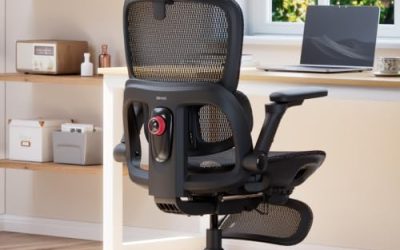
Pick an ergonomic chair with a breathable mesh back, adjustable lumbar, and armrests that move in several directions. You need steady support for long calls and documents, plus a backrest that opens up when the workday ends. A tilt lock and a gentle recline turn the same seat into a relaxed gaming spot without a second chair. Look for a backrest that breathes, since a full day in a warm room turns a sealed chair into a distraction by mid-afternoon.
You Play Competitively in Long Sessions
Choose a racing-style chair with a high backrest, side bolsters, and a recline that locks at a relaxed angle for breaks between rounds. A padded seat and a footrest help you stay settled during long queues, while casters that roll smoothly let you shift position without dragging. Keep the armrests low enough to clear the desk edge. A headrest that adjusts in height and angle keeps long queues comfortable, and a wide seat stops the bolsters from pressing your hips.
You Share a Desk in a Small Room
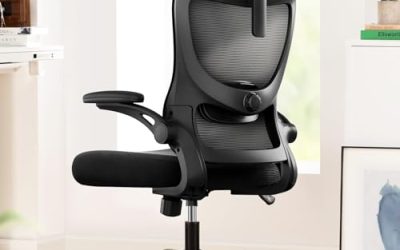
Go for a compact chair with a narrower seat, flip-up armrests, and a base that tucks under the desk when you stand. A lighter frame makes it easy to pull out and push back, and quiet casters keep late sessions from waking the household. Measure the floor space first, including room to recline. A chair that folds its armrests away also slides neatly under a desk, freeing floor space when the room doubles as a bedroom.
You Need Extra Room and a Higher Weight Capacity
Look for a wide seat, a reinforced frame, and a weight capacity with a generous margin above your weight. A broader backrest and a deeper pan keep larger frames supported instead of squeezed, and a sturdy base stops the chair from feeling tippy. Check the listed seat width rather than trusting a photo. A gas lift rated for heavier loads keeps the seat height steady, and thick padding stops the pan from flattening under daily use.
Common Mistakes
- Buying on looks alone. A racing stripe or a sleek silhouette says nothing about lumbar shape, seat depth, or how the chair behaves in hour five. Photos hide thin padding, a narrow pan, and armrests that cannot move, so read the listed dimensions and adjustments before letting the design win you over. A chair that photographs well and supports poorly becomes an expensive reminder within a week, and the return process costs time you could have spent sitting comfortably. Let the spec sheet, not the product photo, make the final call.
- Ignoring seat measurements. Guessing your fit from a product photo is the fastest route to a chair that pinches your hips or cuts into the backs of your knees. Measure your hip width, thigh length, and desk height, then compare those numbers with the listed seat width, depth, and height range before ordering. A few minutes with a tape measure beats a return shipment and a week without a chair, and it also tells you whether a compact model will actually suit you or leave you cramped. Write the numbers down and keep them beside you while you browse.
- Treating weight capacity as a suggestion. Loading a chair near its listed limit strains the gas lift, the base, and the frame, and the wear shows up as sagging, creaking, and wobble within months. Pick a chair rated comfortably above your weight so the moving parts work well within their range instead of at the edge of it. The margin also covers winter clothing, a bag resting on your lap, and years of daily use, so the chair still feels solid long after the first month. A generous margin is cheap insurance.
- Forgetting the floor and the desk. A chair that fits your body can still fail your room if its base will not slide under the desk, its recline hits the wall, or its casters rattle across hard floors. Measure the space behind the chair for recline, check the clearance under the desk, and think about whether you need soft casters for hard floors or a mat for carpet. A chair that cannot move freely in its spot will annoy you every single day, no matter how good the seat feels. Map the room before you order.
- Skipping the adjustment check. A chair with fixed armrests, a fixed headrest, and a backrest that only locks upright forces your body to adapt to the chair instead of the other way around. Confirm which parts move — height, lumbar, armrests, tilt, seat depth — and whether each adjustment is a real mechanism or a decorative claim in the listing. More genuine adjustments mean the chair can grow with changes in your desk, your posture, and your routine, while a rigid chair locks you into one position. Count the adjustments before you commit.
Frequently Asked Questions
Can one chair really work for both office tasks and gaming?
Yes, when its adjustments cover both postures. Upright work needs lumbar support, armrests at elbow height, and a seat that keeps your feet flat, while gaming adds a relaxed recline and room to shift position. A chair with adjustable lumbar, moving armrests, and a locking tilt handles both without compromise. Start with the adjustments, not the styling, and one chair can serve both halves of your day.
Is mesh or leather better for a chair used all day?
Mesh suits warm rooms and long sessions because air moves through the backrest, keeping you cooler across a full day. PU leather looks tidy and wipes clean, yet it can trap heat and feel sticky in summer. Fabric sits in the middle, with a softer feel that still breathes better than smooth leather. Let your room temperature decide, since a warm room makes mesh the safer pick.
How much recline do I need for gaming breaks?
A backrest that leans back to a relaxed angle with a tilt lock is enough for most players, giving your spine a break between rounds without turning the chair into a lounger. A footrest adds comfort for longer pauses, but it is optional if your sessions run short and you sit upright most of the time. For short breaks a recline is plenty, while longer pauses reward a deeper lean.
What should I measure before ordering a chair online?
Measure your hip width, thigh length from the back of the knee to your lower back, desk height, and the space behind the chair. Compare each number with the listed seat width, seat depth, seat height range, and recline clearance so the chair fits your body and your room before it arrives. Keep the list beside you while you browse, and skip any chair whose listing leaves those numbers out.
FAQ
Can one chair really work for both office tasks and gaming?
Is mesh or leather better for a chair used all day?
How much recline do I need for gaming breaks?
What should I measure before ordering a chair online?
More from Amazon
Programs that pair well with the guide above. Offers and eligibility are set by Amazon and may change.
Free shipping on eligible items, Prime Video and more. Eligible new members can start with a free trial.
Start a Prime free trialAd-free music streaming. Eligible new subscribers can start with a free trial.
Try Music Unlimited freeA Prime membership for ages 18-24 with a trial period. Eligibility is set by Amazon.
See Prime for Young AdultsAudiobooks and podcasts to listen to on the go. Eligible new members can start with a free trial.
Try Audible freeAs an Amazon Associate we earn from qualifying purchases.