Our Top Picks
 Razer BlackWidow V4 X Mechanical Gaming Keyboard20.5 x 8 x 2 Inch18.36 x 6.01 x 1.71 inches2.51 poundsCheck on Amazon
For most gamers, an actuation force of about 45 to 55 grams is enough, with 45 g the common default for fast play and 55 g a middle ground; 60 g or more suits heavy-handed typists or anyone who wants fewer accidental presses. Switches below that range feel lighter but can register presses you did not intend.
What Actuation Force Means
Actuation force is the pressure needed for the switch to register a keypress. It is usually written in grams-force (gf) or centinewtons (cN), and the two are close enough that 1 gf is roughly 0.98 cN. Guides aimed at buyers note that the number is a single point in a longer force curve: a linear switch gets steadily heavier as the spring compresses, while a tactile switch has a bump with its own peak force.
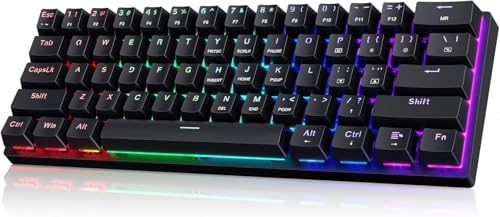
60% Wired Mechanical Gaming Keyboard with Blue Switches, LED Backlit | 61 Keys Ultra-Compact Mini Portable Office Keyboard for PC/Mac/Xbox, 18 LED Backlight, Easy to Carry On Trip, Black
Chosen because it specifies LED Backlit and 18 LED Backlight.
View on AmazonRazer BlackWidow V4 X Mechanical Gaming Keyboard, Yellow Switches, Black | Linear & Silent Switches, 6 Dedicated Macro Keys, Chroma RGB, Doubleshot ABS Keycaps, Roller & Media Controls, Snap Tap
Chosen because it specifies Yellow Switches and Black.
View on Amazon
GEODMAER 65% Gaming Keyboard, Wired Backlit Mini Keyboard, Ultra-Compact Anti-Ghosting No-Conflict 68 Keys Membrane Gaming Wired Keyboard for PC Laptop Windows Gamer
Chosen because it specifies Wired Backlit Mini Keyboard.
View on Amazon
Akko Linear Switches Mechanical Gaming Keyboard Starlit Switch 5-Pin with LED Diffuser Pre-Lubed 45gf
Picked as a relevant option in this category.
View on AmazonQuick Reference by Force Range
| Range | Feel | Suits | Watch out for |
|---|---|---|---|
| 35 to 45 g | Very light | Rapid taps, light touch typists | Accidental presses if fingers rest on keys |
| 45 to 55 g | Medium-light | Most gamers, mixed typing and play | Little; the common sweet spot |
| 55 to 60 g | Medium | Players who like some resistance | Can tire fingers in long sessions |
| 60 g and up | Heavy | Heavy-handed typists, fewer misfires | Slower repeated taps, more strain |
These bands come from buyer guides and vary slightly by source, so use them as a rough map rather than a rule.
Familiar Reference Points
Cherry’s MX line is the usual yardstick. Guides list MX Red, a linear switch, at about 45 g and MX Black, also linear, at about 60 g. MX Brown, which is tactile, is commonly listed around 45 to 55 g depending on whether the source quotes actuation or tactile force, and MX Blue, which is clicky, around 50 to 60 g. Cherry MX Clear is a heavier tactile option listed near 65 cN. Numbers disagree between guides, so confirm exact values on the maker’s datasheet for the switch you are considering.
Why the Number Alone Is Not the Whole Story
- Bottom-out force. A switch with a 45 g actuation force can need considerably more force at the end of travel. One guide lists a 45 g linear switch with a much higher bottom-out figure, though sources disagree on exact values. Bottom-out force matters if you press keys all the way down.
- Linear versus tactile. A 55 g linear and a 55 g tactile feel very different because the tactile switch’s bump peaks above its spring weight.
- Keycaps and stabilisers. Thick keycaps add perceived weight, and one buyer guide says a light switch can feel several grams heavier under heavy caps.
- Actuation distance. Force and actuation point are separate. A short travel to actuation can feel faster even at the same force.
- Spring and lubrication. Lubed or modified switches can feel smoother without changing the printed spec.
Light vs Heavy for Gaming
Lighter switches let you tap quickly and with less fatigue, which is why many gamers choose around 45 g. The downside is accidental actuation, especially if you rest your fingers on the keys between movements. Heavier switches add a buffer so a resting finger does not trigger, and some players feel more control from the resistance. For games with a lot of tapping, light to medium force is common. For strategy games or heavy typing alongside gaming, medium to heavy is reasonable.
Magnetic and Adjustable Switches
Some modern gaming keyboards use magnetic or optical sensing, where the actuation point can be adjusted in software, and the force is set by the spring rather than a mechanical contact. On these boards, force and actuation distance are separate choices, so a medium-force spring with a short actuation point is possible. Check the maker’s specs, since the adjustable range and available spring weights vary by model.
How to Find Your Own Number
- Try a switch tester or a sampler with several force levels, if you can get one.
- Press each as you would in a game, tapping quickly and also resting a finger on the key.
- Note any switch that triggers without intention or tires you within a few minutes.
- If you are unsure, start with a 45 to 55 g board. It is the range most guides treat as the broadest fit.
- Consider a hot-swap board so you can change switches later; check which switch pin type the board accepts.
Pick X If… Decision Table
| Your habits | Force to look at |
|---|---|
| Fast tapper, light touch, rarely rests fingers | Around 40 to 45 g |
| Mixed gamer and typist | Around 45 to 55 g |
| Rests fingers on keys, prone to misfires | Around 55 to 65 g |
| Heavy typist who bottoms out | 60 g and above, with a soft keycap or dampening |
| Undecided | Medium range with hot-swap sockets |
Common Mistakes
- Assuming lighter is always better. Very light switches can cause misfires and are not automatically faster.
- Comparing grams across switch types. Linear and tactile numbers are not directly comparable.
- Ignoring bottom-out force. The end-of-travel weight can matter more than the actuation figure if you bottom out.
- Trusting a single source. Spec numbers vary between datasheets and retailers, so go to the maker’s sheet.
- Forgetting the keycaps. Heavier caps change the feel of the same switch.
Comfort and Strain
If your fingers, wrists or hands ache after gaming, force is only one factor; posture, key travel, desk height and break frequency also matter. Persistent pain or numbness is a reason to speak to a doctor or physiotherapist rather than just swapping switches.
Reading a Spec Sheet
When comparing switches, look for several values together: actuation force, bottom-out force, pre-travel, total travel and whether the switch is linear, tactile or clicky. Makers do not always quote the same measurement, so one datasheet may list the force at the actuation point while another lists the tactile peak. Where two sources disagree, prefer the maker datasheet and treat reseller listings with caution. It also helps to note the spring type, since progressive springs feel lighter at first and heavier toward the bottom. Finally, remember that switch feel changes slightly as a switch breaks in, so first impressions of a new board may shift over the first few weeks of use.
Frequently Asked Questions
Is 45 g too light for gaming?
No, it is a common choice, as with Cherry MX Red. It suits fast tapping, but if you rest fingers on the keys you may get accidental presses, in which case a slightly heavier switch can help.
Is 60 g too heavy?
Not necessarily. Guides describe 60 g switches such as MX Black as suited to heavy-handed users who want fewer accidental presses. It may feel tiring during long, fast-tapping sessions.
Does actuation force affect reaction time?
It affects how much effort a press takes, not your brain’s reaction speed. Lighter switches can make rapid repeated presses easier, but there is no proven universal speed gain.
What is the difference between actuation and bottom-out force?
Actuation force is what registers the press, and bottom-out force is what you need to press the key fully down. The second is usually higher, so a switch can feel heavier at the bottom than its headline number suggests.
Can I change a switch’s force without replacing it?
Some enthusiasts swap springs, but that is a modification that may affect warranty. On adjustable magnetic keyboards, actuation distance can be changed in software, though spring weight stays fixed.
Which force is best for FPS games?
Many players pick light to medium linear switches around 45 to 55 g. This is common preference rather than a rule, so test what feels comfortable for your play style.
FAQ
Is 45 g too light for gaming?
Is 60 g too heavy?
Does actuation force affect reaction time?
What is the difference between actuation and bottom-out force?
Can I change a switch’s force without replacing it?
Which force is best for FPS games?
More from Amazon
Programs that pair well with the guide above. Offers and eligibility are set by Amazon and may change.
Free shipping on eligible items, Prime Video and more. Eligible new members can start with a free trial.
Start a Prime free trialAd-free music streaming. Eligible new subscribers can start with a free trial.
Try Music Unlimited freeA Prime membership for ages 18-24 with a trial period. Eligibility is set by Amazon.
See Prime for Young AdultsAudiobooks and podcasts to listen to on the go. Eligible new members can start with a free trial.
Try Audible freeAs an Amazon Associate we earn from qualifying purchases.