Our Top Picks
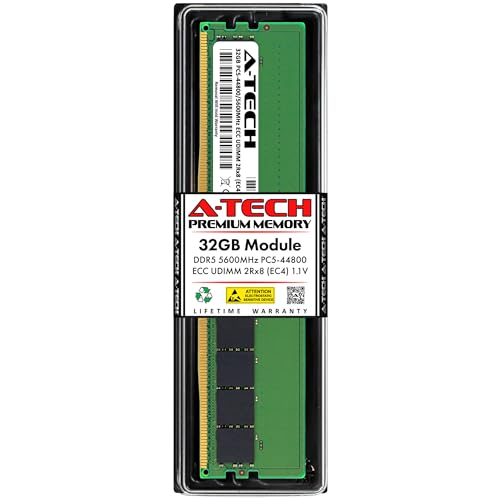 A-Tech 32GB DDR5 5600MHz PC5-44800 ECC UDIMM 2Rx832GB | 2Rx8 EC45.25 x 1.23 x 0.15 inchesCheck on Amazon
ECC memory is RAM that can detect and correct single-bit errors using extra check bits, and for a typical gaming PC you can safely ignore it. Standard DDR5 gaming kits already include a limited form of error correction inside each chip, but that is not the same as full ECC protection between the memory and the processor.
What ECC Memory Is
ECC stands for error-correcting code. Memory cells can occasionally flip a bit because of electrical noise, heat or, rarely, cosmic radiation. Ordinary memory has no way to notice this, so the changed bit may cause a wrong calculation, a corrupted file or a crash. ECC memory stores extra check bits alongside the data. When data is read, the memory controller recomputes the check and can correct a single flipped bit and flag larger errors.

Crucial Bundle with 64GB (2 x 32GB) DDR4 PC4-21300 2666MHz RDIMM (2 x CT32G4RFD4266), Dual Ranked Registered ECC Memory
Chosen because it specifies Dual Ranked Registered ECC Memory.
View on Amazon
Micron Memory Bundle with 256GB (8 x 32GB) DDR4 PC4-21333 2666MHz RDIMM (8 x MTA36ASF4G72PZ-2G6E1), Dual Ranked Registered ECC Memory
Chosen because it specifies Dual Ranked Registered ECC Memory.
View on Amazon
A-Tech 64GB Kit (4x16GB) DDR4 2400MHz PC4-19200 ECC RDIMM 2Rx4 Dual Rank 1.2V ECC Registered DIMM 288-Pin Server & Workstation RAM Memory Upgrade Modules (A-Tech Enterprise Series)
Picked as a relevant option in this category.
View on AmazonA-Tech 32GB DDR5 5600MHz PC5-44800 ECC UDIMM 2Rx8 (EC4 9x4) Dual Rank 1.1V ECC Unbuffered DIMM 288-Pin Server, Workstation RAM Memory Upgrade Module
Chosen because it specifies Workstation RAM Memory Upgrade Module.
View on AmazonTraditional ECC modules have a wider data path. A standard module uses a 64-bit data bus, and an ECC module adds extra bits so the controller can compute and compare the code. That requires additional memory chips on the module, which is why ECC modules typically cost more and are less common in consumer shops.
On-Die ECC Versus Real ECC
This is where most confusion begins. DDR5 includes on-die ECC in every chip as part of the JEDEC standard. Technical write-ups explain that it corrects single-bit errors inside the DRAM chip before data leaves it, which helps chip makers reach reliable yields at high densities. It does not protect the data while it travels between the module and the CPU, and it does not report errors to the operating system.
Real ECC, sometimes called side-band ECC, adds extra chips and data lines so the memory controller can protect data end to end and report corrected errors. A standard DDR5 gaming kit does not have this, even though it has on-die ECC.
Quick Reference Table
| Feature | Standard DDR5 (on-die ECC) | ECC DDR5 (side-band) |
|---|---|---|
| Corrects errors inside the chip | Yes | Yes |
| Protects the module-to-CPU path | No | Yes |
| Reports errors to the OS | No | Yes, when platform supports it |
| Extra chips on module | No | Yes |
| XMP or EXPO overclock profiles | Common | Usually absent on server-type modules |
| Typical use | Gaming and general desktops | Workstations, servers, home labs |
Does Your Gaming PC Support ECC?
Support depends on the CPU, the motherboard and the module type. AMD lists ECC support for some Ryzen desktop processors with the note that it requires motherboard support, which means the board maker must route the signals and enable the feature in firmware. Intel mainstream desktop platforms have traditionally reserved ECC for workstation chipsets, though specifics vary by generation. Some AM5 boards list support for ECC and non-ECC unbuffered DDR5, while many gaming boards do not mention it at all. Guides also warn that even when ECC modules are accepted, error reporting may be incomplete on some boards.
Server-style registered modules, called RDIMMs, are a different type that desktop boards do not accept. Workstation platforms such as Threadripper PRO use them.
How to Check ECC on Your Own System
- Look at the CPU and board specifications. The maker’s spec page for your CPU and the motherboard manual state whether ECC is supported.
- Check the module label or part number. ECC unbuffered modules are labeled ECC or UDIMM ECC. Standard gaming kits are not.
- Check Windows. In Command Prompt, running
wmic memorychip get datawidth,totalwidthcompares the data width with the total width. A value of 64 and 72 suggests ECC is active. Equal values suggest it is not. Microsoft has been phasing out wmic on newer builds, so PowerShell equivalents may be needed on some systems. - Check firmware. Some boards have an ECC option under a memory or advanced menu. The name and location vary by maker, so consult the motherboard manual.
On Linux, a memory information tool can list the error correction type, with on-die ECC alone typically showing no system-level ECC.
Common Misconceptions
- “My DDR5 already has ECC, so I am covered.” On-die ECC is limited to the chip. It is not the same as system ECC.
- “ECC makes games faster.” It does not. Checking adds a small overhead, and ECC modules are often clocked lower than gaming kits.
- “ECC prevents all crashes.” It only addresses memory bit errors. Drivers, overheating and unstable overclocks cause far more game crashes.
- “Any board accepts ECC modules.” Some boards will boot ECC modules but run them in non-ECC mode.
When to Care and When to Ignore It
Gamers who simply play, stream and browse have little reason to pursue ECC. The bit-error chance is small, and symptoms from unstable overclocks, failing sticks or software bugs are much more common. If you suspect faulty memory, run a memory test tool and a game stress test rather than buying ECC modules.
ECC makes sense for machines where silent corruption is costly: home servers, network storage with file systems that checksum data, scientific or financial work, and long-running virtual machine hosts. If your gaming PC doubles as one of these, check the CPU and board for support first, then pick modules from the board maker’s supported list. ECC modules generally run at the platform’s stock speeds, and overclocking them may not be possible.
Changing memory settings in firmware can cause boot failures and may affect warranty terms. Keep settings at defaults unless you know what you are changing, and clear the CMOS following your board manual if the PC will not start.
Buying and Setup Notes
If you decide ECC fits your build, start from the platform rather than the memory. Choose a CPU and motherboard whose makers list ECC unbuffered DDR5 support, then pick modules from the board’s supported memory list. Expect JEDEC standard speeds, and do not assume gaming features such as XMP or EXPO will be present. After installing, confirm in the operating system that the total memory width exceeds the data width, and look for an error-reporting entry in the system event log. Always power down and unplug the PC before touching the modules, and discharge static by touching the bare metal of the case first. If the system fails to start with ECC modules, consult the motherboard manual or the maker’s support team before changing firmware options.
Frequently Asked Questions
Is ECC memory worth it for gaming?
For most players, no. It does not raise frame rates and adds cost and compatibility limits. Its value is data integrity, which matters more for servers and workstations than for games.
Can I use ECC RAM on a Ryzen motherboard?
Often yes with unbuffered ECC modules, but only if the CPU and motherboard both support it. AMD describes ECC on some Ryzen CPUs as requiring motherboard support. Consult the board’s manual and supported memory list.
Does DDR5 have ECC built in?
DDR5 chips have on-die ECC, which corrects single-bit errors inside the chip. It does not provide full ECC across the memory bus and does not report errors to the operating system.
Can I mix ECC and non-ECC modules?
Mixing is not recommended. If the platform accepts both, ECC is typically disabled for the whole system, and stability can suffer.
Will ECC memory work with XMP or EXPO?
Most ECC modules do not carry overclock profiles, and server-type modules generally do not. Expect JEDEC standard speeds.