Our Top Picks
 TP-Link AXE5400 Tri-Band WiFi 6E RouterWiFi 6E, Tri-Band AXE540012.91 x 10.43 x 4.72 inches1.5 PoundsCheck on Amazon
Wi-Fi 6E is Wi-Fi 6 (802.11ax) extended into the 6 GHz band, which adds a large block of clean spectrum that older Wi-Fi 5 and Wi-Fi 6 devices cannot use. The benefit for a gaming PC is less congestion and more room for wide channels, not a higher top speed than regular Wi-Fi 6. Newer Wi-Fi 7 builds on the same band, but Wi-Fi 6E remains a solid wireless option when Ethernet is not practical.
What the “E” means
The E stands for extended. Standard Wi-Fi 6 works on the 2.4 GHz and 5 GHz bands. Wi-Fi 6E keeps the same technology but adds the 6 GHz band, which spans 5925 to 7125 MHz in the United States, about 1200 MHz of new spectrum, according to router makers such as TP-Link and network vendors such as Juniper. That is a large addition compared with the roughly 500 to 600 MHz available in 5 GHz.
TP-Link AXE5400 Tri-Band WiFi 6E Router, 2025 PCMag Editors' Choice | 2.5Gbps WAN Port for Gaming & Streaming, 6GHz Band, 160MHz, OneMesh, Dual-Core CPU, VPN & WPA3 (Archer AXE75)
Chosen because it specifies 2025 PCMag Editors' Choice and 2.5Gbps WAN Port for Gaming & Streaming.
View on Amazon
MSI Radix AXE6600 WiFi 6E Tri-Band Gaming Router, AI QoS, RGB, 1.8GHz Quad-Core Processor, MU-MIMO, Tri Band Gigabit Wireless, 8-Stream, High Speed Long Range Gaming Router
Chosen because it specifies AI QoS and RGB.
View on Amazon
TP-Link - Archer AXE7800 Tri-Band Wi-Fi 6E Router - Black (Renewed)
Chosen because it specifies Archer AXE7800 Tri-Band Wi-Fi 6E Router and Black (Renewed).
View on Amazon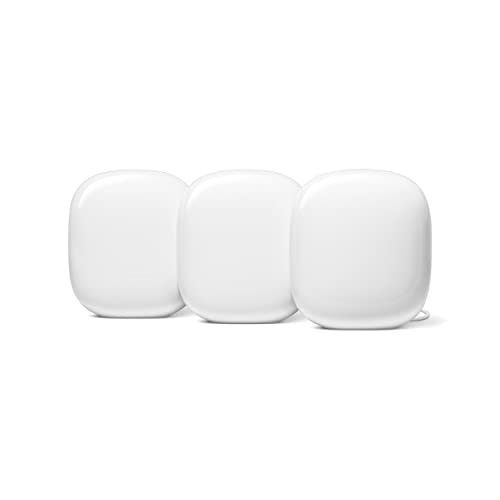
Google Nest WiFi Pro - 6E - Reliable Home Wi-Fi System with Fast Speed and Whole Home Coverage - Mesh Router - 3 Pack - Snow
Chosen because it specifies Mesh Router and 3 Pack.
View on AmazonIn the United States that space fits up to seven non-overlapping 160 MHz channels, fourteen 80 MHz channels or fifty-nine 20 MHz channels. By comparison, the 5 GHz band has only two 160 MHz channels, and those are awkward to use because of radar-avoidance rules (DFS) that many devices handle poorly. Other regions opened less of the band. Reports describe the European Union allowing 480 MHz, which fits three 160 MHz channels, so what you get depends on local regulation.
How it works in practice
Wi-Fi 6E uses the same features as Wi-Fi 6, such as OFDMA and improved scheduling for many devices, but on a band that contains no legacy traffic. Only 6E-capable devices can connect on 6 GHz, so the channel is not shared with older phones, smart-home gadgets or neighbors’ Wi-Fi 5 routers. The practical result is steadier latency and fewer interference-related hiccups in busy apartments or homes with many devices.
Wi-Fi 6E also requires WPA3 security on the 6 GHz band, which is a mandatory part of the certification rather than an option.
The trade-off: range
Higher frequencies lose more signal passing through walls and floors. Network vendors describe 6 GHz as having a shorter effective range than 5 GHz and much shorter than 2.4 GHz. A PC in the same room as the router, or one wall away, will benefit most. A PC two floors away may fall back to 5 GHz, which is normal behavior for a tri-band setup.
Why it matters for gaming PCs
Online games are mostly sensitive to delay variation (jitter) and packet loss, not raw bandwidth. A clean 6 GHz channel can reduce interference-driven spikes, which is where Wi-Fi can feel worse than Ethernet. Large game downloads and local network transfers also benefit from wider channels when the router and the PC both support them. Even so, a wired Ethernet connection remains the most consistent option for competitive play, and Wi-Fi 6E is the best choice when running a cable is not possible.
Many recent motherboards for Intel and AMD platforms include a Wi-Fi 6E or Wi-Fi 7 module, and desktop PCI Express and USB adapters also exist. The wireless chip is listed on the motherboard maker’s specification page.
How to check your own system
- Check your router. Look at the maker’s specification page for tri-band or 6 GHz support, or open the router’s admin page, which will list a separate 6 GHz network if it is enabled. Router menus vary by maker.
- Check your PC adapter. Open Device Manager, expand Network adapters and note the adapter name, for example Intel AX210 or similar. Then check the maker’s specification for 6 GHz support. In Windows Settings, Network and internet, Wi-Fi, Hardware properties, the Network band line shows which band you are connected on.
- Check your operating system. Windows 11 supports 6 GHz with a compatible driver. Keep the adapter driver current using the motherboard or adapter maker’s download page.
- Check your region. 6 GHz rules differ by country, and some regions limit the available channels.
Quick-reference table
| Band | Range | Congestion | Best use |
|---|---|---|---|
| 2.4 GHz | Longest | Very high | Distant or simple devices |
| 5 GHz | Medium | Moderate | Most Wi-Fi 5 and 6 devices |
| 6 GHz (Wi-Fi 6E) | Shortest | Very low | Nearby, performance-sensitive devices like a gaming PC |
Common misconceptions
- “6E is a faster generation than Wi-Fi 6.” It uses the same technology; the gain comes from the extra band.
- “6E makes my existing devices faster.” Only devices with a 6E radio can use 6 GHz. Older devices stay on 2.4 or 5 GHz.
- “6E has better range.” Range is shorter than lower bands.
- “I need an internet plan upgrade.” The wireless link between devices and router is separate from your internet speed.
- “6E is the same as Wi-Fi 7.” Wi-Fi 7 (802.11be) adds features such as wider 320 MHz channels and multi-link operation, and it also works in 6 GHz.
When to care and when to ignore it
Care about Wi-Fi 6E if you live in a dense building with many competing networks, play online on Wi-Fi, and your PC will sit within a room or two of the router. Care also if you are buying a new router, because tri-band 6E models are common and Wi-Fi 7 models are an alternative. You can ignore it if your PC uses Ethernet, if your router is far from your PC, or if your internet plan is slow enough that the wireless link is not the limit.
Getting the most from a 6E connection
Place the router in an open spot near the gaming area, ideally in the same room or with a clear line of sight, because 6 GHz weakens quickly through walls. If your router lets you name the bands separately, give 6 GHz its own network name so the PC joins it deliberately. Some routers combine bands under one name and steer devices automatically, which is convenient but can leave a PC on 5 GHz. Keep the adapter driver updated, and when a router offers a channel width setting, wide 160 MHz channels suit short distances while narrower ones can be steadier at range. Mesh systems may use 6 GHz only as a backhaul link between nodes, so read the maker’s description to see whether client devices can use the band directly.
Frequently Asked Questions
Do I need a new router and a new adapter for Wi-Fi 6E?
Yes, both ends need 6E support to use the 6 GHz band. Your devices will still work on 2.4 and 5 GHz with older equipment, but the 6 GHz benefits require a compatible router and a compatible PC adapter.
Is Wi-Fi 6E better than Wi-Fi 6 for gaming?
It can be, mainly through less interference and lower jitter on a nearby clear channel. Top speed is similar, so the improvement is in consistency rather than raw throughput.
Is Wi-Fi 6E better than Ethernet?
No. A wired connection is generally more stable and has lower and steadier latency. Wi-Fi 6E is the best wireless option when running a cable is not possible.
Is Wi-Fi 7 worth it over Wi-Fi 6E?
Wi-Fi 7 adds features such as wider channels and multi-link operation, which help in good conditions. If you already have Wi-Fi 6E hardware and a modest connection, the practical gain may be small. Compatibility with your devices matters more.
Why does my PC not connect to the 6 GHz network?
Common causes are an adapter without 6 GHz support, an outdated driver, a router with 6 GHz disabled, distance from the router, or a regional restriction. Update the driver, move closer and check the router settings per the maker’s manual.