Key takeaways
- Top-down view. The camera faces down at the table, not at you, so you need a mount that holds it above the mat.
- Readable card detail. Card recognition and opponents’ eyes both need enough pixels per card.
- Stable focus. Hands moving in and out of the frame make cheap autofocus hunt; focus should lock on the mat.
- Even, glare-free light. Sleeves and foils reflect overhead lights straight into the lens.
What's inside
The best webcam for SpellTable is a 1080p or 4K camera with lockable focus mounted 40–60 cm above your playmat, and a Logitech C920s or C922 on an overhead arm handles most Commander games, while a Logitech Brio 4K or an IPEVO V4K document camera gives sharper card text for opponents who want to read every name. For SpellTable, the mount and lighting decide more than the camera: an angled, glary, out-of-focus battlefield is unreadable at any resolution.
What SpellTable Needs From a Camera
SpellTable is browser-based remote Magic: The Gathering. Each player points a camera at their own battlefield, and opponents click cards on your feed to identify them. That puts unusual demands on the camera:
- Top-down view. The camera faces down at the table, not at you, so you need a mount that holds it above the mat.
- Readable card detail. Card recognition and opponents’ eyes both need enough pixels per card.
- Stable focus. Hands moving in and out of the frame make cheap autofocus hunt; focus should lock on the mat.
- Even, glare-free light. Sleeves and foils reflect overhead lights straight into the lens.
Worked Example: How High to Mount the Camera
A standard playmat is about 61 × 35.5 cm (24 × 14 inches). The height needed to fit it depends on the lens’s field of view. For a 16:9 camera, the diagonal FOV converts to horizontal and vertical angles, and the required height is half the mat dimension divided by the tangent of half the angle.
| Diagonal FOV | Horizontal / vertical FOV | Height to fit 61 cm width | Height to fit 35.5 cm depth | Mount height (with ~10% margin) | Example cams |
|---|---|---|---|---|---|
| 65° | ~58° / ~35° | ~55 cm | ~57 cm | ~62 cm | Brio 4K at narrowest setting |
| 78° | ~70° / ~43° | ~43 cm | ~45 cm | ~50 cm | Logitech C920s, C922 |
| 90° | ~82° / ~52° | ~35 cm | ~36 cm | ~40 cm | Brio 4K at widest setting |
The limiting dimension is the mat’s depth, because 16:9 sensors are wide and short. Many players frame just the creature and land zones instead of the whole mat, which lets the camera sit lower and increases detail on each card.
Pixels per card
If 1920 pixels span a 61 cm mat, you get about 3.1 pixels per millimetre. A card’s name line is roughly 3 mm tall, so it lands at about 9–10 pixels high: readable, but tight. At 720p it drops to about 6 pixels, where names blur together. A 4K camera framing the same mat gives about 6 pixels per millimetre, so even after the platform compresses the feed, cards keep more legible edges. Framing only your battlefield instead of the full mat raises density by 30–50% on any camera.
Camera Options for SpellTable
| Camera | Resolution | FOV | Focus | Mounting | Typical price | Best for |
|---|---|---|---|---|---|---|
| Logitech C920s | 1080p30 | 78° | Auto, lockable in software | Standard 1/4″ tripod thread | $50–$80 | Budget Commander setup |
| Logitech C922 | 1080p30 / 720p60 | 78° | Auto, lockable | 1/4″ thread, includes mini tripod | $60–$100 | Same as C920s with a tripod in the box |
| Logitech Brio 4K | 4K30 | 65 / 78 / 90° | Auto | 1/4″ thread | $130–$200 | Sharp text and flexible framing |
| IPEVO V4K document camera | 8MP sensor, 4K-class still detail | Fixed overhead | Auto, with focus lock | Built-in jointed stand | $90–$130 | No separate arm needed |
| Phone as webcam | 1080p–4K | Varies | Excellent auto | Phone clamp on an arm | Phone you own plus $20–$40 mount | Highest image quality per dollar |
Avoid gimbal webcams with auto-tracking for this job: they try to find a face and will swing away from your cards unless tracking is disabled. Fixed-focus webcams tuned for faces at 50–120 cm can also look soft when pointed at a mat only 40 cm away.
Mounting Options
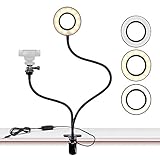
- Overhead arm with a 1/4″ screw (about $20–$45): clamps to the table edge and reaches over the mat. Choose one with at least 50 cm reach and a stiff joint so the camera does not drift during a long game.
- Gooseneck clamp: cheap and compact, but heavier cameras like the Brio sag slowly. Better for the lightweight C920s.
- Tripod with horizontal boom: stable and adjustable, but its legs take up table space.
- Document camera stand: self-contained and tidy, though the fixed height can limit how much of a large mat it covers.
Setup Steps for a Clear Battlefield
- Square the camera. Point it straight down over the middle of your play area. Angled cameras make the far row of cards smaller and harder to identify.
- Lock focus. Place a card in the center, let autofocus settle, then switch to manual focus in Logi Tune, G HUB or the camera’s app so hands do not trigger refocusing.
- Kill glare. Move the main light off to the side at about 45 degrees rather than directly overhead. Matte or non-glare sleeves help more than any camera upgrade.
- Fix white balance. Set it manually so card colors stay true; auto white balance can turn white cards blue when a blue playmat dominates the frame.
- Choose the camera in SpellTable. In the game setup screen, select the overhead camera and flip or rotate the image if your cards appear upside down to opponents.
- Use a wired connection if you can. SpellTable runs in the browser over a peer video connection; a stable network keeps the feed sharp instead of dropping resolution mid-game.
FAQ
Is 720p enough for SpellTable?
It works, but small card names become hard to read. If you have a choice, use 1080p and frame tightly around your battlefield.
Do I need a second camera for my face?
No. SpellTable is built around the battlefield camera. Some playgroups run a separate voice or video call for faces, which any laptop camera can handle.