
Shopping for a gaming laptop under $1500 in 2026 is deceptively difficult. The sub-$1500 tier is where manufacturers make their sharpest compromises, and two machines with identical GPU names on the spec sheet can deliver wildly different frame rates depending on cooling design, wattage limits, and panel quality. A laptop advertising an RTX 5060 might run it at 75W in a thin chassis or 115W in a thicker one, and that gap is the difference between comfortable 1440p gaming and disappointing stutter in modern titles.
This guide cuts through the marketing language to focus on what actually determines gaming performance in this price bracket. We’ve evaluated the strongest contenders on sustained performance under load, display quality, thermal behavior, and long-term upgradeability, then ranked them by real value rather than headline specs. Whether you’re chasing high-refresh esports frame rates or want a machine capable of maxed-out AAA visuals, there’s a clear winner here for your priorities.
Our top picks
 ASUS ROG Strix G16
- Unleash power with Windows 11 Home, an Intel…
- Multitask seamlessly with 16GB of DDR5-5600MHz memory and…
- Immerse yourself in stunning visuals with the smooth…
 msi Katana 15 15.6” 165Hz QHD Gaming
- Supercharged Process: The 13th Gen
- Simplistic Design: Enjoy the latest generation of Windows…
- Beyond Fast: The NVIDIA GeForce RTX 4070 GPU…
 acer Nitro V 15.6” FHD IPS 165Hz
- 15.6" Full HD (1920 x 1080) widescreen LED-backlit…
- Intel Core i5-13420H Processor - up to 4.6GHz,…
- NVIDIA GeForce RTX 5050 Laptop GPU with 8GB…
| Product | Key specs | |
|---|---|---|
| ASUS ROG Strix G16 | Unleash power with Windows 11 Home, an Intel… Multitask seamlessly with 16GB of DDR5-5600MHz memory and… Immerse yourself in stunning visuals with the smooth… | Check price |
| msi Katana 15 15.6” 165Hz QHD Gaming | Supercharged Process: The 13th Gen Simplistic Design: Enjoy the latest generation of Windows… Beyond Fast: The NVIDIA GeForce RTX 4070 GPU… | Check price |
| acer Nitro V 15.6” FHD IPS 165Hz | 15.6" Full HD (1920 x 1080) widescreen LED-backlit… Intel Core i5-13420H Processor - up to 4.6GHz,… NVIDIA GeForce RTX 5050 Laptop GPU with 8GB… | Check price |
 Alienware 16 Aurora Gaming Laptop Alienware 16 Aurora Gaming Laptop | Brilliant display: Go deeper into games with a… Game changing graphics: Step into the future of… Innovative cooling: A newly designed Cryo-Chamber structure focuses… | Check price |
 GIGABYTE GIGABYTE | GIGABYTE GiMATE as Your Smart AI Mate Intel Core i7-13620H Processor NVIDIA GeForce RTX 5060 Laptop GPU | Check price |
 Lenovo LOQ 15.6" IPS FHD 144Hz AMD Lenovo LOQ 15.6" IPS FHD 144Hz AMD | Performance That Dominates: Equipped with an AMD Ryzen… Stunning Visuals: The 15.6" Full HD IPS LCD… Smart Connectivity: Wi-Fi 6 and Bluetooth 5.3 deliver… | Check price |
 ASUS V16 Gaming Laptop ASUS V16 Gaming Laptop | Check price | |
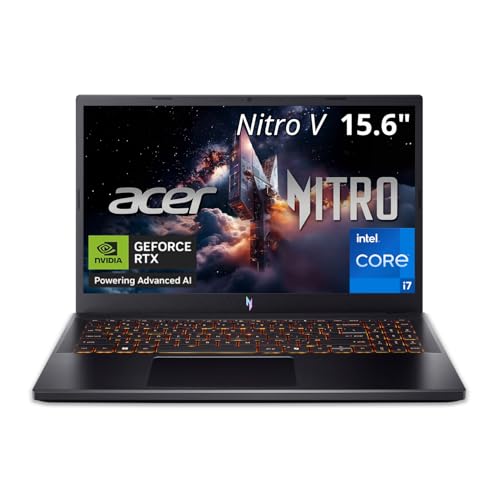 Acer Nitro V 15in Gaming Laptop ANV15-52-73D8 Acer Nitro V 15in Gaming Laptop ANV15-52-73D8 | Check price |
As an Amazon Associate we earn from qualifying purchases at no extra cost to you.
⚡ Save on Your Next PC — Amazon Prime
Prime members get fast free shipping on the systems above, plus early access to Prime Day & Black Friday PC deals. New members get a 30-day free trial.
Watch: Best Gaming Laptop Under $1500 — Video Review
How to Choose Gaming Laptop Under $1500
- GPU wattage over GPU name: An RTX 5060 at 115W can outperform a poorly cooled RTX 4070 at 80W. Check the manufacturer’s stated total graphics power (TGP) before comparing models, since this single number often predicts real-world performance better than the GPU tier itself.
- Match the panel to the GPU: A QHD display is worth paying for only if the GPU can drive it. At this budget, a sharp 165Hz FHD or WUXGA screen usually delivers a better experience than a QHD panel your card struggles to feed at high settings.
- Prioritize 16GB RAM and dual SODIMM slots: 16GB is the practical floor for 2026 gaming, but soldered memory locks you out of future upgrades. Laptops with two accessible SODIMM slots let you move to 32GB cheaply when open-world titles demand it.
- Don’t ignore storage headroom: A 512GB SSD fills up after four or five modern installs. Either budget for a 1TB configuration upfront or confirm there’s a free M.2 slot so you can add a second drive without cloning anything.
- Weigh cooling against portability: Thinner chassis throttle faster under sustained load. If you game for hours at a time, a slightly heavier laptop with a more aggressive cooling solution will hold higher clocks and stay quieter than an ultra-slim alternative.
The Best Picks Reviewed
ASUS ROG Strix G16 (2025)
The Strix G16 pairs an RTX 5060 with Intel’s Core i7-14650HX and a genuinely capable cooling system, which lets the GPU hold near its rated power far longer than most competitors at this price. The 16:10 165Hz panel and 1TB Gen 4 SSD round out a machine that feels a class above its price tag, and Wi-Fi 7 future-proofs the networking side.
MSI Katana 15
This is the pick for anyone who wants maximum raw GPU horsepower per dollar, since an RTX 4070 at this price remains a strong proposition for ray-traced AAA gaming at QHD. The i7-13620H is a generation behind, but Cooler Boost 5 keeps thermals in check and the 165Hz QHD panel makes good use of the extra graphics headroom.
GIGABYTE Gaming A16
Gigabyte’s A16 hits the sweet spot for buyers who want an RTX 5060 and a 16-inch WUXGA display without paying a premium for brand cachet. The i7-13620H is more than sufficient to keep the GPU fed at 1200p, and the 1TB SSD with 16GB DDR5 means there’s nothing to upgrade on day one.
Lenovo LOQ 15.6″
The LOQ pairs an RTX 5060 with a Ryzen 7 250 in one of the most aggressively priced packages in this roundup, making it the value champion if you can live with a 144Hz FHD panel. The 512GB SSD is the main compromise, though the accessible M.2 slot makes adding storage straightforward.
Acer Nitro V 15.6″
Acer’s Nitro V is the entry point to this list, and the RTX 5050 with 8GB of GDDR7 handles 1080p high settings competently in most current titles. The i5-13420H and 165Hz IPS panel make it a sensible esports machine, but budget for a storage upgrade since 512GB fills quickly.
Frequently Asked Questions
Is an RTX 5060 enough for 1440p gaming in 2026?
Yes, with sensible settings. Most 2026 releases run comfortably above 60fps at 1440p with DLSS enabled and settings at high rather than ultra, and esports titles will exceed 165fps easily. Native 1440p ultra with heavy ray tracing is where you’ll need to compromise.
Should I choose the RTX 4070 over a newer RTX 5060?
It depends on your priorities. The RTX 4070 generally delivers higher raw rasterization performance, while the RTX 5060 brings newer architecture features and better efficiency. If you’re gaming at QHD and want maximum frames today, the 4070 is the stronger choice.
Is 16GB of RAM still enough for gaming?
For now, yes, though it’s increasingly the minimum rather than the comfortable option. Some open-world titles already benefit from 32GB when running alongside a browser and Discord. Choosing a laptop with accessible SODIMM slots means you can upgrade later for well under $60.
Do gaming laptops in this range last more than three years?
Typically yes, provided you keep the vents clear and replace thermal paste around the two-year mark. The GPU is the component that ages fastest, but an RTX 5060 or 4070 should handle 1080p gaming well beyond 2029 with settings adjustments.
Final Thoughts
For most buyers, the ASUS ROG Strix G16 is the strongest all-round choice under $1500, combining a well-cooled RTX 5060 with a current-generation CPU, a 1TB SSD, and a genuinely good 16:10 display. If raw graphics performance matters more than anything else, the MSI Katana 15 and its RTX 4070 remain hard to beat at this price. Budget-focused shoppers should look closely at the Lenovo LOQ, which delivers the same RTX 5060 experience for noticeably less as long as you’re comfortable adding storage down the line.








