Our Top Picks
A webcam decides how you show up on every call, stream and recording. The built-in camera on a laptop sits low, crops tight and falls apart in dim light, so a dedicated webcam is the fastest way to look sharper on screen. This guide compares five PC webcams currently sold on Amazon US, from a long-running 1080p workhorse to a 4K camera that follows you around the room. Each one is a USB webcam for a desktop or laptop, judged on the same points: resolution and frame rate, focus and field of view, microphones, privacy controls and how it mounts.
No single webcam wins for everyone. A fixed desk setup calls for different hardware than a presenter who moves around, and a streamer who already owns a good microphone has different needs than someone who wants one cable and nothing else. The five picks below cover those cases: two 4K cameras for detail, two 1080p cameras for smooth motion, and one PTZ camera that tracks you. Read the comparison, match the camera to your room and your habits, and confirm the exact model on the live listing before ordering, because several of these cameras ship in more than one color and configuration.
What to look for
Resolution is the first number to check, and it is not the whole story. A 1080p camera at 60 frames per second looks smoother on a call than a 4K camera capped at 30 frames per second, and most meeting software downscales video to 1080p or lower anyway. 4K earns its keep when you record, crop into the frame, or want fine detail in your face and background. Look for the frame rate next to the resolution, and treat a camera that lists 4K at 30 frames per second and 1080p at 60 frames per second as two different cameras in one body.
Focus type matters more than most buyers expect. Fixed-focus cameras are tuned for a set distance from the lens, often about an arm’s length, and they keep that zone sharp with no moving parts. Autofocus cameras adjust as you lean in or sit back, which helps when you move around, but a slow autofocus can hunt for focus in low light. If you sit at a fixed distance from your monitor, a fixed-focus camera is simple and reliable. If you present while standing, or you shift between a chair and a standing desk, autofocus is worth having.
Field of view decides how much of the room shows behind you. A narrow field of view, around 65 to 78 degrees, frames your head and shoulders and hides a messy room. A wide field of view, around 84 to 90 degrees, shows more of your desk and the people beside you, which suits a shared desk or a small group. Some cameras let you switch between two or three fields of view in software, which is handy when one camera serves both solo calls and group sessions.
Microphones split the five picks cleanly. Two of the cameras in this guide have no built-in microphone at all, by design, because their makers expect you to use a headset or a desk microphone. Two more have dual microphones with noise reduction, and one has a single microphone tuned for voice. If you take calls from a quiet room and want one cable doing everything, a camera with good built-in mics is the right call. If you already own a headset or a USB microphone, a camera without a mic is not a drawback, and it often costs less for the same image quality.
Privacy controls deserve a look before you buy. A physical shutter that slides over the lens is the most direct control, and three of the five picks have one built in. The other two rely on software or on unplugging the camera, which works but is less convenient. A mount matters too: every camera here clips to a monitor, and most also thread onto a tripod, which is useful when the camera sits on a shelf or a desk arm.
Lighting is the last piece. A camera with a large sensor holds up better in a dim room, and a camera with HDR handles a bright window behind you more gracefully. No webcam fixes a dark room on its own, so a lamp behind the camera, aimed at your face, does more for image quality than any sensor upgrade. Check the sensor size and the low-light notes in each section below, and weigh them against the light in your own room.
Logitech MX Brio Ultra HD 4K Webcam, Graphite

The Logitech MX Brio is the most complete webcam in this guide, and the one to pick when a single camera has to handle work calls, streaming and recording without extra gear. It records 4K video at 30 frames per second and 1080p at 60 frames per second, so it covers both the detail-first and the motion-first cases in one body. The sensor is an 8.5 megapixel Sony CMOS sensor, the largest in this guide, and it gives the Brio the strongest low-light image of the five picks. Autofocus keeps you sharp as you lean in or sit back, and the camera switches between 65, 78 and 90 degree fields of view in software, so one camera frames a solo call and a group session alike.
The microphone setup is the best in this guide as well. Dual beamforming microphones with noise reduction pick up your voice and push room noise down, and Logitech pairs them with an AI image enhancement mode that adjusts exposure and white balance as the light in the room changes. A privacy shutter slides over the lens, and Show Mode tilts the camera down to show your desk, which is handy when you need to show a document or a sketch on a call. The camera connects over USB-C and mounts on a monitor clip or a tripod thread.
Confirm the exact model before ordering. The consumer model is part number 960-001545, sold in Graphite, Pale Gray and Black, and the listing here is the Graphite version. Logitech also sells a business model, the Brio 705, under a different part number. The 4K mode runs at 30 frames per second, so 60 frames per second means dropping to 1080p.
Elgato Facecam MK.2 Premium Full HD Webcam

The Elgato Facecam MK.2 is the best 1080p webcam in this guide, and the right pick for streamers and callers who want the smoothest motion rather than the highest resolution. It sends uncompressed 1080p video at 60 frames per second, with HDR support and DSLR-style controls for ISO, shutter speed and white balance in Elgato Camera Hub software. The sensor is a Sony CMOS sensor, and the lens is a fixed-focus design tuned for 30 to 120 centimetres, which covers a normal desk setup with no focus hunting. The field of view is 84 degrees, wide enough to show your shoulders and a little of the desk behind you.
There is no built-in microphone, and that is a deliberate choice. Elgato expects you to use a headset or a separate microphone, and the camera puts its whole budget into the image. A privacy shutter slides over the lens, and pan, tilt and zoom controls live in the Camera Hub software, so you can frame the shot without touching the camera. The camera connects over USB-C and mounts on a monitor clip or a tripod thread.
One detail needs care. Elgato states the lens aperture as f/2.4, while one Amazon table entry states f/2.8, so this guide uses Elgato’s figure and flags the disagreement. The fixed focus is a strength at a desk and a limit anywhere else: if you sit much closer than 30 centimetres or much farther than 120 centimetres, the image softens, so measure your seating distance before you buy. The MK.2 is also the second generation of the Facecam, and the original Facecam is still sold under its own listing, so confirm the model number 20WAC9901 on the page you open.
Elgato Facecam 4K 4K60 Studio Webcam

The Elgato Facecam 4K is the studio pick in this guide, built for creators who record in 4K and want manual control over the image. It records 4K video at 60 frames per second, the only camera here that holds 4K at full motion, with HDR support and manual ISO and shutter control in Elgato Camera Hub software. The sensor is a Sony CMOS sensor at 1/1.8 inch, the largest sensor in this guide alongside the MX Brio, and the lens is a fixed-focus f/4.0 design with a 90 degree field of view. A 49 millimetre filter thread on the front accepts standard lens filters, which is a studio feature no other pick in this guide has.
Like the MK.2, the Facecam 4K has no built-in microphone. Elgato leaves the microphone out on purpose, and the camera is aimed at people who already own a good microphone or headset. The camera connects over USB-C, mounts on a monitor clip or a tripod thread, and the uncompressed video feed keeps detail intact through editing and streaming software.
The fixed focus needs the same check as the MK.2: the camera is tuned for a desk distance, so confirm your seating position before you buy. The 4K60 mode needs a USB port and a computer that can handle the data rate, so check that your machine supports it before ordering. The model number is 20WAF9901, and Elgato also lists the same camera under SKU 10WAF9901 on its own store, so confirm the model on the Amazon listing. If you take calls from a quiet room and want one cable doing everything, the MX Brio fits better; if you record in 4K and already own a microphone, the Facecam 4K is the sharper tool.
Insta360 Link 2 PTZ 4K Webcam

The Insta360 Link 2 is the only PTZ camera in this guide, and the pick for presenters who move. The camera sits on a dual-axis gimbal that pans and tilts to follow you, with AI tracking that keeps you framed as you walk, gesture or shift between a chair and a standing position. It records 4K video at 30 frames per second and 1080p at 60 frames per second, with HDR and a 1/2 inch sensor that is larger than most 4K webcams. Gesture control lets you switch tracking on and off with a hand signal, and DeskView mode tilts the camera down to show your desk from above.
The microphone is a single AI noise-canceling microphone, tuned for voice in a room with background noise. It is not a dual-microphone array like the MX Brio, so a noisy room still favours a headset, but for a quiet room it is enough on its own. The camera connects over USB-C, mounts on a monitor clip or a tripod thread, and works with the meeting and streaming software most people already use.
Two limits need stating plainly. Insta360 notes that the Link 2 is not compatible with ARM-based Windows systems, and it does not support Windows Hello face sign-in, so check your computer before ordering. The model number is CINSABNB, and Insta360 also sells the Link 2C, a fixed camera without the gimbal, under a different model number, so confirm the model on the listing you open. The tracking is the reason to buy this camera; if you sit still at a fixed desk, the Facecam MK.2 or the MX Brio gives you the same image for less fuss.
Logitech HD Pro Webcam C920
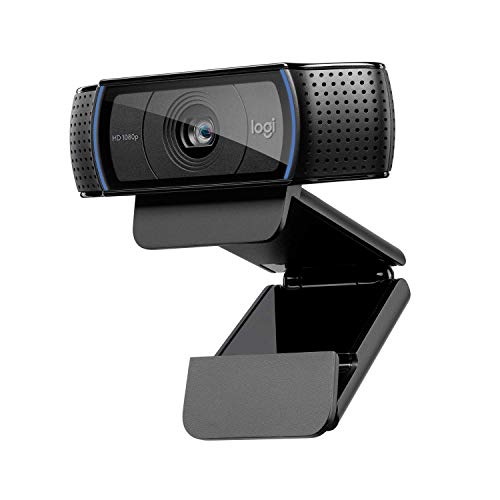
The Logitech C920 is the long-running workhorse of this guide, and the pick when you want a proven 1080p webcam with a microphone built in. It records 1080p video at 30 frames per second, with autofocus and HD light correction that adjusts exposure in dim rooms. Dual stereo microphones with automatic noise reduction handle calls without extra gear, and the 78 degree field of view frames head and shoulders without showing much of the room. The camera connects over USB-A with a 6 foot cable, clips to a monitor, and threads onto a tripod.
The C920 has been sold since January 2012, and the listing states that the maker has not discontinued it, which is a long run for any webcam. That longevity is a strength and a limit at the same time: the image is clean and reliable, but it is 1080p at 30 frames per second, so it does not match the smoothness of the 1080p60 picks or the detail of the 4K picks. The model number is 960-000764, and the camera carries a 2 year limited warranty.
Confirm the exact model before ordering. Logitech sells several cameras with similar names, and the C920x and C922x are separate models with different part numbers, so check the model number on the listing you open. The C920 has no privacy shutter, so if you want a physical lens cover, the MX Brio or the Facecam MK.2 fits better. For a spare room, a second desk, or a first webcam that just works, the C920 is the simplest pick in this guide.
| Webcam | Resolution | Frame rate | Microphones | Privacy shutter | Mount |
|---|---|---|---|---|---|
| Logitech MX Brio | 4K | 30 fps at 4K, 60 fps at 1080p | Dual beamforming | Yes | Clip, tripod |
| Elgato Facecam MK.2 | 1080p | 60 fps | None | Yes | Clip, tripod |
| Elgato Facecam 4K | 4K | 60 fps at 4K | None | No | Clip, tripod |
| Insta360 Link 2 | 4K | 30 fps at 4K, 60 fps at 1080p | Single AI noise-canceling | No | Clip, tripod |
| Logitech C920 | 1080p | 30 fps | Dual stereo | No | Clip, tripod |
Frequently asked questions
Do I need a 4K webcam for video calls?
No. Most meeting software downscales video to 1080p or lower, so a 1080p camera at 60 frames per second often looks smoother on a call than a 4K camera capped at 30 frames per second. 4K earns its keep when you record, crop into the frame, or want fine detail in your face and background. If your calls are the main use, pick the camera with the best focus, field of view and microphones for your room, and treat 4K as a bonus for recording.
Which webcam in this guide has the best microphones?
The Logitech MX Brio has the strongest microphone setup here, with dual beamforming microphones and noise reduction, plus AI image enhancement that adjusts exposure as the light changes. The Logitech C920 is next, with dual stereo microphones and automatic noise reduction. The Insta360 Link 2 has a single AI noise-canceling microphone that suits a quiet room. The two Elgato cameras have no built-in microphone at all, by design, so pair them with a headset or a separate microphone if you need one.
Can I use these webcams with any meeting software?
Yes, with one exception. All five cameras work as standard USB webcams with the meeting and streaming software most people use, including Zoom, Teams, Google Meet, OBS and Twitch. The exception is the Insta360 Link 2, which Insta360 notes is not compatible with ARM-based Windows systems, and which does not support Windows Hello face sign-in. Check your computer against that note before ordering the Link 2, and confirm the exact model number on the listing you open.
How to choose
Match the camera to how you sit and what you already own. If you take calls from a fixed desk and want one camera that does everything, the Logitech MX Brio is the most complete pick: 4K detail, 1080p at 60 frames per second, the best microphones here, a privacy shutter and three fields of view in software. If you stream and already own a microphone, the Elgato Facecam MK.2 gives you the smoothest 1080p image in this guide, and the Elgato Facecam 4K gives you 4K at 60 frames per second with manual control and a filter thread. If you present while moving, the Insta360 Link 2 is the only camera here that follows you, and its AI tracking is the reason to buy it. If you want the simplest webcam that just works, the Logitech C920 covers calls with a built-in microphone and a long track record.
Before ordering, confirm three things on the live listing: the exact model number, because several of these cameras ship in more than one version; the connection type, because the newer cameras use USB-C while the C920 uses USB-A; and the field of view, because a narrow frame hides a messy room and a wide frame shows more of it. A lamp behind the camera, aimed at your face, does more for image quality than any sensor upgrade, so set your light first and let the camera do the rest.
Disclosure: As an Amazon Associate, we may earn a commission from qualifying purchases made through links in this article, at no additional cost to you.
FAQ
Do I need a 4K webcam for video calls?
Which webcam in this guide has the best microphones?
Can I use these webcams with any meeting software?
More from Amazon
Programs that pair well with the guide above. Offers and eligibility are set by Amazon and may change.
Free shipping on eligible items, Prime Video and more. Eligible new members can start with a free trial.
Start a Prime free trialAd-free music streaming. Eligible new subscribers can start with a free trial.
Try Music Unlimited freeA Prime membership for ages 18-24 with a trial period. Eligibility is set by Amazon.
See Prime for Young AdultsAudiobooks and podcasts to listen to on the go. Eligible new members can start with a free trial.
Try Audible freeAs an Amazon Associate we earn from qualifying purchases.