Our Top Picks
 CORSAIR Vengeance LPX DDR4 RAM 32GB2 count (pack of 1)5.32 x 0.28 x 1.32 inches0 poundsCheck on Amazon
An older gaming PC rarely needs a new motherboard to feel faster; it often just needs more memory, or better memory. If the machine you own runs DDR4, upgrading the RAM is one of the few jobs that is cheap, quick and low-risk, and it can turn stuttering open-world games and slow alt-tab switching into a smoother experience. The question this guide answers is which DDR4 kit to buy for a system that is a few years old, and what to check before you spend anything.
The answer starts with the shape of your machine. Older gaming desktops take full-size DIMMs, while older gaming laptops and compact PCs take the shorter SODIMM format, and the two never swap. The eight kits below cover both, from 16GB to 64GB, so the first job is to read your manual or open the case, identify the module type, and then choose a capacity and speed that your CPU and board will actually use.
Quick Picks

Crucial 32GB DDR4 RAM Kit (2x16GB), 3200MHz (PC4-25600) CL22 Laptop Memory, SODIMM 260-Pin, Downclockable to 2933/2666MHz, Compatible with 13th Gen Intel Core and AMD Ryzen 7000 - CT2K16G4SFRA32A
One of the home product options compared in this guide.
View on Amazon
G.SKILL RipjawsV Series DDR4 RAM (XMP) 32GB (2x16GB) Up to 3200MT/s* CL16-18-18-38 1.35V Intel AMD Desktop Computer Memory U-DIMM - Black (F4-3200C16D-32GVK)
One of the home product options compared in this guide.
View on AmazonCrucial 16GB DDR4 RAM Kit (2x8GB), 3200MHz (PC4-25600), Downclockable to 2933/2666MHz Laptop Memory SODIMM 260-Pin, Compatible with 13th Gen Intel Core and AMD Ryzen 7000 - CT2K8G4SFRA32A
One of the home product options compared in this guide.
View on AmazonCrucial 64GB DDR4 RAM Kit (2x32GB), 3200MHz (PC4-25600) CL22 Laptop Memory, SODIMM 260-Pin, Downclockable to 2933/2666MHz, Compatible with 13th Gen Intel Core and AMD Ryzen 7000 - CT2K32G4SFD832A
One of the home product options compared in this guide.
View on AmazonCORSAIR Vengeance LPX DDR4 RAM 32GB (2x16GB) Up to 3200MHz CL16-20-20-38 1.35V Intel XMP AMD EXPO Computer Memory – Black (CMK32GX4M2E3200C16)
One of the home product options compared in this guide.
View on AmazonG.SKILL RipjawsV Series DDR4 RAM (XMP) 16GB (2x8GB) Up to 3200MT/s* CL16-18-18-38 1.35V Intel AMD Desktop Computer Memory U-DIMM - Black (F4-3200C16D-16GVKB)
One of the home product options compared in this guide.
View on Amazon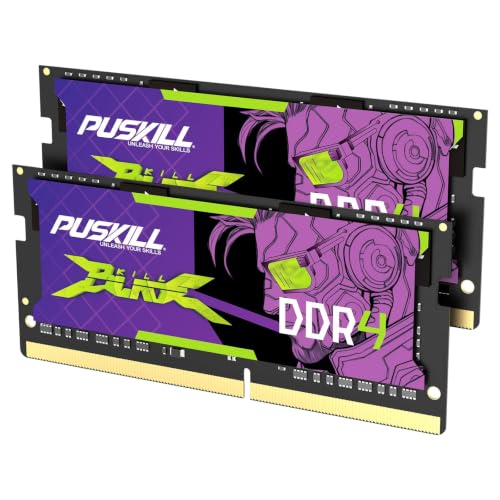
PUSKILL 32GB DDR4 3200MHz RAM (2x16GB) SODIMM CL22 Laptop | 32GB kit, 3200MHz, SODIMM laptop, CL22, 1.2V, plug-and-play, cost-effective dual-channel upgrade
One of the home product options compared in this guide.
View on Amazon
Timetec 32GB KIT (2x16GB) DDR4 2666MHz (PC4-2666V) PC4-21300 UDIMM Desktop RAM – 288-Pin 1.2V CL19 Non-ECC Unbuffered DIMM Memory Module Upgrade
One of the home product options compared in this guide.
View on Amazon| Product | Best for | Key feature from the title |
|---|---|---|
| G.SKILL Ripjaws V 32GB (2x16GB) | Desktop upgrade with a profile | 3200MT/s, CL16-18-18-38, XMP |
| CORSAIR Vengeance LPX 32GB (2x16GB) | Low-profile desktop cases | 3200MHz CL16, XMP and AMD EXPO |
| G.SKILL Ripjaws V 16GB (2x8GB) | Modest desktop capacity boost | 3200MT/s, CL16, U-DIMM |
| Timetec 32GB (2x16GB) DDR4-2666 | Older desktops that run 2666 | PC4-21300, 1.2V, 288-pin UDIMM |
| Crucial 32GB (2x16GB) DDR4-3200 SODIMM | Gaming laptops | CL22, downclockable to 2933/2666MHz |
| Crucial 16GB (2x8GB) DDR4-3200 SODIMM | Entry-level laptop upgrade | 260-pin SODIMM, downclockable |
| PUSKILL 32GB DDR4-3200 SODIMM | Value laptop upgrade | 1.2V, CL22, dual-channel |
| Crucial 64GB (2x32GB) DDR4-3200 SODIMM | Maximum laptop capacity | 2x32GB, 260-pin SODIMM |
How to Choose
Identify DIMM or SODIMM first
Desktop memory is listed as UDIMM or U-DIMM, while laptop memory is listed as SODIMM or SO-DIMM with a 260-pin count for DDR4. This is the first and strictest filter. Many compact desktops and all-in-ones also use SODIMM, so a quick look at the existing sticks, or the machine’s service manual, saves a return.
How much capacity an older platform can use
Sixteen gigabytes is the practical floor for current games, and 32GB suits streaming alongside play. Capacities above that are only useful if the board supports them, and older boards often cap at 32GB or less. Check the maximum memory in the specifications before choosing the 64GB laptop kit, and keep a spare slot’s capacity limit in mind.
Speed, timings and downclocking
Older processors may only run DDR4 at 2666 or 2933MHz. A 3200MHz kit will usually still work, because many are described as downclockable, but it will run at the slower speed. Desktop kits with an XMP profile, such as the two G.Skill options and the Corsair listing, can reach their rated speed if the board supports it. Lower latency numbers like CL16 help a little, but capacity matters more for stutter.
Voltage, matching and what budget kits skip
Standard 1.2V laptop modules run cooler and are the norm for SODIMM, while desktop performance kits list 1.35V for their rated speeds. Ideally buy one matched kit rather than mixing with the old sticks, because mixed speeds can cause instability. Budget kits tend to skip heat spreaders and XMP profiles, which is fine for a basic upgrade but not for tuning.
The 8 Best Options
G.SKILL Ripjaws V 32GB (2x16GB)
A desktop U-DIMM kit rated up to 3200MT/s with CL16-18-18-38 timings and 1.35V, with an XMP profile. It suits an aging desktop that you want to make capable again, with enough memory for modern games and background programs.
- XMP profile for reaching 3200MT/s on a supporting board
- Tighter timings than the 1.2V laptop kits
- Trade-off: fits desktops only
The black spreader is a plain look that blends into most older cases, and the two-stick layout leaves the other slots free if the board has four. Skip it if your machine takes SODIMM.
CORSAIR Vengeance LPX 32GB (2x16GB)
A low-profile desktop kit rated up to 3200MHz with CL16-20-20-38 timings at 1.35V, listing Intel XMP and AMD EXPO. The slim heat spreader suits builds where a large CPU cooler hangs over the memory slots.
- Supports both Intel XMP and AMD EXPO
- Low-profile height helps with cooler clearance
- Trade-off: the CL20 secondary timings are looser than the G.Skill option
Because it lists both profile types, it is a flexible choice if you may change the processor later and move between Intel and AMD platforms. Skip it if you have a laptop or compact system.
G.SKILL Ripjaws V 16GB (2x8GB)
The smaller sibling of the 32GB kit, with 3200MT/s and CL16-18-18-38 timings. It fits desktops that currently run 8GB and need a meaningful, affordable jump without paying for capacity they will not use.
- 16GB suits mainstream gaming in a desktop
- XMP profile support is described in the title
- Trade-off: it may not satisfy heavy multitasking
It is also a clean way to fill two empty slots on a machine that already has a matching pair, though check the board for speed limits. Skip it if you stream, edit or keep many apps open.
Timetec 32GB (2x16GB) DDR4-2666
A desktop UDIMM kit running at 2666MHz with 1.2V and CL19. It is aimed at older desktops whose CPU or board tops out at 2666, where faster memory would only be downclocked anyway.
- PC4-21300 matches older platform speeds
- 1.2V and non-ECC unbuffered, a common standard
- Trade-off: no overclock profile and a modest speed
It can also make sense in a small office-style machine that has been repurposed for gaming. Skip it if you want a rated 3200MHz profile.
Crucial 32GB (2x16GB) DDR4-3200 SODIMM
A laptop kit with 3200MHz CL22 that can downclock to 2933 or 2666MHz, listed as compatible with recent Intel and Ryzen systems. It is the sensible pick for an older gaming laptop that supports 32GB.
- Downclockable for older platforms
- Two 16GB sticks for dual-channel use
- Trade-off: SODIMM only, and CL22 is relaxed
For a laptop that struggles with modern titles and browser tabs together, doubling from 16GB to 32GB is where the change is most likely to be felt. Skip it if your machine uses full-size DIMMs.
Crucial 16GB (2x8GB) DDR4-3200 SODIMM
The entry-level laptop version, with the same 3200MHz rating and downclocking behavior. It fits owners of older gaming laptops that ship with 8GB and need a solid, plain upgrade.
- 260-pin SODIMM for standard laptop slots
- Downclockable to 2933 or 2666MHz
- Trade-off: 16GB will feel tight for heavier workloads
Two 8GB sticks also keep dual-channel mode active, which is better for integrated or shared memory than one large stick. Skip it if you want 32GB or you have a desktop.
PUSKILL 32GB DDR4-3200 SODIMM
A 32GB laptop kit listing 3200MHz, CL22, 1.2V and plug-and-play use, described as a cost-effective dual-channel upgrade. It suits budget-minded owners of older laptops.
- Dual-channel kit with 1.2V operation
- Plug-and-play design
- Trade-off: a lesser-known brand with limited detail on the listing
Treat it as a budget tier option and confirm your laptop’s maximum memory before ordering. Skip it if you prefer a recognized memory brand.
Crucial 64GB (2x32GB) DDR4-3200 SODIMM
The highest-capacity kit on the list, intended for laptops or compact systems whose firmware accepts 64GB. It makes sense mainly for people mixing games with heavy creative or virtual-machine work.
- 2x32GB layout for maximum capacity
- Same downclockable 3200MHz design as other Crucial kits
- Trade-off: most older gaming laptops will not support this much memory
Treat it as the premium tier of this guide rather than a default choice. Skip it if your system cannot address 64GB.
Which One Fits Your Situation
You have an older gaming desktop and want a clear upgrade
Choose the G.SKILL Ripjaws V 32GB kit if your board supports XMP, or the Corsair Vengeance LPX 32GB if cooler clearance is tight.
Your desktop is old enough to top out at 2666MHz
The Timetec 32GB DDR4-2666 kit matches the speed your platform can use, so you do not pay for performance you cannot reach.
You game on an aging laptop
The Crucial 32GB DDR4-3200 SODIMM is the most sensible choice, provided the laptop accepts 32GB. If it is limited to 16GB, the Crucial 16GB SODIMM is the matching option.
Common Mistakes
- Buying SODIMM for a desktop board or UDIMM for a laptop.
- Paying extra for 3200MHz when the older CPU only supports a lower speed.
- Mixing a new kit with old sticks and getting unstable performance.
- Skipping the manual’s maximum capacity figure in 2026 when planning an upgrade.
- Forgetting to enable XMP so the memory runs at its rated speed.
Related guides
- Hall Effect Vs Potentiometer Controller Sticks Explained
- Low Profile Cpu Coolers For Small Form Factor Pcs
- How To Transfer Nintendo Switch Data To A New Console
Frequently Asked Questions
Will 3200MHz memory work in a board that supports 2666MHz?
Usually, yes, running at the slower supported speed. Several listings here describe downclocking explicitly.
Is 16GB enough for an older gaming PC?
For most games, yes. If you also stream or run many applications, 32GB offers more breathing room.
Should I replace all my old sticks?
Often yes. A single matched kit is more reliable than mixing sticks with different speeds or timings.
How can I tell what my PC uses?
Look at the labels on the installed sticks, check the machine’s manual, or use a system information tool to view the memory type and slot count.
FAQ
Will 3200MHz memory work in a board that supports 2666MHz?
Is 16GB enough for an older gaming PC?
Should I replace all my old sticks?
How can I tell what my PC uses?
More from Amazon
Programs that pair well with the guide above. Offers and eligibility are set by Amazon and may change.
Free shipping on eligible items, Prime Video and more. Eligible new members can start with a free trial.
Start a Prime free trialAd-free music streaming. Eligible new subscribers can start with a free trial.
Try Music Unlimited freeA Prime membership for ages 18-24 with a trial period. Eligibility is set by Amazon.
See Prime for Young AdultsAudiobooks and podcasts to listen to on the go. Eligible new members can start with a free trial.
Try Audible freeAs an Amazon Associate we earn from qualifying purchases.