Our Top Picks
A gaming case lives or dies by how well air moves through it. Fresh air has to come in at the front, pass over the graphics card and CPU, and leave at the rear and top without stalling in a corner. Case fans are the cheapest part of that equation, yet buyers often grab the first multipack they see, mixing fans that were designed for different jobs. The goal here is airflow, so the choice is less about looks and more about whether a fan can move air through a mesh front panel or a dust filter.
This guide is for builders refreshing a hot case or filling the empty fan mounts in a new one. All eight options are 120mm fans, so they fit the most common mounting size. The differences that matter are speed range, PWM control, bearing type, pack size and whether the fan has lighting, since every one of those changes how the fan behaves once it is bolted into a real case.
Quick Picks
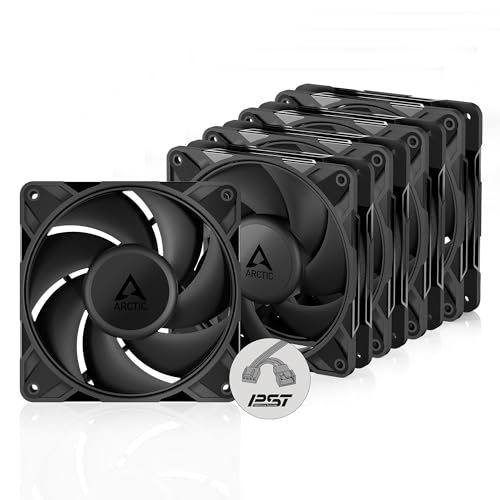
ARCTIC P12 Pro PST - 5 Pack - Powerful Premium Fan, 120 mm PWM Fan with Y-Cable Splitter, 600-3000 RPM, 0 RPM <5% PWM, Fluid Dynamic Bearing, 4-Pin - Black
One of the home product options compared in this guide.
View on Amazon
ARCTIC P12 (5 Pack) - PC Fans, 120mm Case Fan, Pressure-optimised, Quiet Motor, Computer, Fan Speed: 1800 RPM - Black
One of the home product options compared in this guide.
View on Amazon
Noctua NF-P12 redux-1700 PWM, Quiet Fan 120mm | High Airflow, Low Noise, 25mm Thick Fan for PC and Electronics Cooling Streamlined Package 1700rpm 4-Pin PWM
One of the home product options compared in this guide.
View on Amazon
Thermalright TL-C12C X5 CPU Fan,Black Cooling, Fan in The unlit Version,Establish Ties or Contact PC Fan with 1550RPM Speed, 120mm Computer Case Cooler,PWM Control for Case and Liquid Cooler
One of the home product options compared in this guide.
View on Amazon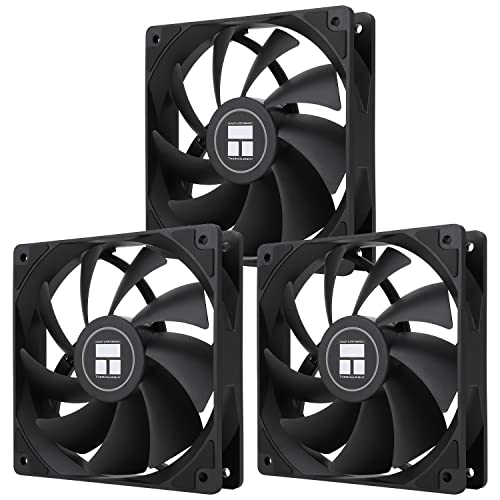
Thermalright TL-C12C X3 CPU Fan 120mm Case Cooler Fan, 4pin PWM Silent Computer with S-FDB Bearing Included, up to 1550RPM Cooling Fan(3 Quantities)
One of the home product options compared in this guide.
View on Amazon
Thermalright 5 Pack TL-C12C-S CPU Fan 120mm ARGB Case Cooler Fan, 4pin PWM Silent Computer Fan with S-FDB Bearing Included, up to 1550RPM Cooling Fan(5 Quantities)
One of the home product options compared in this guide.
View on Amazon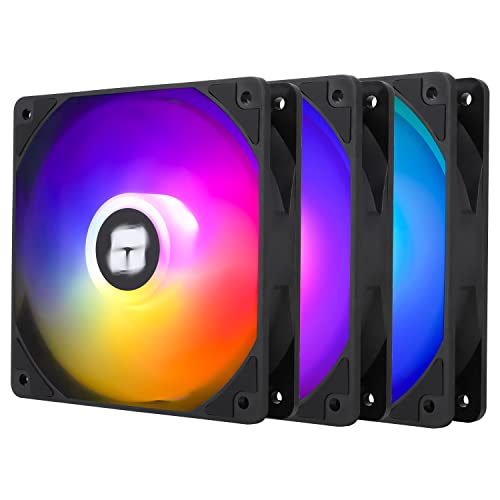
Thermalright TL-C12C-S X3 CPU Fan 120mm ARGB Case Cooler Fan, 4pin PWM Silent Computer Fan wth S-FDB Bearing Included, up to 1550RPM Cooling Fan(3 Quantities)
One of the home product options compared in this guide.
View on Amazon
be quiet! Pure Wings 3 120mm Silent PWM Computer Case Fan, Maximum Airflow | High Top-End Speed with Low Minimum RPM, Gaming PC Air Fan, 4-Pin, Rifle Bearing, Extraordinary Air Pressure,
One of the home product options compared in this guide.
View on Amazon| Product | Best for | Key feature from the title |
|---|---|---|
| ARCTIC P12 Pro PST (5 Pack) | Full-case upgrades with fan control | 600-3000 RPM, 0 RPM below 5% PWM |
| ARCTIC P12 (5 Pack) | Simple multipack airflow | Pressure-optimised, 1800 RPM |
| Noctua NF-P12 redux-1700 PWM | Quiet, high-airflow single fans | 1700 RPM, 25mm thick, 4-pin PWM |
| Thermalright TL-C12C X5 (unlit) | Plain black builds | 1550 RPM, PWM, no lighting |
| Thermalright TL-C12C X3 | Three-fan front intake | S-FDB bearing, up to 1550 RPM |
| Thermalright TL-C12C-S (5 Pack, ARGB) | Lit builds with many fans | ARGB, 4-pin PWM, S-FDB bearing |
| Thermalright TL-C12C-S X3 (ARGB) | Smaller lit builds | ARGB, 3 quantities, 1550 RPM |
| be quiet! Pure Wings 3 120mm | Silent, low-idle systems | PWM, rifle bearing, low minimum RPM |
How to Choose
Airflow or static pressure
Fans are tuned for one of two jobs. Airflow fans move a lot of air in open space, which suits an unobstructed case exhaust. Pressure-optimised fans push air through resistance such as dust filters, mesh panels and radiators. The ARCTIC P12 listing says pressure-optimised. For a front-intake position behind a filter, that tuning matters more than the peak speed number on the box.
Speed range and PWM control
A four-pin PWM fan lets your motherboard raise and lower speed with temperature. That means quiet at idle and fast under gaming load. A wide range, such as the 600-3000 RPM listed for the P12 Pro, gives you more tuning room. A zero-RPM feature, also listed on that model, stops the fan entirely at low demand, though some builders prefer a gentle constant flow.
Bearing type and noise
Bearing design affects lifespan and sound. Fluid dynamic and similar bearings are generally quieter and last longer than basic sleeve designs. The listings here mention fluid dynamic, S-FDB and rifle bearings. Compare them as a clue to quality, not a guarantee, and remember that noise also depends on your case panels and fan speed.
Lighting, pack size and what budget fans skip
Lighting adds a controller or header requirement, and fans with ARGB need a compatible header or hub. Buy the pack size that matches your mounts so you do not mix different fans on the same airflow path. Budget multipacks often skip features such as zero-RPM mode, rubber corners or a daisy-chain cable, which makes cable tidying harder.
The 8 Best Options
ARCTIC P12 Pro PST (5 Pack)
This pack gives you five PWM fans with a wide 600-3000 RPM range, a Y-cable splitter and a zero-RPM mode below 5 percent PWM. It suits builders filling a whole case who want control across a large speed range without separate controllers.
- Wide speed range with fluid dynamic bearing
- Y-cable splitter helps wire several fans to one header
- Trade-off: the 3000 RPM ceiling means high noise at full speed
A fan curve set in the BIOS lets you hold them low until the graphics card heats the case. Skip it if you prefer lit fans or a fixed speed.
ARCTIC P12 (5 Pack)
A simpler five-pack of 120mm fans described as pressure-optimised with a quiet motor and a 1800 RPM speed. It suits anyone who wants plain airflow through filters and mesh without extra features.
- Pressure-optimised tuning for filters and panels
- Five fans cover a typical case in one purchase
- Trade-off: the listing does not mention PWM control or a splitter
The fixed 1800 RPM figure suits people who want to plug fans in and leave them alone, and the plain design should sit well in a mixed-brand case. Skip it if variable speed control is a priority.
Noctua NF-P12 redux-1700 PWM
A single 120mm, 25mm thick fan with a 4-pin PWM connector and a speed of 1700 rpm. It is for owners who value low noise and plan to place a fan at a specific spot such as a radiator or CPU cooler rather than fill the whole case.
- High airflow with low noise described in the title
- PWM support allows temperature-based speed control
- Trade-off: sold as a single fan, so a full upgrade costs more
Skip it if you need five fans for a full case.
Thermalright TL-C12C X5 (unlit)
A black 120mm fan with a PWM connection and a 1550 RPM speed, sold in the unlit version for builds without lighting. The title also mentions use with cases and liquid coolers. The title is unclear on the pack count, so verify quantity before ordering.
- No lighting for clean, dark builds
- PWM control with up to 1550 RPM
- Trade-off: the unclear quantity in the title
Skip it if you want ARGB lighting or a clearly stated pack size.
Thermalright TL-C12C X3
A three-pack of 120mm PWM fans with an S-FDB bearing and speeds up to 1550 RPM. It is a good match for filling a three-fan front intake without lighting hardware.
- S-FDB bearing and 4-pin PWM
- Three fans match a common front mount
- Trade-off: no lighting and no stated zero-RPM mode
It also pairs naturally with the unlit X5 version if you need fans for the rear and top positions in the same style. Skip it if you want lit fans.
Thermalright TL-C12C-S (5 Pack, ARGB)
A five-pack of 120mm ARGB fans with PWM, an S-FDB bearing and speeds up to 1550 RPM. It suits builders with a glass-sided case who want a coordinated light show along with airflow.
- ARGB lighting across five fans
- PWM and S-FDB bearing listed
- Trade-off: lighting requires a compatible header or controller
Before buying, confirm how many ARGB headers your board has and whether the fans chain together, since five lit fans can quickly outnumber the connectors. Skip it if you prefer a plain, unlit case.
Thermalright TL-C12C-S X3 (ARGB)
The three-fan ARGB version of the same design, with 4-pin PWM, S-FDB bearing and speeds up to 1550 RPM. It fits smaller builds that need three lit fans, such as a front intake trio.
- ARGB lighting in a three-fan pack
- Same PWM and bearing features as the larger pack
- Trade-off: you need extra fans to fill rear or top mounts
Skip it if you need more than three fans.
be quiet! Pure Wings 3 120mm
A 120mm PWM fan emphasizing silent running, with a high top-end speed and a low minimum RPM, plus a rifle bearing. It suits builders who want to keep a desk quiet while retaining the option to ramp up under load.
- Low minimum RPM and high top speed for flexible control
- Rifle bearing and 4-pin PWM
- Trade-off: it is sold as one fan, which raises the cost of a full set
Skip it if you need ARGB or a multipack.
Which One Fits Your Situation
You are replacing every fan in a mesh-front case
Choose the ARCTIC P12 Pro PST five-pack. The pressure focus, wide RPM range and splitter cable make it easy to wire and tune.
You want a dark, quiet build with a few strategic fans
The Noctua NF-P12 redux-1700 PWM or the be quiet! Pure Wings 3 suits a build where noise is a priority and only a handful of fans are needed. Either one works well beside a few ARCTIC fans if you want to mix a quiet exhaust with a stronger front intake.
You have a glass-sided case and want lighting
The Thermalright TL-C12C-S five-pack gives you ARGB across a whole case, while the X3 version suits a three-fan layout. Whichever you pick, run a short test of the lighting before closing the case, and confirm the fan headers match what your board offers.
Common Mistakes
- Putting airflow-tuned fans behind dense dust filters and expecting strong results.
- Skipping PWM control and running every fan at full speed all the time.
- Mixing intake and exhaust fans without checking the air direction.
- Buying ARGB fans without a header or hub to power the lighting.
- Overlooking cable length, which can make tidying a 2026 build harder than expected.
Related guides
- Hall Effect Vs Potentiometer Controller Sticks Explained
- Low Profile Cpu Coolers For Small Form Factor Pcs
- How To Transfer Nintendo Switch Data To A New Console
Frequently Asked Questions
How many case fans does a gaming PC need?
A typical balanced setup uses two or three intake fans at the front and one exhaust at the rear. Cases with top mounts can add more exhaust.
Does higher RPM always mean better airflow?
No. Fan blade design, pressure, and obstruction all matter, and a higher speed also raises noise. Look at design intent as well as the RPM figure.
Do I need PWM fans?
PWM is not required, but it lets the motherboard adjust speed with temperature. That usually means a quieter PC at idle.
Are ARGB fans worse for airflow?
Not by design. Lighting is a feature, and airflow depends on the blade and motor, not the LEDs.
FAQ
How many case fans does a gaming PC need?
Does higher RPM always mean better airflow?
Do I need PWM fans?
Are ARGB fans worse for airflow?
More from Amazon
Programs that pair well with the guide above. Offers and eligibility are set by Amazon and may change.
Free shipping on eligible items, Prime Video and more. Eligible new members can start with a free trial.
Start a Prime free trialAd-free music streaming. Eligible new subscribers can start with a free trial.
Try Music Unlimited freeA Prime membership for ages 18-24 with a trial period. Eligibility is set by Amazon.
See Prime for Young AdultsAudiobooks and podcasts to listen to on the go. Eligible new members can start with a free trial.
Try Audible freeAs an Amazon Associate we earn from qualifying purchases.