Our Top Picks


As an Amazon Associate we earn from qualifying purchases.
The Joy-Con problem is shape, not technology. Each controller is a thin, flat slab with squared edges, designed to slide onto the side of a console rather than to fill a human hand. Played as a pair on the TV, they leave your fingers curled around almost nothing, and played sideways as a single controller, the tiny SL and SR buttons sit nearly flush with the casing. A Joy-Con grip fixes the geometry. It adds the palm swell and handle angle the controllers themselves lack, and nothing more.
That “nothing more” is worth stating plainly, because grip marketing often implies otherwise. No grip in this guide adds buttons (with one exception, noted below), improves the analog sticks, changes the rumble, or makes the controllers more accurate. What changes is how long your hands stay comfortable. The five picks below cover the three real formats: paired grips that join two Joy-Con into one controller, charging grips that also top the batteries up over a cable, and single-Joy-Con handles for sideways multiplayer. Four fit the original Joy-Con used by the Switch and Switch OLED. The fifth is the separate grip Nintendo sells for the Switch 2 and its larger Joy-Con 2, included because the two controller generations are not interchangeable and the listings are not always clear about that.
Affiliate Disclosure: This article contains affiliate links. If you buy through a link on this page, we may earn a commission at no additional cost to you. That income helps keep the site running, and it does not change which products we include or what we say about them.
Nintendo Joy-Con Charging Grip

Nintendo’s own charging grip is the obvious first pick for docked and tabletop play, and its defining feature is in the name: slide the two Joy-Con in, connect the included USB charging cable, and the controllers charge while you play or while they sit idle. That solves a genuine annoyance, because a standard grip leaves the Joy-Con batteries to drain, and the only other way to charge them is clipped onto the console.
Be clear about what it is not. There is no battery inside this grip. It passes power through from a USB source, which means playing while charging also means playing tethered to a cable. And ergonomically it is nearly identical to the plain grip packed in with every Switch: the same flat center and modest handles. You are paying for the charging circuit, not for a comfort upgrade. If your hands cramp in the bundled grip, this one will cramp them in exactly the same places.
Specs
- Type: paired-Joy-Con grip with pass-through USB charging
- Charging: USB-C port on the grip; USB charging cable included
- Internal battery: none — charging requires the cable to be connected
- Compatibility: original Joy-Con (Switch and Switch OLED); does not fit Joy-Con 2
- Manufacturer: Nintendo
PowerA Joy-Con Comfort Grip
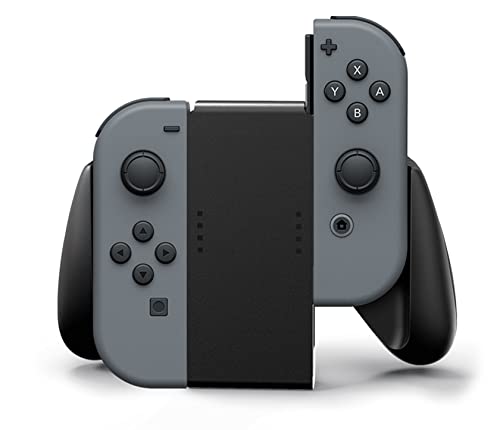
PowerA’s Comfort Grip takes the opposite trade. It does no charging at all, and in exchange it is the most comfortable passive housing here. The handles are wider and more contoured than Nintendo’s, with a rubberized surface where your palms rest, so the pair of Joy-Con feels closer to a conventional controller. The player indicator lights show through the center panel, and the grip stands upright on its own, which makes it easy to park next to the dock.
The limitation is total: with no charging port, the Joy-Con only recharge when they go back onto the console or into a separate charging dock. For players who mostly play on the TV in long sessions, that means the occasional dead controller and a break while it charges on the console. It is also worth knowing the grip is light plastic throughout — comfortable, but it does not have the dense feel of Nintendo’s charging grip. This listing is the black version; PowerA sells the same grip in themed designs.
Specs
- Type: paired-Joy-Con comfort grip
- Charging: none — Joy-Con must be charged on the console or a separate dock
- Grip surface: rubberized handles
- Details: player indicator lights visible through the center panel; stands upright on its own
- Compatibility: original Joy-Con (Switch and Switch OLED); does not fit Joy-Con 2
- Licensing: officially licensed by Nintendo
FASTSNAIL Joy-Con Grips (2-Pack)
Everything above assumes two Joy-Con used together. Plenty of Switch games are played with a single Joy-Con held sideways, and that is where the bare controller is at its worst: a narrow stick of plastic with shoulder buttons you can barely find by touch. FASTSNAIL’s grips are shells that a single Joy-Con drops into, adding a proper handle underneath and enlarged SL and SR buttons on top. The pack includes two, one shaped for the left Joy-Con and one for the right, so two players can each have a workable controller.
These are the cheapest-feeling picks here and the most single-purpose. The matte, anti-slip surface does its job, and the fit is snug when new, though grips of this style can loosen with repeated removal. They have to come off before the Joy-Con can attach to the console or slide into a paired grip, and they do nothing for two-handed play. Within their lane — party games, Mario Kart with friends, a second player joining on the couch — they fix the one thing that makes single-Joy-Con play miserable.
Specs
- Type: single-Joy-Con handle grips, pack of 2 (left and right)
- Shoulder buttons: enlarged SL/SR buttons for sideways play
- Material: hard shell with matte anti-slip surface
- Compatibility: original Joy-Con (Switch and Switch OLED); does not fit Joy-Con 2
- Colors: several color options sold under this listing line
PEGLY OEM Joy-Con Comfort Grip
The PEGLY grip is a budget paired housing with one specific engineering difference: the center slides the Joy-Con run on are metal rather than plastic. On most passive grips those rails are the wear point — they flex, they loosen, and after enough swaps the controllers start to feel vague in the housing. Metal rails hold their shape, so the click-in fit stays firm longer. The handle shape follows the usual comfort-grip pattern, giving your palms more to hold than the flat bundled grip.
The trade-off is provenance. This is an unbranded OEM-style product rather than a licensed accessory, so fit and finish are less consistent from unit to unit than the Nintendo and PowerA grips above, and there is no charging and no indicator window worth relying on. It earns its place for one kind of buyer: someone who swaps Joy-Con in and out of a paired grip daily and has already worn out a plastic one.
Specs
- Type: paired-Joy-Con comfort grip
- Rails: metal slide rails for the Joy-Con mounts
- Charging: none
- Compatibility: original Joy-Con (Switch and Switch OLED); does not fit Joy-Con 2
- Licensing: unbranded OEM accessory, not Nintendo licensed
Nintendo Joy-Con 2 Charging Grip
This pick fits nothing else in the guide, and that is the point of including it. The Switch 2’s Joy-Con 2 controllers are physically larger than the originals and attach to their console magnetically rather than by sliding on rails, so no original-Switch grip — including the four above — accepts them, and this grip accepts nothing else. Nintendo also ships the Switch 2 without any grip in the box, so owners who want the joined-controller layout have to buy one.
Functionally it mirrors the original charging grip: the Joy-Con 2 charge over the included USB cable while you play, and there is still no internal battery. The one genuine addition is a pair of GL and GR buttons on the grips, which can be assigned to other inputs — the only extra controls any product here provides. If you still play on an original Switch or OLED, ignore this listing entirely; if you have moved to Switch 2, it is the only first-party option, and third-party listings that blur the two generations should be read carefully before ordering.
Specs
- Type: paired-Joy-Con 2 grip with pass-through USB charging
- Extra controls: assignable GL/GR buttons
- Charging: USB charging cable included; no internal battery
- Attachment: magnetic, matching the Joy-Con 2 design
- Compatibility: Nintendo Switch 2 and Joy-Con 2 only; does not fit original Joy-Con
- Manufacturer: Nintendo
How to Choose
Start with how you actually play. If your Joy-Con live on the console in handheld mode, none of these grips help you — the controllers have to come off the console to go into any of them. Handheld comfort is a different product category: console grip cases such as Skull & Co’s NeoGrip wrap the whole system, and replacement controllers such as the Hori Split Pad replace the Joy-Con outright with larger controls. Both are legitimate routes; they are simply not Joy-Con grips.
For TV and tabletop play, the first decision is charging. Only charging grips charge, and both Nintendo charging grips do it by cable pass-through, with no battery of their own. If untethered play with charging matters, the honest answer is a separate charging dock for storage plus a passive grip for play. If it does not, a comfort grip like PowerA’s gives you better handles for less complexity.
The second decision is format. Paired grips suit one player using both controllers. Single-Joy-Con handles suit households that regularly hand one controller each to two players, and they are the only picks here that enlarge the SL and SR buttons. Many households end up owning one of each.
Compatibility deserves a final, blunt check. Original Joy-Con are the same controllers across the Switch and Switch OLED, so every original-generation grip fits both consoles. Joy-Con 2 are larger and magnetic, and share no grips with the originals. Some marketplace listings describe one grip as fitting both generations; treat that as a red flag rather than a feature, and order against the ASIN and stated model, not the headline.
Finally, set expectations. A grip changes the outside of the controller. It will not fix stick drift, add a proper D-pad, or match the feel of a full-size pro-style controller. It makes the Joy-Con you already own comfortable enough for the sessions you actually play — which, for most people, is the whole problem.
FAQ
Do Joy-Con grips charge the controllers?
Only models sold as charging grips, and only while connected by USB cable — neither Nintendo charging grip contains a battery. Comfort grips and single-Joy-Con handles never charge; the controllers recharge on the console or in a separate dock.
Will a Switch grip fit the Switch 2 Joy-Con 2?
No. Joy-Con 2 are larger and attach magnetically, while original Joy-Con slide on rails. Grips are generation-specific in both directions, so check which controller a listing names before buying.
Do I have to remove the grips to dock or play handheld?
Yes, in practice. Joy-Con must come out of a paired grip to attach to the console, and single-Joy-Con shells must be removed first as well. The grips themselves never go near the dock; they hold controllers that are off the console.
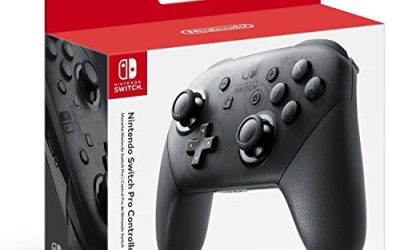
Is a grip a good substitute for a Pro Controller?
It is a cheaper and narrower fix. A grip improves the shape of the Joy-Con you own but keeps their small sticks, buttons and layout. Players who want a full-size controller’s sticks and D-pad should buy one instead of expecting a grip to close that gap.
Which grip is best for big hands?
Among these picks, the PowerA Comfort Grip has the fullest handles for paired play. Even so, very large hands may find any Joy-Con grip cramped over long sessions, which is the honest case for a conventional controller instead.
Conclusion
For most Switch and OLED owners, the choice is simple: the PowerA Comfort Grip if you want the best handles, Nintendo’s Charging Grip if flat batteries keep interrupting your sessions, and FASTSNAIL’s two-pack if sideways multiplayer is your household’s default. The PEGLY grip suits heavy swappers who wear out plastic rails, and Switch 2 owners have exactly one first-party route in the Joy-Con 2 Charging Grip. None of these will transform the Joy-Con — they just give your hands the shape Nintendo left off.
More from Amazon
Programs that pair well with the guide above. Offers and eligibility are set by Amazon and may change.
Free shipping on eligible items, Prime Video and more. Eligible new members can start with a free trial.
Start a Prime free trialAd-free music streaming. Eligible new subscribers can start with a free trial.
Try Music Unlimited freeA Prime membership for ages 18-24 with a trial period. Eligibility is set by Amazon.
See Prime for Young AdultsAudiobooks and podcasts to listen to on the go. Eligible new members can start with a free trial.
Try Audible freeAs an Amazon Associate we earn from qualifying purchases.