Our Top Picks
A GPU BIOS switch does not reset anything by itself: it selects which of the card’s two firmware chips the graphics card reads when the PC powers on, so “resetting” means powering off, flipping the switch to the other position and booting again. Many cards ship with a Performance (or default) BIOS and a Quiet BIOS, and the second chip doubles as a safety net if the first becomes unstable or a flash goes wrong.
What the switch does
Dual BIOS cards carry two separate firmware chips, and a small physical switch on the card chooses between them. The card reads the selection during power-up, so the change takes effect after a restart. Makers and reviewers warn against flipping the switch while the system is running, since it can cause instability and can even corrupt the active profile. Power the PC down fully before moving it.

UBANU 2Pcs Chassis Switch, Metal Button | 12mm Boot Reset & 16mm Host Switch Cable, with 60cm Extension Cable ATX Supply On/Off, for DIY Computer Builds
Chosen because it specifies Metal Button and 12mm Boot Reset & 16mm Host Switch Cable.
View on Amazon
ZYAMY 2PCS 2-Pin PC Power Cable Reset Switch ATX Computer Case Internal Power Cable On/Off Cord Red+Black
Picked as a relevant option in this category.
View on Amazon
FDXGYH 2 Pcs ATX PC Power Switch Cord 2 Pin SW Motherboard Reset Switch PC Desktop Power Cable On/Off Push Button
Picked as a relevant option in this category.
View on Amazon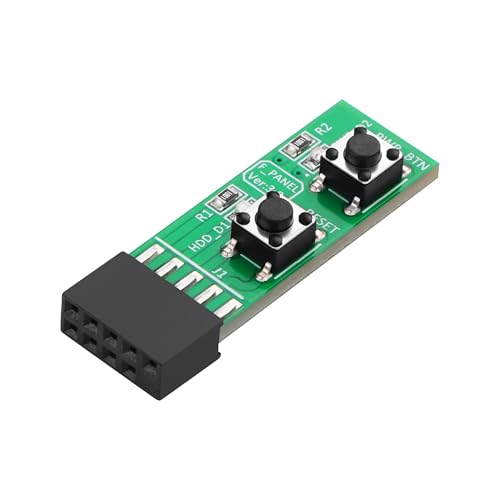
SinLoon 9Pin Reset/Power ON/Off Switch Board Adapter Test for Desktop PC Motherboard
Picked as a relevant option in this category.
View on AmazonThe modes depend on the maker. Many cards pair a Performance profile with a Quiet profile. Reviewers report that Quiet tends to use a lower power limit and a gentler fan curve, while Performance allows higher clocks and may be louder. ZOTAC’s recent cards use named modes (an AMPLIFY mode and a QUIET mode), and the maker’s guide says the card signals the active mode on start with a short light flash. Sapphire and ASUS publish their own guides, so read the one for your exact card.
Switch labels by maker
| Maker | Typical labeling | Notes |
|---|---|---|
| ASUS | P mode and Q mode | Switch is on the card, labelled P and Q, check the markings on your model as forum posts disagree on direction between cards |
| Sapphire | Quiet and performance positions | The maker’s how-to describes the switch near the video outputs and which direction is which |
| ZOTAC | AMPLIFY and QUIET | Hardware and software switching are described by the maker, and a restart is needed |
| Other makers | Varies | Use the manual, since labels and meanings differ |
How to switch BIOS positions safely
- Close games and apps, then shut down Windows normally.
- Switch the power supply off and unplug the power cable. You do not need to remove the card.
- Locate the switch on the top edge or rear end of the card, near the power connectors or video outputs. Use the printed labels.
- Move the switch with a small plastic tool or a fingernail to the other position.
- Reconnect power, start the PC and let it reach the desktop. Check a monitoring tool to confirm the card’s clocks, fan behavior and power limit have changed as expected.
When people use this as a “reset”
- After a bad overclock or undervolt. Software tuning is stored by the driver or utility, not in the BIOS, so first reset the tuning utility. If the card is still unstable, the other BIOS gives a known baseline.
- After a failed VBIOS flash. If you flashed one chip and the card will not start properly, power off, switch to the untouched BIOS, boot and then re-flash the damaged chip using the maker’s recommended tool. This is the main purpose of dual BIOS, according to maker guides.
- Display problems after a firmware change. Switching can help determine whether the active firmware is the cause.
- Noise or heat complaints. Quiet mode trades some performance for lower noise on many cards, according to reviewers. ASUS-related reports say Quiet reduces the power limit by roughly ten to fifteen percent compared to Performance, but the exact change depends on the model.
Situations and what to try
| Symptom | Likely cause | What to try |
|---|---|---|
| Card is too loud | Performance profile or high fan curve | Power off and use the Quiet position, or adjust the fan curve in the maker’s utility |
| Crashes after an overclock | Unstable tuning in software | Reset tuning in the utility first, then try the other BIOS |
| No display after flashing | Corrupt VBIOS on the active chip | Power off, switch to the other chip, boot, then restore the firmware using the maker’s guidance |
| Switch moved but nothing changed | Card read the old position or the PC was not fully powered down | Shut down, flip, restart. Confirm with a monitoring tool |
| Both positions behave the same | Some cards have mild differences, or the profiles match | Read the maker’s page for what each position changes |
What the switch does not do
- It does not clear your motherboard’s CMOS. For motherboard settings, use that board’s clear method.
- It does not undo Windows driver settings. Reset those in the graphics driver or tuning software.
- It does not repair physical damage. A card showing heat damage on a power connector should be stopped and returned to the maker or a technician, following the maker’s guidance on the 12VHPWR or 12V-2×6 connector.
- It does not guarantee safe flashing. Flashing a graphics BIOS can brick the card and may affect warranty, so only use the maker’s own tools and files for the exact model.
Common mistakes
- Flipping the switch with the PC running.
- Assuming the up or left position is Quiet on every card. Always read the printed labels.
- Flashing a BIOS for a different model, or for a different memory configuration of the same name.
- Flashing both chips in a row, leaving no working fallback.
- Expecting an enormous performance difference. Reviewers describe the change as modest, so keep expectations realistic.
Frequently Asked Questions
How do I reset my GPU BIOS?
Power the PC off, move the BIOS switch to the other position, then boot. Some makers also provide a tool to flash the default firmware back, so look at the support page for your card. ASUS lists a utility for restoring the default VBIOS on certain cards.
Is it safe to move the BIOS switch while the PC is on?
Makers and reviewers advise against it, since the card reads the switch at power-up and a change during use can cause instability. Shut down first, then switch.
What is the difference between Quiet and Performance BIOS?
Quiet profiles generally have a lower power limit and a quieter fan curve, while Performance profiles allow higher clocks and may be louder. The exact values depend on the card, so read the maker’s description.
Will the switch fix a card that will not display?
It can, if the active BIOS chip is corrupt, because the other chip may still hold working firmware. If both chips behave the same, the cause may lie elsewhere, such as the power connector, the slot or the motherboard.
Does the switch void my warranty?
Moving a switch that the maker provides is normal use. Flashing custom or non-official firmware is different and may affect warranty, so read the maker’s terms.
FAQ
How do I reset my GPU BIOS?
Is it safe to move the BIOS switch while the PC is on?
What is the difference between Quiet and Performance BIOS?
Will the switch fix a card that will not display?
Does the switch void my warranty?
More from Amazon
Programs that pair well with the guide above. Offers and eligibility are set by Amazon and may change.
Free shipping on eligible items, Prime Video and more. Eligible new members can start with a free trial.
Start a Prime free trialAd-free music streaming. Eligible new subscribers can start with a free trial.
Try Music Unlimited freeA Prime membership for ages 18-24 with a trial period. Eligibility is set by Amazon.
See Prime for Young AdultsAudiobooks and podcasts to listen to on the go. Eligible new members can start with a free trial.
Try Audible freeAs an Amazon Associate we earn from qualifying purchases.