Our Top Picks
 Creative Sound Blaster Audigy Fx Pro Hi-Res PCIe4.13 inches6.93 x 5.59 x 1.57 inches0.1 poundsCheck on Amazon
Most desktop motherboards ship with onboard audio that is good enough for video calls and background music. The moment you plug in a pair of demanding headphones, notice hiss in a quiet game, or want a proper microphone input, that onboard chip starts to feel like the weakest link in the chain. An internal sound card is a modest fix: it moves audio processing off the crowded motherboard and gives you a cleaner output stage, a better headphone amplifier, and more control over how games and voice chat sound.
The word “affordable” shapes this list. It means no premium audiophile hardware, only cards that make sense for a budget or mid-range gaming build. For 2026, that puts a few well-known Creative cards beside lesser-known generic boards, and the gap between them is bigger than the product names suggest. The sections below explain what to look for, which listings give you enough information to judge, and which ones leave you guessing.
Quick Picks
Creative Sound Blaster Audigy Fx Pro Hi-Res PCIe Sound Card | Hi-Res, PCIe Sound Card, Hi-Res Audio, Surround Sound, Clean Audio, PC Upgrade
One of the consumer electronics options compared in this guide.
View on Amazon
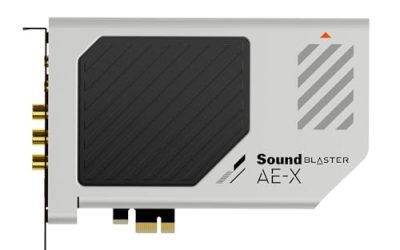
Creative Sound Blaster AE-X Hi-Res PCIe Sound Card for PC | Hi-Res, PCIe Sound Card, 32-bit/384kHz, Hi-Res Audio, PC Audio, Desktop App Support
One of the consumer electronics options compared in this guide.
View on Amazon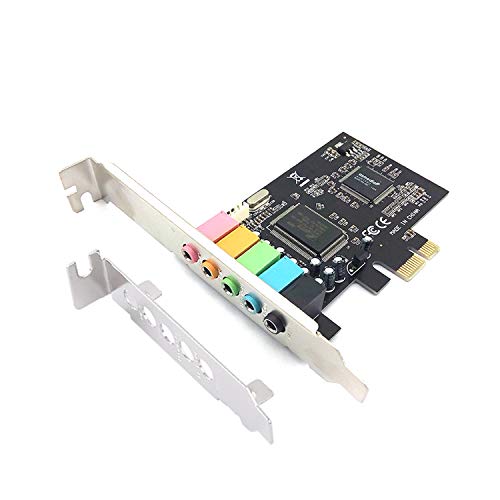
Padarsey PCIe 5.1 Internal Sound Card for PC, Windows 7, 3D Stereo Audio Card, CMI8738 Chip, PCI Express Adapter
One of the consumer electronics options compared in this guide.
View on Amazon
Creative Sound Blaster Z SE Internal PCI-e Gaming Sound Card and DAC, 24-bit / 192 kHz, 116 dB SNR, ASIO, 600Ω Headphones Amp, Mic EQ, Discrete 5.1 / Virtual 7.1, Supports Dolby Digital Live, DTS …
One of the consumer electronics options compared in this guide.
View on Amazon
Creative - Sound Blaster Audigy FX V2 Sound Card
One of the consumer electronics options compared in this guide.
View on Amazon
Creative Sound BlasterX AE-5 Plus SABRE32-class Hi-res 32-bit/384 kHz PCIe Gaming Sound Card and DAC with Dolby Digital and DTS, Xamp Discrete Headphone Bi-amp, Up to 122dB SNR, RGB Lighting System
One of the consumer electronics options compared in this guide.
View on Amazon
MECCANIXITY PCIe Sound Card, Internal 5.1 Stereo Audio Card 24 Bit with CD Computer Case Built-in PCIe Channel Adapter Board for Desktop, PC, Computer
One of the consumer electronics options compared in this guide.
View on Amazon| Product | Best for | Key spec from the title |
|---|---|---|
| Sound Blaster Audigy Fx Pro | Simple upgrade over onboard audio | Hi-Res PCIe sound card with surround sound |
| Sound Blaster AE-X | Desktop users who want app control | 32-bit/384kHz, desktop app support |
| Padarsey PCIe 5.1 | Lowest-cost basic surround | CMI8738 chip, 5.1, 3D stereo |
| Sound Blaster Z SE | Headphone users with demanding models | 24-bit/192kHz, 116 dB SNR, 600 ohm amp, ASIO |
| Sound Blaster Audigy FX V2 | Shoppers who want a known brand name | Sound Blaster Audigy FX V2 sound card |
| SoundBlasterX AE-5 Plus | Enthusiasts with a higher budget | SABRE32-class DAC, 32-bit/384kHz, Dolby and DTS |
| MECCANIXITY PCIe 5.1 | Basic surround for an older build | 24-bit 5.1 internal card |
How to Choose
Decide what you want fixed
If your complaint is background noise or weak volume on headphones, look at the headphone amplifier and the signal-to-noise figure. If your problem is voice chat, look at microphone inputs and EQ features. If you want surround output for speakers, check the number of analog outputs. A card that excels at one job may do nothing for another, so write down the problem before you compare models.
Read the numbers that actually matter
A signal-to-noise ratio of around 110 dB or higher points to a quiet output stage. Sample rate and bit depth, such as 24-bit/192kHz or 32-bit/384kHz, set the maximum quality the card can process, but most game and music files never need that headroom. Impedance support up to 600 ohms matters mainly for high-end studio headphones. Treat bit-depth marketing as secondary to noise and amplifier quality.
Check slot, software, and operating system support
Every card here uses a PCIe connection, so you need a free slot, and you should confirm that a PCIe x1 slot is not blocked by a large graphics card. Look for current Windows driver support. Cards that mention Windows 7 may not have modern drivers. Branded cards typically provide control panels for EQ, surround, and microphone features, while generic boards often rely on basic system settings.
Know where budget cards cut corners
The cheapest boards use older audio chips, offer fewer connectors, and skip proper shielding, which can leave you with the same electronic noise you wanted to escape. Their listings are often vague about driver support and warranty. A mid-range Creative card usually adds a better amplifier, software control, and a longer track record of driver updates, which is worth the step up if you plan to use the card for years.
The 7 Best Options
Sound Blaster Audigy Fx Pro
The Audigy Fx Pro is positioned as a straightforward PCIe upgrade. The title calls it a Hi-Res sound card with surround sound and clean audio, aimed at PC users who want to step up from onboard audio without a complicated setup. It is the kind of card you drop into a spare slot, install the driver, and forget about, which is exactly what many buyers want.
- Strength: Hi-Res support and surround output are listed in the title.
- Strength: A known brand with a PCIe design suits a straightforward desktop upgrade.
- Trade-off: The title gives no noise or amplifier figures, so headphone power is unclear.
Skip it if you own demanding headphones and want published amplifier specs. Buyers who need a microphone EQ or detailed streaming controls should also read the full feature list before choosing it over a card with more published detail.
Sound Blaster AE-X
The AE-X lists a Hi-Res PCIe design with 32-bit/384kHz support and desktop app support, which hints at software control for audio profiles. It suits players who want to tweak sound without leaving the desktop, and the higher sample-rate ceiling gives it more room than a basic surround board if you also listen to lossless music.
- Strength: 32-bit/384kHz support is listed for high-resolution playback.
- Strength: Desktop app support allows control over sound profiles.
- Trade-off: The title does not mention a headphone amplifier rating.
Skip it if you need explicit high-impedance headphone support. Anyone who only listens through small desktop speakers will not hear the benefit of the higher sample rate, and could save money with a simpler card.
Padarsey PCIe 5.1
This board is the lowest-commitment way to add 5.1 output. The title lists a PCIe 5.1 internal card with 3D stereo audio, a CMI8738 chip, and Windows 7 mention. It is a simple utility card for older systems, and it makes sense mainly when the goal is extra outputs rather than better sound. Because the listing mentions an older operating system, driver availability for current Windows versions needs checking.
- Strength: A 5.1 internal card is available at a basic tier.
- Strength: PCI Express format fits modern motherboards.
- Trade-off: The CMI8738 chip is an older design and the title mentions only Windows 7.
Skip it if you want modern driver support or low-noise headphone output. Streamers and music listeners will outgrow it quickly, since the title lists no microphone or amplifier features.
Sound Blaster Z SE
The Z SE has the most complete specification list among the affordable cards. The title shows 24-bit/192kHz, 116 dB SNR, ASIO support, a headphone amp rated for 600 ohm headphones, mic EQ, and discrete 5.1. It reads like a card built for people who care about headphones, and it is the easiest to justify for that reason. Gamers who stream will also appreciate the mic EQ and ASIO mention.
- Strength: A 116 dB SNR and 600 ohm amplifier support suit demanding headphones.
- Strength: ASIO and mic EQ are useful for streaming and music work.
- Trade-off: Higher resolution is wasted if you only use basic speakers.
Skip it if you only need simple stereo playback on small desktop speakers, because the extra amplifier headroom would go unused. It is also more than needed for someone who just wants a second set of speaker outputs.
Sound Blaster Audigy FX V2
The Audigy FX V2 listing is sparse, showing only the brand, model name, and sound card category. That makes it the hardest card to evaluate, though the Sound Blaster name offers a familiar driver and software ecosystem. In practice it is the listing to open in a second tab and compare against the manufacturer page before relying on it.
- Strength: A recognized brand reduces compatibility worries.
- Strength: The Audigy line is built for entry-level upgrades.
- Trade-off: The title offers no specs, so you must verify details elsewhere.
Skip it if you want to compare numbers before buying, since a sparse title gives you nothing to weigh against the cards that list SNR, bit depth, or amplifier ratings.
SoundBlasterX AE-5 Plus
The AE-5 Plus is the high-end option in this group. The title lists a SABRE32-class DAC, 32-bit/384kHz audio, Dolby Digital and DTS support, and a discrete headphone amplifier, all on a PCIe gaming card. It is aimed at buyers who treat audio as a hobby and want a card that can drive headphones and a home theater receiver from the same slot.
- Strength: A SABRE32-class DAC and discrete amp suit audio-focused buyers.
- Strength: Dolby Digital and DTS support help with home theater audio.
- Trade-off: It is the premium-leaning card in a list about affordable ones, so the value case depends on actually using those features.
Skip it if budget is tight or you play on basic speakers. The Z SE already lists strong headphone specs, so choose this one only when the DAC and surround formats matter to you.
MECCANIXITY PCIe 5.1
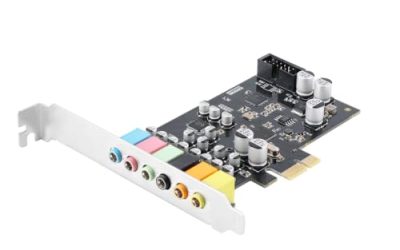
This generic card lists a PCIe 5.1 internal sound card with 24-bit stereo, a CD input, and a channel adapter board. It targets people repairing or upgrading an older desktop on the lowest budget, such as an office machine that needs working surround outputs. The title is short on detail, so expectations should stay modest.
- Strength: 5.1 and 24-bit audio support appear in a basic card.
- Strength: A CD connection suits older cases and optical drives.
- Trade-off: The title gives no chip model, SNR, or software support.
Skip it if you need verified quality, modern software, or detailed driver information. Because no chip, noise rating, or software is listed, it is hard to compare fairly with the branded cards above.
Which One Fits Your Situation
You own good headphones and hear hiss
Pick the Sound Blaster Z SE. Its SNR and 600 ohm amplifier are exactly what that problem needs.
You want a cleaner upgrade with minimal fuss
The Audigy Fx Pro or the AE-X will do, with the AE-X appealing if desktop app control matters to you.
You are building a budget surround setup
Between the Padarsey and the MECCANIXITY, either offers basic 5.1 at the lowest cost, though you give up documentation and driver clarity.
You want the strongest card and can stretch
The SoundBlasterX AE-5 Plus is the enthusiast choice, especially for home theater formats such as Dolby Digital and DTS.
Common Mistakes
- Buying a sound card to fix a problem caused by cheap headphones or speakers, which no card can cure.
- Ignoring PCIe slot clearance beneath a large graphics card.
- Paying for 32-bit/384kHz when the music and games never use it.
- Choosing a generic board without checking Windows 10 or Windows 11 driver support.
- Expecting a card to remove noise coming from front-panel cables or a poor power supply.
Related guides
- How To Fix Stick Drift On Xbox And Ps5 Controllers
- Mirrorless Cameras For Landscape Photography
- How Long Does A Gaming Laptop Last Before Upgrade
Frequently Asked Questions
Is a sound card still worth it?
For many users onboard audio is enough. Modern motherboards have improved a lot, so test your current setup first with good headphones before spending anything. A card helps most with high-impedance headphones, noisy motherboards, and extra mic features.
Do I need a sound card for gaming?
No, games run fine on onboard audio. A card adds cleaner output and options like virtual surround, but it does not raise frame rates.
PCIe card or USB DAC?
A USB DAC avoids slot and case issues and works across devices. An internal card saves desk space and costs less for similar features.
Will it work with Windows 11?
Branded Creative cards generally offer current drivers, but verify the manufacturer’s support page. Generic cards often have limited driver information.