Our Top Picks
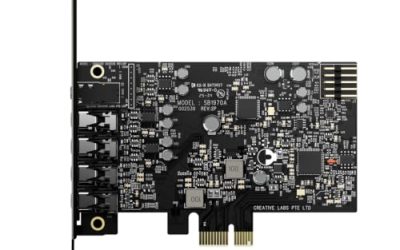
 Creative Sound Blaster Audigy Fx Pro Hi-Res PCIe4.13 inches6.93 x 5.59 x 1.57 inches0.1 poundsCheck on Amazon
Latency is the delay between a sound entering or leaving your computer and reaching your ears, and it is the one audio spec that can ruin a recording session or a rhythm game without ever showing up in a frequency chart. A buyer searching for low latency sound cards usually has a concrete problem: a vocal that echoes in the headphones, a guitar that feels late under the fingers, or a stream where game audio drifts away from the video. The solution is rarely just a card with a bigger sample rate, because latency depends on the driver, the buffer size, and the connection type as much as on the hardware.
This guide is for streamers, home recorders, and gamers shopping in 2026 who want to pick sensibly from a mixed set of PCIe cards and USB interfaces. The six products below include two Creative Sound Blaster PCIe cards, a professional PCIe digital card, and three USB devices. Two generic stereo adapters in the listing set made no low-latency claim, so they were left out. Be aware that many listings are thin on technical detail, which means the numbers you care about must be confirmed on the manufacturer’s page.
Quick Picks

Creative Sound Blaster AE-X Hi-Res PCIe Sound Card for PC | Hi-Res, PCIe Sound Card, 32-bit/384kHz, Hi-Res Audio, PC Audio, Desktop App Support
One of the consumer electronics options compared in this guide.
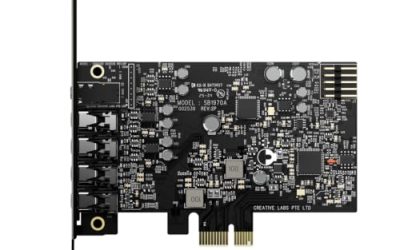
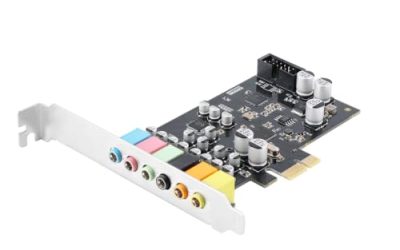
View on AmazonCreative Sound Blaster Audigy Fx Pro Hi-Res PCIe Sound Card | Hi-Res, PCIe Sound Card, Hi-Res Audio, Surround Sound, Clean Audio, PC Upgrade
One of the consumer electronics options compared in this guide.
View on Amazon
For Low latency USB sound card 2 in 2 out with built-in monitoring for real time For Recording and playback applications
One of the consumer electronics options compared in this guide.
View on Amazon
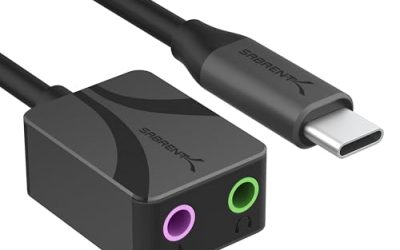
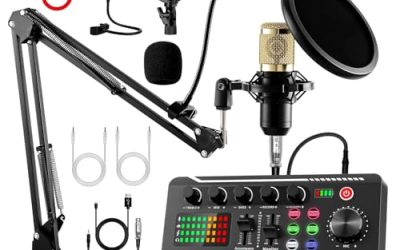
Live Streaming Audio Interface,USB-C Phone Sound Card Adapter Low Latency
One of the consumer electronics options compared in this guide.
View on Amazon
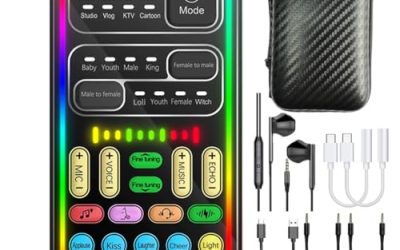
5V 1A USB External Sound Card V8S with Rich Sound Voice Effects Low Latency Support Bluetooth for Electric Guitar Phones
One of the consumer electronics options compared in this guide.
View on Amazon
for H37F Professional PCIe Digital Sound Card Low Latency Bracket for Studio Recording
One of the consumer electronics options compared in this guide.
View on Amazon| Product | Best for | Key spec from the title |
|---|---|---|
| Creative Sound Blaster AE-X | High-resolution gaming audio | PCIe, 32-bit/384kHz, Hi-Res |
| Creative Sound Blaster Audigy Fx Pro | Affordable PCIe upgrade | Hi-Res PCIe, surround, clean audio |
| Low Latency USB Sound Card 2-in 2-out | Recording with monitoring | 2 in 2 out, built-in monitoring |
| Live Streaming Audio Interface | Phone and USB-C streaming | USB-C, low latency |
| V8S USB External Sound Card | Voice effects and guitar | Voice effects, Bluetooth, low latency |
| H37F Professional PCIe Digital Card | Studio recording | Professional PCIe, low latency bracket |
How to Choose
Know what latency number to aim for
For comfortable live monitoring, a round-trip delay under about 10 milliseconds is generally unnoticeable to most performers, and many singers are fine up to around 15. At a 48kHz sample rate, a 128-sample buffer adds roughly 2.7 milliseconds in each direction, and a 64-sample buffer roughly 1.3. Lower buffers reduce delay but demand a faster processor and stable drivers. Listings that only say low latency without a number should be treated as claims, not guarantees. Measure the result yourself by clapping into a microphone while listening on headphones and noticing whether the echo trails your hands; a clear delay means a smaller buffer or a different monitoring path is needed.
Check the driver model, not just the hardware
On Windows, ASIO drivers deliver the lowest delay, while generic system drivers add more. A card with an ASIO driver or a built-in monitoring path will outperform a similar device that routes everything through the operating system mixer. If the product title mentions built-in monitoring, as the 2-in 2-out USB card does, it can pass your input directly to headphones with almost no delay by bypassing the computer. The trade-off is that effects and plug-ins applied in software will not be heard in that direct path, so a vocalist who wants reverb in the headphones must use a different routing and accept some delay.
Decide between PCIe and USB
PCIe cards sit directly on the motherboard bus, which can allow stable low buffers and no USB bandwidth contention. USB devices are easier to move between a desktop and a laptop. For a single desktop recording or gaming machine, PCIe is attractive. For flexibility or phone use, USB wins. Make sure your motherboard has a free PCIe slot before choosing a card. A graphics card in the neighboring slot can leave only a cramped gap, and a long card may not fit in a small case, so measure before you order.
Match inputs and outputs to your use
Gaming needs good headphone output and a microphone input. Recording needs line or instrument inputs and possibly phantom power for condenser microphones. Streaming may need a loopback feature. Where budget models cut corners: input noise, driver stability, grounding, and documentation. If the listing does not name its inputs, assume it is limited until the manufacturer proves otherwise. Also confirm that your operating system and recording software are supported, because a card that works only with outdated drivers can cost you hours of troubleshooting.
The 6 Best Options
Creative Sound Blaster AE-X
The AE-X is a Hi-Res PCIe card for PC with 32-bit/384kHz audio and desktop app support, as described in the title. It is aimed at gamers who want powerful processing and flexible headphone output on a desktop, and who are comfortable installing a card and its software. Picture a competitive player who wants footsteps and voice chat balanced precisely, or a streamer who routes game, chat, and music through separate channels on one desktop; the card’s software is where those choices live, which is a plus for tinkerers and a minus for anyone who wants plug-and-play simplicity.
- Strength: 32-bit/384kHz Hi-Res support is a clear, named spec.
- Strength: a PCIe card on the motherboard avoids USB hubs and cable clutter.
- Trade-off: the title makes no latency claim, so confirm driver support and buffer options.
Skip it if you need a portable interface or a laptop-friendly solution. Read the manufacturer notes to see which inputs are supported.
Creative Sound Blaster Audigy Fx Pro
This Hi-Res PCIe card promises surround sound and clean audio as an upgrade for a PC. It sits below the AE-X and suits buyers who want a recognized brand, driver support, and a straightforward way to improve onboard sound without a large investment. A player who has a noisy motherboard output, a pair of good headphones, and a free PCIe slot is the typical match, and the surround features appeal to movie watchers who sit at the PC in the evening rather than in the living room.
- Strength: a recognized brand with a PCIe design offers dependable driver support.
- Strength: Hi-Res audio and surround sound suit gaming and movies.
- Trade-off: the listing mentions no low-latency or monitoring features.
Skip it if recording or live monitoring is your main use.
Low Latency USB Sound Card, 2-in 2-out
The most recording-oriented USB item here, advertised as a low latency USB sound card with two inputs, two outputs, and built-in monitoring for real-time recording and playback. For vocalists, guitarists, and podcasters, direct monitoring is the feature that removes delay from the headphones. A songwriter tracking acoustic guitar and vocals in a spare bedroom, or a podcaster who wants to hear a guest without a half-second echo, will notice the difference immediately, as the signal reaches the headphones before it makes the trip through the computer.
- Strength: built-in monitoring supports real-time listening with little delay.
- Strength: 2-in 2-out is enough for a mic and instrument or a stereo pair.
- Trade-off: the title carries no brand or detailed specs, so support is uncertain.
Skip it if you want a brand-name warranty or phantom power claims.
Live Streaming Audio Interface, USB-C
This device is described as a live streaming audio interface and a USB-C phone sound card adapter with low latency. It targets mobile streamers and creators who broadcast from a phone or tablet and want better sound than the built-in microphone. Think of a live shopping host, a street musician sharing a set, or a gamer streaming mobile titles: portability and a single cable to the phone matter more than a long input list, and quick setup keeps broadcasts on schedule.
- Strength: USB-C suits modern phones and tablets.
- Strength: streaming focus implies features aimed at live broadcasting.
- Trade-off: the title gives no sample rate, channel count, or brand.
Skip it if you plan to use it on an older PC with only USB-A ports.
V8S USB External Sound Card
The V8S is a 5V external sound card with voice effects, Bluetooth, and low latency, mentioning use with electric guitar and phones. It is a novelty-leaning device suited to casual streamers and karaoke fans who want effects more than studio accuracy. A group of friends playing online games and wanting silly voice changes, or a beginner exploring music apps on a phone, is closer to its audience than a musician building a track for release, and expectations should be set accordingly.
- Strength: voice effects and Bluetooth add fun features for casual use.
- Strength: it mentions guitar and phone use, hinting at flexibility.
- Trade-off: this type of device is not aimed at professional recording.
Skip it if you want clean, accurate recording.
H37F Professional PCIe Digital Sound Card
The H37F is listed as a professional PCIe digital card for studio recording, and the title mentions low latency and a bracket. It targets home studios with a desktop that needs a dedicated digital audio card, and it is the most pro-oriented hardware here. A hobbyist building a small project studio around a tower PC, or an engineer re-purposing a desktop for tracking, will want to cross-check the connector list and driver availability before committing, since a professional label alone does not guarantee compatibility with a particular recording program.
- Strength: it is explicitly positioned for studio recording and low latency.
- Strength: PCIe installation supports stable operation in a desktop.
- Trade-off: the title offers little detail on channels or connectors.
Skip it if you are using a laptop or need analog inputs without extra gear.
Which One Fits Your Situation
You record vocals or guitar at your desk
The Low Latency USB Sound Card, 2-in 2-out, offers direct monitoring and two inputs, so a microphone and an instrument can be captured together while you listen without delay.
You game on a desktop and want better headphone audio
The Sound Blaster AE-X lists Hi-Res support and desktop app control.
You stream from a phone
The USB-C Live Streaming Audio Interface is designed around phone connections.
You are building a home studio
The H37F Professional PCIe card is positioned for studio use, but verify its connectors first.
Common Mistakes
- Assuming a high sample rate means low latency.
- Ignoring the driver, then using the system mixer and adding delay.
- Buying a PCIe card for a laptop.
- Relying on a vague low latency claim with no numbers.
- Forgetting that Bluetooth connections add noticeable delay.
Related guides
- How To Fix Stick Drift On Xbox And Ps5 Controllers
- Mirrorless Cameras For Landscape Photography
- How Long Does A Gaming Laptop Last Before Upgrade
Frequently Asked Questions
What is a good latency for gaming?
Under about 20 milliseconds is not noticeable for most games. Rhythm and competitive games benefit from lower. Remember that display lag and wireless controllers also add delay, so a sound card cannot fix a chain that is slow elsewhere.
Does Bluetooth add latency?
Yes, usually noticeably. Wired connections are far better for monitoring or recording, so treat Bluetooth on a device like the V8S as a convenience for casual use rather than for timing-critical work.
Do I need ASIO?
For recording on Windows, yes, ideally. It reduces buffer delay compared with standard system drivers.
Is PCIe better than USB for latency?
It can be, thanks to direct bus access. A good USB interface with solid drivers can still perform well.