Our Top Picks
 SABRENT USB-C to 3.5mm Audio AdapterUSB-C Audio Adapter, 24-bit1.1 x 0.8 x 0.5 Inches0.1 PoundsCheck on Amazon
 Plugable USB Audio Adapter1.06 x 2.8 x 2.88 centimeters1.75 x 0.3 x 1.1 inches0 PoundsCheck on Amazon
Mac owners usually do not need a sound card the way a gaming PC owner does, because there is no PCIe slot to fill and the built-in audio is already decent. What they do need is an external USB device when the headphone jack is missing, when a separate microphone input is required, or when the built-in output is not enough for high-impedance headphones. That makes the term sound card on a Mac mostly shorthand for a small USB audio adapter or interface.
The key buying question is compatibility. macOS supports class-compliant USB audio devices without drivers, but vendor software and effects such as virtual 7.1 surround are often built for Windows. This 2026 guide compares seven external USB sound cards from their listed specs, flags which titles name Mac support, and explains which ones suit a MacBook, a Mac mini, or a desktop with a studio-style setup.
Quick Picks
SABRENT USB-C to 3.5mm Audio Adapter, USB Sound Card, Mono Mic (AU-UCMA) | USB-C, External Sound Card, 24-bit/96kHz, Stereo Out & Mono Mic In, For Windows, macOS, Linux, Aluminum, Plug and Play
One of the consumer electronics options compared in this guide.
View on Amazon
Cubilux 7.1 USB Surround Sound Card- 48KHz-384KHz Sample Rate for Headphones, Full Aluminum Alloy USB A External Sound Card for Laptop PC-Supports Line-in & Stereo Mic in
One of the consumer electronics options compared in this guide.
View on Amazon
SMSL Nano ONE Pro External Sound Card, Hi-Fi DSP Chip,Virtual 7.1 Surround Sound, for Windows/Mac/Phone/Live Stream/Game,3.5mm Headphone Output, Mic in, Plug and Play Driverless (Black)
One of the consumer electronics options compared in this guide.
View on Amazon
Cubilux CB5 USB Audio Interface for Recording, Streaming, Podcasting, USB to 3.5mm Sound Card with Stereo Microphone Input, Line-In, Line-Out & Headphone Jack for Monitors, Support Windows & Mac OS
One of the consumer electronics options compared in this guide.
View on AmazonPlugable USB Audio Adapter | Adds 3.5mm Speaker & Mic Ports for Laptops Lacking Audio Jack; Compact External Sound Card, Plug-and-Play for Win/Mac/Linux
One of the consumer electronics options compared in this guide.
View on Amazon
VENTION USB Sound Card, External Stereo Sound Card with Volume Control, USB to 3.5mm Jack Audio Adapter for Windows, Mac, PC, Laptop, Desktop, Headset, Switch and More
One of the consumer electronics options compared in this guide.
View on Amazon
USB Sound Card, 7.1 Channel External Microphone Audio Jack Adapter Clear Sound for PC, Laptop, Mac, PS4, Headphone (Plug and Play No Drivers Needed)
One of the consumer electronics options compared in this guide.
View on Amazon| Product | Best for | Key spec from the title |
|---|---|---|
| SABRENT AU-UCMA | USB-C laptops needing a mic and headphone jack | 24-bit/96kHz, stereo out, mono mic in |
| Cubilux 7.1 USB Sound Card | Higher sample rate on a USB-A port | 48KHz-384KHz, aluminum alloy |
| SMSL Nano ONE Pro | Hi-Fi style listening with Mac support named | Hi-Fi DSP chip, Windows/Mac/Phone |
| Cubilux CB5 | Recording, streaming, podcasting | Stereo mic input, line-in, line-out, headphone |
| Plugable USB Audio Adapter | Simple speaker and mic ports | Win/Mac/Lin plug-and-play |
| VENTION USB Sound Card | Volume control on the cable | Stereo, volume control, Mac named |
| 7.1 Channel USB Sound Card | Basic adapter for laptop or console | 7.1 channel, Mac and PS4 named, no drivers |
How to Choose
Confirm the Mac claim and the plug
Look for Mac named in the title or specifications, and check the connector. Many recent MacBooks only have USB-C or Thunderbolt ports, so a USB-A device needs an adapter, while a USB-C device plugs straight in. Cheap USB-C hubs can introduce noise, so a direct connection is preferable. A device that works without drivers saves effort, because macOS recognizes class-compliant audio without installers.
Adapter versus interface
A simple adapter adds a 3.5mm headphone and microphone port, which covers calls and basic listening. An audio interface adds stereo mic inputs, line in, line out, and sometimes monitoring controls, which matter for recording and podcasting. If you only need a headphone jack, do not pay for interface features. If you record voice, mono mic input may be too limited, and an interface with a stereo or balanced input is the better route.
Sample rate, bit depth, and DACs
Numbers like 24-bit/96kHz or up to 384KHz describe the format the device can handle. Higher figures help with high-resolution music files but make little difference for voice and streaming. A DAC or DSP chip name signals a design aimed at audio quality, but real differences depend on the headphones and the file. Ignore surround claims on a Mac unless the vendor states macOS support.
Controls and what to ignore
Inline volume or mute controls are convenient, and a metal body can resist wear. Ignore marketing like clear sound and 3D audio, which are not measurable. Cheaper adapters tend to cut corners on noise floor and on microphone quality, so a recording workflow deserves a proper interface instead of a basic dongle. A metal housing and a braided cable are signs of durability, but check them against the full listing.
The 7 Best Options
SABRENT AU-UCMA
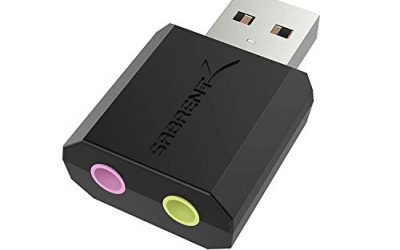
The Sabrent AU-UCMA is a USB-C to 3.5mm audio adapter that works as an external sound card, with 24-bit/96kHz audio, stereo output, and a mono microphone input. It fits MacBook owners who want to plug a headset into a USB-C port, though the title shows only Windows in the visible text, so confirm Mac support on the spec sheet before ordering. Remote workers on a thin laptop who join calls all day are the natural audience, since one small plug solves the missing jack without bulk.
- Strength: USB-C connector fits modern laptops without an adapter.
- Strength: 24-bit/96kHz with a mono mic input for headsets.
- Trade-off: mono mic in only, so it is a headset adapter rather than a recording interface.
Skip it if you need stereo microphone input or a listed Mac statement in the title. Because the microphone input is mono, podcasters and musicians will outgrow it quickly, and anyone using studio headphones should check the output level.
Cubilux 7.1 USB Sound Card
This Cubilux model is a full aluminum alloy USB-A external sound card with a 48KHz-384KHz sample rate range and 7.1 surround for headphones, listed for laptops and PCs and Linux. It suits listeners who value a sturdy body and high sample rates. The metal housing resists the knocks of a laptop bag better than plastic dongles, and the 7.1 claim is mostly a bonus for Windows users.
- Strength: aluminum alloy body and 384KHz sample rate support.
- Strength: USB-A connector suits desktop ports.
- Trade-off: Mac support is not shown in the title, and USB-A needs an adapter on USB-C Macs.
Skip it if you want a Mac statement in the title or a native USB-C plug. Mac owners who want surround effects should also verify that the software exists for macOS, since many such features do not.
SMSL Nano ONE Pro
The SMSL Nano ONE Pro is an external sound card with a Hi-Fi DSP chip and virtual 7.1 surround, listed for Windows, Mac, and phones, with live stream and game use, a 3.5mm headphone output, and a mic input. It is the option that names Mac and aims at audio quality. It suits Mac owners who listen to music and also want a microphone input for calls, because the title lists both functions alongside live streaming and gaming.
- Strength: Mac, Windows, and phone support named.
- Strength: Hi-Fi DSP chip and 3.5mm headphone output.
- Trade-off: virtual 7.1 surround is software, and its behavior on a Mac may differ.
Skip it if you want a plain adapter with no processing, or a stereo microphone interface. Anyone who only needs a jack for calls would be paying for features that never get used. The DSP-based surround processing is the reason for the higher tier of spend, so people who will not use it should pick a simpler model.
Cubilux CB5
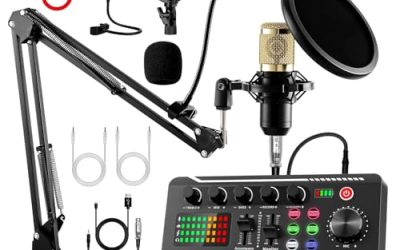
The CB5 is a USB audio interface for recording, streaming, and podcasting, with a stereo microphone input, line-in, line-out, and headphone connections. It fits creators who want more than one input and are comfortable with a small interface. A Mac mini on a desk with a condenser microphone and a pair of monitor speakers is the kind of setup where its inputs and outputs earn their place.
- Strength: stereo mic input plus line in and line out.
- Strength: aimed at recording and podcasting.
- Trade-off: the visible title does not state Mac support, so confirm it.
Skip it if you only need a headphone jack, since an interface adds complexity, extra cables, and more settings to learn. Confirm Mac support before relying on it for a recording session.
Plugable USB Audio Adapter
The Plugable adapter adds 3.5mm speaker and mic ports for laptops that lack an audio jack, in a compact plug-and-play design for Windows, Mac, and Linux. It is the plain choice for a no-fuss port, and the Mac is named directly. A student who needs a jack for a headset on a lecture-hall laptop is the example it fits best.
- Strength: Mac named and plug-and-play operation.
- Strength: compact design with speaker and mic ports.
- Trade-off: basic adapter without volume controls or high-resolution specs.
Skip it if you want audiophile features or a recording interface. It is also a plain adapter, so no extra mixing controls or monitoring features are listed.
VENTION USB Sound Card
The VENTION lists an external stereo sound card with volume control, USB to 3.5mm adapter use, and support for Windows, Mac, PC, laptop, desktop, and headset. The volume control sits on the device, which saves a trip to system settings. That matters when a call starts and you need to turn down a loud headset quickly, and the Mac is named among the supported systems.
- Strength: volume control and Mac named.
- Strength: simple stereo USB to 3.5mm adapter.
- Trade-off: the title gives no sample rate or bit depth.
Skip it if you want a stated resolution or a mic input detail. People who intend to record vocals should step up to an interface with a stereo input.
7.1 Channel USB Sound Card
This unbranded adapter lists a 7.1 channel external sound card with a microphone and audio jack, clear sound for PC, laptop, Mac, PS4, and headphone, with plug and play and no drivers. It suits buyers who want one cheap adapter for a Mac and a console. The no-drivers claim makes it easy to move between devices, although the unbranded listing leaves support and durability without a named maker behind them.
- Strength: Mac and PS4 named, no drivers needed.
- Strength: microphone and headphone connections.
- Trade-off: no brand and no stated resolution.
Skip it if you want a known maker or a clear audio specification. A 7.1 label on a basic adapter mostly describes virtual channels, so Mac users should not expect real surround.
Which One Fits Your Situation
Thin MacBook with only USB-C ports
The Sabrent AU-UCMA has a USB-C connector, which avoids an adapter, but check that it supports your Mac.
Podcasting or recording
The Cubilux CB5 offers stereo mic input and line connections, which suits creators more than a basic adapter does, though Mac support should be verified first.
Quality-minded listening
The SMSL Nano ONE Pro names Mac and a Hi-Fi DSP chip for headphone listeners who want something nicer than a bare dongle.
Simple jack on a budget
The Plugable or VENTION adapters name Mac and keep things plain, with the VENTION adding an on-device volume control. Either one is enough for calls and streaming video.
Common Mistakes
- Assuming surround features work the same on macOS as on Windows.
- Buying a USB-A device for a USB-C only Mac without an adapter.
- Paying for an interface when only a headphone jack is needed.
- Skipping a check for Mac support in the specifications.
- Expecting a basic adapter to match a studio microphone input.
Related guides
- How To Fix Stick Drift On Xbox And Ps5 Controllers
- How Long Does A Gaming Laptop Last Before Upgrade
- Mirrorless Cameras For Landscape Photography
Frequently Asked Questions
Do Macs need drivers for USB sound cards?
Class-compliant USB audio devices work without drivers. Extra features may need vendor software, and that software is often written for Windows first.
Will 7.1 surround work on a Mac?
It depends on the vendor software. Many surround features are Windows-focused, so treat them as optional.
Is a USB sound card better than the built-in jack?
Not always. It helps when the jack is missing or you need extra inputs, but a recent Mac’s built-in output is already fine for everyday listening.
What sample rate do I need?
For voice and streaming, 48kHz is fine. Higher rates matter only for high-resolution music files and compatible headphones, so most buyers will never hear the difference between 48kHz and 96kHz on everyday content.