Our Top Picks
An external USB sound card is the cheapest fix for three very specific headaches: a laptop whose headphone jack crackles, a desktop whose front-panel audio hisses, and a headset with split microphone and headphone plugs that has nowhere to go. A small dongle that plugs into a USB port and presents fresh 3.5mm jacks bypasses the motherboard audio entirely, and for most people that is the whole upgrade. The real decision is which kind of dongle you need: a simple stereo adapter, a unit with inline volume controls, or one that offers surround modes or a higher sample rate.
This guide is for laptop owners, console and PC headset users, and anyone who wants cleaner output from a simple device that fits in a pocket. It is not for people who need XLR inputs or phantom power; that is an audio interface, a different product. The eight dongles below cover plain stereo adapters, a hub-style unit, and surround-capable models. For a USB audio adapter in 2026, the questions that matter are the jack layout, driver requirements, operating system support and whether the extras actually help the way you use it.
Quick Picks

SABRENT USB External Stereo Sound Card Adapter, Plug & Play (AU-MMSA) | USB audio adapter; no drivers needed; for Windows & Mac; 3.5mm headphone & mic jacks; usb to 3.5mm jack audio adapter
One of the consumer electronics options compared in this guide.
View on Amazon
UGREEN UGREEN USB Sound Card Adapter with TRS 3.5mm Headphone & Mics | USB to Aux 3.5mm External Audio Converter for Windows Mac Linux PC Laptops Desktops PS5 Switch 2
One of the consumer electronics options compared in this guide.
View on Amazon
VENTION USB Sound Card, External Stereo Sound Card with Volume Control, USB to 3.5mm Jack Audio Adapter for Windows, Mac, PC, Laptop, Desktop, Headset, Switch and More
One of the consumer electronics options compared in this guide.
View on Amazon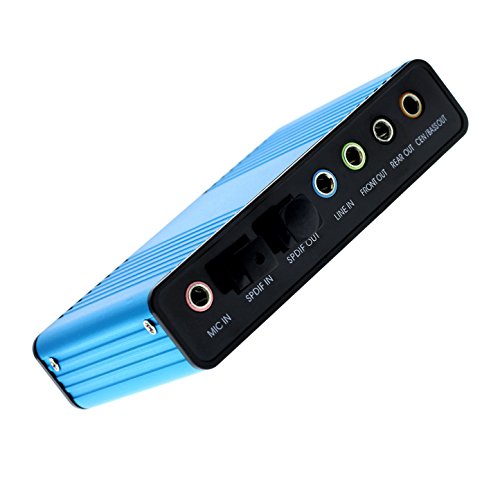
Optimal Shop USB 2.0 External Sound Card 6 Channel 5.1 Surround Adapter Audio S/PDIF for PC -Blue
One of the consumer electronics options compared in this guide.
View on Amazon
Cubilux 7.1 USB Surround Sound Card- 48KHz-384KHz Sample Rate for Headphones, Full Aluminum Alloy USB A External Sound Card for Laptop PC-Supports Line-in & Stereo Mic in
One of the consumer electronics options compared in this guide.
View on Amazon
ENVEL USB to 3.5mm Audio Adapter, External Stereo Sound Card | Dual TRS 3-Pole 3.5mm Headphone and Microphone Jack for PS4/PS5/PC/Laptop, Built-in Chip Mic-Supported Headphone Adapter
One of the consumer electronics options compared in this guide.
View on Amazon
Micolindun External Sound Card USB Hubs Audio Adapter to USB Port & 3.5mm Audio & Micro Jack for PC Laptop. Plug and Play (Blue)
One of the consumer electronics options compared in this guide.
View on Amazon
1Mii USB Sound Card, 3.5mm Audio Adapter with Virtual 7.1 for PC/Laptop | Plug and Play No Driver Needed, Control Volume Mute Directly, 6 ft Braided Cable, for Gaming, Meetings and Voice Chat
One of the consumer electronics options compared in this guide.
View on Amazon| Product | Best for | Key spec from the title |
|---|---|---|
| Sabrent AU-MMSA | Plain plug-and-play stereo | No drivers, Windows and Mac, headphone and mic jacks |
| UGREEN USB Sound Card | Cross-platform use including Linux | TRS 3.5mm headphone and mic, Windows Mac Linux |
| Vention USB Sound Card | Headsets with volume control | Volume control, USB to 3.5mm jack |
| Optimal Shop 5.1 Adapter | Six-channel and digital output | 6 channel 5.1 surround, S/PDIF |
| Cubilux 7.1 USB Sound Card | Higher sample-rate listening | 48KHz to 384KHz, aluminum alloy |
| ENVEL USB Audio Adapter | Console and PC headsets | Dual TRS 3.5mm jacks, PS4, PS5, PC |
| Micolindun Sound Card Hub | Adding USB ports and audio | USB hub with 3.5mm audio and mic jack |
| 1Mii USB Sound Card | Virtual 7.1 and inline controls | Virtual 7.1, volume and mute, 6 ft braided cable |
How to Choose
Match the jack layout to your headset
This is the most common reason for returns. Some dongles offer two separate 3.5mm jacks, one for headphones and one for a microphone, while others offer a single combined jack. The ENVEL and UGREEN list TRS jacks, a three-pole connector that separates microphone and headphone connections. A headset with a single four-pole plug needs a combined jack or a splitter. Check your plug before you buy, since mismatched jacks leave you with sound but no microphone. A quick look at the plug helps: if it has three metal bands, it is a stereo plug; four bands means it carries a microphone signal too. Gaming headsets with two separate plugs are the easiest match for a dual-jack dongle, while phone-style headsets with one four-band plug usually want a combined jack or a small splitter cable.
Check operating system and driver support
Plug-and-play cards use the operating system’s built-in audio class driver, so they work without installation. The Sabrent and 1Mii titles say no drivers are needed, and the UGREEN lists Windows, Mac and Linux. Surround-capable models may rely on virtual processing in the operating system or a software panel for effects. If you use a less common system, choose the listing that names it, and avoid assuming universal support.
Treat surround claims with care
A USB dongle with a stereo headphone output cannot create true surround, only virtual surround that processes stereo audio. The 1Mii lists virtual 7.1, and the Cubilux lists 7.1 surround for headphones, which means software processing. The Optimal Shop lists six-channel 5.1 with S/PDIF, which is a different design that outputs multiple channels to a surround system or digital receiver. Decide whether you want headphone effects or a real multi-channel output.
Know where budget dongles cut corners
Cheap dongles use basic converters and little shielding, so noise can creep in near other USB devices. Weak cable strain relief and plastic housings are common. A sample rate listing such as the Cubilux’s 48KHz to 384KHz is a useful specification, but only if your music files and player use it. For gaming and calls, a modest converter is fine; for critical listening, a stated sample range and metal housing are better signals than extra effects. Ignore marketing numbers that do not map to a measurable spec, and remember that the headphones you plug in set the ceiling on sound quality, so a premium dongle with bargain earbuds will not sound much different from a plain one.
The 8 Best Options
Sabrent AU-MMSA
The classic no-nonsense dongle. The title lists a USB external stereo sound card adapter, plug and play, a model number, no drivers needed, support for Windows and Mac, and 3.5mm headphone and mic jacks. It suits anyone who wants a simple fix for a failing laptop jack and nothing more.
- Strength: No drivers required, so it works as soon as it is plugged in.
- Strength: Separate headphone and microphone jacks for common headsets.
- Trade-off: The title lists no Linux support or surround features.
Skip it if you need virtual surround, inline controls or digital output. It is a plain stereo adapter, and its value is reliability and simplicity rather than extra features. That makes it a sensible spare to keep in a laptop bag for the day the built-in jack gives out.
UGREEN USB Sound Card
A cross-platform stereo option. The title lists TRS 3.5mm headphone and mic jacks, USB to aux conversion, and support for Windows, Mac, Linux and PC laptops and desktops. It suits people who use more than one operating system or run Linux.
- Strength: Linux is named alongside Windows and Mac.
- Strength: TRS jacks separate the headphone and microphone connections.
- Trade-off: No volume control or surround features are mentioned.
Skip it if you want hardware volume buttons or surround processing. Its appeal is flexibility across systems, so it is less compelling for someone who only ever uses one Windows laptop and wants extras on the cable.
Vention USB Sound Card
A dongle with a volume control. The title lists an external stereo sound card with volume control, USB to 3.5mm jack conversion, and support for Windows, Mac, PC, laptops, desktops and headsets. It suits headset users who dislike adjusting volume in software.
- Strength: Hardware volume control within reach.
- Strength: Broad compatibility with common computers and headsets.
- Trade-off: The title does not say whether it has separate or combined jacks.
Skip it if you need a particular jack layout confirmed or want surround modes.
Optimal Shop 5.1 Adapter
The multi-channel pick. The title lists a USB 2.0 external sound card with six-channel 5.1 surround, an adapter with S/PDIF for PC, and a blue finish. It suits someone connecting a PC to a surround speaker system or a digital receiver instead of headphones.
- Strength: Six-channel output and S/PDIF connection for surround setups.
- Strength: A different capability from the stereo-only dongles.
- Trade-off: USB 2.0 and a plain listing give little detail on supported systems.
Skip it if you only use headphones, or if your speakers lack the matching inputs. Before buying, confirm that your receiver or speaker set actually accepts the type of connection this adapter outputs, because a surround adapter is only useful when something downstream can use the extra channels.
Cubilux 7.1 USB Sound Card
The detail-oriented listing. The title lists a 7.1 USB surround sound card with a 48KHz to 384KHz sample rate for headphones, a full aluminum alloy body, and support for Linux. It suits listeners who care about sample rate and a sturdier body.
- Strength: A stated sample rate range up to 384KHz.
- Strength: Metal housing and Linux support are both named.
- Trade-off: The 7.1 label refers to virtual surround for headphones.
Skip it if you do not use high-resolution files or just want a basic stereo adapter. Streaming services and ordinary downloads rarely use the top of that sample range, so the extra headroom matters only to people who collect lossless audio.
ENVEL USB Audio Adapter
An adapter with console in mind. The title lists a USB to 3.5mm audio adapter, an external stereo sound card, dual TRS three-pole jacks for headphone and mic, and use with PS4, PS5, PC and laptops. It suits gamers who share a headset between a console and a computer.
- Strength: Names PS4 and PS5 along with PC.
- Strength: Separate TRS jacks for headphone and microphone.
- Trade-off: The title shows no volume control or surround features.
Skip it if your headset has a single four-pole plug without a splitter.
Micolindun Sound Card Hub
The multitasker. The title lists an external sound card with USB hub functionality, a USB port, 3.5mm audio and a microphone jack, plug and play, in blue. It suits a laptop with few ports that needs both extra USB and audio in one dongle.
- Strength: Combines audio with an extra USB port.
- Strength: Plug and play with no installation.
- Trade-off: The title gives few audio specifications.
Skip it if you want a dedicated audio device with clearly stated features.
1Mii USB Sound Card
A feature-packed stereo adapter. The title lists a 3.5mm audio adapter with virtual 7.1, plug and play with no driver, direct volume and mute control, and a six-foot braided cable. It suits desktop users who want controls on a longer cable.
- Strength: Hardware volume and mute controls.
- Strength: A six-foot braided cable reaches a desk from a tower.
- Trade-off: Virtual 7.1 is processing, not separate surround channels.
Skip it if you want a compact dongle that sits flush against a laptop.
Which One Fits Your Situation
You just need your laptop audio to stop crackling
The Sabrent AU-MMSA is the simplest fix, with no drivers and clear Windows and Mac support.
You use a headset on a console and a PC
The ENVEL USB Audio Adapter names PS4, PS5 and PC, with separate TRS jacks.
You listen to high-resolution music
The Cubilux 7.1 lists a sample rate range up to 384KHz and a metal body.
You want controls within reach
Either the Vention or the 1Mii puts volume control on the cable, and the 1Mii adds mute.
Common Mistakes
- Buying a dongle with two jacks for a headset that has one combined plug.
- Expecting true surround from a headphone-only USB adapter.
- Assuming every model works on Linux or a console without checking the title.
- Choosing a hub-style unit and forgetting that a crowded USB port can add noise.
- Plugging into a front-panel port with a weak connection instead of a rear one.
Related guides
- How To Fix Stick Drift On Xbox And Ps5 Controllers
- How Long Does A Gaming Laptop Last Before Upgrade
- Gaming Chairs For Tall People Over 6 Foot 3
Frequently Asked Questions
Do USB sound cards improve audio quality?
They can, mainly by bypassing a noisy built-in jack. The improvement is most noticeable when onboard audio hisses or crackles. A cheap dongle will not turn basic headphones into high-end ones.
Do I need drivers?
Most plug-and-play models use the operating system’s built-in audio driver. The Sabrent and 1Mii titles say no drivers are needed.
Will it work with a PlayStation?
Only if the listing says so. The ENVEL names PS4 and PS5. Others may work but are not stated in their titles.
What does virtual 7.1 mean?
It is software processing that simulates surround from a stereo signal for headphones. It can add a sense of space in games, but it is not seven separate speakers.