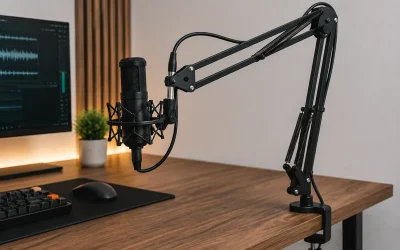
You pull your microphone closer during an intense match, only to feel the mounting base wobble, tilt forward, and slowly creep off the edge of your desk. A desk clamp boom arm slipping off desk fix becomes an urgent priority the moment your broadcast microphone, shock mount, or overhead camera setup starts losing traction. On smooth laminate, polished glass, or bevel-edged desktops, standard C-clamps struggle to maintain sufficient static friction. What starts as a subtle millimeter shift during arm rotation quickly degrades into total clamping failure, risking hundreds of dollars in audio gear crashing onto your floor.
Addressing a creeping clamp immediately is essential for both equipment safety and desktop preservation. Over-tightening a slipping mount often gouges wood veneer or crushes hollow-core gaming furniture without solving the root traction issue. By analyzing mechanical grip, weight distribution, and desk surface friction, you can permanently anchor your mounting bracket without damaging your setup. In modern 2026 gaming setups, heavy broadcast hardware demands structured load distribution and high-friction interface materials to remain rock-solid during daily operation.
Likely Causes
| Cause | How to confirm | Fix difficulty |
|---|---|---|
| Oils and Dust Accumulation | Light horizontal push causes base to slide across desk surface effortlessly. | Easy |
| Hardened or Smooth Stock Rubber Pads | Factory clamp pads feel glossy, plastic-like, or compressed completely flat. | Easy |
| Beveled or Curved Desk Edge | Lower cup or upper bracket rests partially on a sloped desk transition. | Easy |
| Hollow-Core Desk Deforming | Desk surface bows inward; clamp screw feels loose every few days. | Moderate |
| Excessive Lever Arm Extension | Mount pivots or slides only when the boom arm is extended fully horizontal. | Moderate |
| Thread Vibration and Walk | The bottom threaded T-bar bolt rotates back out on its own over time. | Hard |
Fix 1: Degrease and Deep Clean Contact Points
What causes it
Accumulated skin oils, manufacturing residues, furniture polish, and micro-dust collect under the clamp pad, drastically lowering the coefficient of friction between the metal bracket and the desktop.
How to check
Unclamp the mounting bracket completely and inspect the underside of the clamp base and the desk edge. If either surface feels slick, glossy, or shows oily ring marks, surface contamination is preventing raw mechanical grip.
What to do
Pour a small amount of 70% or 90% Isopropyl Alcohol onto a lint-free microfiber cloth. Scrub both the top and bottom desk surfaces where the clamp attaches, as well as the rubber contact pads of the clamp itself. Scrub vigorously for 30 seconds to strip off silicone films, pledge polish, and body oils. Allow all surfaces to air dry completely for two minutes before repositioning the clamp and re-tightening by hand.
How to undo it
Cleaning leaves no permanent modifications or chemical residues behind. To return to the previous state, simply reapply your preferred furniture polish or wood conditioner to the desk surface.
Fix 2: Apply High-Friction Silicone or Neoprene Pads
What causes it
Stock foam pads supplied with budget boom arms are often dense, smooth, or low-density plastic. These materials do not deform sufficiently to grip smooth surfaces like melamine, glass, or sealed hardwood.
How to check
Press your thumb firmly against the factory clamp pad and drag it across the desktop. If it glides easily without significant tacky, rubbery resistance, the pad material lacks the required static traction.
What to do
Peel off the slick factory foam pads from the top bracket and bottom pressure plate. Clean off any leftover adhesive using adhesive remover. Cut two pieces of 2mm-thick textured silicone rubber or high-density neoprene sheeting to match the dimensions of your clamp (typically 50mm x 60mm). Strip the backing from the self-adhesive side of the new silicone pads, stick them directly onto the metal contact points of the clamp, and re-clamp the assembly onto the desk. Hand-tighten until snug, plus an additional half-turn.
How to undo it
Peel the replacement silicone or neoprene pads off the metal clamp bracket and wipe away residual adhesive using isopropyl alcohol to return the bracket to its original bare metal condition.
Fix 3: Install a Solid Wood or Metal Reinforcement Spreader Plate
What causes it
Standard C-clamps apply force over a tiny surface area (often less than 4 square inches). On thin desktops, soft pine, or hollow-core honeycomb desks, this concentrated point load deforms the material, releasing clamping pressure and causing the arm to slip outward.
How to check
Look closely at the desk surface adjacent to the clamp while tightening the screw. If the wood surface dips or bows, or if you are using lightweight honeycomb furniture, the desktop is crushing under point pressure.
What to do
Obtain two matching reinforcement plates made from 1/4-inch (6mm) solid hardwood (such as oak or maple) or 3mm (1/8-inch) structural aluminum plate, sized at least 100mm x 100mm (4in x 4in). Place one plate flat on top of the desk edge and the second plate directly underneath the desk. Position your boom arm clamp over these sandwich plates and tighten the clamping bolt. The larger plates spread the clamping force over four times the original area, preventing material deformation and dramatically increasing total grip.
How to undo it
Loosen the lower clamp bolt, slide the assembly off the desk, and lift away the upper and lower spreader plates. Your desk remains entirely original and undamaged.
Fix 4: Re-seat Clamp Clear of Beveled and Chamfered Edges
What causes it
Modern gaming desks frequently incorporate chamfered, rounded, or sloped front and side edges for wrist comfort. If the upper mounting plate or lower cup washer rests even partially on a sloped transition, clamping pressure generates an outward vector that pushes the bracket off the edge.
How to check
Crouch down and view the mounted clamp dead-on from the side at eye level. Check whether the flat clamping surfaces rest 100% parallel to the flat top and bottom faces of the desk, or if a wedge-shaped gap exists near the back of the clamp pad.
What to do
Slide the boom arm clamp deeper onto the desk until the entire footprint of both the top bracket and lower washer rest on 100% flat desk stock, past the edge bevel. If your desk chamfer extends deep into the desk (greater than 25mm), insert a custom-cut hardwood triangular shim into the gap under the sloped edge to create a parallel clamping plane before tightening the main bolt.
How to undo it
Loosen the mounting screw, pull the clamp forward, and remove any wooden shims or angled packing blocks from the desk edge.
Fix 5: Rebalance Arm Extension and Reduce Overhang Leverage
What causes it
Extending a heavy boom arm straight out horizontally creates extreme rotational torque (lever arm action) on the desktop base. A heavy microphone weighing 1.5kg extended 80cm out multiplies rotational force, breaking the clamp’s static grip.
How to check
Extend your boom arm completely horizontal and apply gentle downward pressure on the microphone shock mount. Watch the rear edge of the desk clamp. If the back lip lifts off the desk or pivots sideways, excessive mechanical leverage is overpowering the clamp’s friction.
What to do
Loosen the adjustment thumbscrews at the base elbow and mid-arm joint. Adjust the primary lower arm section so it sits closer to vertical (between 60 and 75 degrees relative to the desk plane) rather than horizontal. Extend reach using only the upper arm segment, keeping the center of gravity closer to the clamp base. Re-tighten all joint tension knobs to approximately 2.5 N·m (firm hand tightness) to keep the payload balanced.
How to undo it
Loosen the tension knobs on the arm joints and reposition the boom arm back to your preferred horizontal reach or angle at any time.
Fix 6: Install Anti-Vibration Lock Washers on Threaded Clamp Bolts
What causes it
Constantly swinging the boom arm back and forth during streams or gaming sessions introduces micro-vibrations into the main threaded vertical bolt. Over time, this rotational vibration causes thread walk, backing the screw out and loosening clamp pressure.
How to check
Monitor your clamp tightness daily over one week. If you find yourself having to turn the lower T-bar handle a quarter-turn every morning to keep it secure, thread walk from physical motion is unseating the bolt.
What to do
Unscrew the bottom clamp bolt assembly entirely from the bracket. Slide an M8 or M10 (matching your bolt size) split lock washer followed by a wide steel fender washer onto the threaded rod right above the turning handle. Apply a single drop of medium-strength blue threadlocker to the middle threads of the bolt. Re-thread the bolt into the clamp bracket, tighten it firmly against the desk by hand, and let the threadlocker cure for 24 hours without moving the arm.
How to undo it
Unscrew the bolt using standard hand tools. The blue threadlocker bond breaks under moderate manual torque. Wipe the bolt threads clean with a wire brush to remove cured compound.
If Nothing Works
If your desktop material is too soft, too thin, or features extreme aggressive angles that prevent any C-clamp from holding, switch from edge-clamping to a grommet mount setup. Most high-end broadcast boom arms come supplied with an interchangeable grommet mounting kit. Using a power drill fitted with a 1/2-inch (12mm) or 5/8-inch (16mm) spade bit, drill a single clean hole through your desktop at the desired mounting position. Pass the grommet threaded post straight through the hole, place the wide steel backup washer underneath, and secure it with the bottom locking nut. This creates a mechanical bolt-through joint that physically cannot slip or creep off the desk edge. Alternatively, replace the clamp base entirely with a heavy-duty weighted desktop base or mount a dedicated boom arm wall flange directly into a nearby wall stud using two 1/4-inch x 2.5-inch lag bolts.
FAQ
Can I clamp a heavy boom arm onto a glass desk safely?
Yes, but you must never clamp directly onto bare glass. To safely mount a boom arm to a tempered glass desk, place 3mm aluminum or hardwood reinforcement plates on both the top and bottom of the glass edge, sandwiched with 2mm silicone friction pads. This distributes the clamping pressure across a broad area, preventing local point stress from shattering the glass panel while providing maximum anti-slip grip.
Will tightening the clamp harder stop it from sliding?
No. Torque applied past firm hand-tightness rarely fixes a slipping clamp and often damages your gear. Excessively tightening a bolt on a slick surface will strip the threads, bend the metal C-clamp frame, or crush the desktop interior without increasing friction. Slippage is solved by increasing surface traction (using silicone or cleaning oils) rather than applying force.
What is the best material to put between a clamp and a slippery desk?
Textured 2mm silicone rubber sheeting offers the highest static coefficient of friction on laminate, glass, and polished metal. High-density neoprene sheeting is a close second. Avoid using cardboard, folded paper, thin felt, or basic soft foam, as these materials compress flat, tear easily, or slide across smooth surfaces under lateral load.
Why does my boom arm clamp keep loosening over time even without moving it?
Clamps loosen over time due to load relaxation and thermal expansion. Soft desk materials (like particle board or soft pine) slowly compress under constant pressure, creating micro-gaps over several weeks. Additionally, ambient room temperature fluctuations cause the metal threaded bolt and clamp body to expand and contract, slowly unwinding the thread if no lock washer is present.